
STORCUBE S2500PLUS
STORCUBE S2500 Plus Solar Storage System User Manual
Model: S2500PLUS | Brand: STORCUBE
1. Introduction
The STORCUBE S2500 Plus is an advanced portable solar energy storage system designed to provide reliable power for various applications, from home backup to outdoor activities. It efficiently stores excess solar energy and offers multiple output options to power your devices. This manual provides essential information for the safe and effective use of your S2500 Plus system.

Image: The STORCUBE S2500 Plus system set up on a balcony, demonstrating its integration with solar panels and a household power grid.
2. Key Features
- Portable Balcony Power Source: The S2500 Plus stores excess solar energy for peak periods and supports up to 1200W of solar panels and a micro-inverter. With 12 outputs and a 3300W AC output, it provides reliable backup power for home emergencies or outdoor activities.
- Plug & Play, Easy Installation: Compatible with 99.99% of micro-inverters, connecting to solar panels (up to 1200W, 10V-60V input) and micro-inverters (up to 800W for grid connection). Installation is simple, and energy consumption management is effortless via the STORCUBE app.
- Dual Charging (AC and Solar): Supports both solar and AC charging, with AC input up to 2200W, reaching 80% charge in 69 minutes. It allows simultaneous charging and prioritizes solar energy over AC to save energy.
- 2560Wh Capacity: Offers a 2560Wh capacity to store surplus solar energy for nighttime use. With over 3500 charge cycles and a 10-year lifespan, it can power 99.99% of household appliances with 3300W output.
- Advanced Safety Features: Equipped with a BMS protection system and LiFePO4 batteries, similar to those used in electric vehicles. Supports over 3500 charge cycles and can last up to 10 years with daily use.

Image: An infographic summarizing the main features and benefits of the STORCUBE S2500 Plus system.
3. Package Contents
Upon opening the package, please verify that all the following components are included:
- 1x STORCUBE S2500 Plus Solar Balcony Power Station
- 2x Y-Connection Cables
- 2x Flat Cables
- 1x PV Connection Cable
- 1x Micro-Inverter Connection Cable
- 1x USB to Type-C Charging Cable
4. Setup and Installation
The STORCUBE S2500 Plus is designed for easy, plug-and-play installation. Follow these steps to set up your system:
- Positioning: Place the S2500 Plus on a stable, flat surface, ideally near your solar panels and a grid connection point. Ensure adequate ventilation around the unit.
- Solar Panel Connection: Connect your solar panels (not included) to the S2500 Plus using the provided PV connection cable and Y-connection cables. Ensure the solar input does not exceed 1200W (10V-60V).
- Micro-Inverter Connection: Connect the S2500 Plus to your micro-inverter (not included) using the micro-inverter connection cable. The system supports up to 800W for grid connection.
- Grid Connection: If using for grid-tied applications, ensure proper connection to your home's electrical system via the micro-inverter.
- Initial Charge: Before first use, it is recommended to fully charge the S2500 Plus using the AC input.

Image: A visual guide to the simple Plug & Play installation process, highlighting the connections for solar input and micro-inverter output.

Image: An exploded view diagram detailing each cable and component required for the installation of the S2500 Plus system.
5. Operating Instructions
5.1 Charging the S2500 Plus
The S2500 Plus supports dual charging methods:
- Solar Charging: Connect compatible solar panels to the PV input ports. The system will automatically prioritize solar charging when available.
- AC Charging: Connect the S2500 Plus to a standard AC outlet using the appropriate cable. The system supports up to 2200W AC input for rapid charging.
The intelligent charging system allows simultaneous AC and solar charging, optimizing energy intake. You can monitor the charging status on the unit's display or via the STORCUBE app.
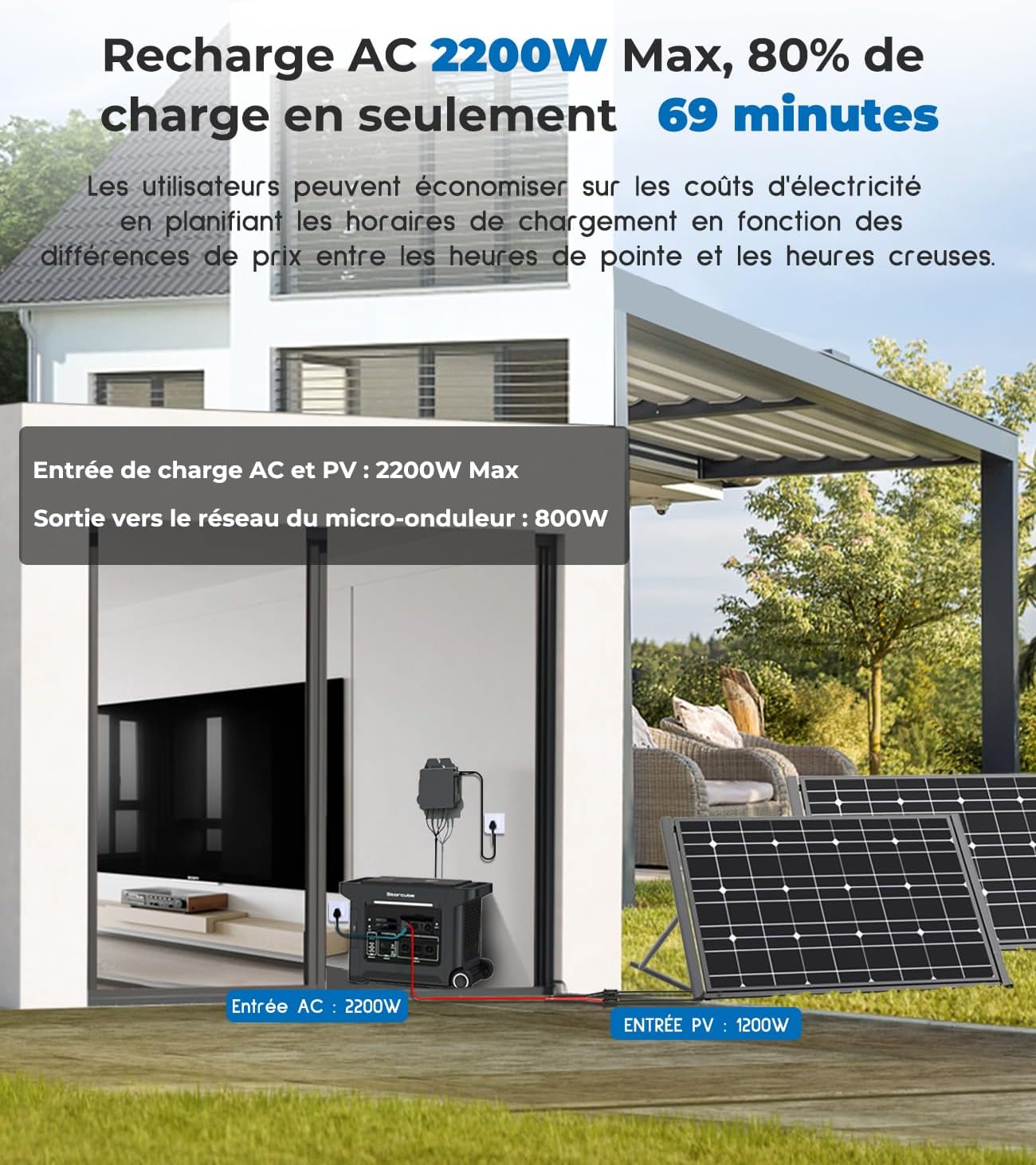
Image: Illustration of the dual charging capability, showing both AC and solar panel connections to the S2500 Plus.
5.2 Powering Devices
The S2500 Plus offers multiple output ports to power a wide range of devices:
- AC Outputs: Use the 3300W AC outlets for household appliances and high-power devices.
- DC Outputs: Utilize the DC ports for compatible devices.
- USB Outputs: Charge your mobile devices, laptops, and other USB-powered gadgets.
Ensure the total power consumption of connected devices does not exceed the S2500 Plus's maximum output capacity.

Image: Examples of household appliances and their estimated runtimes when powered by the S2500 Plus.
5.3 Smart App Control
Manage and monitor your S2500 Plus system in real-time using the dedicated STORCUBE mobile application. The app allows you to:
- View current input and output power.
- Check battery level and remaining runtime.
- Control output ports (USB, DC, AC).
- Monitor energy consumption and savings.
- Access system settings and updates.
Download the STORCUBE app from the App Store or Google Play.

Image: The STORCUBE app interface demonstrating real-time monitoring and control capabilities of the S2500 Plus.
6. Maintenance
To ensure the longevity and optimal performance of your STORCUBE S2500 Plus, follow these maintenance guidelines:
- Cleaning: Regularly wipe the exterior of the unit with a soft, dry cloth. Do not use abrasive cleaners or solvents.
- Ventilation: Ensure that the ventilation openings are clear of dust and debris to prevent overheating.
- Storage: If storing the unit for an extended period, charge it to approximately 50-80% and store it in a cool, dry place away from direct sunlight and extreme temperatures. Recharge every 3-6 months to maintain battery health.
- Battery Care: The LiFePO4 battery is designed for long life. Avoid fully discharging the battery frequently to maximize its lifespan.
7. Troubleshooting
If you encounter any issues with your STORCUBE S2500 Plus, please refer to the following common troubleshooting tips:
- Unit Not Turning On: Ensure the battery is charged. Connect the unit to an AC outlet for charging and try again.
- No Output Power: Check if the output ports are enabled (via the unit's buttons or the app). Verify that the connected devices are working correctly and not exceeding the maximum output power.
- Charging Issues: Ensure all charging cables are securely connected. If using solar, check solar panel connection and sunlight conditions. If using AC, verify the power outlet is functional.
- App Connectivity Problems: Ensure Bluetooth/Wi-Fi is enabled on your device and the S2500 Plus. Restart the app and the unit if necessary.
- Overload Protection: If the unit shuts down due to overload, disconnect some devices and restart the unit.
For persistent issues or problems not listed here, please contact STORCUBE customer support.
8. Specifications
| Specification | Value |
|---|---|
| Model Name | S2500PLUS |
| Manufacturer | Beijing CEEPOWER Storage Technology Co.,Ltd. |
| Product Dimensions (L x W x H) | 51.7 x 25.8 x 35.7 cm |
| Item Weight | 32 Kilograms |
| Battery Type | Lithium-ion (LiFePO4) |
| Battery Capacity | 2560Wh |
| AC Output Power | 3300 Watts |
| Voltage | 230 Volts (AC) |
| Solar Input Power | Up to 1200W |
| AC Charge Input | Up to 2200W |
| Color | Black |
| Included Components | S2500 unit, various connection cables (as listed in Package Contents) |
9. Warranty and Support
The STORCUBE S2500 Plus comes with a 5-year manufacturer's warranty, ensuring peace of mind regarding your investment. This warranty covers defects in materials and workmanship under normal use.
For warranty claims, technical support, or any inquiries regarding your product, please contact STORCUBE customer service through the official channels. You can also visit the STORCUBE Brand Store on Amazon for more information and resources.
Related documentsS2500PLUS

Ask a question about this manual
Ask about setup, troubleshooting, compatibility, parts, safety, or missing instructions. Manuals+ will review the question and use this page’s manual context to help answer it.