
1. Introduction
Thank you for choosing the Timberland FAST STRIKE Men's Chronograph Watch, model TDWGB0056003. This robust and stylish timepiece is designed for durability and functionality, featuring a chronograph and date display. This manual provides essential information for its proper use, setup, and care to ensure its longevity and optimal performance.
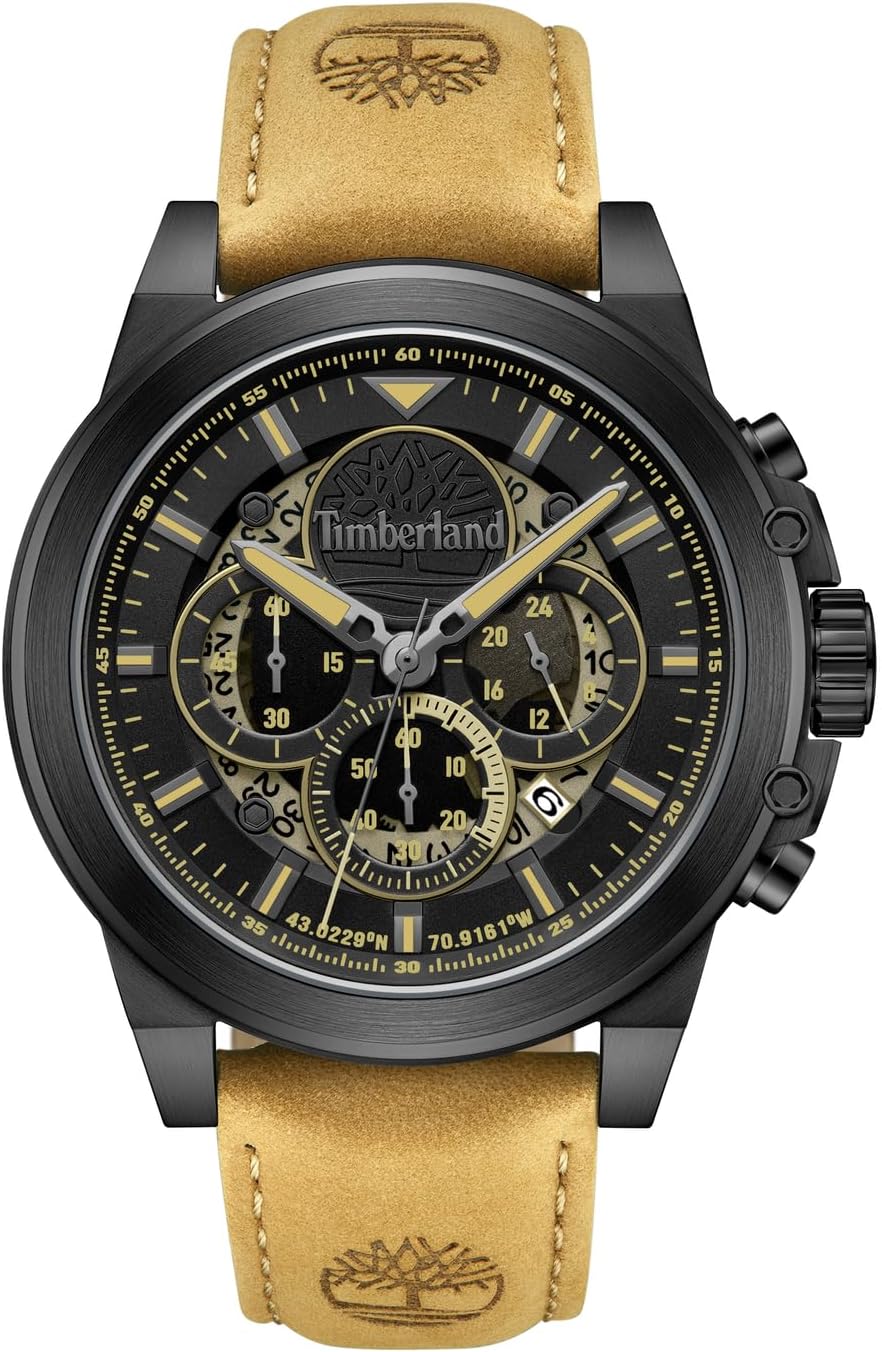
Image: Front view of the Timberland FAST STRIKE Chronograph Watch, showcasing its black dial, gold accents, and tan leather strap.
2. Product Overview
Familiarize yourself with the main components of your watch:
- Crown (A): Used for setting time and date.
- Pusher (B): Top pusher, used to start and stop the chronograph.
- Pusher (C): Bottom pusher, used to reset the chronograph.
- Main Dial: Displays hours, minutes, and seconds.
- Sub-dials: Chronograph minute counter, chronograph second counter, and 24-hour indicator.
- Date Window: Displays the current date.

Image: Side view of the watch, highlighting the crown (A) and chronograph pushers (B and C).
3. Setup
3.1. Setting the Time
- Pull the crown (A) out to the second click position. The second hand will stop.
- Rotate the crown (A) to set the hour and minute hands. Ensure the AM/PM is correctly set if your watch has a 24-hour indicator or date changes at midnight.
- Push the crown (A) back into the normal position. The second hand will resume movement.
3.2. Setting the Date
- Pull the crown (A) out to the first click position.
- Rotate the crown (A) clockwise or counter-clockwise (depending on the movement) to set the date. Avoid setting the date between 9 PM and 3 AM, as this may interfere with the automatic date change mechanism.
- Push the crown (A) back into the normal position.
3.3. Initial Strap Adjustment
The leather strap is designed for comfort and durability. Adjust the tang buckle to find a comfortable fit on your wrist. Ensure it is snug but not too tight to allow for proper circulation.
4. Operating the Chronograph
Your watch features a chronograph function for measuring elapsed time.
4.1. Starting and Stopping the Chronograph
- Press pusher (B) to start the chronograph. The chronograph second hand will begin to move.
- Press pusher (B) again to stop the chronograph. The elapsed time will be indicated by the chronograph second and minute hands.
4.2. Resetting the Chronograph
- After stopping the chronograph with pusher (B), press pusher (C) to reset all chronograph hands to their zero positions.
- Note: The chronograph must be stopped before it can be reset.
4.3. Chronograph Sub-dials
- 60-Second Sub-dial: Typically located at the 6 o'clock position, this measures elapsed seconds for the chronograph.
- 30-Minute Sub-dial: Typically located at the 9 o'clock position, this measures elapsed minutes for the chronograph.
- 24-Hour Indicator: Typically located at the 3 o'clock position, this sub-dial displays the time in a 24-hour format, synchronized with the main hour hand.
5. Care and Maintenance
5.1. Water Resistance (5 ATM / 50 Meters)
Your watch is water resistant up to 5 ATM (50 meters). This means it is suitable for everyday use, such as accidental splashes, rain, and short periods of recreational swimming. It is not suitable for diving, snorkeling, or prolonged water exposure. Always ensure the crown is pushed in completely before any contact with water.

Image: Rear view of the watch, displaying the case back with '5ATM Water Resistant' engraving.
5.2. Cleaning
- Case and Crystal: Wipe with a soft, dry cloth. For stubborn dirt, a slightly damp cloth can be used, followed by a dry cloth.
- Leather Strap: Avoid prolonged exposure to water, direct sunlight, and harsh chemicals. Clean with a specialized leather cleaner or a slightly damp cloth and allow to air dry naturally.
5.3. Battery Replacement
The watch is powered by a quartz movement (VJ53B) and requires a battery. When the battery runs low, the second hand may start skipping seconds or stop entirely. Battery replacement should be performed by a qualified watch technician to ensure proper sealing and maintain water resistance.
5.4. Luminous Features
The hands and markers on your watch are treated with a luminous material, allowing for readability in low-light conditions after exposure to light.

Image: The watch face in darkness, illustrating the luminous glow of the hands and hour markers.
6. Troubleshooting
| Problem | Possible Cause | Solution |
|---|---|---|
| Watch stops or runs intermittently. | Low battery. | Replace battery by a professional. |
| Time/Date is incorrect. | Crown not fully pushed in; incorrect setting. | Refer to Section 3.1 and 3.2 to reset time and date. Ensure crown is fully pushed in. |
| Chronograph hands do not reset to zero. | Chronograph was not stopped before resetting; internal misalignment. | Ensure chronograph is stopped before pressing pusher (C). If issue persists, consult a service center. |
| Moisture under the crystal. | Water resistance compromised. | Immediately take to a professional watch repair service. Do not attempt to dry it yourself. |
7. Specifications
- Model Number: TDWGB0056003
- Movement: VJ53B Quartz
- Case Material: Stainless Steel
- Case Diameter: 46 mm
- Case Thickness: 11.5 mm
- Band Material: Leather
- Band Width: 22 mm
- Band Color: Tan
- Dial Color: Black
- Windshield Material: Mineral Glass
- Water Resistance: 5 ATM (50 meters)
- Functions: Chronograph, Date Display, 24-hour indicator, Second hand
- Weight: 89 g
8. Warranty and Support
Your Timberland FAST STRIKE watch comes with a limited manufacturer's warranty. Please refer to the included warranty card and genuine product certificate for specific terms and conditions.
For any service, repairs, or inquiries not covered in this manual, please contact an authorized Timberland service center or the retailer where the watch was purchased. Attempting repairs yourself may void the warranty and cause further damage.


