
1. Introduction
Thank you for choosing the LanLuk Portable Charger 40800mAh Power Bank, Model T3. This device is designed to provide reliable and fast charging for a wide range of electronic devices, ensuring your gadgets remain powered on the go. It features a high-capacity battery, multiple built-in cables, and advanced safety protections.

Figure 1: LanLuk Portable Charger 40800mAh Power Bank.
2. Package Contents
- LanLuk Portable Charger (40800mAh) with 3 Built-in Cables (iOS, Type-C, USB-A)
- USB-C to USB-C Charging Cable
- User Manual
3. Product Overview
The LanLuk Portable Charger is equipped with various input and output options for maximum compatibility and convenience.
3.1 Ports and Built-in Cables
- Built-in iOS Cable: Output for Apple devices.
- Built-in Type-C Cable: Output for USB-C compatible devices.
- Built-in USB-A Cable: For recharging the power bank itself.
- USB-A Output 1 Port: Standard USB output.
- QC USB-A Output 2 Port: Quick Charge enabled USB output.
- USB-C Input/Output Port: Supports both input for recharging the power bank and output for charging devices.
3.2 LED Digital Display
The integrated LED digital screen accurately displays the remaining battery percentage of the power bank, allowing you to monitor its charge level at a glance.
3.3 Power Button
A single power button controls the device's functions, including turning it on to check battery status and initiating charging.
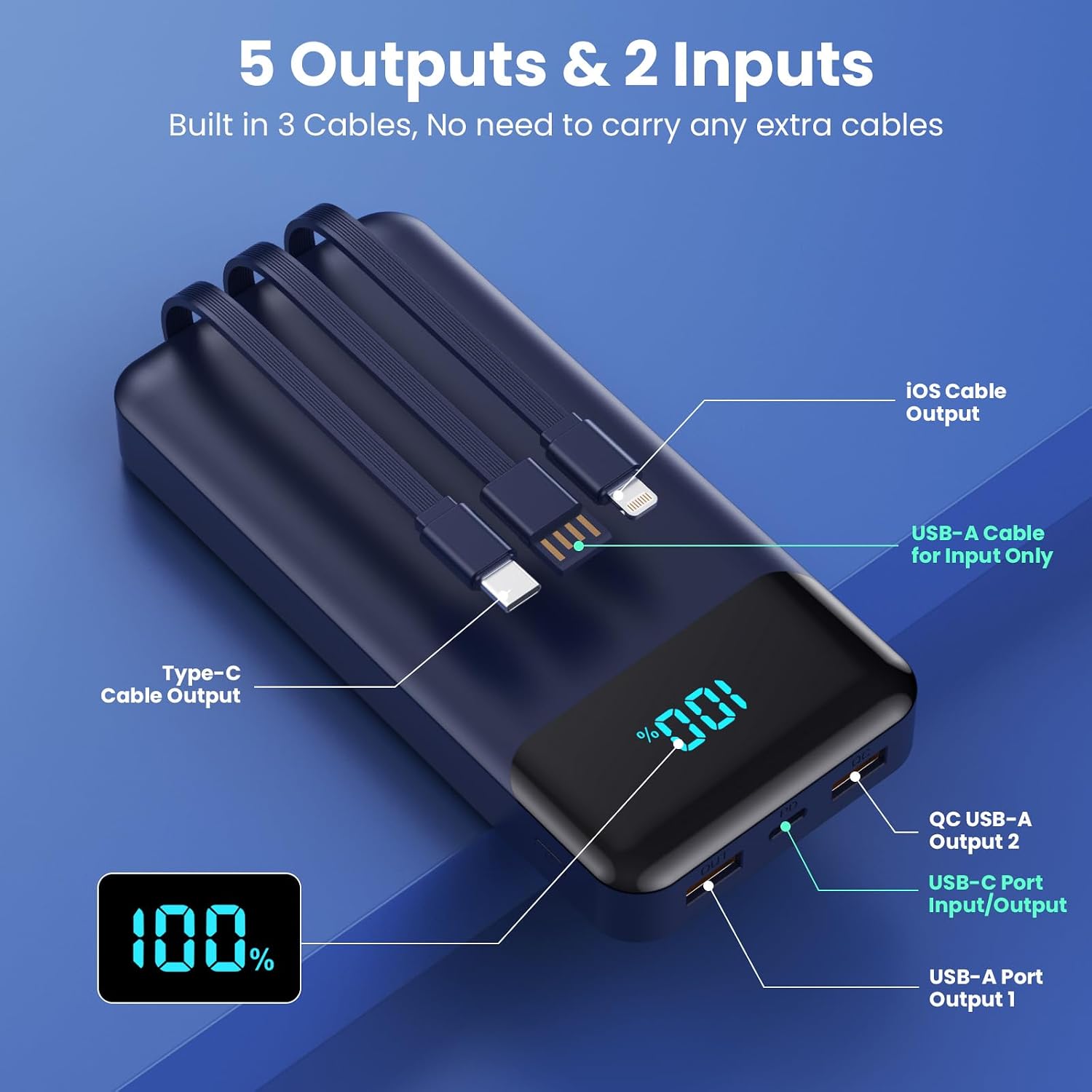
Figure 2: Detailed view of the power bank's ports and built-in cables.
4. Setup and Initial Charging
Before first use, it is recommended to fully charge the power bank to optimize battery performance.
4.1 Recharging the Power Bank
The power bank can be recharged using two methods:
- Using the Built-in USB-A Cable: Connect the built-in USB-A cable to a compatible USB power adapter (not included) or a computer USB port.
- Using the USB-C Input/Output Port: Connect a USB-C to USB-C cable (included) to a compatible USB-C power adapter (not included).

Figure 3: Two methods for recharging the power bank.
5. Operating Instructions
5.1 Charging Your Devices
To charge a device, press the power button once to activate the power bank. The LED display will show the battery percentage. Connect your device using one of the following options:
- Built-in Cables: Use the appropriate built-in iOS or Type-C cable for your device.
- USB Ports: Connect your device's charging cable to the USB-A Output 1, QC USB-A Output 2, or USB-C Input/Output port.
The power bank supports 25W PD fast charging, capable of charging compatible devices like iPhone 17/16 up to 50% in approximately 30 minutes.

Figure 4: Fast charging a device using the power bank.
5.2 Simultaneous Charging
The power bank can charge up to 5 devices simultaneously using its combination of built-in cables and USB ports.
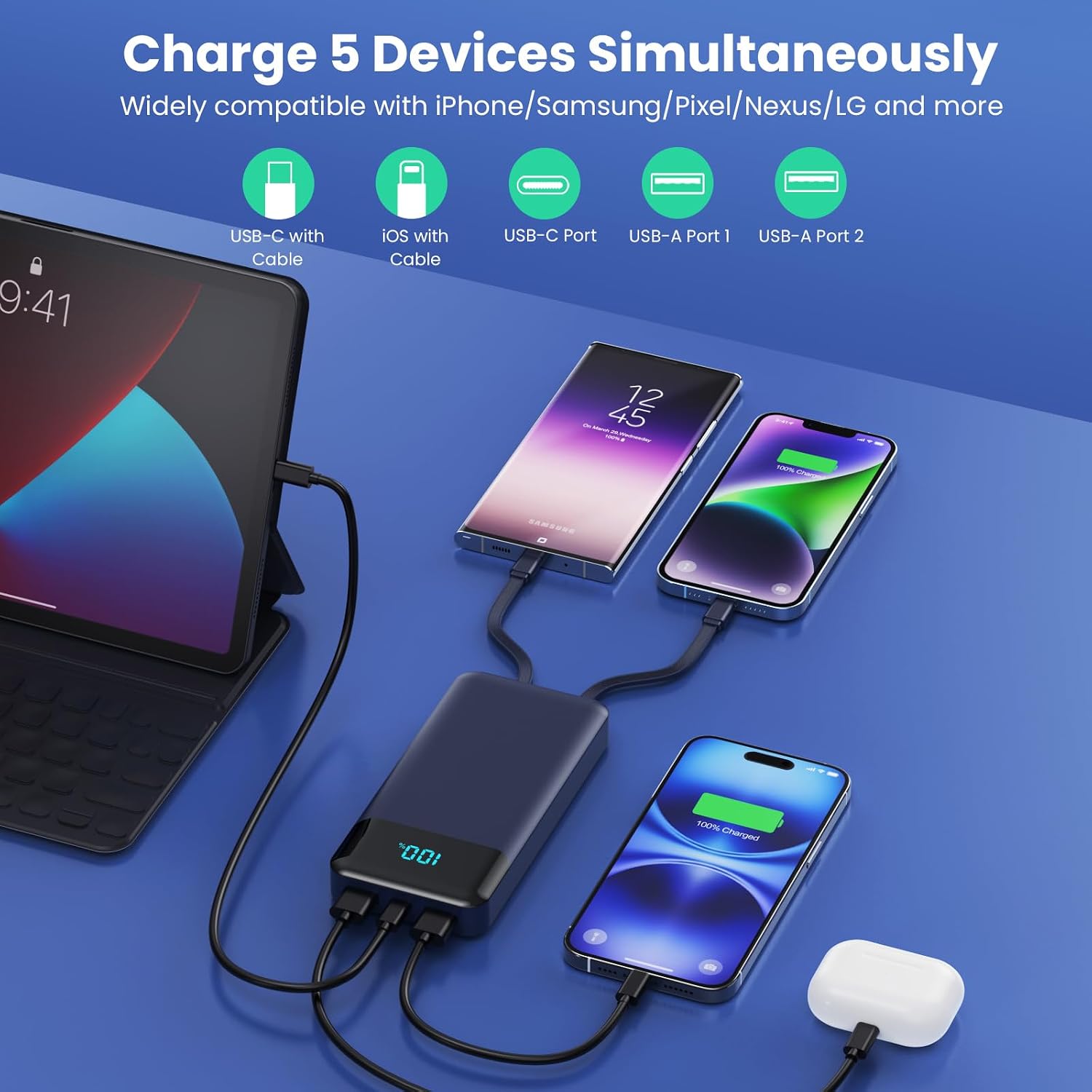
Figure 5: Charging multiple devices at once.
6. Safety Information
The LanLuk Portable Charger is equipped with an Intelligent Controlling IC and 10 multiple system protections to ensure safe operation. These protections include:
- Over-Charger Protection
- Reverse-Polarity Protection
- Short-Circuit Protection
- Over-Current Protection
- AI Software Protection
- Spark-Proof Protection
- Over-Load Protection
- Over-Voltage Protection
- High-Low Temp Protection
- Reverse-Charge Protection

Figure 6: The 10-point safety system for device protection.
7. Specifications
| Feature | Detail |
|---|---|
| Model Number | T3 |
| Battery Capacity | 40800 Milliamp Hours |
| Product Dimensions | 5.9 x 2.67 x 1.18 inches |
| Item Weight | 1.1 pounds |
| Special Features | 25W Fast Charging, Compact Portable Battery Pack, Digital Display, Over Charging Protection, 3 Built-in Cables and 3 Ports |
| Connector Type | iOS, USB-A, USB-C, Built-in Multiple Cables & Ports |
| Manufacturer | DONGGUAN BANGYUAN NEW ENERGY CO., LTD. |
8. Maintenance
To ensure the longevity and optimal performance of your power bank:
- Regularly clean the tips of the built-in cables to prevent poor contact due to stains or oxidation.
- Store the power bank in a cool, dry place away from extreme temperatures and direct sunlight.
- Avoid dropping or subjecting the device to strong impacts.
9. Troubleshooting
- Device not charging: Ensure the power bank is turned on (press the power button). Check that the charging cable is securely connected to both the power bank and your device. Verify that the cable type is compatible with your device.
- Power bank not recharging: Ensure the charging cable is properly connected to a power source and the power bank's input port. Try a different power adapter or cable.
- Slow charging: Ensure your device and cable support fast charging protocols (PD 25W, QC4.0) to achieve optimal speeds.
- Built-in iOS cable not working: Some users have reported issues with the built-in iOS cable not consistently charging. Ensure the cable tip is clean and try reconnecting. If issues persist, use an external cable with one of the USB output ports.
10. Product Video
Watch this video for a detailed review of the LanLuk Portable Charger:
Video: Honest Power bank Review for a must have. This video provides an overview and demonstration of the power bank's features and functionality.
11. Warranty and Support
For warranty information or technical support, please refer to the contact details provided on the product packaging or visit the official LanLuk website. Keep your purchase receipt for warranty claims.