Introduction
This manual provides detailed instructions for the setup, operation, and maintenance of your Desobry 10" Portable TV. Please read this manual thoroughly before using the product to ensure proper functionality and longevity.
The Desobry 10" Portable TV features a 1080P Full HD IPS screen, multiple power options, and wide compatibility with various devices. It is designed for portable entertainment, whether at home, during travel, or outdoors.
Package Contents
Verify that all items listed below are included in your package:
- Portable TV
- AC Adapter
- AV Cable
- Antenna (Detachable)
- Car Charger
- Remote Control
- AAA Battery
- Car Headrest Mount Holder
- User Manual

Figure 1: Included accessories with the Desobry 10" Portable TV.
Product Overview
Familiarize yourself with the various components and ports of your portable TV.
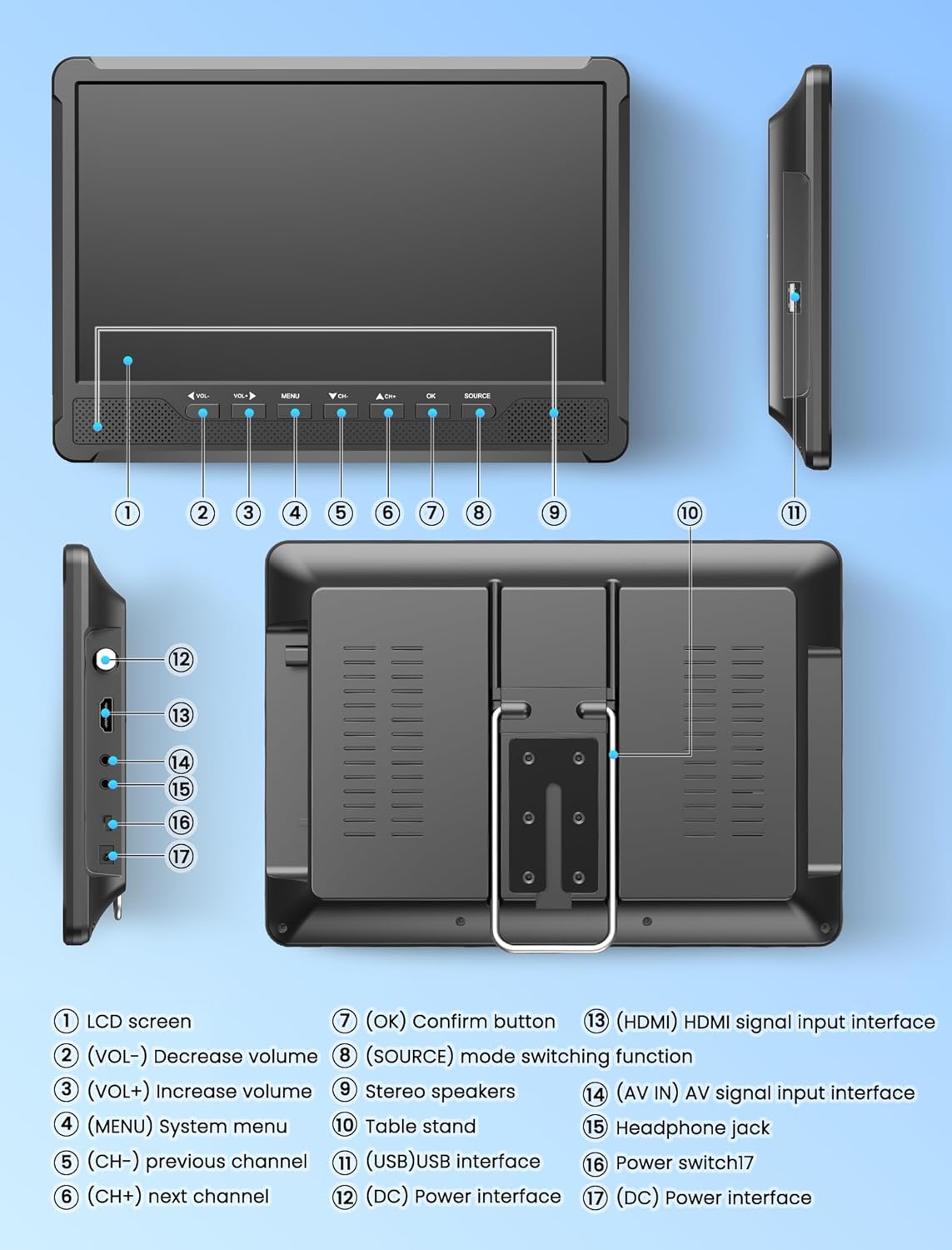
Figure 2: Front, side, and rear views of the Desobry 10" Portable TV with labeled components.
Controls and Ports:
- LCD Screen: 10-inch display.
- VOL- / VOL+: Decrease/Increase volume.
- MENU: Access system menu.
- CH- / CH+: Previous/Next channel.
- OK: Confirm button.
- SOURCE: Mode switching function (TV, HDMI, AV, USB).
- Stereo Speakers: Built-in dual speakers.
- Table Stand: Integrated for desktop use.
- USB Interface: For media playback (MAVI, MPG, MOV, MKV, MP4, TS, VOB, DAT, MP3, WMA, M4A, AAC, JPG, JPEG, BMP, PNG, Text).
- DC Power Interface: For connecting AC adapter or car charger.
- HDMI Input: For connecting external devices like laptops, Firestick, Roku, game consoles.
- AV IN / AV OUT: Audio/Video input/output interfaces.
- Headphone Jack: For private listening.
- Power Switch: To turn the device on/off.
Setup
1. Powering the TV
Your Desobry Portable TV can be powered in several ways:
- Built-in Rechargeable Battery: The TV has a built-in 4000 mAh rechargeable battery for portable use.
- AC Adapter: Connect the included AC adapter to the DC Power Interface and a wall outlet for home use and charging.
- Car Charger: Use the included car charger to power the TV and charge its battery in a vehicle.

Figure 3: Multiple power options for your portable TV.
2. Connecting the Antenna
Attach the detachable antenna to the antenna input port on the TV. For optimal reception, position the antenna in an area with a clear signal. You may need to adjust its position for better channel reception.

Figure 4: Connecting the included antenna for TV reception.
3. Initial Power On and Channel Scan
After connecting the power and antenna, slide the Power Switch to the 'ON' position. The TV will power on. Follow the on-screen prompts for the initial setup wizard, which typically includes selecting your preferred language and performing an automatic channel scan to find available digital TV channels.
Video 1: A seller-provided user guide demonstrating the initial setup and channel scan process for a 10-inch portable TV.
Operating Instructions
1. Basic Operation
- Power On/Off: Use the physical power switch or the power button on the remote control.
- Volume Adjustment: Use the VOL+ and VOL- buttons on the TV or remote.
- Channel Selection: Use the CH+ and CH- buttons on the TV or remote.
- Menu Navigation: Press the MENU button to access settings. Use channel/volume buttons to navigate and OK to select.
2. Input Source Selection
Press the SOURCE button on the TV or remote control to cycle through available input sources: TV (Digital/Analog), HDMI, AV, and USB.
3. Media Playback via USB
Insert a USB flash drive into the USB port. Select 'USB' as the input source. The TV supports various media formats including MAVI, MPG, MOV, MKV, MP4, TS, VOB, DAT, MP3, WMA, M4A, AAC, JPG, JPEG, BMP, PNG, and Text files.

Figure 5: Supported media formats for USB playback.
4. Connecting External Devices (HDMI/AV)
Use the HDMI input to connect devices like laptops, Amazon Firestick, Roku, Slingbox, or game consoles. Use the AV input with the provided AV cable for older devices like DVD players.

Figure 6: Connecting a DVD player using the AV cable.

Figure 7: HDMI input for connecting various devices. Note: HDMI cable is not included.
5. FM Radio Function
The TV includes a built-in FM tuner. Select 'FM Radio' from the input source menu to scan and listen to local FM radio stations.
Display and Viewing
The Desobry Portable TV features a Full HD 1080P IPS screen with a 1920 x 1080 resolution. The IPS technology provides a wide 178° viewing angle, ensuring consistent picture quality from various perspectives.

Figure 8: IPS screen advantages over other display types.

Figure 9: Enjoy a wide 178° viewing angle.
Installation and Mounting
The portable TV offers flexible installation options:
- Built-in Foldable Stand: For convenient desktop placement, the TV includes an integrated stand that can be adjusted to a suitable viewing angle.
- Car Headrest Installation Kit: A headrest bracket is included for mounting the TV on a car seat, providing entertainment during car rides.
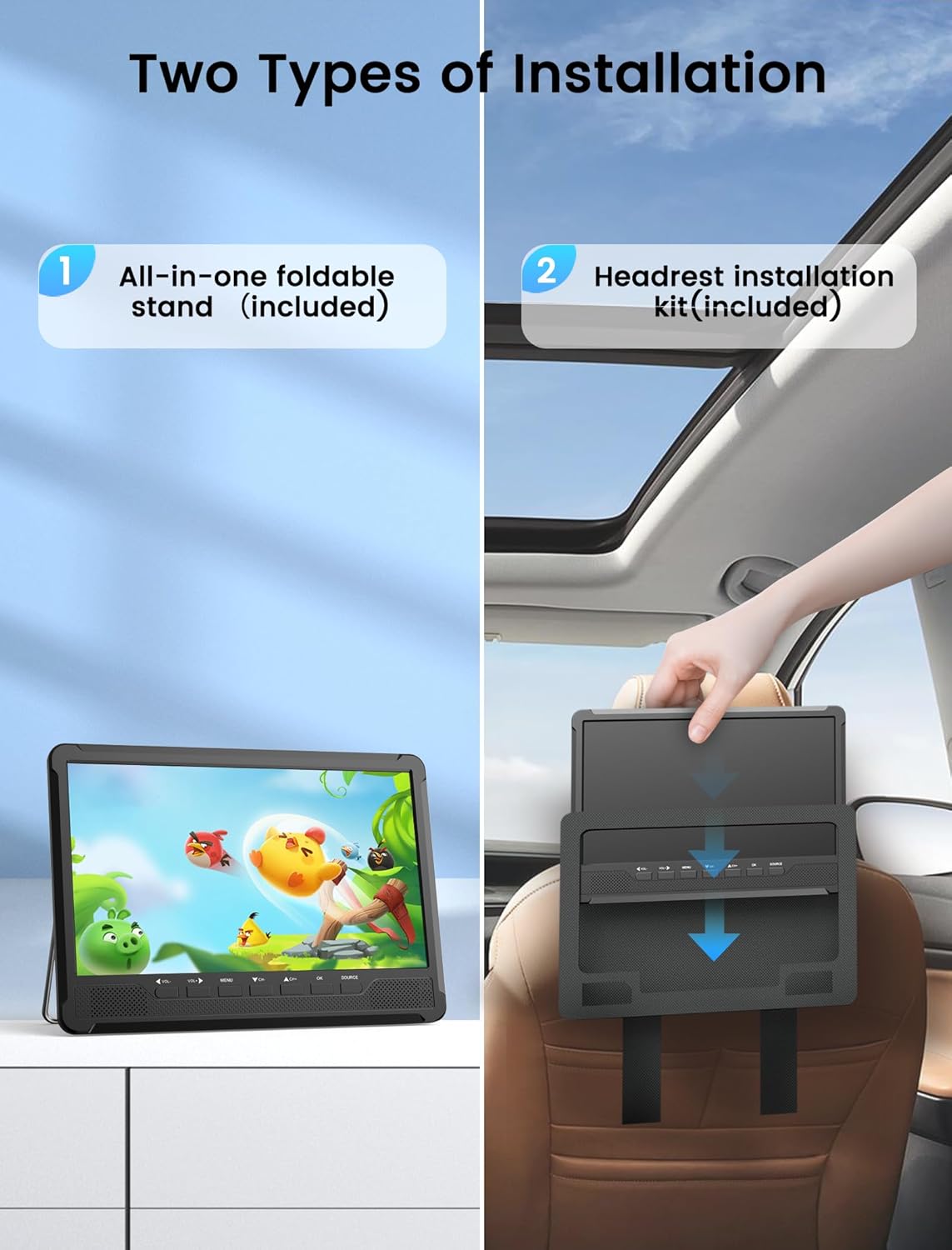
Figure 10: Installation options for the portable TV.
Maintenance
Cleaning
To clean the screen, gently wipe it with a soft, lint-free cloth. For stubborn marks, dampen the cloth with a small amount of water or a screen-cleaning solution. Avoid using harsh chemicals or abrasive materials.
Battery Care
To prolong the life of the built-in rechargeable battery, avoid completely draining it frequently. Charge the TV regularly, even when not in use for extended periods. Store the TV in a cool, dry place.
Troubleshooting
No Signal / Poor Reception
- Ensure the antenna is securely connected to the TV.
- Adjust the position and orientation of the antenna to find the best signal.
- Perform a channel scan from the TV's menu to detect available channels.
- Check the 'DTV Signal' indicator in the TV's menu (usually under Channel Setup) to assess signal strength.
No Power
- Ensure the power switch is in the 'ON' position.
- If using the AC adapter, verify it is properly connected to both the TV and a working power outlet.
- If using the built-in battery, ensure it is charged. Connect the AC adapter or car charger to charge the battery.
No Sound
- Increase the volume using the VOL+ button.
- Check if the TV is muted. Press the MUTE button on the remote control to unmute.
- If using external speakers or headphones, ensure they are properly connected and functioning.
Specifications
| Brand | Desobry |
| Model Number | DESOBRY-10.6-PORTABLE-TV |
| Screen Size | 10 Inches |
| Display Technology | LCD (IPS) |
| Resolution | 1080p (1920 x 1080) |
| Aspect Ratio | 16:9 |
| Refresh Rate | 60 Hz |
| Connectivity Technology | USB, HDMI, RCA (AV) |
| Special Feature | Built-In Speaker, Built-in Stand, Digital Tuner, FM Radio |
| Power Source | 1 Lithium Ion battery (included), AC Adapter, Car Charger |
| Item Weight | 3.1 pounds |
| Product Dimensions | 1"D x 1"W x 1"H |
Warranty and Support
For warranty information or technical support, please refer to the contact details provided in the packaging or on the official Desobry website. Keep your purchase receipt for warranty claims.


