
Introduction
The DewinLVD KM160F is a versatile WiFi battery controller and voltage monitor designed for comprehensive battery management. It provides real-time data on voltage, current, power, capacity, and more, accessible via a 2.4-inch high-definition color screen and a dedicated mobile application. This manual provides detailed instructions for setup, operation, maintenance, and troubleshooting to ensure optimal performance and longevity of your device.

Figure 1: DewinLVD KM160F WiFi Battery Controller and included shunt with cables.
Setup and Installation
Package Contents
- 1 x Display Unit
- 1 x Sampler (600A Shunt)
- 1 x 5m Communication Cable
- 1 x 1m Red Power Cable
- 1 x User Manual (English)
Wiring Diagram
Follow the diagram below for correct installation. Ensure all connections are secure before powering on the device.
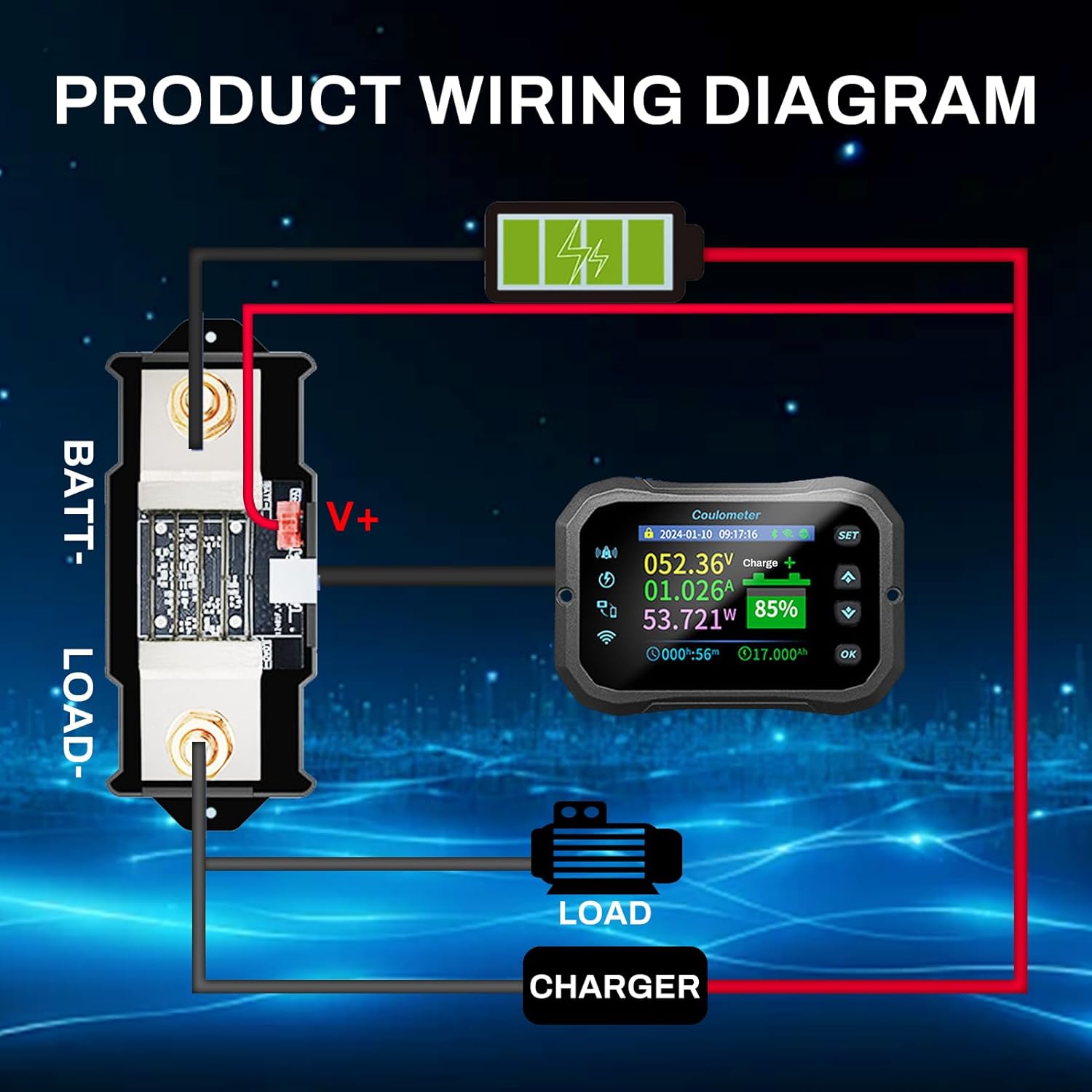
Figure 2: Wiring diagram showing connections between the battery, shunt, load, charger, and display unit.
App Installation and WiFi/Bluetooth Connection
The KM160F supports remote monitoring via the "Junce Home" application. Download the app from your device's app store. Once installed, follow the in-app instructions to connect your battery monitor via WiFi or Bluetooth. The device offers a connection distance of up to 10 meters without obstacles for both WiFi (2.4 GHz network) and Bluetooth.

Figure 3: Illustration of remote real-time monitoring capabilities using the mobile application.
Operating Instructions
Display Modes
The 2.4-inch LCD screen features two display modes: Dark Mode and Bright Color Mode. For outdoor use or in intense light, manually switch to Bright Color Mode to enhance visibility.

Figure 4: Comparison of Dark Mode and Bright Color Mode on the display unit.
Multifunctional Display
The display provides real-time information on various parameters:
- Estimated charge and discharge time
- Remaining capacity percentage
- Power (W)
- Voltage (V)
- Current (A)
- Charge and discharge status

Figure 5: Visual representation of key features including 2.4-inch HD screen, real-time monitoring, screen whitening, intelligent power-off memory, mobile control, bidirectional current detection, ultra-low power consumption, low voltage reminder, and low capacity reminder.
Automatic Current Direction Detection
The monitor automatically detects the direction of current flow. When charging and discharging occur simultaneously, the screen displays the difference between the charging and discharging currents.
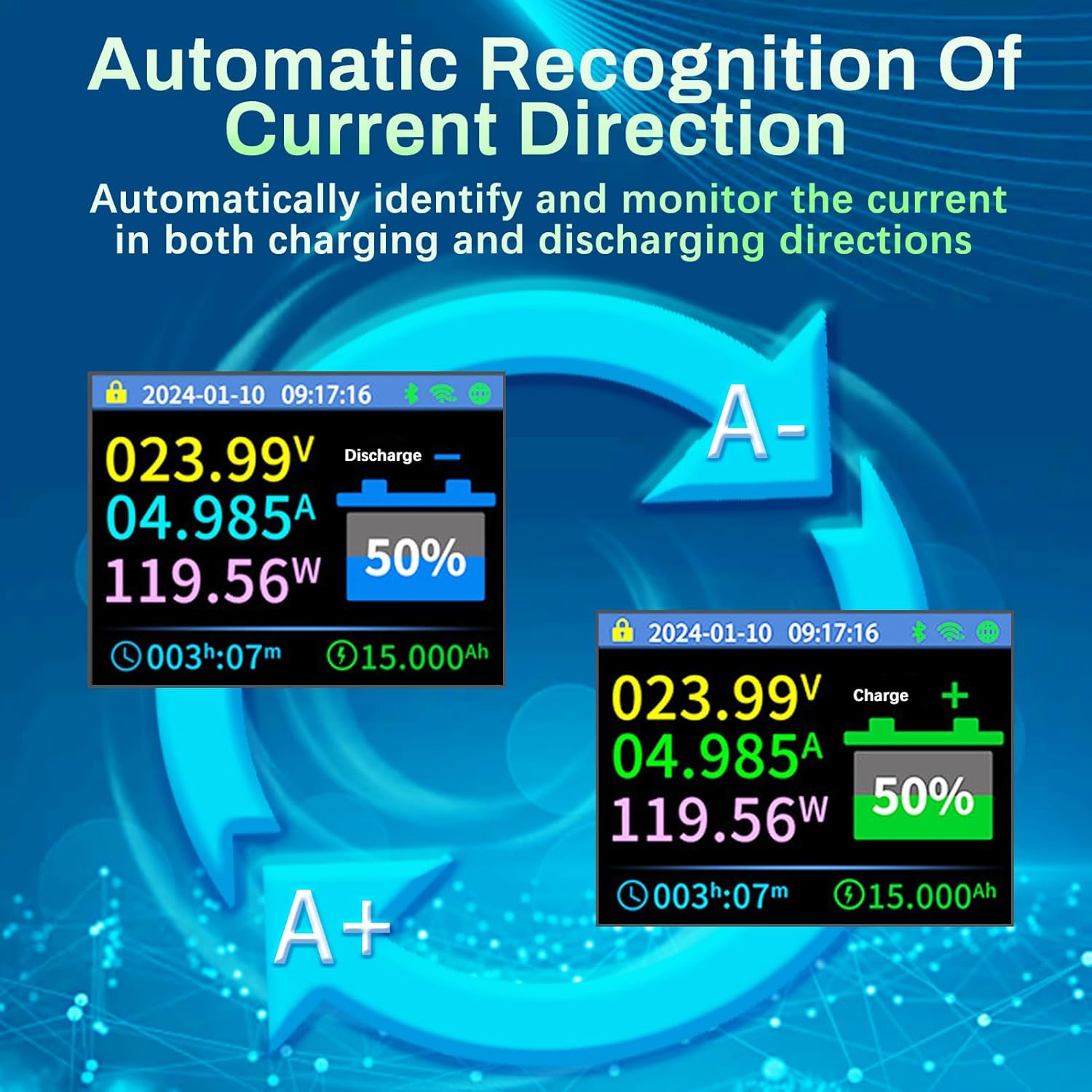
Figure 6: Display showing current direction (charge/discharge) and corresponding values.
Intelligent Alarm System
The integrated buzzer provides intelligent alarms for low capacity or low voltage. If the measured value falls below a preset threshold, the buzzer will sound, and a pop-up window will appear on the screen to alert you.
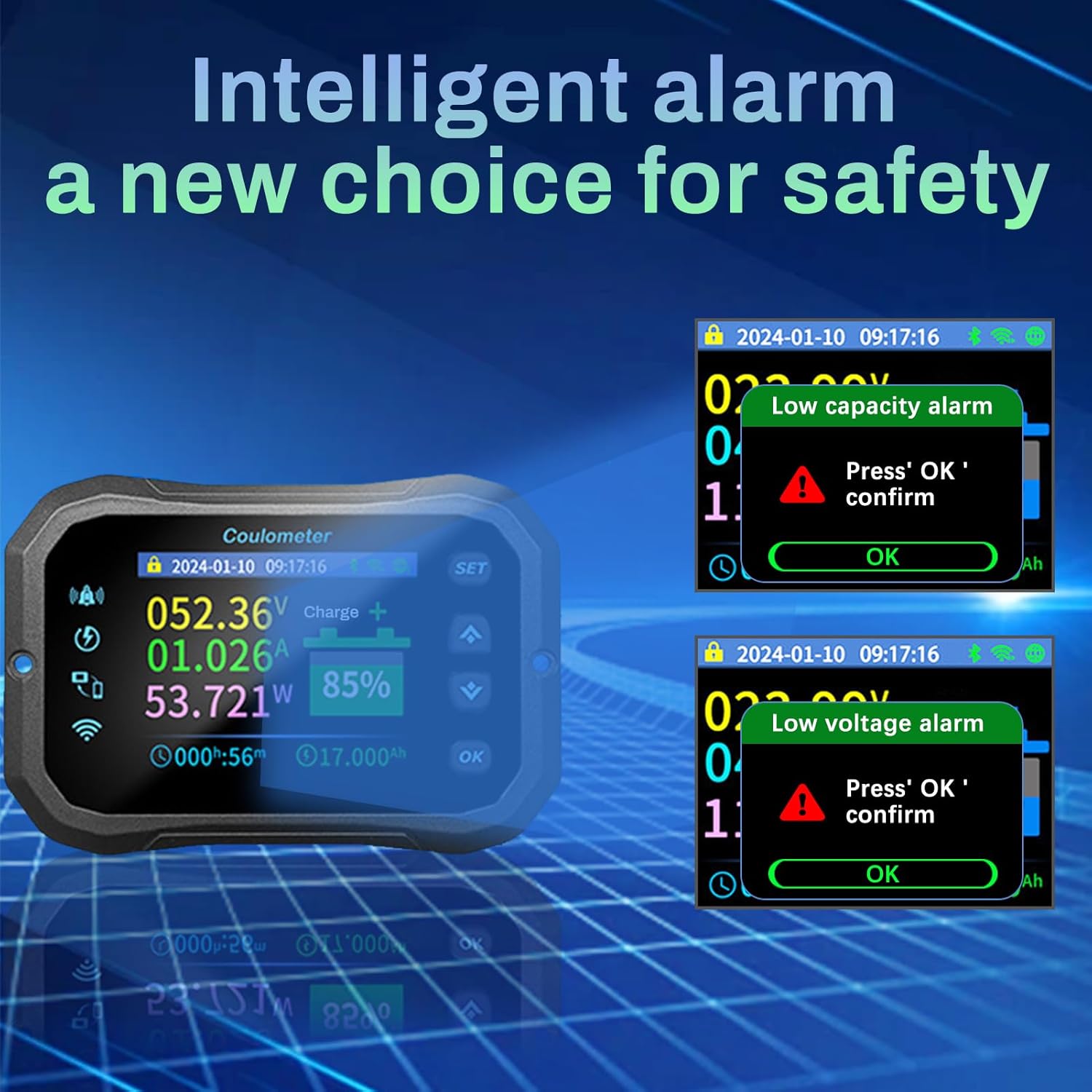
Figure 7: Examples of low capacity and low voltage alarm notifications on the display.
Maintenance
Data Retention
The KM160F features a built-in memory chip that ensures parameters are not lost after a power failure. The device will resume operation according to the settings prior to the power outage, providing peace of mind.

Figure 8: Illustration of the intelligent power-off memory feature, ensuring data integrity.
Cleaning and Care
To maintain the device, wipe the display and casing with a soft, dry cloth. Avoid using abrasive cleaners or solvents that could damage the surface. Ensure the device is kept in a dry environment and protected from extreme temperatures.
Troubleshooting
Common Issues and Solutions
The KM160F is designed to address common battery monitoring challenges:
- Running out of battery unexpectedly: Real-time capacity display and low capacity alarms prevent this.
- Inaccurate original instrument panel readings: The KM160F provides precise measurements.
- Uncertainty about charge level: Accurate Ah measurement and percentage display clarify charge status.
- Battery anxiety: Comprehensive monitoring provides peace of mind.
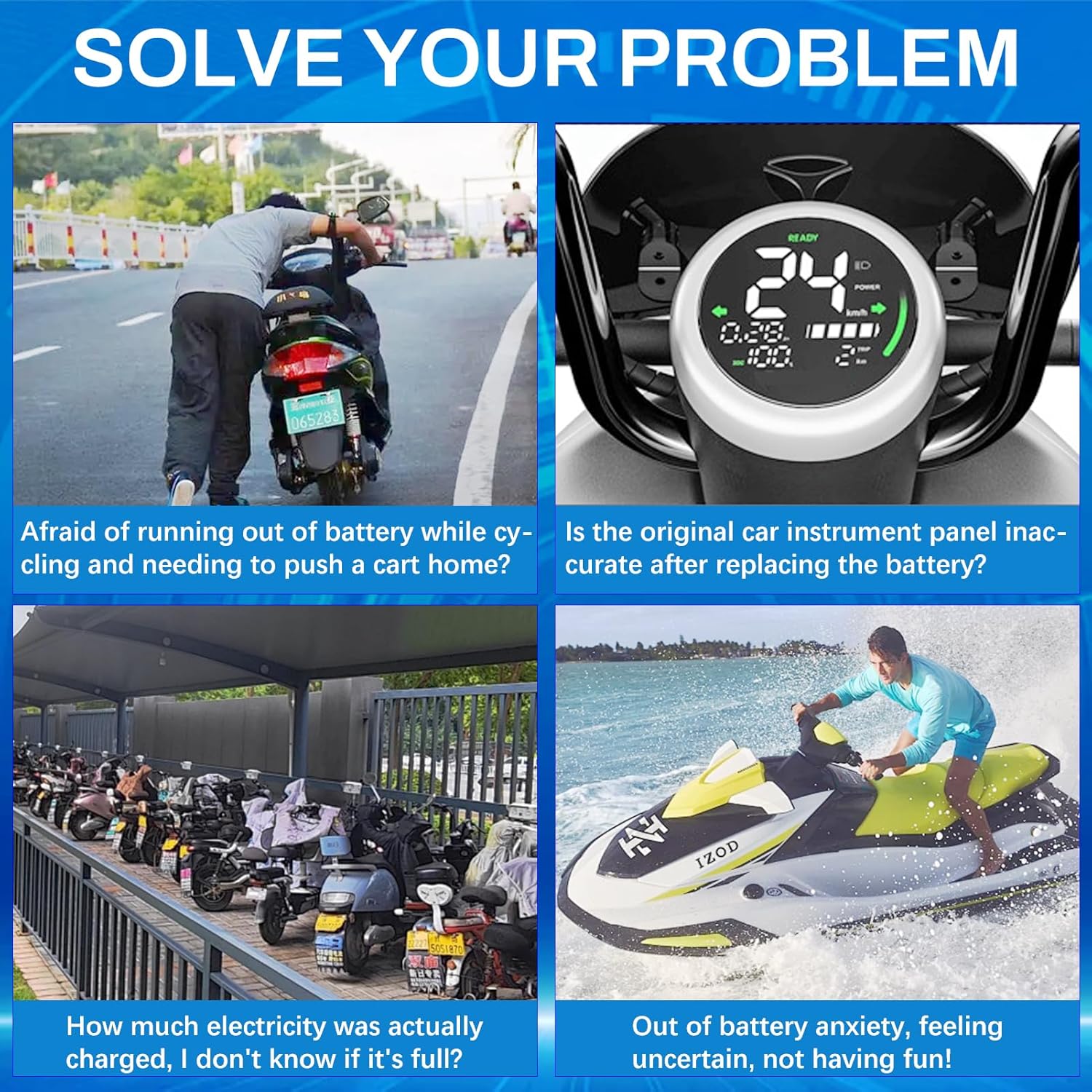
Figure 9: Visual examples of problems solved by using the KM160F battery monitor.
General Troubleshooting Tips
- No display: Check power connections and ensure the red power cable is correctly connected.
- Inaccurate readings: Verify shunt connections and ensure the communication cable is securely plugged in.
- App connectivity issues: Ensure your phone is within 10 meters of the device and your WiFi network is 2.4 GHz. Restart the app and the device if necessary.
- Alarm not sounding: Check alarm settings in the app or on the device to ensure thresholds are correctly set.
Specifications
Detailed technical specifications for the DewinLVD KM160F WiFi Battery Controller:

Figure 10: Comprehensive table of product specifications.
| Parameter | Value |
|---|---|
| Material | ABS + Copper |
| Sampling Mode | Shunt |
| Voltage Measurement Range | 10-100 V |
| Voltage Resolution | 0.01 V |
| Current Measurement Range | 0-600 A |
| Current Resolution | 0.01 A |
| Capacity Display Range | 0% - 100% |
| Power Measurement Range | 0-60 kW |
| Power Resolution | 0.0001 W |
| Ampere-hour Measurement Range | 0-9999.9 Ah |
| Capacity Resolution | 0.001 Ah |
| Bluetooth Connection Distance | Max 10 meters (unobstructed) |
| WiFi Connection Distance | Up to 10 meters (unobstructed) |
| WiFi Connection Network | 2.4 GHz |
| Remote Connection Distance | Worldwide |
| Voltage Accuracy | ± 5% + 0.02 V |
| Current Accuracy | ± 1% + 0.1 A |
| Sampling Rate | 5 times/sec |
| Display Power Consumption | 0.9 W |
| Screen Off Time | 10s, 20s, 30s, 40s, 50s, 60s, Auto |
| Discharge Condition (Screen On/Off) | I ≥ 30 mA (screen on), I < 30 mA and time > 20 seconds (screen off) |
Warranty and Support
This product is manufactured by DewinLVD. For warranty information, technical support, or service inquiries, please refer to the contact details provided with your purchase documentation or visit the official DewinLVD website. Keep your purchase receipt as proof of purchase for any warranty claims.


