
Peakeep MHP6030
Peakeep Slim Digital Mirror Alarm Clock MHP6030 User Manual
Model: MHP6030
1. Introduction
Thank you for choosing the Peakeep Slim Digital Mirror Alarm Clock. This modern and aesthetic clock is designed to complement any home or office decor while providing essential timekeeping and alarm functions. Its large LED display ensures clear readability, and its versatile features cater to various user preferences.
Key features include a slim design with a mirror face, a large LED display (6"L x 3"W inches) for easy viewing, 6 adjustable brightness levels, a loud alarm with 5 adjustable volumes (55 to 100 dB), a 9-minute snooze function, and a battery backup system to maintain settings during power outages.
2. Setup
2.1. Powering the Clock
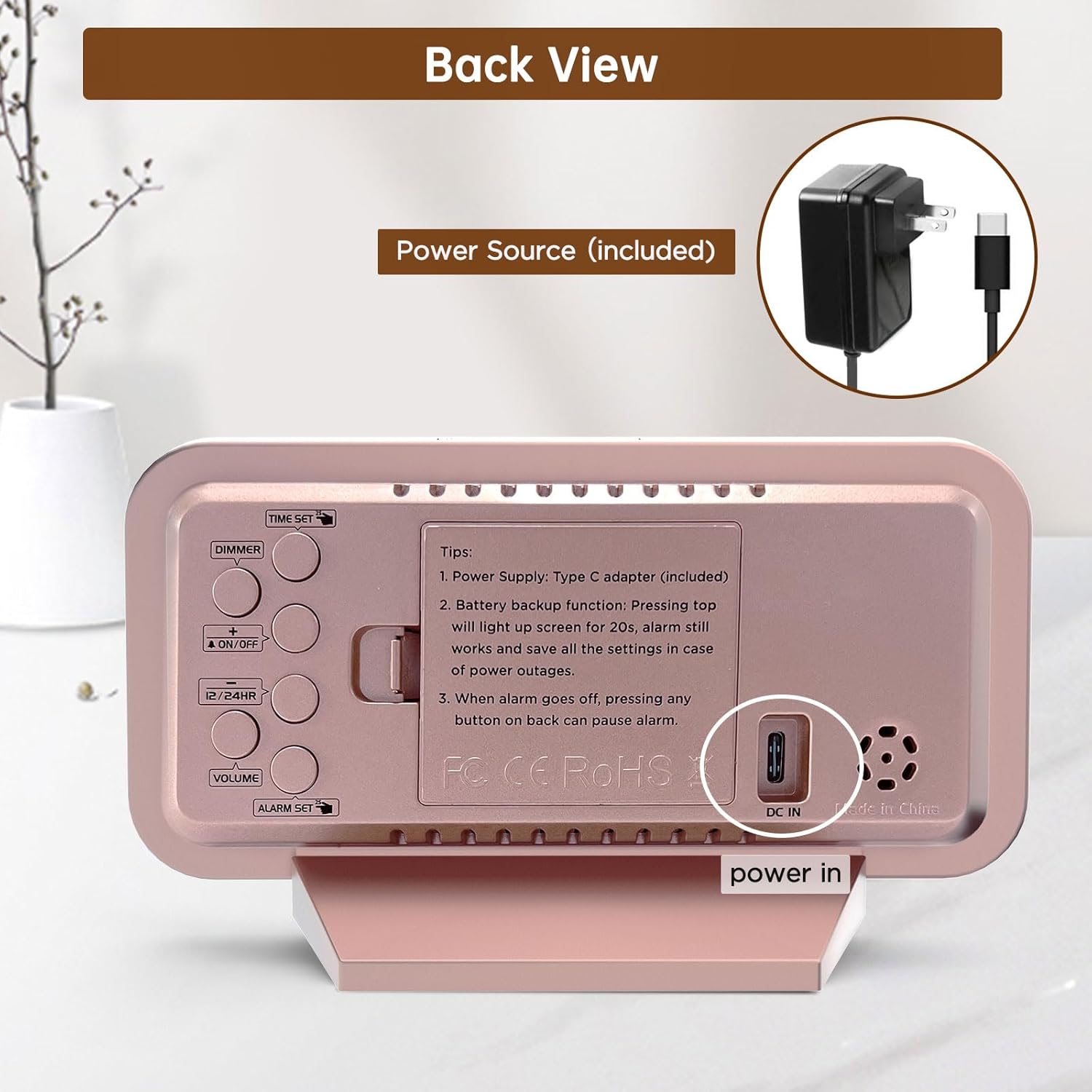
The Peakeep Digital Alarm Clock is primarily powered by the included Type C adapter. Connect the adapter to the DC IN port on the back of the clock and plug it into a standard electrical outlet. The clock display will illuminate, indicating it is powered on.

The clock is powered by the included Type C adapter, ensuring continuous operation.
2.2. Battery Backup Installation
For memory backup during power outages, install 4 AAA batteries (not provided) into the battery compartment located on the back of the clock. These batteries will preserve your time and alarm settings and trigger the alarm in case of a power interruption. The screen will light up for 20 seconds with a top touch when running on battery power.

Battery backup ensures settings are saved and the alarm functions during power outages.
3. Operating Instructions
The control buttons are located on the back of the clock for easy access and adjustment.

Rear view of the clock with clearly labeled buttons for various functions.
3.1. Setting the Time
- Press the TIME SET button once to enter time setting mode. The hour digits will start blinking.
- Use the + or - buttons to adjust the hour. Press and hold for fast adjustment.
- Press TIME SET again to set the minute digits. Use the + or - buttons to adjust the minutes.
- Press TIME SET a third time to exit and save the time.
3.2. Setting the Alarm
- Press the ALARM SET button once to enter alarm setting mode. The alarm hour digits will start blinking.
- Use the + or - buttons to adjust the alarm hour.
- Press ALARM SET again to set the alarm minute digits. Use the + or - buttons to adjust the minutes.
- Press ALARM SET a third time to exit and save the alarm.
- To activate/deactivate the alarm, press the ON/OFF button. An alarm icon will appear/disappear on the display.
3.3. Adjusting Display Brightness (Dimmer)
The clock features 6 adjustable brightness levels (L1 to L5 and OFF) to suit various lighting conditions and personal preferences.
- Press the DIMMER button repeatedly to cycle through the 6 brightness levels.
- Select the desired brightness level for comfortable viewing day or night.

The clock offers 6 brightness levels, from bright (L5) to off, for optimal visibility and comfort.
3.4. Adjusting Alarm Volume
The alarm has 5 adjustable volume levels, ranging from 55 dB to 100 dB, suitable for both light and heavy sleepers.
- Press the VOLUME button repeatedly to cycle through the 5 volume levels (V01 to V05).
- Choose the volume that best suits your waking needs.
Adjust the alarm volume from a gentle 55dB to a loud 105dB to ensure you wake up.
3.5. 12/24 Hour Format
To switch between 12-hour (AM/PM) and 24-hour (military) time formats, press the 12/24HR button.
3.6. Snooze Function
When the alarm sounds, press the large SNOOZE/LIGHT button on the top of the clock to activate the 9-minute snooze function. The alarm will sound again after 9 minutes.
4. Maintenance
- Clean the clock's mirror surface and body with a soft, dry cloth. Avoid using abrasive cleaners or solvents.
- Ensure the clock is placed on a stable, flat surface to prevent accidental falls.
- Keep the clock away from direct sunlight, extreme temperatures, and high humidity.
- If not using the battery backup function, remove the AAA batteries to prevent leakage.
5. Troubleshooting
5.1. Display is blank or not lighting up
- Ensure the Type C adapter is securely plugged into both the clock and a working power outlet.
- If using battery backup, press the top SNOOZE/LIGHT button to temporarily illuminate the screen for 20 seconds. Batteries are for memory backup only and do not keep the display continuously lit.
5.2. Alarm does not sound
- Verify that the alarm is activated (alarm icon visible on the display).
- Check the alarm volume setting to ensure it is not set to V00 (mute).
- If running on battery backup, ensure the batteries are fresh and correctly installed.
5.3. Time/Alarm settings are lost after power outage
- Ensure 4 fresh AAA batteries are installed in the battery compartment for memory retention.
6. Specifications
| Feature | Detail |
|---|---|
| Brand | Peakeep |
| Model Number | MHP6030 |
| Color | Rose Gold With Mirror |
| Display Type | Digital |
| Style | Modern |
| Product Dimensions | 6"W x 3.5"H |
| Item Weight | 6.4 ounces |
| Power Source | Type C Adapter (included) |
| Battery Backup | 4 AAA batteries required (not included) |
| Special Features | Slim Design Mirror Face, Large Numbers, 6 Brightness Levels, Loud Alarm, Adjustable Volume, Snooze Function |
| Material | Plastic, Electronic, Glass |
| Mounting Type | Tabletop |
7. Product Videos
7.1. Battery Backup Functionality
This video demonstrates the battery backup feature of the Peakeep Digital Alarm Clock, highlighting how it retains settings and triggers the alarm during power outages.
7.2. Mirror Functionality
This video showcases the clock's mirror surface, illustrating its dual functionality as both a time display and a convenient mirror for quick checks.
8. Warranty Information
This product comes with a standard manufacturer's warranty. Please refer to the product packaging or contact customer support for specific warranty terms and conditions.
9. Customer Support
For any questions, technical assistance, or support regarding your Peakeep Slim Digital Mirror Alarm Clock, please contact our customer support team:
- Email: sales@us-myhome.com
Related documentsMHP6030


Ask a question about this manual
Ask about setup, troubleshooting, compatibility, parts, safety, or missing instructions. Manuals+ will review the question and use this page’s manual context to help answer it.