
1. Introduction
This manual provides comprehensive instructions for the assembly, operation, and maintenance of your Casaottima 40-Inch Small Computer Desk with Fabric Drawers & File Cabinet. Please read this manual thoroughly before assembly and use to ensure proper function and longevity of your product.

Image 1.1: The Casaottima 40-Inch Small Computer Desk, featuring a vintage wood grain desktop, black metal frame, and dark grey fabric drawers and file cabinet. A monitor, printer, and various office supplies are arranged on the desk, demonstrating its functionality.
2. Safety Information
- Always assemble the desk on a soft, clean surface to prevent scratches.
- Ensure all screws and fasteners are securely tightened before use. Periodically check and re-tighten as necessary.
- Do not overload the desk or drawers beyond their stated weight capacity.
- Keep small parts away from children during assembly to prevent choking hazards.
- Avoid placing hot items directly on the desktop surface without protection.
- Use the adjustable foot pads to ensure stability on uneven floors.
3. Package Contents
Before beginning assembly, verify that all components listed below are present and undamaged. If any parts are missing or damaged, please contact customer support.

Image 3.1: Diagram illustrating the desk's dimensions and various components, including the desktop, metal frame parts, fabric drawers, file cabinet, cloth storage bag, and hook. Weight capacities for the desktop (110 lbs) and drawers (7 lbs, 6 lbs) are also indicated.
Typical Components:
- Desktop Panel (1)
- Metal Frame Legs (2)
- Crossbars/Support Beams (various)
- Fabric Drawers (2)
- Fabric File Cabinet (1)
- Cloth Storage Bag (1)
- Hook (1)
- Adjustable Foot Pads (4)
- Assembly Hardware (screws, Allen wrench, etc.)
- Instruction Manual (this document)
4. Setup and Assembly Instructions
Follow these steps carefully for proper assembly. It is recommended to have two people for certain steps.
- Unpack and Identify Parts: Lay out all components on a clean, soft surface. Refer to the "Package Contents" section and Image 3.1 to identify each part.
- Assemble the Metal Frame: Attach the crossbars to the metal frame legs using the provided screws. Do not fully tighten screws until all frame components are loosely assembled.
- Attach Desktop: Carefully place the desktop panel onto the assembled metal frame. Align the pre-drilled holes and secure the desktop to the frame using the appropriate screws. Fully tighten all screws on the metal frame and desktop.
- Install Adjustable Foot Pads: Screw the adjustable foot pads into the bottom of each leg. Adjust them as needed to ensure the desk is level and stable.
- Configure Drawers and File Cabinet (Reversible Design):
The fabric drawers and file cabinet can be installed on either the left or right side of the desk to suit your preference and room layout. Refer to Image 4.1 for visual guidance on the reversible design.

Image 4.1: Illustration demonstrating the reversible design of the desk, showing how the drawer and file cabinet unit can be positioned on either the left or right side of the desk frame.
Assemble the fabric drawers and file cabinet according to the separate instructions provided for these components, then slide them into the designated slots on the chosen side of the desk frame.
- Attach Cloth Storage Bag and Hook: The cloth storage bag and hook are also reversible. Attach them to the desired side of the desk frame. The hook is ideal for headphones or bags, while the storage bag can hold books or documents.
5. Operation and Features
5.1 Fabric Drawers and File Cabinet
The desk includes two fabric drawers and one fabric file cabinet designed for organized storage. The file cabinet is suitable for letter, A4, and legal-sized files. An adjustable rod within the file cabinet allows for flexible organization.

Image 5.1: A detailed view of the fabric drawers and file cabinet. The top two are standard drawers, while the bottom one is a file cabinet with an adjustable rod, shown holding various file types.
- To open, gently pull the handle. To close, push until fully seated.
- Ensure drawers are not overloaded to prevent damage or difficulty in opening/closing.
- The fabric material is designed to be easy to clean and helps keep contents dust-free.
5.2 Cloth Storage Bag and Hook
The reversible cloth storage bag and hook provide additional organizational options.
- Cloth Storage Bag: Ideal for storing books, magazines, notebooks, or other frequently accessed items, keeping your desktop clear.
- Hook: Use the hook to hang headphones, backpacks, or other accessories, keeping them within easy reach and off the floor.
6. Maintenance
- Cleaning the Desktop: Wipe the desktop surface with a soft, damp cloth. Avoid harsh chemicals or abrasive cleaners that could damage the finish.
- Cleaning Fabric Components: The fabric drawers and storage bag can be spot cleaned with a mild detergent and a damp cloth. Allow to air dry completely. Do not machine wash.
- Hardware Check: Periodically inspect all screws and connections to ensure they remain tight. Re-tighten as needed to maintain stability.
- Foot Pads: Ensure the adjustable foot pads are properly adjusted to prevent wobbling and protect your floor.
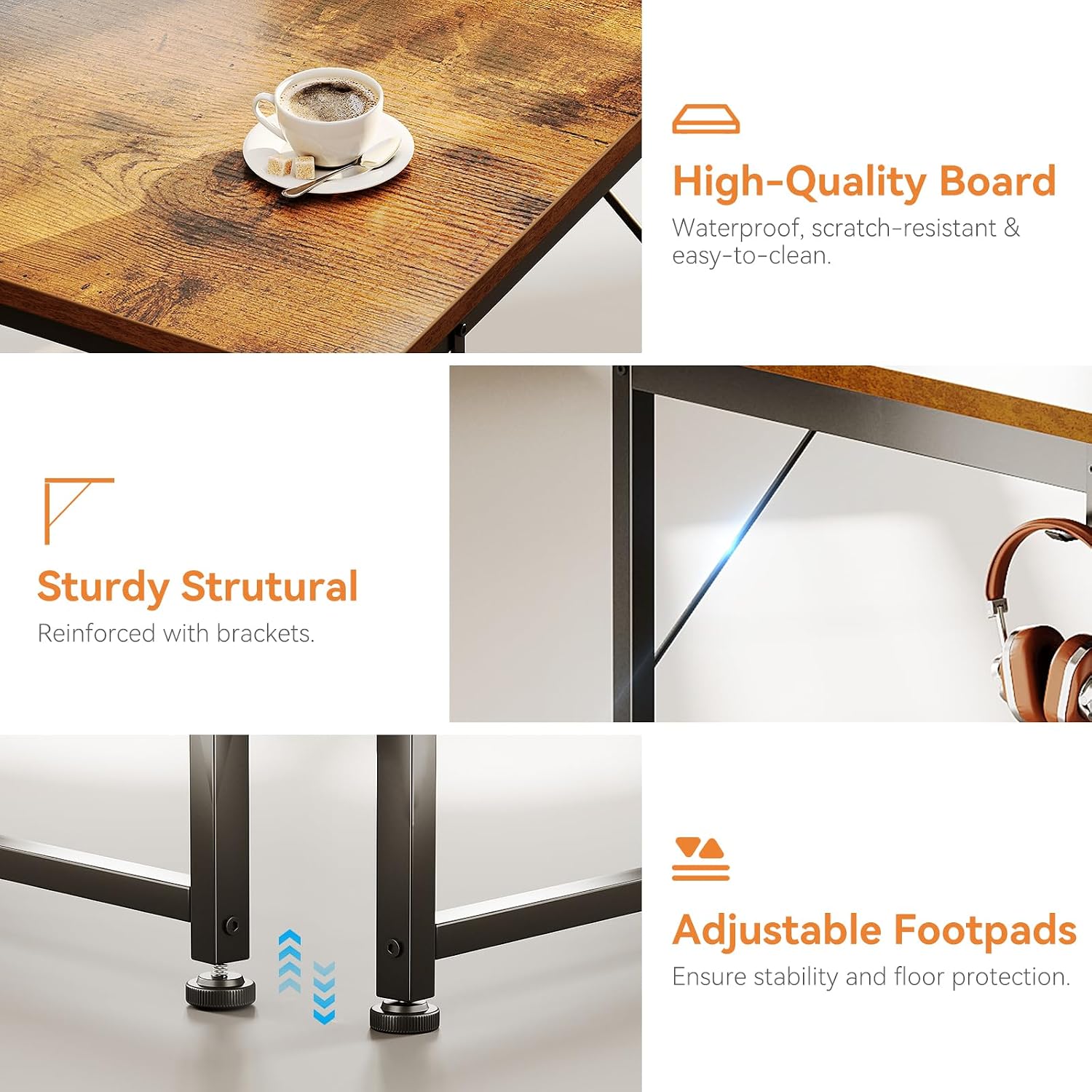
Image 6.1: Visual representation of key desk features including the waterproof, scratch-resistant, and easy-to-clean high-quality board, reinforced sturdy structural elements, and adjustable footpads for stability and floor protection.
7. Troubleshooting
| Problem | Possible Cause | Solution |
|---|---|---|
| Desk is wobbly. | Uneven floor; loose screws. | Adjust the foot pads until stable. Check and tighten all assembly screws. |
| Drawers do not slide smoothly. | Overloaded drawer; improper assembly. | Reduce contents in the drawer. Recheck drawer assembly to ensure it is correctly seated. |
| Missing parts or damaged components. | Shipping damage; packaging error. | Contact Casaottima customer support immediately with your purchase details. |
8. Specifications
- Brand: Casaottima
- Model: 40-Inch Small Computer Desk with Fabric Drawers & File Cabinet
- Product Dimensions: 39.37" W x 18.9" D x 29.8" H (100cm W x 48cm D x 75.7cm H)
- Color: Vintage (desktop), Black (frame), Dark Grey (fabric components)
- Style: Modern
- Base Material: Metal
- Desktop Material: High-Quality MDF Board
- Special Features: Fabric File Cabinet, Fabric Drawers, Cloth Storage Bag, Hook, Reversible Design, Adjustable Foot Pads
- Recommended Use: Home Office, Study, Writing, Vanity
- Weight Capacity (Desktop): Approximately 110 lbs (50 kg)
- Weight Capacity (Drawers): Approximately 7 lbs (3.2 kg) per drawer
9. Warranty and Customer Support
Casaottima is committed to providing high-quality products and excellent customer service. If you encounter any issues with your desk, such as damage upon arrival, missing parts, or scratches, please do not hesitate to contact our professional customer support team.
Please have your purchase details and model number (B0DG4THJZL) ready when contacting support to facilitate a quicker resolution. Our team aims to assist you within 24 hours.
For support, please refer to the contact information provided with your purchase or visit the official Casaottima store page on Amazon: Casaottima Store.