Introduction
Thank you for purchasing the Silver Crest SC-1589 2-in-1 Electric Food Blender. This manual provides essential information for the safe and efficient operation, maintenance, and troubleshooting of your new appliance. Please read it thoroughly before first use and keep it for future reference.
Important Safety Instructions
- Always unplug the blender from the power outlet before cleaning or when not in use.
- Do not immerse the motor base in water or any other liquid.
- Keep hands and utensils out of the container while blending to reduce the risk of severe personal injury and/or damage to the blender.
- Ensure the lid is securely in place before operating the blender.
- Do not blend hot liquids in large quantities as pressure buildup can cause the lid to eject and result in burns.
- This appliance is not intended for use by persons with reduced physical, sensory, or mental capabilities, or lack of experience and knowledge, unless they have been given supervision or instruction concerning use of the appliance by a person responsible for their safety.
- Children should be supervised to ensure that they do not play with the appliance.
- Do not operate any appliance with a damaged cord or plug, or after the appliance malfunctions or has been dropped or damaged in any manner.
- Avoid contact with moving parts.
Product Overview and Components
Familiarize yourself with the parts of your Silver Crest SC-1589 blender.

Image 1: The Silver Crest SC-1589 2-in-1 Electric Food Blender, fully assembled with its main 2-liter jar containing various fruits, ready for blending. The red motor base features control knobs and switches.
- Motor Base: Contains the powerful 4500W motor and control panel.
- 2-Liter Blending Jar: Large capacity, unbreakable, with a lid and measuring marks.
- Lid with Filler Cap: For secure blending and adding ingredients during operation.
- 6 Stainless Steel Blades: Integrated into the blending jar for efficient processing.
- Control Panel: Features a speed dial (15 functions), ON/OFF switches, and pulse function.
- Tamper: For pushing down ingredients (if included, common with high-power blenders).
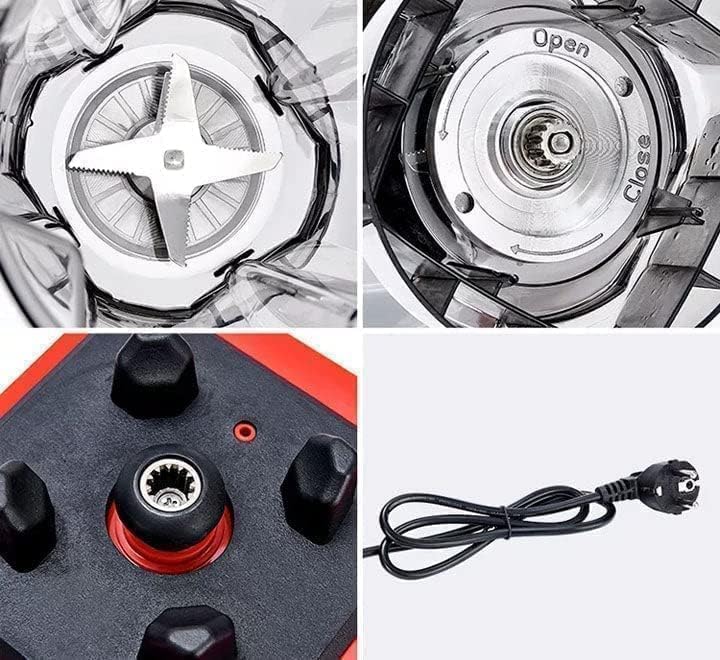
Image 2: A detailed view of key blender components. Top-left shows the sharp stainless steel blades inside the jar. Top-right displays the jar's base with "Open" and "Close" indicators for secure attachment. Bottom-left highlights the motor base coupling, and bottom-right shows the power cord with its plug.
Setup and Assembly
The Silver Crest SC-1589 blender requires minimal assembly before first use.
- Unpack: Carefully remove all components from the packaging. Retain packaging for storage or future transport.
- Clean: Before first use, wash the blending jar, lid, and filler cap in warm, soapy water. Rinse thoroughly and dry. Do not immerse the motor base in water.
- Place Motor Base: Position the motor base on a stable, flat, and dry surface. Ensure it is away from the edge of the counter and out of reach of children.
- Attach Blending Jar: Place the blending jar onto the motor base, aligning the base of the jar with the motor coupling. Twist the jar clockwise until it locks securely into place. Some models may have an "Open" and "Close" indicator on the jar base.
- Add Ingredients: Place your desired ingredients into the blending jar. Do not exceed the maximum fill line.
- Secure Lid: Place the lid firmly onto the blending jar and ensure the filler cap is inserted into the lid opening.
- Plug In: Plug the power cord into a suitable electrical outlet.

Image 3: The Silver Crest SC-1589 blender showcasing its 2-in-1 functionality. The main blending jar is attached to the motor base, while a smaller, empty jar is shown alongside, indicating versatility for different blending tasks.
Operating Instructions
Follow these steps for safe and effective blending.
- Prepare Ingredients: Cut solid ingredients into small pieces (approximately 2-3 cm) to facilitate blending.
- Load Jar: Add liquids first, then soft ingredients, followed by hard ingredients, and finally ice. Do not overfill.
- Secure Lid: Always ensure the lid is securely fastened before starting the blender.
- Select Speed: Turn the speed dial to your desired setting. The blender offers 15 speed functions for various blending needs. Start with a lower speed and gradually increase as needed.
- Start Blending: Press the "ON" switch to begin blending. For short bursts of power, use the pulse function (if available, typically a separate switch or a specific dial position).
- Monitor: Blend until desired consistency is achieved. If ingredients get stuck, turn off the blender, unplug it, remove the lid, and use a tamper or spatula to dislodge them. Never use your hands.
- Stop Blending: Press the "OFF" switch or turn the speed dial to the "OFF" position. Wait for the blades to completely stop before removing the lid or jar.
- Pour: Carefully remove the blending jar from the motor base and pour out the contents.
Tips for Best Results:
- For thicker mixtures, use the tamper through the lid's filler cap opening to push ingredients towards the blades.
- Do not run the blender continuously for more than 60 seconds to prevent overheating. Allow a short break between blending cycles.
- When blending hot liquids, ensure the filler cap is removed to allow steam to escape, and hold the lid down firmly with a cloth. Blend in small batches.

Image 4: The Silver Crest SC-1589 blender positioned next to an assortment of ingredients, including small bowls of spices and a larger bowl of fresh fruits, demonstrating its capability for both food processing and juice making.
Cleaning and Maintenance
Proper cleaning ensures the longevity and hygiene of your blender.
- Unplug: Always unplug the blender before cleaning.
- Self-Cleaning (Quick Clean): For a quick clean, fill the blending jar halfway with warm water and add a drop of dish soap. Secure the lid and run the blender on a low speed for 30 seconds. Rinse thoroughly.
- Deep Cleaning:
- Blending Jar, Lid, and Filler Cap: Wash these parts in warm, soapy water using a brush to clean around the blades. Rinse thoroughly and dry. Note: The blending jar is not dishwasher safe.
- Motor Base: Wipe the motor base with a damp cloth. Never immerse the motor base in water or spray it with water.
- Storage: Store the blender in a clean, dry place. You can store the jar assembled on the motor base or separately.
Troubleshooting
Refer to this section for common issues and their solutions.
| Problem | Possible Cause | Solution |
|---|---|---|
| Blender does not turn on. | Not plugged in; power switch off; jar not correctly seated. | Ensure power cord is securely plugged in. Turn the power switch to "ON". Ensure the blending jar is correctly locked onto the motor base. |
| Ingredients are not blending smoothly. | Too little liquid; ingredients too large; jar overfilled. | Add more liquid. Cut ingredients into smaller pieces. Do not overfill the jar. Use the tamper to push ingredients towards the blades. |
| Blender stops during operation. | Overheating (thermal protection activated); motor overloaded. | Turn off and unplug the blender. Remove some ingredients if overloaded. Allow the motor to cool down for at least 15-20 minutes before restarting. |
| Loud noise or unusual smell. | Foreign object in jar; motor issue; worn coupling. | Immediately turn off and unplug. Check for foreign objects. If the issue persists, discontinue use and contact customer support. |
Product Specifications
- Model: SC-1589
- Power: 4500 Watts
- Jar Capacity: 2 Liters
- Blades: 6 Stainless Steel Blades
- Speed Functions: 15
- Material: Plastic (Jar)
- Color: Red
- Recommended Uses: Juices, Food Blending
- Dimensions (D x W x H): 10 x 30 x 40 cm
- Item Weight: 550 Grams
- Dishwasher Safe: No
- Assembly Required: Yes
Warranty and Support
Your Silver Crest SC-1589 blender comes with a 1-Year Warranty from the date of purchase.
This warranty covers manufacturing defects under normal household use. It does not cover damage resulting from misuse, accident, alteration, neglect, commercial use, or unauthorized repair.
For warranty claims or technical support, please contact your retailer or the authorized service center with your proof of purchase.


