
Wireless Express WE-BB
Wireless Express Retro Boombox Speaker Instruction Manual
Model: WE-BB
Introduction
This instruction manual provides comprehensive guidance for the setup, operation, and maintenance of your Wireless Express Retro Boombox Speaker. Designed for portability and powerful sound, this speaker combines nostalgic aesthetics with modern audio technology, featuring Bluetooth connectivity, FM radio, and LED light effects. Please read this manual thoroughly to ensure proper use and to maximize your enjoyment of the product.
Safety Information
- Do not expose the unit to extreme temperatures, humidity, or direct sunlight.
- Avoid dropping or subjecting the speaker to strong impacts.
- Keep the speaker away from water and other liquids.
- Do not attempt to disassemble or repair the unit yourself. Refer all servicing to qualified personnel.
- Use only the provided charging cable.
- Ensure proper ventilation around the speaker during operation.
What's in the Box
- Wireless Express Retro Boombox Speaker
- Charging Cable
- Instruction Manual (this document)
Product Overview
Familiarize yourself with the various components of your Retro Boombox Speaker:
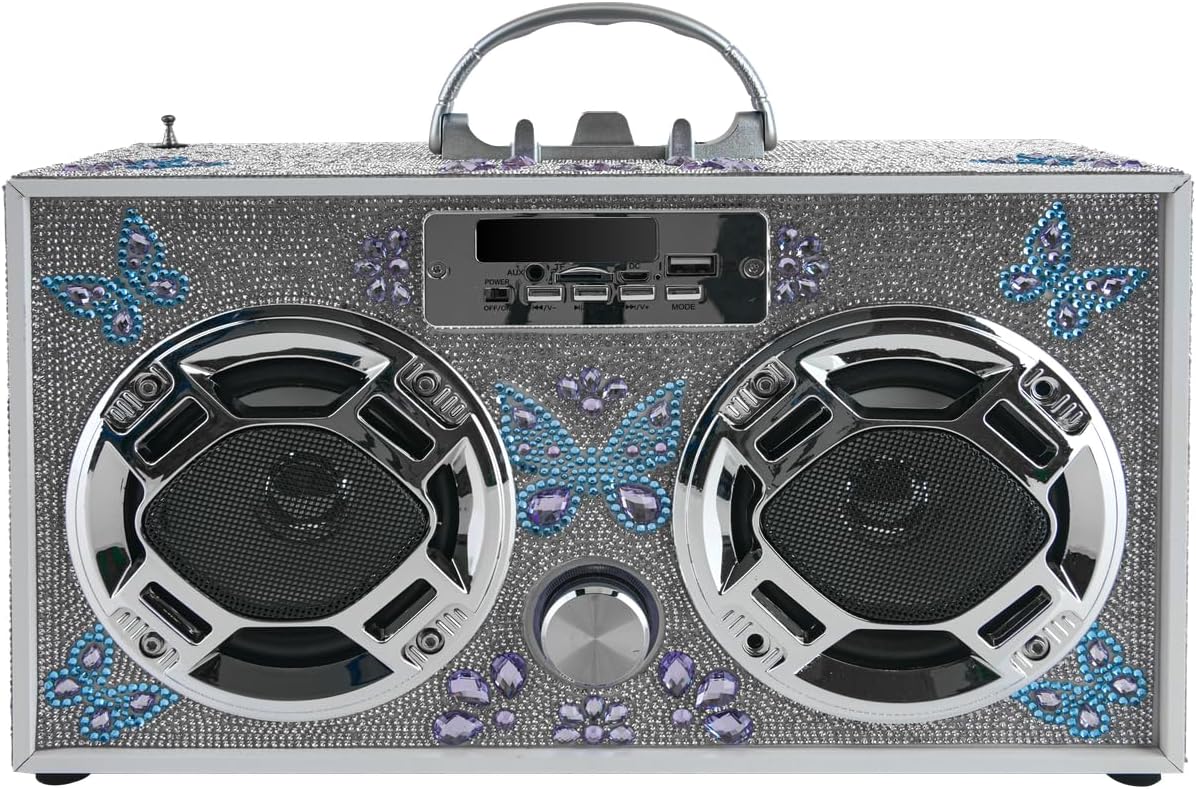
Figure 1: Front view of the Butterfly Silver Bling Retro Boombox Speaker. It features a silver bling exterior with blue and purple butterfly accents, two large speaker grilles, and a central control panel with various buttons and ports.

Figure 2: Feature diagram highlighting key functionalities including Bluetooth connectivity, LED speaker lights, FM radio, stereo sound, built-in phone holder, SD/USB input, remote control, LED light-up dancing speakers, and rechargeable battery with charging cord included.

Figure 3: Angled view of the Butterfly Silver Bling Retro Boombox Speaker, showcasing its portable handle and the detailed bling finish on the top and sides.
Control Panel Layout:
- Power Switch: ON/OFF toggle.
- Mode Button: Switches between Bluetooth, FM Radio, USB, and SD card modes.
- Play/Pause Button: Controls media playback.
- Previous/Next Track Buttons: Navigates through tracks or radio stations.
- Volume Knob: Adjusts the audio output level.
- USB Port: For USB drive playback.
- SD Card Slot: For SD card playback.
- AUX Input: For connecting external audio devices via 3.5mm cable.
- DC 5V IN Port: For charging the speaker.
- Telescoping Antenna: For improved FM radio reception.
- Built-in Phone Holder: Located on top for convenient device placement.
Setup
1. Charging the Speaker
- Locate the DC 5V IN port on the control panel.
- Connect the provided charging cable to the speaker and a compatible USB power adapter (not included) or a USB port on a computer.
- The charging indicator light will illuminate. Once fully charged, the light may change color or turn off.
- A full charge provides several hours of continuous playtime.
2. Powering On/Off
- To power on, slide the Power Switch to the "ON" position.
- To power off, slide the Power Switch to the "OFF" position.
Operating Instructions
1. Bluetooth Pairing
- Power on the speaker. It will automatically enter Bluetooth pairing mode, indicated by a flashing LED light or an audible prompt.
- On your mobile device (smartphone, tablet, etc.), enable Bluetooth and search for available devices.
- Select "WE-BB" or similar from the list of devices.
- Once paired, the speaker will confirm with an audible sound, and the LED light may become solid.
- You can now stream audio from your device to the speaker.
2. FM Radio Operation
- Press the "Mode" button until "FM" or the radio frequency is displayed.
- Extend the telescoping antenna for optimal reception.
- Press and hold the "Play/Pause" button to auto-scan and save available FM stations.
- Use the "Previous/Next Track" buttons to navigate through saved stations.
3. USB/SD Card Playback
- Insert a USB drive or SD card (with compatible audio files) into the respective port/slot.
- The speaker will automatically switch to USB or SD card mode and begin playing audio. If not, press the "Mode" button to select the correct source.
- Use the "Play/Pause" and "Previous/Next Track" buttons to control playback.
4. AUX Input
- Connect an external audio device to the AUX input port using a 3.5mm audio cable (not included).
- Press the "Mode" button until "AUX" is displayed or selected.
- Audio will now play through the speaker from your connected device. Control playback from the external device.
5. LED Light Show
- The speaker features dynamic LED lights that pulse and change to the beat of your music.
- The LED lights are typically activated automatically when the speaker is powered on and playing music.
- Refer to the product's specific controls for any dedicated light mode buttons, if available (not explicitly listed in provided data, so general statement).
6. Volume Control
- Rotate the Volume Knob on the front panel clockwise to increase volume and counter-clockwise to decrease volume.
Maintenance
- Cleaning: Use a soft, dry cloth to wipe the exterior of the speaker. Do not use abrasive cleaners or solvents.
- Storage: When not in use for extended periods, store the speaker in a cool, dry place away from direct sunlight.
- Battery Care: To prolong battery life, avoid fully discharging the battery frequently. Charge the speaker regularly, even if not in active use.
Troubleshooting
| Problem | Possible Cause | Solution |
|---|---|---|
| Speaker does not power on. | Battery is low or depleted. | Charge the speaker using the provided charging cable. |
| No sound. | Volume is too low; incorrect mode selected; device not paired (Bluetooth). | Increase volume; press "Mode" button to select correct input; re-pair Bluetooth device. |
| Bluetooth device cannot pair. | Speaker is not in pairing mode; device is too far; interference. | Ensure speaker is in Bluetooth mode; move device closer to speaker; turn off other Bluetooth devices. |
| Poor FM radio reception. | Antenna not extended; weak signal. | Fully extend the telescoping antenna; try repositioning the speaker. |
| USB/SD card not playing. | Unsupported file format; card/drive not inserted correctly. | Ensure audio files are in a compatible format (e.g., MP3); re-insert the USB drive/SD card firmly. |
Specifications
- Brand: Wireless Express
- Model Number: WE-BB
- Product Dimensions: 13 x 5 x 8 inches
- Item Weight: 3.39 pounds
- Connectivity Technology: Bluetooth
- Color: Butterfly Silver Bling
- Speaker Type: Bookshelf
- Manufacturer: Wireless Express
- First Available: September 4, 2024
Warranty and Support
For warranty information or technical support, please refer to the contact details provided on the product packaging or visit the official Wireless Express website. Keep your purchase receipt as proof of purchase for any warranty claims.
Related documentsWE-BB

Ask a question about this manual
Ask about setup, troubleshooting, compatibility, parts, safety, or missing instructions. Manuals+ will review the question and use this page’s manual context to help answer it.