1. Introduction
Thank you for purchasing the SKMEI Men's Digital Sports Watch Model 2106. This watch combines digital and analog displays with multiple functions, including a stopwatch, countdown timer, alarm, and LED backlight. This manual provides detailed instructions to help you set up and operate your watch effectively.

Figure 1: Front view of the SKMEI Model 2106 Digital Sports Watch.
2. Watch Components
Familiarize yourself with the buttons and display areas of your watch:
- A (Top Left): LIGHT Button - Activates the LED backlight.
- B (Bottom Left): MODE Button - Cycles through different modes (Time, Alarm, Stopwatch, Countdown).
- C (Top Right): START/STOP Button - Starts and stops the stopwatch, or adjusts settings.
- D (Bottom Right): RESET/ADJUST Button - Resets the stopwatch, or selects items for adjustment.
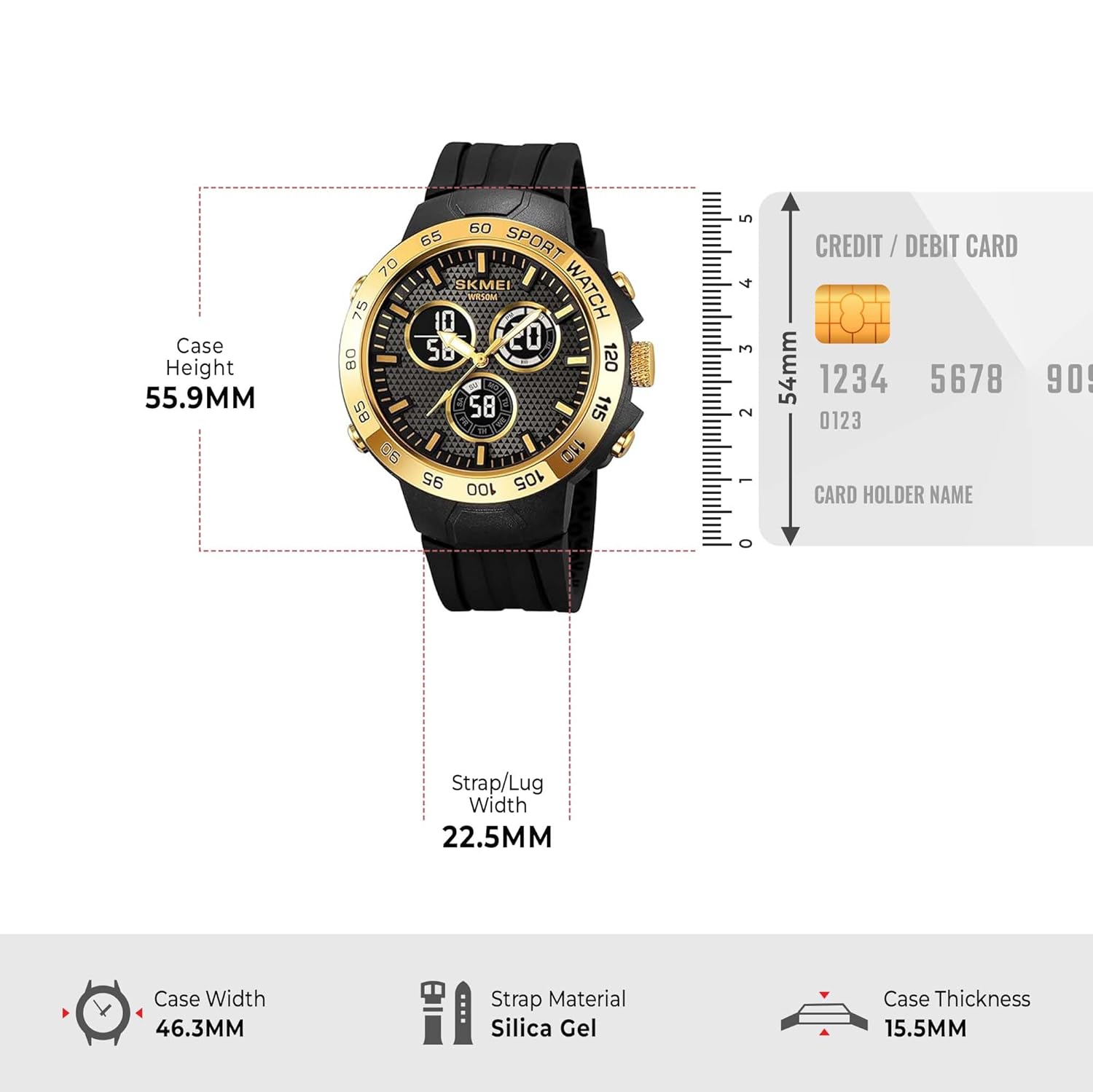
Figure 2: Watch components and button layout. Buttons A, B, C, D are located at the top-left, bottom-left, top-right, and bottom-right positions respectively.

Figure 3: Detailed view of the watch dial, highlighting the digital displays for time, date, and day.
3. Setup
3.1 Setting Time and Date
- In Timekeeping Mode, press and hold the RESET/ADJUST (D) button until the seconds begin to flash, indicating setting mode.
- Press the MODE (B) button to cycle through the settings: Seconds → Hour → Minute → Year → Month → Day.
- Use the START/STOP (C) button to increase the flashing value. Hold START/STOP (C) to rapidly advance the value.
- To switch between 12-hour and 24-hour format, press the START/STOP (C) button when the hour setting is flashing.
- Once all settings are correct, press the RESET/ADJUST (D) button to exit setting mode.
3.2 Setting Multiple Time Zones
This watch supports a 3-time zone display. To set the additional time zones:
- From Timekeeping Mode, press the MODE (B) button repeatedly until you reach the desired secondary time zone display (T2 or T3).
- Press and hold the RESET/ADJUST (D) button until the hour digit flashes.
- Use the START/STOP (C) button to adjust the hour.
- Press the MODE (B) button to select minutes, then use START/STOP (C) to adjust.
- Press the RESET/ADJUST (D) button to confirm and exit setting mode.
4. Operating Instructions
4.1 Timekeeping Mode
This is the default mode, displaying the current time, date, and day of the week. The analog hands will automatically synchronize with the digital time.
4.2 Alarm Mode
- From Timekeeping Mode, press the MODE (B) button once to enter Alarm Mode.
- Press and hold the RESET/ADJUST (D) button until the hour digit flashes.
- Press the MODE (B) button to select between hour and minute settings.
- Use the START/STOP (C) button to adjust the flashing value.
- Press the RESET/ADJUST (D) button to confirm the alarm time.
- To activate/deactivate the alarm, press the START/STOP (C) button while in Alarm Mode (without holding RESET/ADJUST (D)). An alarm icon will appear/disappear on the display.
4.3 Stopwatch Mode
- From Timekeeping Mode, press the MODE (B) button twice to enter Stopwatch Mode. The display will show '00:00:00'.
- Press the START/STOP (C) button to start the stopwatch.
- Press the START/STOP (C) button again to stop the stopwatch.
- Press the RESET/ADJUST (D) button to reset the stopwatch to '00:00:00'.
- To record lap times, press RESET/ADJUST (D) while the stopwatch is running. The lap time will display briefly, and the stopwatch will continue running in the background. Press START/STOP (C) to stop, then RESET/ADJUST (D) to view total time.
4.4 Countdown Timer Mode
- From Timekeeping Mode, press the MODE (B) button three times to enter Countdown Timer Mode.
- Press and hold the RESET/ADJUST (D) button until the hour digit flashes.
- Press the MODE (B) button to select between hour, minute, and second settings.
- Use the START/STOP (C) button to adjust the flashing value.
- Press the RESET/ADJUST (D) button to confirm the countdown time.
- Press the START/STOP (C) button to start the countdown.
- Press the START/STOP (C) button again to pause/resume the countdown.
- When the countdown reaches zero, an alarm will sound. Press any button to stop the alarm.
4.5 LED Backlight
Press the LIGHT (A) button to illuminate the display for a few seconds, improving visibility in low-light conditions.
5. Maintenance
- Cleaning: Wipe the watch regularly with a soft, dry cloth. For stubborn dirt, use a slightly damp cloth and mild soap, then dry thoroughly. Avoid harsh chemicals.
- Water Resistance: This watch is 50M water-resistant. It is suitable for swimming, handwashing, and light rain. Do not press any buttons while the watch is submerged in water. Avoid hot water, steam, or extreme temperature changes, as this can compromise the water seals.
- Battery: The watch is powered by a battery. When the display becomes dim or functions become erratic, it may be time for a battery replacement. It is recommended to have the battery replaced by a qualified watch technician to ensure water resistance is maintained.
- Storage: When not in use for extended periods, store the watch in a cool, dry place away from direct sunlight and strong magnetic fields.

Figure 4: Back of the watch, indicating water resistance and model number.
6. Troubleshooting
| Problem | Possible Cause | Solution |
|---|---|---|
| Display is blank or dim. | Low battery. | Replace the battery. |
| Time is incorrect. | Time not set correctly or accidental adjustment. | Refer to Section 3.1 to reset the time. |
| Buttons are unresponsive. | Watch may be in a locked mode or battery is very low. | Try pressing all buttons to see if any respond. If not, consider battery replacement. Avoid pressing buttons underwater. |
| Water inside the watch. | Water resistance compromised (e.g., buttons pressed underwater, exposure to hot water/steam). | Immediately take the watch to a professional for inspection and repair to prevent further damage. |
7. Specifications
- Model Number: 2106
- Display Type: Digital
- Movement Type: Quartz
- Case Material: ABS, Zinc Alloy
- Crystal Material: Resin
- Band Material: Silica Gel
- Water Resistance Depth: 50 Metres
- Case Diameter: 4.63 Centimetres
- Case Thickness: 1.55 Centimetres
- Band Width: 2.25 Centimetres
- Band Length: 260 Millimetres
- Item Weight: 62.8 Grams
- Functions: 3-Time Zone Display, Alarm, Stopwatch, Countdown Timer, Date & Week Display, LED Backlight, 12/24 Hour Display.
8. Warranty and Support
Your SKMEI Digital Sports Watch Model 2106 comes with a 9-month Manufacturer Warranty from the date of purchase.
For any service-related inquiries or feedback, please contact the Skmei India Helpline:
- Helpline Number: 1800-889-6251
- Operating Hours: Monday to Saturday, 9:00 AM to 6:00 PM
Please retain your purchase receipt as proof of purchase for warranty claims.


