
Mova P10 Ultra
Contents
MOVA P10 Ultra Robot Vacuum and Mop User Manual
Model: P10 Ultra
1. Introduction
Thank you for choosing the MOVA P10 Ultra Robot Vacuum and Mop. This advanced cleaning device is designed to provide a powerful and convenient cleaning experience for your home. With its intelligent features and robust performance, the MOVA P10 Ultra simplifies your daily cleaning routine, allowing you to enjoy a cleaner living space with minimal effort.
This manual provides essential information on setting up, operating, and maintaining your MOVA P10 Ultra. Please read it thoroughly before use to ensure safe and optimal performance.
Video: Overview of the MOVA P10 Ultra Robot Vacuum.
2. Safety Information
Always follow basic safety precautions when using electrical appliances. This includes, but is not limited to:
- Read all instructions before using the appliance.
- Do not allow children to operate the robot vacuum.
- Ensure the power cord is not damaged and is properly connected.
- Do not use the appliance on wet surfaces or to pick up liquids.
- Keep hair, loose clothing, fingers, and all parts of the body away from openings and moving parts.
- Only use accessories specified by the manufacturer.
3. What's in the Box
- Robot Vacuum x1
- Base Station x1
- Mop Pad x2
- Mop Pad Holder x2
- Quick Start Guide x1
- User Manual x1
- 200ml Cleaning Solution x1
- Power Cord x1
- Base Station Ramp Extension x 1
4. Product Overview
Robot Vacuum Features
The MOVA P10 Ultra is equipped with advanced features for superior cleaning performance:
- Powerful 8,300Pa Suction: Easily sucks away dust, pet hair, cat litter, and crumbs from hard floors and carpets.
- Dual Spinning Extenable Mops: The extendable right-side mop cleans along edges and adapts to corners, ensuring thorough cleaning.
- Auto-lifting Mop (10.5mm): The mopping pads automatically lift by 10.5mm when a carpeted area is detected, preventing carpets from getting wet.
- 360° Obstacle Avoidance: Enhanced LDS navigation and dual-line laser sensors provide flexible obstacle avoidance in any lighting conditions.
- Smart Dirt Detection: The 5-channel color sensing system detects tough messes and automatically rewashes and remops when needed.
- Pet-Friendly Home Clean Design: Includes pet care recommendations like intelligent dust and fur collection boost mode.

Image: The robot vacuum demonstrating its powerful 8,300Pa suction.

Image: The robot vacuum's extendable mop reaching into a corner.
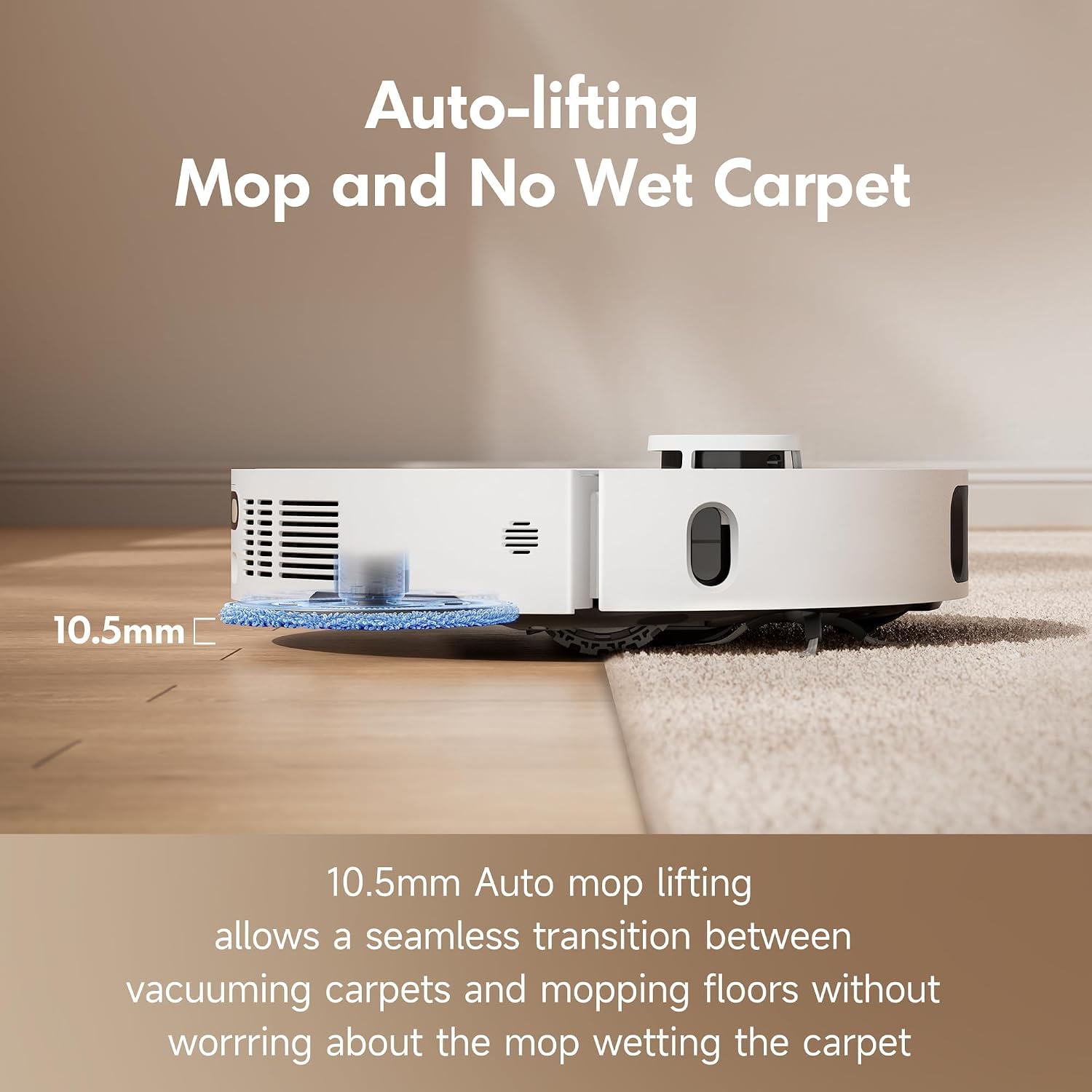
Image: The robot vacuum's mop automatically lifting as it transitions from hard floor to carpet.

Image: The robot vacuum using its sensors for 360-degree obstacle avoidance.
All-in-one Docking Station Features
The upgraded base station simplifies your cleaning routine with comprehensive self-maintenance capabilities:
- Auto Mop Washing: Uses 60°C (140°F) hot water to thoroughly clean mop pads.
- Auto Mop Drying: Hot air drying ensures mop pads are fresh and odor-free.
- Auto Dust Bag Empty: The 3.2L dust bag allows for up to 75 days without manual emptying.
- Auto Water Refilling: Consistently refills the robot's water tank for mopping, covering up to 4300 sqft.
- Dock Self-Cleaning: Built-in duo scraper efficiently cleans the washboard and dock.

Image: Detailed view of the MOVA P10 Ultra's advanced docking station.
App Control & Connectivity
Manage your cleaning with the intuitive MOVA app and voice commands:
- Interactive App Control: Set cleaning frequency, schedule sessions, create virtual walls, and customize cleaning modes.
- Voice Control: Compatible with Alexa and Google Home for hands-free operation.

Image: Screenshot of the MOVA app interface showing various control options.

Image: The robot vacuum being controlled via voice commands with smart home devices.
5. Setup
Follow these steps to set up your MOVA P10 Ultra:
- Unboxing and Placement: Carefully unpack all components. Place the base station against a wall in an open area with good Wi-Fi coverage. Ensure there are no obstacles within 1.5 meters in front and 0.5 meters on either side.
- Connect Power: Plug the power cord into the base station and then into a wall outlet.
- Initial Charge: Place the robot vacuum onto the base station to charge. Ensure the charging contacts on the robot align with those on the base station. Allow for a full charge before first use (approximately 6 hours).
- Download MOVA App: Scan the QR code in the Quick Start Guide or search for
Ask a question about this manual
Ask about setup, troubleshooting, compatibility, parts, safety, or missing instructions. Manuals+ will review the question and use this page’s manual context to help answer it.