
Introduction
Thank you for choosing the Dexnor Protective Case for your iPhone 16 Pro Max. This manual provides essential information for proper installation, usage, and maintenance of your new case. Designed for durability and functionality, this case offers comprehensive protection and enhanced usability for your device.
Video: Overview of the Dexnor Rugged Case for iPhone 16 series, highlighting its robust design and features.
Package Contents
Your Dexnor iPhone 16 Pro Max case package includes the following items:
- Dexnor iPhone 16 Pro Max Case (comprising a back cover with integrated kickstand and a front frame with built-in screen protector)
- Alternative Front Frame (without built-in screen protector, for use with your preferred screen protector)
- Instruction Manual
- Cleaning Cloth
Setup and Installation
Follow these steps to properly install your Dexnor iPhone 16 Pro Max case:
- Separate the Case: Gently pry apart the front frame and the back cover of the case, starting from the bottom-right corner.
- Clean Your Phone: Use the provided cleaning cloth to thoroughly wipe your iPhone 16 Pro Max screen and back to remove any dust or smudges.
- Prepare Front Frame: If using the built-in screen protector, carefully tear off the protective film from both sides of the front cover. If using your own screen protector, use the alternative front frame provided.
- Install Front Cover: Place your iPhone 16 Pro Max into the front frame, ensuring it fits snugly and all edges are aligned.
- Attach Back Cover: Align the front frame with your phone inside to the back cover. Press firmly around the edges until the two parts snap securely together.
- Final Check: Ensure all buttons are functional and all ports are accessible. Wipe the installed case with the cleaning cloth for a pristine finish.
Video: Step-by-step installation guide for the Dexnor iPhone 16 Series case.
Compatibility Check
This case is specifically designed for the iPhone 16 Pro Max. Please verify your phone model before installation to ensure a perfect fit and optimal protection.
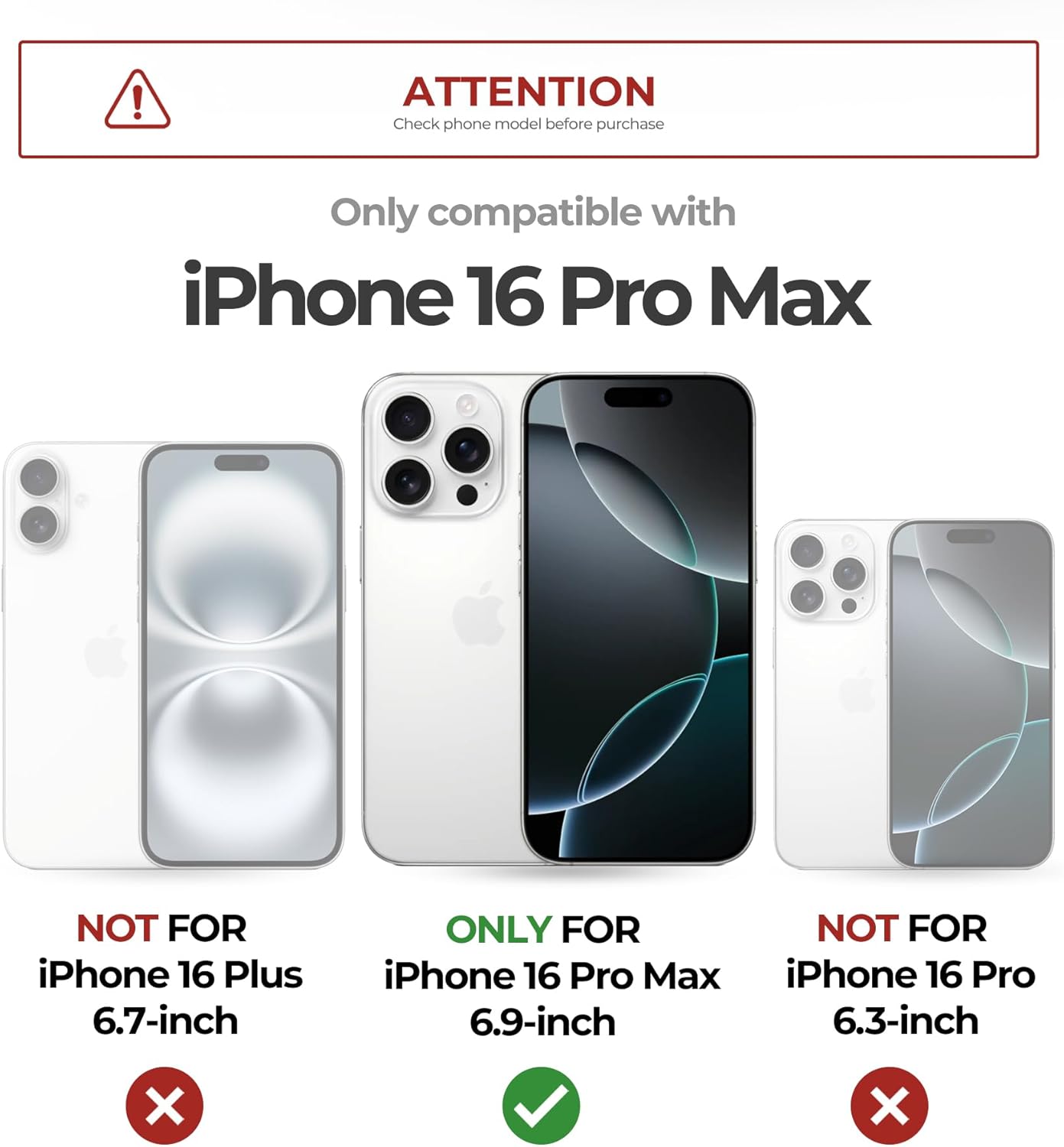
Image: A visual guide illustrating the precise compatibility of the case with iPhone 16 Pro Max, distinguishing it from other iPhone 16 models.
Operating Instructions and Key Features
MagSafe Compatibility
The case features a powerful magnetic ring for seamless compatibility with MagSafe accessories. This ensures a secure attachment for wireless chargers, car mounts, and other magnetic accessories.

Image: The case's magnetic strength is highlighted, demonstrating its secure connection with various MagSafe accessories like wireless chargers and magnetic wallets.
Slide Camera Cover
Protect your iPhone's camera lenses from scratches, dust, and damage with the integrated slide camera cover. Simply slide it open when you need to take photos or videos, and close it for protection and privacy.

Image: A detailed view of the smooth-sliding camera cover, designed to safeguard the camera lens from scratches and ensure privacy.
Adjustable Kickstand
The durable aluminum alloy kickstand allows for hands-free viewing in both landscape and portrait orientations. Adjust the stand to your desired angle (up to 70 degrees) for optimal comfort while watching videos, making calls, or browsing.
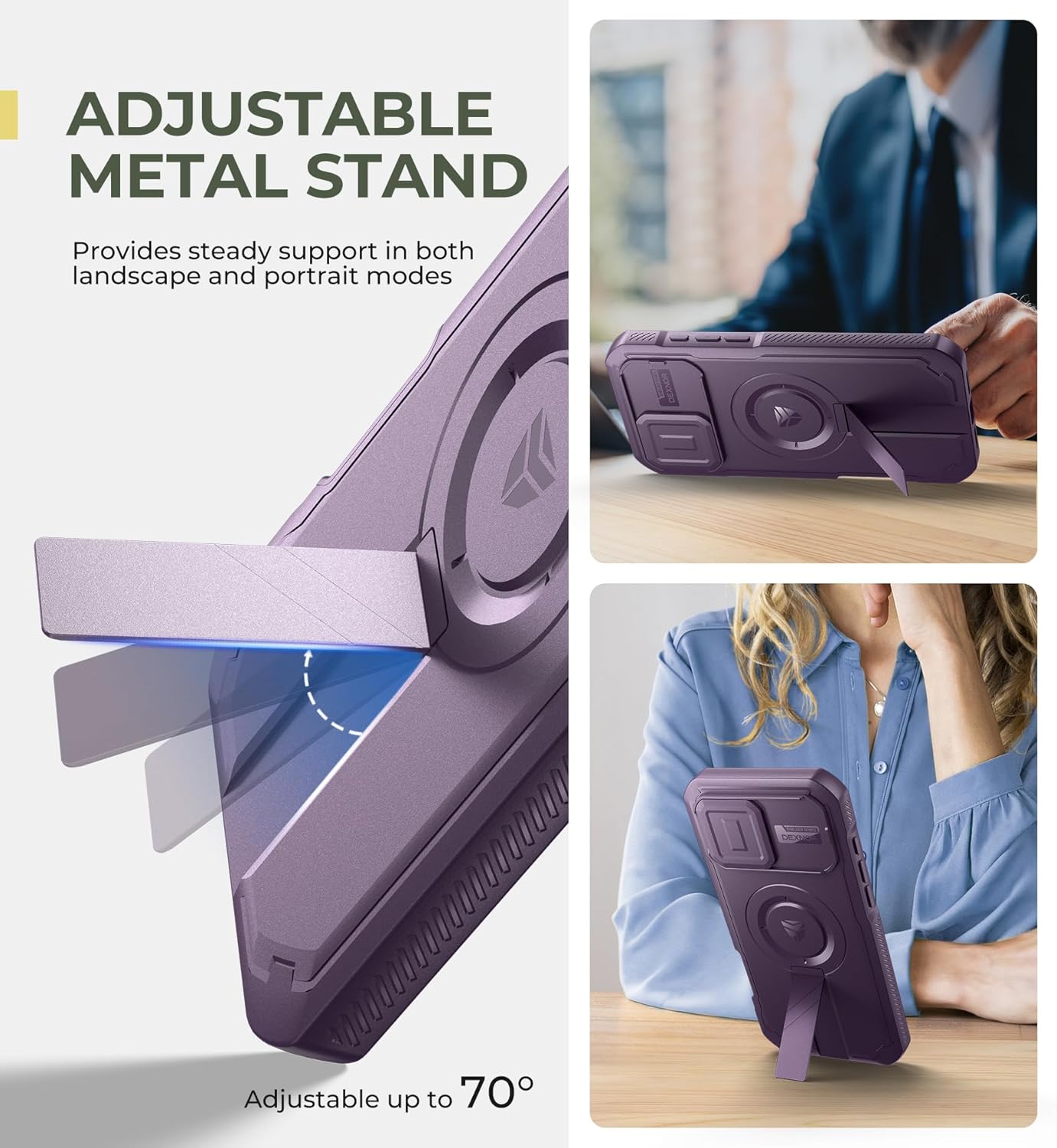
Image: The adjustable metal kickstand is shown in various positions, providing stable support for hands-free viewing in both horizontal and vertical orientations.
Dual Front Frame Options
The case comes with two front frame options: one with a built-in PET screen protector for immediate defense against scratches and spills, and another frame without a screen protector, allowing you to use your preferred tempered glass or film screen protector.

Image: An illustration detailing the two front frame choices: one with a responsive PET screen protector and another for users who prefer to install their own screen protection.
Maintenance
To keep your Dexnor case in optimal condition:
- Clean the case regularly with a soft, damp cloth. Avoid harsh chemicals or abrasive materials.
- Ensure the camera cover slides smoothly and is free from debris.
- Periodically check that the front and back covers remain securely snapped together.
Troubleshooting
If you encounter any issues with your Dexnor case, consider the following:
- Difficulty with Installation: Refer to the installation video via the QR code in the package or on the product page. Ensure you are separating the case from the bottom-right corner.
- Screen Protector Issues: If the built-in screen protector shows bubbles or reduced touch sensitivity, ensure your phone screen is perfectly clean before installation. If issues persist, try the alternative front frame with your own screen protector.
- MagSafe Not Working: Ensure your MagSafe accessory is properly aligned with the magnetic ring on the back of the case.
- Buttons Unresponsive: Double-check that your phone is correctly seated within the case and that the case components are fully snapped together.
Specifications
| Product Dimensions | 7.32 x 3.74 x 0.67 inches |
| Item Weight | 2.4 ounces |
| Material | Thermoplastic Polyurethane (TPU) and Polycarbonate (PC) |
| Compatible Phone Models | iPhone 16 Pro Max |
| Special Features | Built-in Screen Protector, Slide Camera Cover, Adjustable Kickstand, MagSafe Compatible, Military-Grade Protection |
Warranty and Support
Dexnor products are built for durability and customer satisfaction. Your iPhone 16 Pro Max case comes with a 10-year warranty for phone and tablet cases.
For any inquiries or support, please contact Dexnor customer service:
- Response Time (Business Days): 24 hours
- Response Time (Weekends/Holidays): 48 hours
- Return Policy: 60 days
Visit the Dexnor Store for more information and products.
