
1. Introduction
The JOVS Blacken PRO Skincare Device is designed for at-home facial skin rejuvenation, targeting dark spots, blemishes, and redness. Utilizing narrow-spectrum light technology and sapphire cooling, it aims to improve skin tone and texture with regular use.
2. Safety Information
Before using the device, please read this user manual carefully, including all contraindications, warnings, and safety information.
This device is intended for cosmetic use only. Do not use if you have any pre-existing skin conditions without consulting a healthcare professional. Always wear the provided protective goggles during operation. Keep out of reach of children.
Statements regarding dietary supplements have not been evaluated by the FDA and are not intended to diagnose, treat, cure, or prevent any disease or health condition.
3. Package Contents
Verify that all items are present in the package:
- 1 JOVS Blacken PRO Skincare Device
- 1 US Power Plug
- 1 Pair of Protective Goggles
- 1 User Guide (this manual)
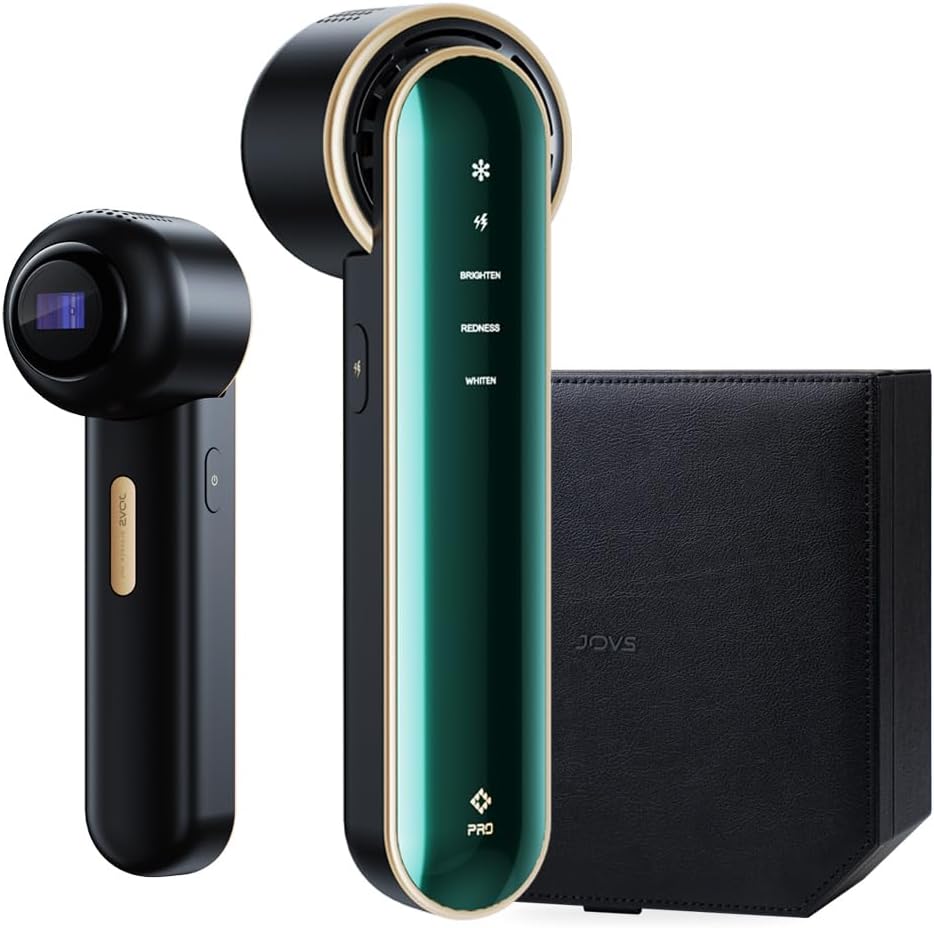
Image: The JOVS Blacken PRO Skincare Device, showing the main unit, a smaller attachment, and a black case, representing the complete package contents.
4. Device Overview
The JOVS Blacken PRO device features a sleek design with intuitive controls and advanced technology for effective skincare.
Key Features:
- Sapphire Cooling Surface: Provides a pain-free and comfortable experience by instantly cooling the skin.
- Narrow-Spectrum Light (500-650nm): Targets melanin and supports capillary health for spot and redness reduction.
- Intelligent Continuous Flash: Facilitates easier handling and consistent treatment.
- 3 Operating Modes: BRI./PORE, REDNESS, and POWER modes for targeted treatments.
- 3-Layer Safety System: Harmful light filtering, smart skin sensing, and overheating protection.

Image: A close-up of the JOVS Blacken PRO device highlighting its sapphire cooling surface, narrow-spectrum light, intelligent continuous flash, and 4-week treatment time for spot reduction.

Image: An internal view diagram of the JOVS Blacken PRO device illustrating its harmful light filtering system, smart skin sensing system, and overheating protection system.
5. Setup
- Unpack: Carefully remove all components from the packaging.
- Inspect: Check the device and accessories for any signs of damage.
- Clean Skin: Ensure your face is clean and dry before use. Remove all makeup, lotions, and creams.
- Connect Power: Plug the US power plug into the device and then into a suitable power outlet.
- Wear Goggles: Put on the provided protective goggles to shield your eyes from the light.
6. Operating Instructions
The device offers three distinct modes for various skin concerns. Follow these steps for effective treatment:
General Usage Steps:
- Power On: Press and hold the power button to turn on the device.
- Select Mode: Short press the mode selection button to cycle through the available modes:
- BRI./PORE Mode: For full-face rejuvenation, refining pores, improving skin texture, and boosting overall radiance.
- REDNESS Mode: Focuses on facial redness and irritation for a calmer, more balanced skin tone.
- POWER Mode: Targets stubborn spots and pigmentation, delivering focused care to reduce visible blemishes.
- Apply to Skin: Place the treatment window firmly against your skin. The device will only activate when proper skin contact is detected.
- Initiate Flash: Short press the flash button for a single flash, or hold for continuous flashing (glide mode).
- Treat Area: Glide the device slowly over the treatment area, ensuring even coverage. Avoid treating the same spot multiple times in one session.
- Power Off: After completing your session, press and hold the power button to turn off the device.
- Post-Treatment: Apply a hydrating mask or moisturizer to soothe the skin.
Recommended Treatment Frequency:
For visible improvements, use the device 2-3 times weekly for at least 4 weeks. Adjust frequency based on skin sensitivity and response.

Image: A woman demonstrating the use of the JOVS Blacken PRO device on her cheek, illustrating proper application technique.

Image: A visual representation of the three treatment modes (BRI./PORE, REDNESS, POWER) indicating the facial areas they are designed to target.
Video Demonstration:
For a visual guide on how to use the JOVS Blacken PRO Skincare Device, please watch the official product video below.
Video: An official demonstration of the JOVS Blacken PRO Skincare Device in use, showcasing its features and application methods.
7. Maintenance
- Cleaning: After each use, wipe the treatment window and the device surface with a soft, dry cloth. Do not use abrasive cleaners or immerse the device in water.
- Storage: Store the device in its original packaging or a protective case in a cool, dry place, away from direct sunlight and extreme temperatures.
- Care: Handle the device with care. Avoid dropping it or subjecting it to strong impacts.
8. Troubleshooting
| Problem | Possible Cause | Solution |
|---|---|---|
| Device does not turn on. | Not properly connected to power, or power outlet issue. | Ensure the power plug is securely connected to both the device and a working power outlet. Try a different outlet. |
| Device does not flash. | Poor skin contact, or safety sensor not activated. | Ensure the treatment window is in full and firm contact with the skin. The device has a smart skin sensing system that prevents flashing without proper contact. |
| Skin feels too warm during use. | Device operating at a higher intensity, or prolonged contact in one area. | The sapphire cooling surface should prevent discomfort. If warmth persists, ensure you are gliding the device and not holding it stationary. Reduce treatment frequency if necessary. |
| Accidentally changed mode instead of flashing. | Buttons are sensitive and close together. | Familiarize yourself with button placement. The mode button is typically a short press, while the flash button might require a distinct press or hold. |
9. Specifications
- Model Number: 01.02.00.0360
- Product Dimensions: 13.35 x 9 x 4.4 inches
- Item Weight: 9.03 ounces
- Light Spectrum: 500-650nm (Narrow-spectrum light)
- Cooling Technology: Sapphire Cooling
- Manufacturer: JOVS
- ASIN: B0DG2TCLKS
10. Warranty and Support
For warranty information, technical support, or customer service inquiries, please refer to the contact information provided in your product packaging or visit the official JOVS website.
JOVS Official Store: Visit JOVS Store on Amazon