
1. Introduction
The MMOBIEL OBD2 Scanner Diagnostic Tool V302 is designed to assist in diagnosing vehicle issues by reading and clearing diagnostic trouble codes (DTCs). This tool is compatible with all OBDII/EOBD compliant vehicles manufactured from 1996 onwards. It provides essential functions such as checking the engine light, I/M readiness status, freeze frame data, live data streams, and EVAP system testing. This manual provides detailed instructions for proper use and maintenance of your device.

Image 1.1: Overview of the MMOBIEL OBD2 Scanner V302.
2. Key Features
The MMOBIEL OBD2 Scanner V302 offers a range of diagnostic capabilities:
- Engine Fault Diagnosis: Reads and clears Check Engine Light (CEL) codes.
- I/M Readiness: Checks vehicle emissions readiness for smog tests.
- Freeze Frame Data: Captures engine parameters at the moment a fault occurs.
- Live Data Stream: Displays real-time engine performance data.
- Mode 8 EVAP System Test: Detects fuel vapor leaks.
- Battery Voltage Reading: Monitors vehicle battery status.
- User-Friendly Interface: Features a 2.8-inch color display and multi-language support.
- Plug-and-Play Operation: Powered directly from the vehicle's OBD2 port.

Image 2.1: Display showing a list of diagnostic features.
3. Setup and Connection
The MMOBIEL OBD2 Scanner V302 is a plug-and-play device. No batteries are required as it draws power directly from your vehicle's OBD2 port.
3.1 Locating the OBD2 Port
The OBD2 port is typically located under the dashboard on the driver's side of the vehicle. Common locations include:
- Under the steering wheel.
- Near the center console.
- Behind an ashtray or coin tray.

Image 3.1: Common locations for the OBD2 port in a vehicle.
3.2 Connecting the Scanner
- Ensure the vehicle's ignition is off.
- Locate the 16-pin OBD2 diagnostic link connector (DLC) in your vehicle.
- Plug the scanner's cable into the vehicle's DLC.
- Turn the vehicle's ignition to the "ON" position (do not start the engine unless instructed by a specific test). The scanner will power on automatically.
4. Operating Instructions
4.1 Navigating the Menu
The scanner features a 2.8-inch color display and a simple button interface. Use the UP/DOWN arrow buttons to scroll through menu options, the OK button to confirm selections, and the ESC button to return to the previous screen.

Image 4.1: Scanner interface with labeled buttons and display.
4.2 Reading and Clearing Diagnostic Trouble Codes (DTCs)
This function allows you to retrieve and clear codes that illuminate the Check Engine Light (CEL).
- From the main menu, select "DTC" or "Read Codes".
- The scanner will display any stored DTCs. Each code will have a description.
- To clear codes, navigate to the "Clear Codes" option. Confirm your selection when prompted.
- Clearing codes will turn off the Check Engine Light, but the underlying issue must be resolved to prevent the light from reappearing.

Image 4.2: Code reading and clearing interface.
4.3 I/M Readiness Status
I/M Readiness (Inspection/Maintenance Readiness) indicates if the various emissions-related systems on the vehicle are operating correctly and have completed their self-tests. This is crucial for emissions inspections.
- From the main menu, select "I/M Readiness".
- The scanner will display the status of various monitors (e.g., Misfire Monitor, Fuel System Monitor, O2 Sensor Monitor).
- A status of "OK" or "Complete" indicates the monitor has run and passed. "INC" or "Incomplete" means the monitor has not yet completed its test cycle.
4.4 Freeze Frame Data
When an emissions-related fault occurs, the vehicle's computer stores a "freeze frame" of engine parameters at that exact moment. This data can help technicians diagnose the conditions under which the fault occurred.
- After reading DTCs, select "Freeze Frame" from the menu.
- The scanner will display various engine parameters such as engine RPM, vehicle speed, coolant temperature, fuel pressure, etc., recorded at the time of the fault.
4.5 Live Data Stream
The Live Data Stream function displays real-time operational parameters from the vehicle's engine control unit (ECU). This can include sensor readings, engine speed, temperatures, and more.
- From the main menu, select "Data Stream" or "Live Data".
- The scanner will display a list of available parameters. You can scroll through these to view various data points.
- Some parameters may be displayed graphically for easier interpretation.
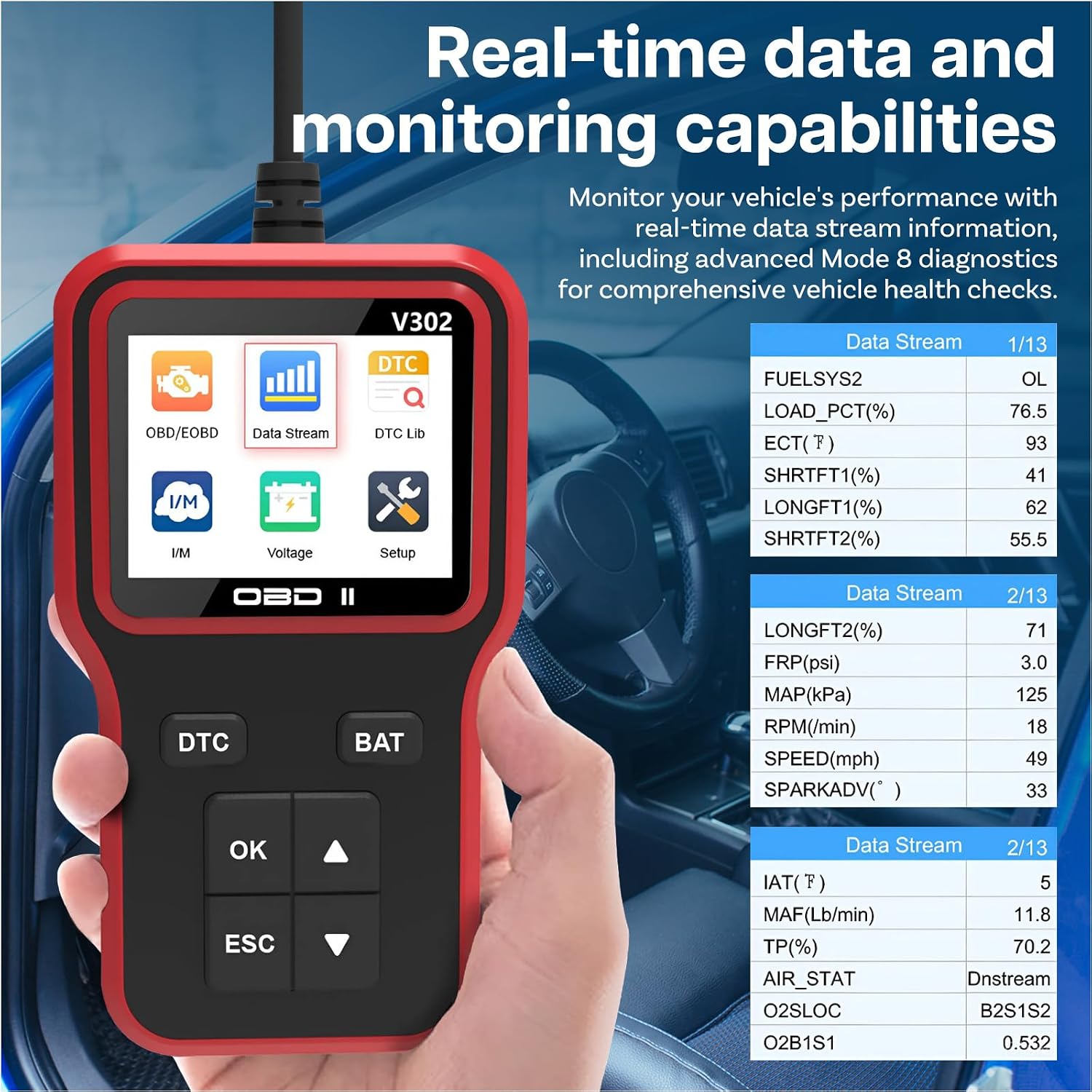
Image 4.3: Real-time data stream display.
4.6 Mode 8 EVAP System Test
The EVAP (Evaporative Emission Control System) test checks for leaks in the fuel vapor system.
- From the main menu, select "Mode 8" or "EVAP Test".
- Follow the on-screen prompts to initiate and complete the test.
4.7 Language Settings
The scanner supports multiple languages for user convenience.
- From the main menu, select "Setup" or "Settings".
- Choose "Language" and select your preferred language from the list (English, German, Italian, Dutch, French, Spanish, Chinese, Russian).
5. Maintenance
To ensure the longevity and proper functioning of your MMOBIEL OBD2 Scanner V302, follow these maintenance guidelines:
- Cleaning: Wipe the device with a soft, dry cloth. Do not use abrasive cleaners or solvents.
- Storage: Store the scanner in a cool, dry place, away from direct sunlight and extreme temperatures.
- Cable Care: Avoid bending or kinking the diagnostic cable excessively. Store it neatly when not in use.
- Software Updates: Check the manufacturer's website periodically for any available software updates to ensure optimal performance and compatibility.
6. Troubleshooting
If you encounter issues with your MMOBIEL OBD2 Scanner V302, refer to the following common troubleshooting steps:
| Problem | Possible Cause | Solution |
|---|---|---|
| Scanner does not power on. |
|
|
| "Link Error" or "Communication Error" message. |
|
|
| Cannot clear codes. |
|
|
7. Specifications
| Feature | Detail |
|---|---|
| Model | V302 |
| Brand | MMOBIEL |
| Display | 2.8-inch Color Screen |
| Supported Protocols | All OBDII/EOBD protocols |
| Operating Voltage | 9-16V (via vehicle OBD2 port) |
| Operating Temperature | 0°C to 60°C (32°F to 140°F) |
| -20°C to 70°C (-4°F to 158°F) | Storage Temperature |
| Supported Languages | English, German, Italian, Dutch, French, Spanish, Chinese, Russian |
8. Warranty and Support
For warranty information and technical support, please refer to the official MMOBIEL website or contact their customer service directly. Keep your purchase receipt as proof of purchase.
Online Support: Visit the MMOBIEL Store on Amazon for product information and support resources.