
1. Introduction
Welcome to the user manual for your DOOGEE V Max Pro 5G Rugged Smartphone. This guide provides essential information to help you set up, operate, and maintain your device. Designed for durability and high performance, the V Max Pro is built to withstand challenging environments while offering advanced features for everyday use.

Figure 1: Front and back view of the DOOGEE V Max Pro 5G Rugged Smartphone, highlighting its robust design and key features like the 22000mAh battery and 108MP camera.
2. Package Contents
Please verify that all items are present in your product package:
- 1 x V MAX Pro 5G Rugged Phone
- 1 x Type-C USB Cable
- 1 x Charger
- 1 x Anti-explosion film (pre-applied)
- 1 x Additional Anti-explosion film
- 1 x Packing Box
- 1 x Manual
3. Setup
3.1 SIM Card and Storage Installation
The DOOGEE V Max Pro supports dual SIM cards and expandable storage. Locate the SIM card tray on the side of the device. Use the provided SIM ejector tool to open the tray. Insert your Nano-SIM cards and/or a microSD card (up to 2TB, sold separately) into the designated slots. Ensure the tray is securely reinserted to maintain water and dust resistance.
3.2 Initial Charging
Before first use, fully charge your DOOGEE V Max Pro. Connect the provided Type-C USB cable to the phone's charging port and the other end to the 33W fast charger. Plug the charger into a power outlet. The device features a massive 22000mAh battery, designed for extended usage. The OTG (On-The-Go) function allows your phone to act as a power bank to charge other compatible devices.
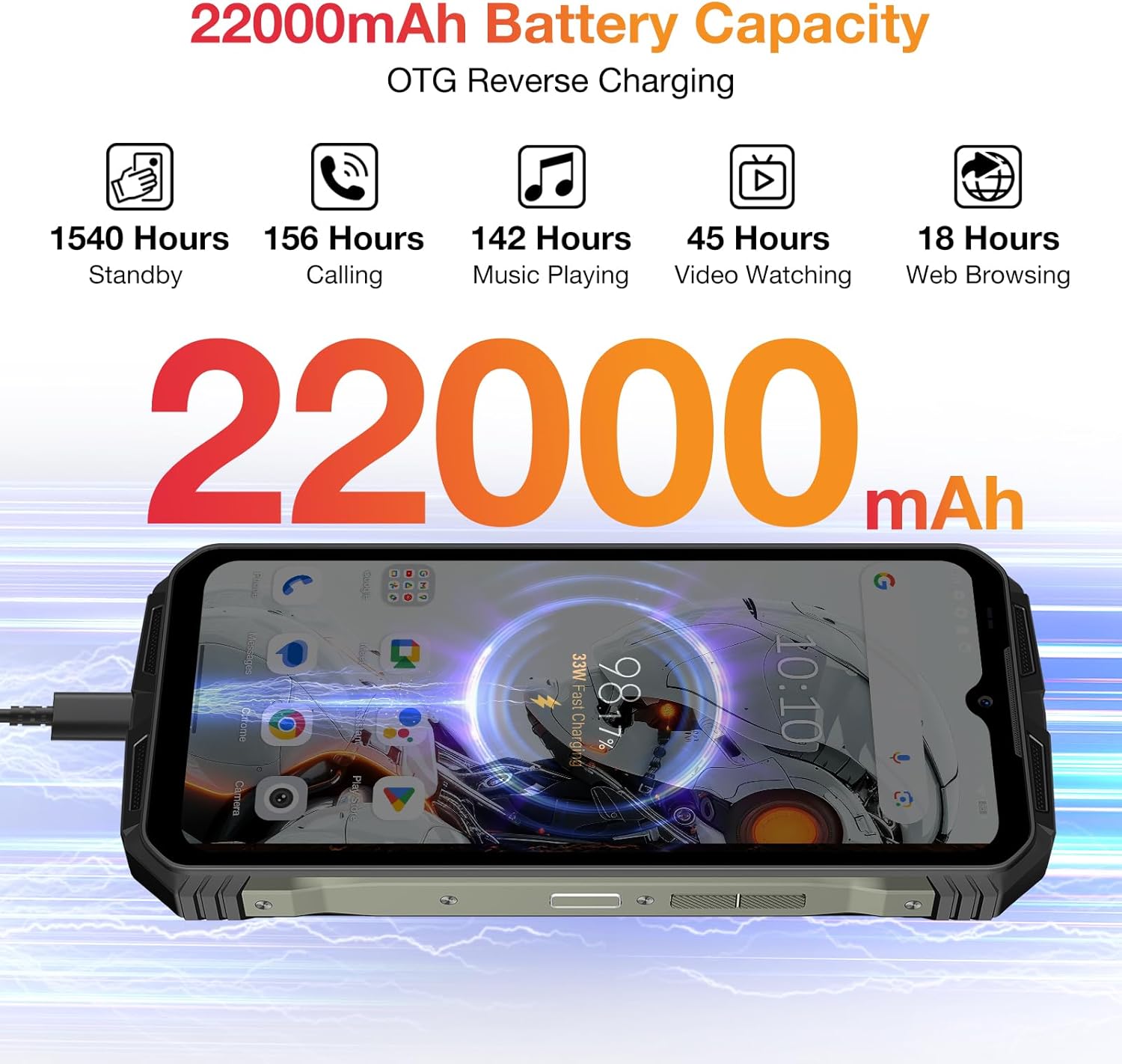
Figure 2: Visual representation of the DOOGEE V Max Pro's 22000mAh battery capacity and its OTG reverse charging capability.
4. Operating Instructions
4.1 Power On/Off
To power on your device, press and hold the Power button located on the side until the DOOGEE logo appears. To power off, press and hold the Power button, then select 'Power off' from the options displayed on the screen.
4.2 Display and Visual Experience
The DOOGEE V Max Pro features a 6.58-inch FHD+ IPS Waterdrop Display with a 120Hz refresh rate. This provides a smooth and immersive visual experience for all your content, from browsing to gaming and video playback.

Figure 3: The 6.58-inch FHD+ 120Hz IPS Waterdrop Display offers vibrant colors and smooth visuals.
4.3 Performance and Storage
Powered by the Dimensity 7050 5G Octa-core processor and equipped with 32GB RAM (12GB + up to 20GB Extended RAM) and 512GB ROM, expandable up to 2TB via TF card, the V Max Pro ensures smooth multitasking and ample storage for all your applications, photos, and videos. It runs on the latest Android 14 system for enhanced user experience and security.

Figure 4: The Dimensity 7050 5G Octa-core Processor provides robust performance for demanding tasks.

Figure 5: The phone offers 32GB RAM and 512GB ROM for smooth operation and extensive storage.

Figure 6: The DOOGEE V Max Pro runs on the latest Android 14 system, offering enhanced features and security.
4.4 Camera System
Capture stunning photos and videos with the V Max Pro's versatile camera setup:
- 108MP AI Main Camera: For high-resolution, detailed shots.
- 20MP Night Vision Camera: Allows for clear photography in low-light or dark conditions.
- 8MP Wide-angle & Macro Camera: Capture expansive landscapes or intricate close-ups.
- 16MP Front Camera: For high-quality selfies and video calls.

Figure 7: Overview of the DOOGEE V Max Pro's triple camera system, including the 108MP main camera, 20MP night vision, and 8MP wide-angle/macro lenses.
4.5 Smart Interaction Lights
The V Max Pro features intelligent interaction lights on the back, which can be customized to provide visual notifications for incoming calls, SMS messages, music playback, and charging status. These lights enhance user interaction and provide quick visual cues.

Figure 8: The smart interaction lights on the back of the DOOGEE V Max Pro provide visual feedback for various notifications.
4.6 Security Features
For enhanced security and convenience, the DOOGEE V Max Pro supports multiple unlock methods, including facial recognition and fingerprint unlock. The fingerprint sensor is conveniently located for quick and secure access to your device.
4.7 Connectivity
The device supports 5G cellular technology for fast network speeds, Wi-Fi 6 for reliable wireless connectivity, and NFC for convenient mobile payments and data exchange.
5. Media Integration
5.1 Product Overview Video
Video 1: An official product video showcasing the DOOGEE V Max Pro's overall features, including its ruggedness, large battery, and performance.
5.2 Battery and Charging Demonstration
Video 2: A short video demonstrating the DOOGEE V Max Pro's 22000mAh battery and its OTG reverse charging capability, allowing it to charge other devices.
5.3 Security Features Overview
Video 3: This video highlights the various security features of the DOOGEE V Max Pro, including NFC, Face ID, and fingerprint unlock for convenient and secure access.
5.4 Ruggedness Demonstration
Video 4: A brief demonstration of the DOOGEE V Max Pro's IP68/IP69K waterproof and dustproof capabilities, showcasing its resilience in challenging environments.
6. Technical Specifications
| Feature | Specification |
|---|---|
| Product Dimensions | 7.02 x 3.27 x 1.03 inches |
| Item Weight | 1.56 pounds |
| Item Model Number | VMAXPRO |
| Batteries | 1 Lithium Ion batteries required (included) |
| Operating System | Android 14 |
| Connectivity Technologies | WIFi 6, Fingerprint, OTG, Face ID, NFC |
| Special Features | NFC/Face ID/Fingerprint/OTG/WIFi 6 |
| Scanner Resolution | 1080 x 2408 |
| Other Camera Features | Rear, Front |
| Audio Jack | 3.5 mm |
| Color | Gray |
| Battery Power Rating | 22000 Milliamp Hours |
| Phone Talk Time | 156 Hours |
| Manufacturer | DOOGEE |
| Memory Storage Capacity | 512 GB |
| Standing Screen Display Size | 6.58 Inches |
| Refresh Rate | 120 Hz |
| Wireless Carrier | Unlocked for All Carriers |
7. Maintenance and Care
To ensure the longevity and optimal performance of your DOOGEE V Max Pro, follow these maintenance guidelines:
- Cleaning: Wipe the device regularly with a soft, damp cloth. Avoid using harsh chemicals or abrasive materials.
- Temperature: Do not expose the phone to extreme temperatures (hot or cold) for prolonged periods.
- Water and Dust Resistance: While the phone is IP68/IP69K rated, ensure all ports and covers are securely closed before exposing it to water or dust. Avoid intentional submersion in corrosive liquids.
- Impact Protection: Despite its rugged design, avoid unnecessary drops or impacts to prevent potential damage to internal components.
- Software Updates: Regularly check for and install software updates to ensure your device has the latest features and security patches.

Figure 9: The DOOGEE V Max Pro is built to IP68/IP69K and MIL-STD-810H standards for superior ruggedness.
8. Troubleshooting Common Issues
If you encounter any issues with your DOOGEE V Max Pro, please refer to the following common troubleshooting steps:
- Device Not Turning On: Ensure the battery is charged. Connect the charger and wait a few minutes before attempting to power on again. If unresponsive, try a forced restart by holding the Power button for 10-15 seconds.
- Charging Issues: Check if the charging cable and adapter are securely connected and undamaged. Try using a different power outlet. Ensure the charging port is clean and free of debris.
- App Crashes/Freezing: Close the problematic app and reopen it. Clear the app's cache and data in Settings > Apps. If the issue persists, uninstall and reinstall the app.
- Poor Network Signal: Check your SIM card installation. Restart the device. Ensure you are within network coverage. If issues persist, contact your service provider.
- Fingerprint/Face Unlock Not Working: Ensure your fingers are clean and dry for fingerprint recognition. For face unlock, ensure adequate lighting and that your face is clearly visible to the front camera. Re-register your fingerprint or face ID if necessary.
- Overheating: Avoid using the phone while charging for extended periods or running multiple demanding applications simultaneously. Close background apps and reduce screen brightness if the device feels excessively warm.
- Factory Reset: As a last resort for persistent software issues, you may perform a factory reset. Warning: This will erase all data on your phone. Back up important data before proceeding. Go to Settings > System > Reset options > Erase all data (factory reset).
9. Warranty and Customer Support
Thank you for purchasing your DOOGEE V Max Pro 5G Rugged Phone. We value your experience and are committed to providing excellent customer service.
- Warranty: Your device comes with a 2-Year Limited Warranty. Please refer to the warranty card included in your package for detailed terms and conditions.
- Money Back Guarantee: We offer a 30-Days Money Back Guarantee and Free Return policy.
- Customer Service: If you encounter any issues or have questions regarding your product, please do not hesitate to contact us. You can reach our official customer support through Amazon's messaging system. We promise to respond within 24 hours and assist in resolving any issues you may have.
- Online Support: 24/7 One-on-One Online Support is available for your convenience.
