
1. Introduction and Overview
The Bonsaii C231-D is a high-performance paper shredder designed for secure disposal of confidential documents in both home and office environments. It features both automatic and manual feeding capabilities, a micro-cut shredding mechanism for enhanced security, and a generous waste bin capacity. This manual provides essential information for the safe and efficient operation of your shredder.

Figure 1.1: Front view of the Bonsaii C231-D paper shredder, showcasing its sleek black design, auto-feed tray, and transparent window for viewing shredded paper levels.
2. Safety Instructions
To prevent injury or damage to the shredder, please read and follow these safety guidelines:
- Keep hands, hair, and loose clothing away from the paper entry slot.
- Keep children and pets away from the shredder.
- Unplug the shredder when not in use or before moving, cleaning, or emptying the waste bin.
- Do not shred metal objects, wet paper, or adhesive materials.
- Do not use aerosol products near the shredder.
- Ensure the waste bin is correctly inserted before operation.
- Do not attempt to shred more than the specified sheet capacity.
- The shredder is equipped with overload and overheat protection. If activated, allow the unit to cool down before resuming operation.
3. Product Components
Familiarize yourself with the main parts of your Bonsaii C231-D shredder:
- Shredder Head: Contains the cutting blades and control panel.
- Auto-Feed Tray: For automatic shredding of multiple sheets.
- Manual Feed Slot: For manual shredding of single sheets, credit cards, and small items.
- Control Panel: Features power switch and indicator lights.
- Waste Bin: Collects shredded paper.
- Casters: Wheels for easy mobility.

Figure 3.1: Close-up view of the shredder's top panel, showing the auto-feed opening, manual feed slot, and the control panel with LED indicator lights for Malfunction, Overheat/Overload, and Bin Full, along with the FWD, AUTO, OFF, REV control modes.
4. Setup
- Unpack: Carefully remove the shredder from its packaging.
- Position: Place the shredder on a flat, stable surface. Ensure the casters are locked if you do not intend to move it frequently.
- Insert Waste Bin: Ensure the 16-liter waste bin is fully and correctly inserted into the shredder cabinet. The shredder will not operate if the bin is not properly seated.
- Connect Power: Plug the power cord into a standard electrical outlet.
5. Operating Instructions
5.1 Control Modes
The shredder features four control modes:
- FWD (Forward): Manually feeds paper forward. Useful for clearing minor jams.
- AUTO (Automatic): The default mode for shredding. The shredder will automatically start when paper is detected in either the auto-feed tray or manual slot.
- OFF: Turns the shredder off. Always set to OFF when not in use or during maintenance.
- REV (Reverse): Reverses the shredding action. Essential for clearing paper jams.
5.2 Automatic Shredding
For shredding multiple sheets of paper:
- Ensure the shredder is in AUTO mode.
- Open the auto-feed tray cover.
- Stack up to 100 sheets of paper neatly into the auto-feed tray. Ensure there are no staples, paper clips, or folded corners.
- The shredder will automatically detect and feed the paper.
- The maximum continuous run time for automatic shredding is 30 minutes. After this, allow a 40-minute cool-down period.
5.3 Manual Shredding
For shredding single sheets, credit cards, or small items:
- Ensure the shredder is in AUTO mode.
- Insert up to 8 sheets of paper, one credit card, or small paper clips/staples into the manual feed slot.
- The shredder will automatically start and shred the item.
- The maximum continuous run time for manual shredding is 10 minutes. After this, allow a 40-minute cool-down period.

Figure 5.1: Illustration of the two shredding modes. On the left, the auto-feed tray is shown accepting up to 100 sheets for 30 minutes of continuous operation. On the right, the manual feed slot is shown accepting up to 8 sheets, credit cards, staples, and paper clips for 10 minutes of continuous operation.

Figure 5.2: Visual representation of the micro-cut shred size, showing paper reduced to 4x12mm particles, indicating a P-4 security level for confidential document destruction.
6. Maintenance
6.1 Emptying the Waste Bin
When the waste bin is full, the shredder's 'Bin Full' indicator light will illuminate. To empty:
- Set the control switch to OFF.
- Carefully pull out the waste bin.
- Dispose of the shredded paper.
- Reinsert the waste bin firmly until it clicks into place.

Figure 6.1: Image showing the shredder with its 16-liter waste bin pulled out, highlighting the 'Bin Full' indicator light (flashing green) which signals when the bin needs emptying.
6.2 Cleaning
- Always unplug the shredder before cleaning.
- Wipe the exterior with a soft, dry cloth. Do not use abrasive cleaners or solvents.
- Periodically oil the shredder blades with shredder oil to maintain performance and extend the life of the unit. Follow the instructions provided with the shredder oil.
7. Troubleshooting
| Problem | Possible Cause | Solution |
|---|---|---|
| Shredder does not start |
|
|
| Paper jam |
|
|
| Overheat/Overload indicator on |
|
|
| Bin Full indicator on | Waste bin is full | Empty the waste bin and reinsert it properly. |

Figure 7.1: Diagram illustrating the automatic reverse mechanism, showing paper being pulled back out of the shredder blades to help clear jams and reduce the likelihood of future blockages.

Figure 7.2: Close-up of the control panel showing the 'Overheat Overload' indicator light. A red light indicates that the shredder has exceeded its operational limits and requires a cool-down period.
8. Specifications
- Model: C231-D
- Shred Type: Micro-Cut
- Shred Size: 4 x 12 mm
- Security Level: P-4
- Auto-Feed Capacity: Up to 100 sheets (80gsm paper)
- Manual Feed Capacity: Up to 8 sheets (80gsm paper)
- Waste Bin Capacity: 16 Liters
- Continuous Run Time (Auto-Feed): 30 minutes
- Continuous Run Time (Manual Feed): 10 minutes
- Cool-Down Time: 40 minutes
- Noise Level: 60 dB
- Dimensions (L x W x H): 35.7 x 22.3 x 47.2 cm
- Recommended Use: Home, Office
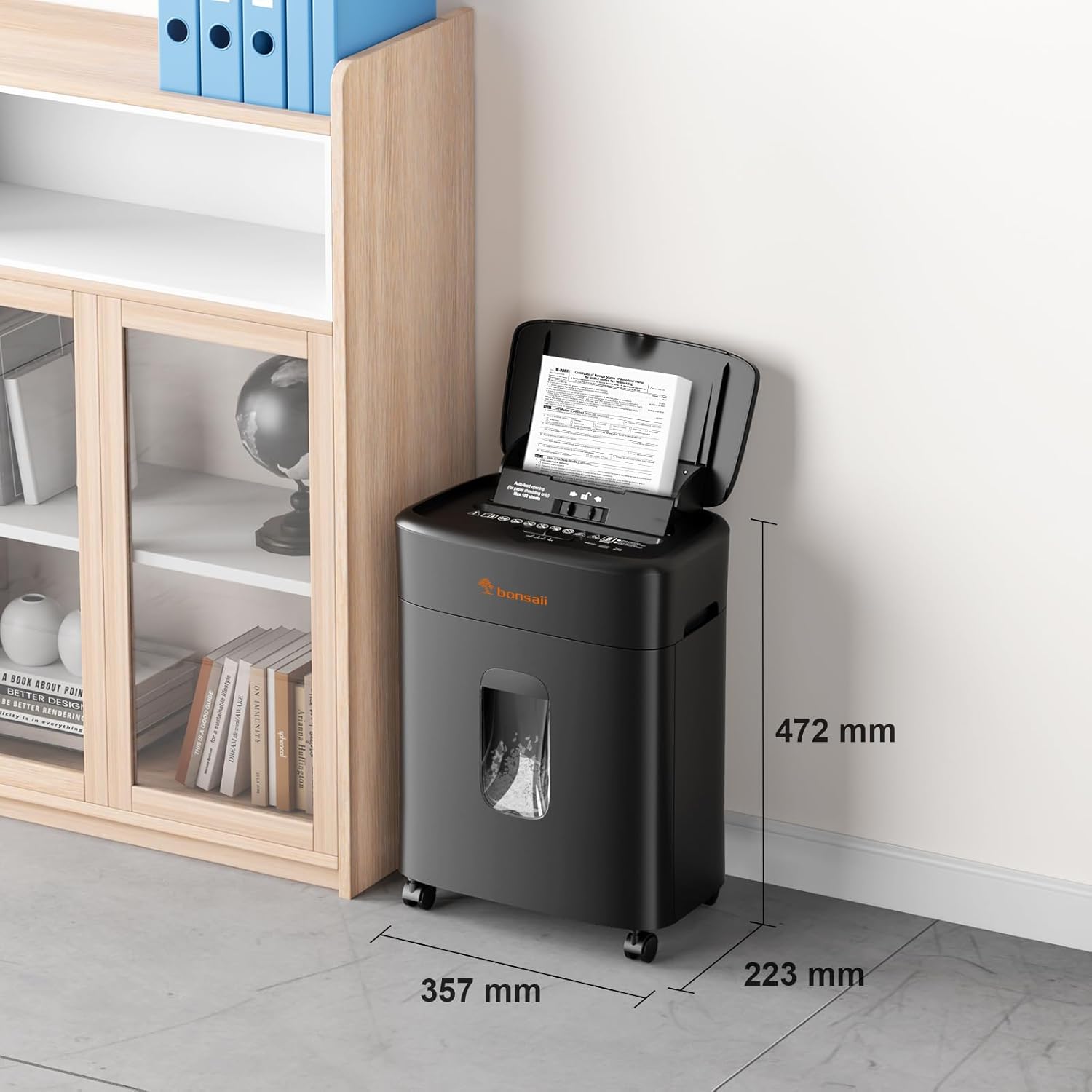
Figure 8.1: Diagram showing the physical dimensions of the Bonsaii C231-D paper shredder: 357 mm (length), 223 mm (width), and 472 mm (height).
9. Warranty and Support
The Bonsaii C231-D paper shredder comes with a 2-year warranty. For any product-related inquiries, technical assistance, or warranty claims, please contact Bonsaii customer service. We offer 24-hour customer service to ensure your satisfaction.
For further assistance, please refer to the contact information provided with your product packaging or visit the official Bonsaii website.


