1. Introduction
This manual provides essential instructions for the safe and efficient use of your as - Schwabe Type 2 Electric Car Charging Cable Reel, Model 65161. Please read this manual thoroughly before installation and operation, and retain it for future reference. Proper installation and adherence to safety guidelines are crucial for optimal performance and user safety.

Image 1.1: The as - Schwabe Type 2 Electric Car Charging Cable Reel, showing the main unit and both Type 2 connectors.
2. Safety Instructions
- Always ensure the cable is free from damage before use. Damaged cables pose a risk of electric shock.
- Do not attempt to disassemble or repair the reel if you are not a qualified electrician. Disassembly by untrained personnel can lead to personal injury and damage to the unit.
- Ensure the cable is fully unrolled when charging at maximum power (11 kW) to prevent overheating.
- Guide the cable manually when retracting to prevent uncontrolled retraction, which can cause injury or property damage.
- The unit is rated IP44, providing protection against splashes of water and solid objects larger than 1mm. It is suitable for indoor and outdoor use but should not be submerged in water.
3. Product Specifications
| Model Number | 65161 |
| Input Cable Length | 2 meters |
| Output Cable Length | 8 meters |
| Max. Power | 11 kW |
| Voltage | 400 V |
| Current | 16 A |
| Phase | 3-Phase |
| Input Connector | Type 2 |
| Output Connector | Type 2 |
| Protection Class | IP44 |
| Swivel Range | 180 degrees |
| Housing Material | Polypropylene Plastic |
| Dimensions (L x W x H) | 38 x 19.5 x 36 cm |
| Item Weight | 7.59 kg |
4. Setup and Installation
The charging cable reel is designed for wall mounting. Ensure the mounting surface is sturdy enough to support the weight of the reel and the forces applied during cable extension and retraction.
4.1 Mounting the Reel
- Select a suitable location for mounting, ensuring sufficient space for the 180-degree swivel function and easy access to your electric vehicle.
- Mark the drilling points for the wall bracket. The mounting holes are typically spaced for secure attachment. (Note: Some users have reported variations in hole spacing; it is recommended to measure the actual unit before drilling.)
- Drill the necessary holes and securely fasten the wall bracket using appropriate screws and wall plugs for your mounting surface.
- Attach the cable reel to the mounted bracket. Ensure it is firmly secured and can swivel freely.

Image 4.1: The cable reel securely mounted on a wall, ready for use.
4.2 Connecting the Input Cable
The reel features a 2-meter input cable with a Type 2 connector. Connect this input cable to a compatible charging station or wallbox that provides 400V, 16A, 3-phase power.
5. Operating Instructions
5.1 Extending the Charging Cable
- Gently pull the output charging cable (8m length) from the reel.
- As you pull, you will hear a clicking sound after every half turn of the drum. This indicates the locking mechanism.
- For optimal charging performance, especially at 11 kW, always pull the cable out completely until it reaches the yellow mark. This prevents heat buildup in the coiled cable.
- Once fully extended, allow the cable to retract slightly until it locks into place at the desired length.

Image 5.1: A user extending the charging cable from the reel.
5.2 Connecting to Your Electric Vehicle
- With the cable extended and locked, connect the Type 2 connector to your electric vehicle's charging port.
- Ensure a secure connection. The vehicle's charging system should indicate that charging has begun.
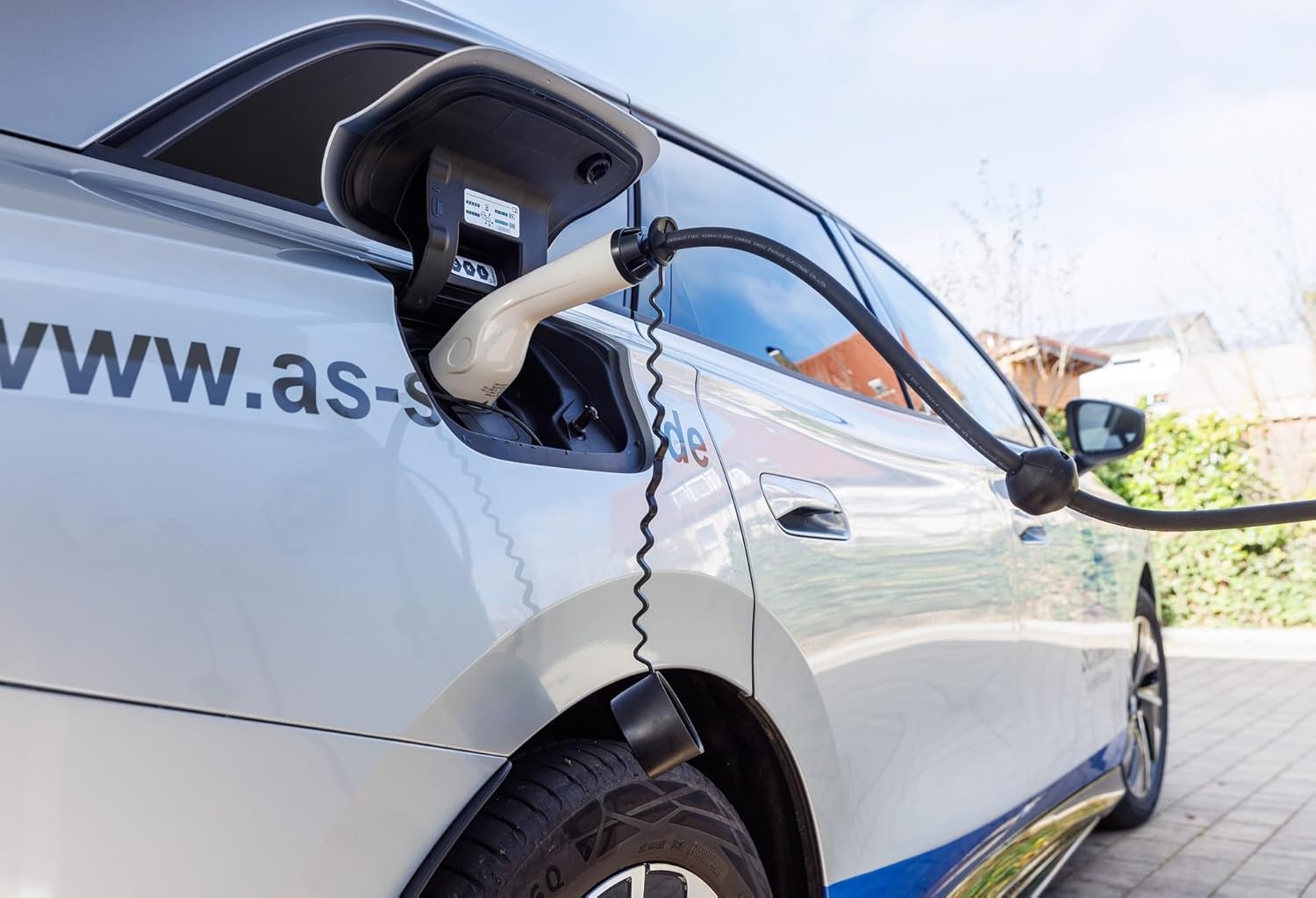
Image 5.2: Close-up of the Type 2 connector properly inserted into an electric vehicle's charging port.
5.3 Retracting the Charging Cable
- Once charging is complete and the cable is disconnected from the vehicle, pull the cable slightly until you hear the next click.
- Important: Guide the cable back into the reel by hand. Do not allow it to retract uncontrollably, as this can cause damage to the cable, the reel, or pose a safety risk.

Image 5.3: An electric car being charged using the as - Schwabe cable reel, demonstrating typical usage.
6. Maintenance
Regular maintenance ensures the longevity and safe operation of your charging cable reel.
- Cable Inspection: Periodically inspect the entire length of the charging cable for any signs of damage, cuts, fraying, or wear. If any damage is found, discontinue use immediately and contact a qualified electrician for assessment or replacement.
- Cleaning: Clean the cable and the reel housing with suitable cleaning agents to remove dirt, dust, and deposits. Ensure the unit is disconnected from power before cleaning. Do not use abrasive cleaners or solvents.
- Professional Service: If maintenance of electrical or mechanical parts is required, or if the cable needs replacement, always contact a qualified electrician or the manufacturer's service department. Do not attempt internal repairs yourself.
7. Troubleshooting
This section addresses common issues you might encounter with your charging cable reel.
7.1 Overheating Protection Triggered
- Symptom: Charging stops, and a red indicator light may illuminate.
- Cause: The integrated thermal protection has activated due to excessive heat. This often occurs if the cable is not fully unrolled during high-power charging, or if ambient temperatures are very high.
- Solution: Disconnect the cable from the vehicle and allow the reel to cool down. Ensure the cable is fully unrolled for future charging sessions, especially at 11 kW. Once cooled, press the reset button (if present) on the unit to resume operation. If the issue persists, reduce the charging current if possible or consult a professional.
7.2 Cable Not Charging
- Symptom: The vehicle does not begin charging when connected.
- Cause: This could be due to a faulty connection, an issue with the vehicle's charging system, the charging station, or a defect in the cable reel itself.
- Solution: Ensure both the input cable to the charging station and the output cable to the vehicle are securely connected. Check if the charging station is operational. Try using a different charging cable if available to isolate the problem. If the issue is with the reel, contact customer support.
7.3 Cable Retraction Issues
- Symptom: The cable does not retract smoothly or gets stuck.
- Cause: The internal spring mechanism may be obstructed or damaged, or the cable is not being guided properly.
- Solution: Ensure the cable path is clear of obstructions. Gently pull the cable out a short distance and then guide it back in slowly. If the problem persists, do not force the retraction. Contact customer support for assistance.
8. Warranty and Support
For warranty information, please refer to the terms and conditions provided by your retailer at the time of purchase or contact the manufacturer directly. Keep your proof of purchase for warranty claims.
8.1 Manufacturer Contact
For technical support, service, or inquiries, please contact:
as - Schwabe GmbH
Merkurstr. 10
72184 Eutingen
Germany
Email: info@as-schwabe.de
You can also visit the official website for more information: www.as-schwabe.de


