
PowMr POW-Sunsmart 10KP
PowMr 10000W Hybrid Solar Inverter User Manual
Model: POW-Sunsmart 10KP | Brand: PowMr
1. Introduction
This manual provides detailed instructions for the installation, operation, and maintenance of your PowMr 10000W Hybrid Solar Inverter. This advanced inverter is designed to efficiently convert 48V DC power from solar panels and batteries into 110V/240V AC split-phase or single-phase power for various applications. Please read this manual thoroughly before installation and use to ensure safe and optimal performance.
2. Safety Information
Adhering to safety precautions is paramount to prevent injury and damage to the equipment. Always follow these guidelines:
- Read all instructions carefully before installation and operation.
- Installation must be performed by qualified personnel in accordance with local electrical codes.
- Ensure all wiring complies with local and national electrical codes and standards.
- Do not disassemble the inverter. There are no user-serviceable parts inside. Refer servicing to qualified personnel.
- Disconnect all power sources (PV array, battery, utility grid) before performing any maintenance or wiring.
- Wear appropriate personal protective equipment (PPE), including insulated gloves and eye protection, during installation and maintenance.
- Avoid contact with live terminals. High voltages are present inside the inverter.
- Ensure proper grounding of the inverter.
3. Product Overview
The PowMr 10000W Hybrid Solar Inverter is a versatile power solution designed for off-grid and hybrid solar systems, featuring advanced MPPT technology and robust protection mechanisms.
3.1 Key Features
- Upgraded Parallel Version: Supports parallel operation for expanding capacity up to 60kW, with a maximum of 6 inverters in parallel.
- Flexible Output: Supports both split-phase (120V/240V) and single-phase (120V) pure sine wave output simultaneously.
- High Power Output: 10000W continuous rated output with a surge capacity of up to 20000W.
- Efficient PV Input: Maximum PV input power of 11KW (5500W per MPPT input) with a maximum PV input voltage of 500V DC.
- Dual MPPT Controllers: Features dual 100A MPPT controllers with 99.9% efficiency, ideal for high-power modules.
- Multiple Operating Modes: Offers four selectable battery charging modes and four AC output working modes to suit diverse application needs.
- Battery Compatibility: Works with 48V lead-acid batteries (Seal, AGM, Gel, Flooded) and lithium batteries. Supports batteryless operation.
- Comprehensive Protection: Includes safeguards against short circuit, over-current, over/under voltage, overload, and backfeed.
- Communication Interfaces: Equipped with CAN, USB, and RS485 interfaces for monitoring and parameter configuration.
3.2 Product Components and Interfaces


| No. | Component | No. | Component |
|---|---|---|---|
| 1 | LCD screen | 6 | BAT INPUT (+) |
| 2 | LED Indicators | 7 | BAT INPUT (-) |
| 3 | Touchable key | 8 | Dry contact |
| 4 | ON/OFF Rocker Switch | 9 | CAN/RS485-2 port |
| 5 | PV INPUT (1/1) | 10 | RS485-1 port |
| 11 | USB-B port | ||
| 12 | Grounding Screw | ||
| 13 | AC OUT (L+L+N) | ||
| 14 | AC IN (L+L+N) | ||
| 15 | AC INPUT breaker | ||
| 16 | Parallel Communication Port |
4. Setup and Installation
Proper installation is crucial for the safe and efficient operation of your solar inverter. Always consult a qualified electrician for installation to ensure compliance with all safety standards and local regulations.
4.1 Wiring Diagrams
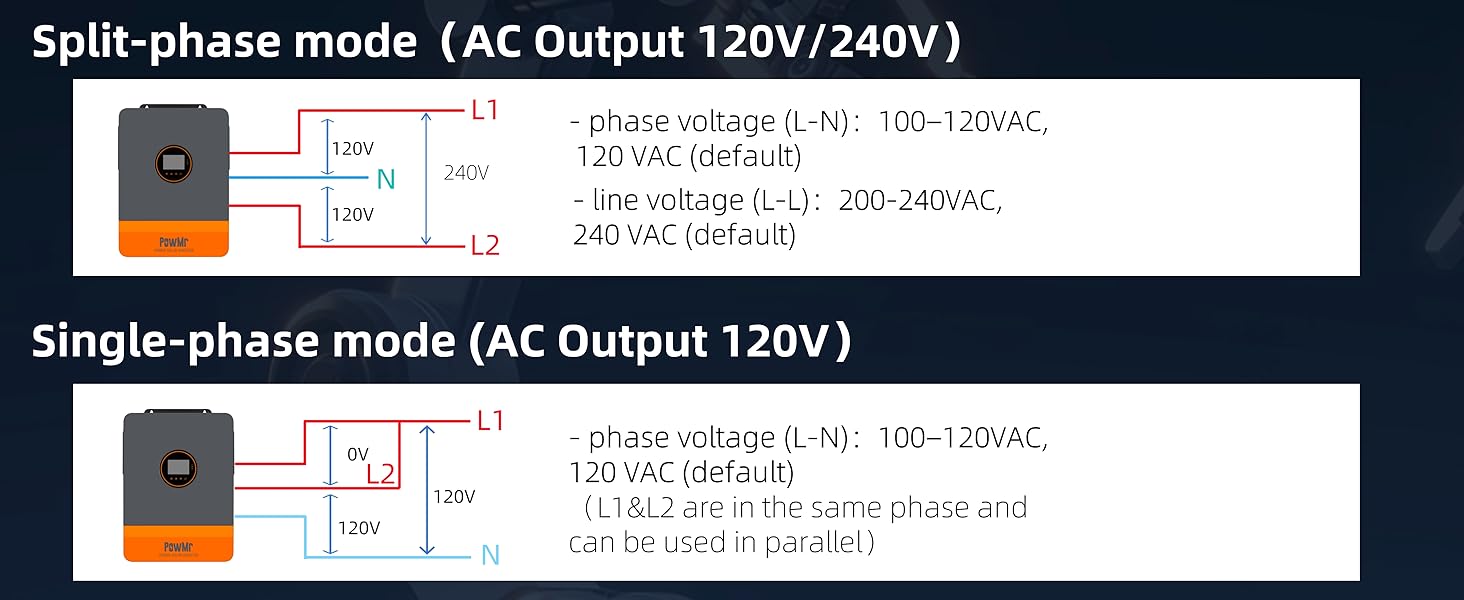
The inverter supports both single-phase and split-phase configurations to accommodate various electrical system requirements.
4.1.1 Split-Phase Mode (AC Output 120V/240V)

In split-phase mode, the inverter provides 120V between L1 and Neutral, and L2 and Neutral, with 240V between L1 and L2. This is suitable for homes requiring both standard 120V and higher voltage 240V appliances.
4.1.2 Single-Phase Mode (AC Output 120V)

In single-phase mode, the inverter provides 120V AC output, suitable for standard household appliances and lighting.
4.2 Parallel Operation
The PowMr 10000W Hybrid Solar Inverter supports parallel operation of up to 6 units to significantly expand system capacity and meet higher power demands.
4.2.1 Two Units in Parallel

4.2.2 Three Units in Parallel

4.2.3 Six Units in Parallel

Professional guidance is required for actual connections in parallel configurations to ensure safety and optimal performance.
5. Operating Instructions
The PowMr Hybrid Solar Inverter offers flexible operating modes to optimize energy usage based on your preferences and available power sources.
5.1 Charging Modes
Select from four distinct battery charging modes to prioritize solar, utility, or a hybrid approach.
- 01 Solar First: Priority is given to charging the battery by PV (photovoltaic) power. Mains charging will only be initiated if the PV power source fails or is insufficient.
- 02 Mains First: Priority is given to charging the battery by Mains Power (utility grid). PV charging will only be initiated if the Mains power source fails.
- 03 Hybrid Charging: This mode combines both PV and Mains Power for battery charging. PV power is prioritized, and Mains Power supplements the charging process when PV energy is insufficient.
- 04 Only Solar: Only PV charging is initiated. No charging from the utility grid (Mains) will occur in this mode.
5.2 AC Output Modes
The inverter provides four AC output working modes to manage power delivery to your loads.

- 01 PV Priority: This mode selects PV power as the primary source for loads, maximizing the use of solar energy. It is suitable for regions with relatively stable power grids.
- 02 Mains Priority: The inverter supplies power from the utility grid (Mains) primarily. It switches to inverter power supply (from battery/PV) only when Mains power has failed, functioning as a backup UPS.
- 03 Inverter Priority: This mode prioritizes power from the inverter (battery/PV) to supply loads, maximizing the use of stored DC energy. It is suitable for areas with stable power grids.
- 04 Solar & Utility Hybrid: In a utility bypass state, if no battery is connected or the battery is full, the load power is supplied by both PV and the utility. Any surplus PV energy can be fed back to the grid if the grid connection function is enabled.
5.3 LCD Display and Communication
The inverter features an intuitive LCD HD display screen for real-time monitoring and configuration, along with multiple communication interfaces.

The LCD display allows users to view critical system parameters and status. The inverter also includes CAN, USB, and RS485 interfaces for seamless connectivity to external devices, data acquisition modules, and for modifying device parameters.
6. Maintenance
Regular maintenance ensures the longevity and optimal performance of your PowMr Hybrid Solar Inverter. Perform the following checks periodically:
- Visual Inspection: Regularly inspect all wiring and connections for signs of wear, damage, or loose connections. Ensure all cables are securely fastened.
- Ventilation: Keep the inverter's ventilation openings clear of dust and debris to ensure proper airflow and cooling. Overheating can reduce efficiency and lifespan.
- Battery Terminals: Periodically check battery terminals for corrosion. Clean any corrosion with a wire brush and apply a protective coating if necessary.
- System Monitoring: Monitor the LCD display for any error codes or unusual readings. Address any warnings promptly.
- Environment: Ensure the environment around the inverter is clean, dry, and within the specified operating temperature and humidity ranges.
- PV Panels: Keep solar panels clean from dirt, dust, and debris to maximize energy harvest.
7. Troubleshooting
This section provides general guidance for common issues you might encounter. For complex problems or issues not listed here, please contact customer support.
- No Power Output:
- Check the AC input breaker and ensure it is in the ON position.
- Verify all battery connections are secure and the battery voltage is within the operating range.
- Check PV input voltage and connections from the solar panels.
- Ensure the inverter's main ON/OFF switch is in the ON position.
- Low Power Output:
- Verify PV panel cleanliness and orientation towards the sun.
- Check the battery charge level; a low battery can limit output.
- Ensure the connected load does not exceed the inverter's continuous power rating.
- Error Codes on LCD:
- Note down the specific error code displayed on the LCD.
- Refer to the full product manual (if available) for a detailed explanation of error codes.
- Contact PowMr customer support with the error code for assistance.
- Overload Protection Triggered:
- Reduce the connected load by disconnecting some appliances.
- The inverter will typically automatically restart after a cool-down period once the overload is removed.
- Battery Not Charging:
- Check PV input connections and ensure solar panels are producing power.
- Verify battery connections are correct and secure.
- Ensure the selected charging mode (e.g., Solar First, Hybrid Charging) is appropriate for your setup.
8. Specifications
The following table outlines the key technical specifications for the PowMr 10000W Hybrid Solar Inverter:
| Feature | Detail |
|---|---|
| Rated Output Power | 10000W (continuous), 20000W (surge) |
| Rated Output Voltage | 120/240Vac (split-phase/single-phase) |
| Max PV Input Power | 11KW (5500W per MPPT input) |
| Max PV Input Voltage | 500V DC |
| PV Starting Voltage | ≥150V |
| MPPT Controller Current | Dual 100A |
| Battery Voltage | 48V |
| Compatible Battery Types | Lead-acid (Seal, AGM, Gel, Flooded), Lithium |
| Parallel Capability | Up to 6 units (60kW total) |
| Communication Interfaces | CAN, USB, RS485 |
| Product Dimensions | 24.4 x 17.5 x 5.1 inches |
| Item Weight | 57.2 pounds |
| Model Name | POW-SunSmart 10KP |
9. Warranty and Support
PowMr products are designed for reliability and performance. For detailed warranty information, including terms, conditions, and registration, please refer to the official PowMr website or the warranty card included with your product.
For technical assistance, troubleshooting, or inquiries regarding spare parts, please contact PowMr customer support through their official channels. When contacting support, please have your product model number (POW-Sunsmart 10KP) and purchase information readily available.
You can also visit the official PowMr Store on Amazon for additional product information and support resources: Visit the PowMr Store on Amazon
Ask a question about this manual
Ask about setup, troubleshooting, compatibility, parts, safety, or missing instructions. Manuals+ will review the question and use this page’s manual context to help answer it.