
1. Introduction and Safety Information
Thank you for choosing the DaranEner Portable Power Station 300W 192Wh. This device is designed to provide reliable power for your electronic devices during outdoor activities, travel, or power outages. It features a durable LiFePO4 battery, multiple output ports, and a compact design for portability.
Important Safety Instructions:
- Do not connect devices that exceed 300W continuous power (600W surge).
- For first-time use, fully charge and discharge the battery to activate its full capacity.
- Keep the device away from water, fire, and extreme temperatures.
- Do not disassemble or attempt to repair the unit yourself. Contact support for technical issues.
- Ensure proper ventilation during use and charging.
2. Product Overview
The DaranEner Portable Power Station is a versatile power solution, offering various output options and a built-in LED light. Its compact size and lightweight design make it ideal for on-the-go power needs.

Figure 2.1: DaranEner Portable Power Station connected to a laptop, phone, and camera, illustrating its multi-device charging capability.
Key Features:
- 300W Rated Power (600W Surge): Capable of powering a wide range of devices.
- 192Wh (60,000mAh) Capacity: Provides extended power for smartphones, laptops, and other electronics.
- LiFePO4 Battery: Offers enhanced safety and a longer lifespan (up to 10 years, 3500+ cycles).
- Pure Sine Wave AC Output: Ensures stable and clean power for sensitive electronics.
- Multiple Output Ports: Includes 2x AC outlets, 2x USB-A ports, 1x USB-C port, and 1x DC carport.
- Lightweight and Portable: Weighs approximately 5.5 lbs (2.5 kg) with a convenient carry handle.
- 4-Mode LED Light: Integrated light with high, low, strobe, and SOS modes for various situations.
- Solar Compatible: Can be recharged using a compatible solar panel (sold separately).
3. Setup and Initial Use
Upon receiving your DaranEner Portable Power Station, it is recommended to perform the following steps:
- Unpack: Carefully remove the power station and all accessories from the packaging.
- Initial Charge: Fully charge the unit using the provided AC fast charging cable until the display shows 100%.
- Initial Discharge: After a full charge, fully discharge the unit by powering a device until the battery is depleted.
- Repeat Cycle: Complete two full charge and discharge cycles to calibrate the battery management system.
Pro Tip: For better long-term maintenance, recharge the battery generator every 1-2 months if not in regular use.
4. Operating Instructions
The power station features an intuitive interface with dedicated buttons for different output types.

Figure 4.1: Detailed view of the power station's front panel, highlighting AC outlets, USB ports, DC output, and control buttons.
4.1 Powering On/Off Outputs:
- DC Power (USB & DC Output): Press and hold the "DC POWER" button to activate the USB-A, USB-C, and 12V DC output ports. The corresponding icons on the display will illuminate. Press and hold again to turn off.
- AC Power: Press and hold the "AC POWER" button to activate the 110V AC outlets. The "AC" icon on the display will illuminate. Press and hold again to turn off.
4.2 Display Information:
The digital display shows the current battery percentage and indicates which output types (AC, USB, DC) are active.
Video 4.1: A seller demonstrating the DaranEner Portable Power Station 300W, showcasing its various ports and the digital display in a camping tent setting.
4.3 Device Compatibility:
This power station is suitable for devices requiring up to 300W of power. Examples include:
- Smartphones (recharge over 10 times)
- Laptops (recharge approximately 2.7 times for a 60Wh laptop)
- Mini-fridges (run for about 3.6 hours for a 45W mini-fridge)
- CPAP machines, drones, mini-fans, LED lights.
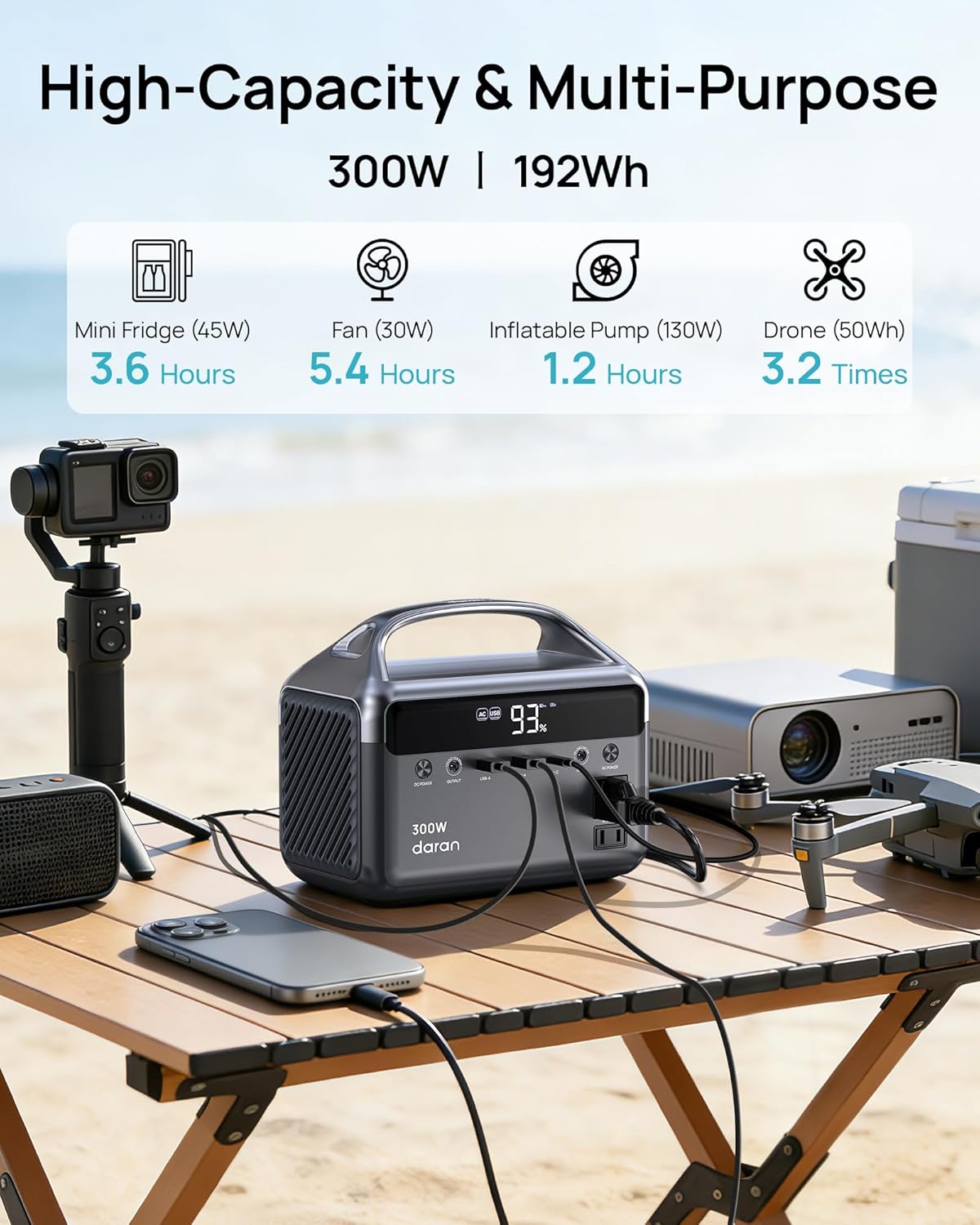
Figure 4.2: The power station providing power to various outdoor electronics, including a mini-fridge, fan, inflatable pump, and drone, highlighting its high capacity and multi-purpose use.
5. Charging Options
The DaranEner Portable Power Station offers flexible charging methods to ensure you always have power when you need it.

Figure 5.1: Visual representation of the three primary charging methods: AC wall outlet, solar panel, and car input.
- AC Wall Outlet: Use the included AC fast charging cable to charge the power station from a standard wall outlet. A full charge takes approximately 3.7 hours.
- Solar Panel (Optional): Connect a compatible solar panel (sold separately) to the DC input port (10-26V DC, 3A max). A 60W solar panel can fully charge the unit in about 3.4 hours under optimal sunlight conditions.
- Car Input: Charge the power station from your vehicle's 12V car port using a compatible car charging cable (sold separately). A full charge with a 60W car input takes approximately 3.4 hours.
6. LED Light Modes
The integrated LED light provides illumination for various situations, from camping to emergencies.

Figure 6.1: The power station's LED light providing illumination inside a tent, demonstrating its utility in low-light conditions.
To activate the LED light, press the dedicated light button on the side of the unit. Cycle through the modes by pressing the button repeatedly:
- High Lighting Mode: Provides maximum brightness for general illumination.
- Low Lighting Mode: Offers reduced brightness for extended use or softer ambient light.
- Strobe Mode: Flashing light for signaling or attracting attention.
- SOS Mode: Emits the international Morse code distress signal (three short, three long, three short flashes).
7. Specifications
Detailed technical specifications for the DaranEner Portable Power Station 300W 192Wh.
| Feature | Specification |
|---|---|
| Model Number | NEO |
| Rated Power | 300W (600W Surge) |
| Battery Capacity | 192Wh (60,000mAh) |
| Battery Type | LiFePO4 (Lithium-Phosphate) |
| AC Output | 2x 110V AC Outlets (Pure Sine Wave) |
| USB-A Output | 2x USB-A Ports (18W each) |
| USB-C Output | 1x USB-C Port (45W) |
| DC Output | 1x DC Carport (12V DC, 10A max) |
| AC Input | 120V~60Hz 2A (55W) |
| Solar/Car Input | 10-26V DC, 3A max (60W max) |
| Dimensions | 8.98 x 5.43 x 6.22 inches |
| Weight | 5.5 lbs (2.5 kg) |
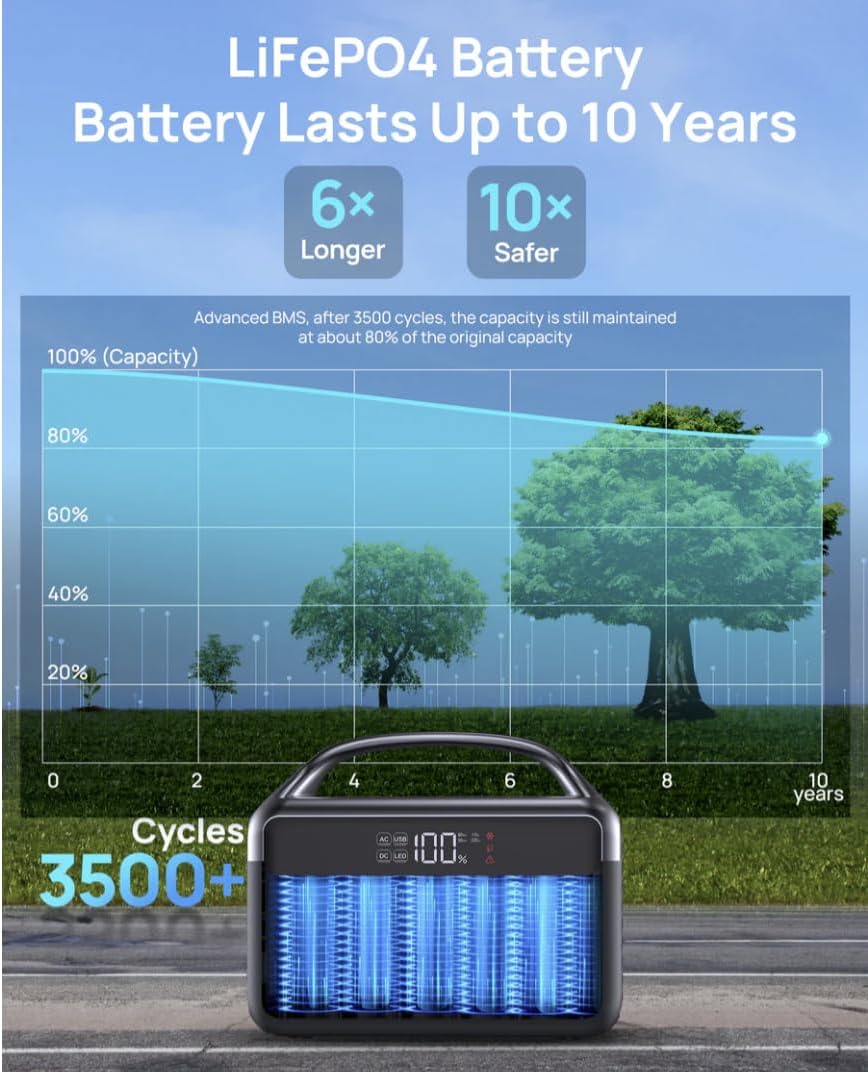
Figure 7.1: The DaranEner Portable Power Station with its compact dimensions (8.98 x 5.43 x 6.22 inches) highlighted, emphasizing its portability.
8. Maintenance
Proper maintenance ensures the longevity and optimal performance of your DaranEner Portable Power Station.
- Regular Recharging: If the unit is not used for extended periods, recharge the battery every 1-2 months to maintain battery health.
- Storage: Store the power station in a cool, dry place, away from direct sunlight and extreme temperatures.
- Cleaning: Use a dry, soft cloth to clean the exterior of the unit. Do not use liquid cleaners or immerse the device in water.
- Avoid Overloading: Do not connect devices that exceed the rated 300W continuous power to prevent damage to the unit.

Figure 8.1: An illustration highlighting the LiFePO4 battery's longevity, maintaining 80% capacity after 3500+ cycles, equivalent to approximately 10 years of use.
9. Troubleshooting
If you encounter any issues with your DaranEner Portable Power Station, please refer to the following common troubleshooting tips:
- Unit Not Turning On: Ensure the battery is charged. If the battery is completely depleted, it may take a few minutes of charging before the display activates.
- No Output Power: Verify that the specific output (DC or AC) is activated by pressing and holding its respective power button. Check if the connected device's power consumption exceeds the unit's rated output.
- Charging Issues: Ensure the charging cable is securely connected. If using solar, confirm the solar panel is in direct sunlight and within the specified voltage range (10-26V DC).
- Overload Protection: If the unit shuts down unexpectedly, it may be due to an overload. Disconnect the high-power device and restart the unit.
For persistent issues or further technical assistance, please contact DaranEner customer support.
10. Warranty and Support
The DaranEner Portable Power Station 300W 192Wh comes with a 1-Year Warranty from the date of purchase, covering manufacturing defects and workmanship.
What the Warranty Covers: This warranty covers defects in materials and workmanship under normal use. It does not cover damage caused by misuse, accidents, unauthorized modifications, or natural disasters.
For Technical Support or Warranty Claims:
- Visit the official DaranEner website: www.daranener.com
- Email our support team at: support@daranener.com
DaranEner is committed to providing reliable, quiet, and clean power solutions. Our goal is to ensure your satisfaction with our products.


