
1. Introduction
This manual provides essential information for the safe and efficient operation of your GIANDEL 4000W Pure Sine Wave Power Inverter. This advanced inverter converts 12V DC battery power to 110V-120V AC household electricity, featuring a continuous output of 4000 watts and a surge capability of 7000 watts for 2 seconds. It is designed for a wide range of applications, including RVs, vessels, and off-grid solar systems, powering sensitive equipment like water pumps, air conditioners, hair dryers, microwaves, and air compressors.
2. Important Safety Information
Read all safety instructions carefully before installation and operation. Failure to follow these instructions may result in electric shock, fire, or serious injury.
- Electrical Safety: The inverter is equipped with UL listed 20 Amps GFCI (Ground Fault Circuit Interrupter) outlets for protection against ground faults. Ensure all connections are secure and properly grounded.
- Ventilation: Always ensure adequate ventilation around the inverter to prevent overheating. The unit features high-speed ventilation fans for temperature regulation.
- Battery Compatibility: This inverter is compatible with all 12V batteries, including LiFePO4, Lead Acid, and Ternary lithium batteries. Ensure your battery system is correctly sized and configured for the inverter's power output.
- Protection Features: The inverter includes multiple electronic protections: under-voltage and over-voltage protection, over-temperature protection, over-load protection, and short circuit protection.
- Cable Sizing: Use appropriately sized, all-insulated ring terminal cables for battery connections to prevent overheating and ensure efficient power transfer. Inadequate cable gauge can lead to voltage drop and reduced performance.
- Installation Environment: Install the inverter in a dry, well-ventilated area, away from flammable materials and direct sunlight.
3. Package Contents
Verify that all items are present in the package:
- GIANDEL 4000W Pure Sine Wave Power Inverter Unit
- 30ft Wired Remote Control with Battery Level Monitor
- Wireless Remote Control (up to 20 meters range)
- All-Insulated Ring Terminal Cables (for battery connection)
- Shockproof Pads
- User Manual

4. Product Features and Overview
The GIANDEL 4000W Pure Sine Wave Power Inverter is engineered for reliability and performance, offering a clean and stable power source.
- High Power Output: Provides 4000W continuous power and 7000W surge power for 2 seconds, suitable for high startup power inductive loads.
- Pure Sine Wave: Delivers clean and smooth power, identical to utility grid power, making it safe for sensitive electronics.
- Universal Battery Compatibility: Works with various 12V battery types, including LiFePO4, Lead Acid, and Ternary lithium.
- Customizable Low Voltage Protection: Input low voltage protection value is resettable from 9.5V to 11.5V to match different battery chemistries.
- Comprehensive Display: A large LCD screen shows input voltage, output voltage, load power, frequency, battery status, and protection codes.
- Dual Remote Control: Includes a 30ft wired remote for convenient control and monitoring, plus a wireless remote for operation up to 20 meters away.
- Robust Construction: Features a durable aluminum alloy housing for superior heat dissipation and fire resistance, along with high-speed cooling fans.
- Advanced Safety: UL Listed 20 Amps GFCI outlets provide ground fault protection. Main components like PCB, fuses, and transformers are UL listed.
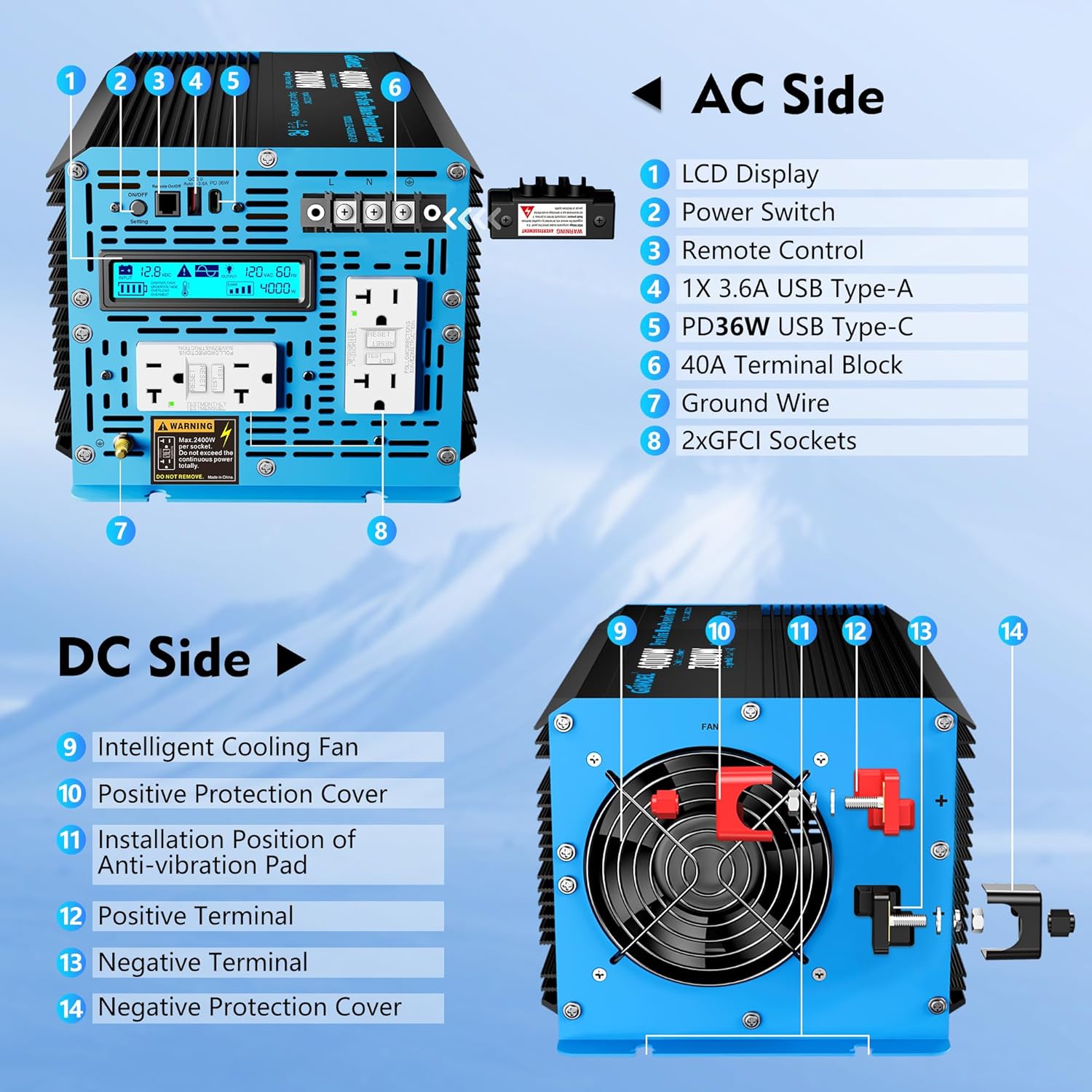

5. Setup and Installation
Proper installation is crucial for performance and safety.
- Mounting the Inverter: Choose a dry, cool, and well-ventilated location. The inverter can be mounted horizontally or vertically. Ensure sufficient clearance around the unit for airflow, especially around the cooling fans.
- Connecting to Batteries:
- Connect the supplied red positive (+) cable to the inverter's positive terminal and the battery's positive terminal.
- Connect the supplied black negative (-) cable to the inverter's negative terminal and the battery's negative terminal.
- Ensure all connections are tight and secure. Use the provided all-insulated ring terminal cables. For high loads, consider using thicker gauge cables if the provided ones are insufficient to prevent voltage drop and overheating.
- Grounding: Connect the inverter's ground terminal to a proper earth ground.
- Connecting Remote Controls:
- Plug the wired remote control cable into the designated 'Remote' port on the inverter.
- The wireless remote control operates independently and does not require a physical connection to the inverter.

6. Operating Instructions
Follow these steps to operate your inverter:
- Power On/Off: Use the ON/OFF switch on the inverter or the remote control to power the unit. The LCD display will illuminate upon activation.
- Monitoring the Display: The LCD screen provides real-time information:
- Input Voltage (VDC)
- Output Voltage (VAC)
- Output Power (W)
- Frequency (Hz)
- Battery Status Indicator
- Protection Codes (e.g., OVERVOLTAGE, OVERLOAD, OVERHEAT)
- Battery Type Selection (F3): This inverter allows you to select the battery type to optimize performance and protection. Refer to the detailed manual for specific steps to access and change this setting.
- Adjusting Low Voltage Protection (F4): You can customize the input low voltage protection value between 9.5V and 11.5V. This is important for different battery types to prevent over-discharge. Consult the full manual for adjustment procedures.
- Connecting AC Appliances: Plug your 110V-120V AC appliances into the GFCI outlets on the inverter. Ensure the total wattage of your appliances does not exceed the inverter's continuous power rating (4000W).

7. Maintenance
Regular maintenance ensures longevity and optimal performance of your inverter.
- Cleaning: Keep the inverter clean and free from dust and debris. Use a dry cloth to wipe the exterior. Do not use liquid cleaners.
- Ventilation: Periodically check that the cooling fans and ventilation openings are not obstructed.
- Connections: Regularly inspect all electrical connections (battery terminals, AC outlets, ground wire) for tightness and corrosion. Tighten any loose connections.
- Storage: If storing the inverter for an extended period, disconnect it from the battery and store it in a cool, dry place.
8. Troubleshooting
If you encounter issues, refer to the following common troubleshooting tips:
- Inverter Not Turning On: Check battery connections for tightness and proper polarity. Ensure the battery voltage is within the operating range (12V). Verify the ON/OFF switch is in the 'ON' position.
- No AC Output: Check if the inverter is in a protection mode (e.g., overload, low voltage). Reduce the load if overloaded. Ensure the appliance is functioning correctly.
- Overload Protection: If the inverter shuts down due to overload, disconnect some appliances and restart the inverter. The 7000W surge capacity is for 2 seconds; sustained loads above 4000W will trigger protection.
- Low Voltage/High Voltage Protection: If the inverter displays a voltage protection code, check your battery voltage. Recharge or replace batteries if necessary. Ensure the input voltage is stable.
- Over-Temperature Protection: If the inverter overheats, ensure adequate ventilation and that cooling fans are operating. Reduce the load if operating in high ambient temperatures.
- Inaccurate LCD Voltage Reading: Some users have reported minor discrepancies (e.g., 0.3V) between the inverter's LCD display and external multimeter readings. While the inverter's core function remains, be aware of this potential for slight variation in display accuracy.

9. Specifications
| Feature | Specification |
|---|---|
| Model Name | GS-4000KAR-GFCI |
| Wattage (Continuous) | 4000 watts |
| Surge Peak Power | 7000 watts (for 2 seconds) |
| Input Voltage | 12V DC |
| Output Voltage | 110V-120V AC |
| Output Frequency | 60Hz |
| Output Waveform | Pure Sine Wave |
| Power Source | Solar and Battery Powered |
| Product Dimensions | 14.6 x 8.1 x 6.7 inches |
| Item Weight | 16.06 pounds |
| Safety Certifications | UL Listed GFCI Outlets, FCC Approved |
10. Warranty and Support
GIANDEL is committed to customer satisfaction.
- Warranty: This product comes with an 18-Month Hassle-Free Warranty.
- Customer Service: Online support and service phone are available to provide friendly customer service and ensure 100% customer satisfaction.
- Service Centers: Three service centers are located in IL, TN, and TX to provide after-sales service.


