
SANSUI W9
Contents
SANSUI W9 TWS Earbuds User Manual
Model: W9
Brand: SANSUI
Introduction
Welcome to the SANSUI W9 TWS Earbuds user manual. These earbuds are designed to provide an exceptional audio experience with wireless 5.4 connectivity, low latency for gaming, and Hi-Fi stereo sound. This manual will guide you through the setup, operation, maintenance, and troubleshooting of your new earbuds to ensure optimal performance and longevity.
What's in the Box
- SANSUI W9 TWS Earbuds (Left and Right)
- Charging Case
- USB Charging Cable
- Multiple Sizes of Eartips (S, M, L)
Setup
Charging the Earbuds and Charging Case
Before first use, fully charge the earbuds and the charging case. The charging case features an LED digital display to show the battery percentage of the case and the individual charge levels of the left and right earbuds.

This image shows the SANSUI W9 TWS Earbuds placed inside their charging case. The case features a prominent LED digital display on the front, indicating the battery percentage of the case and individual charge levels for the left and right earbuds.
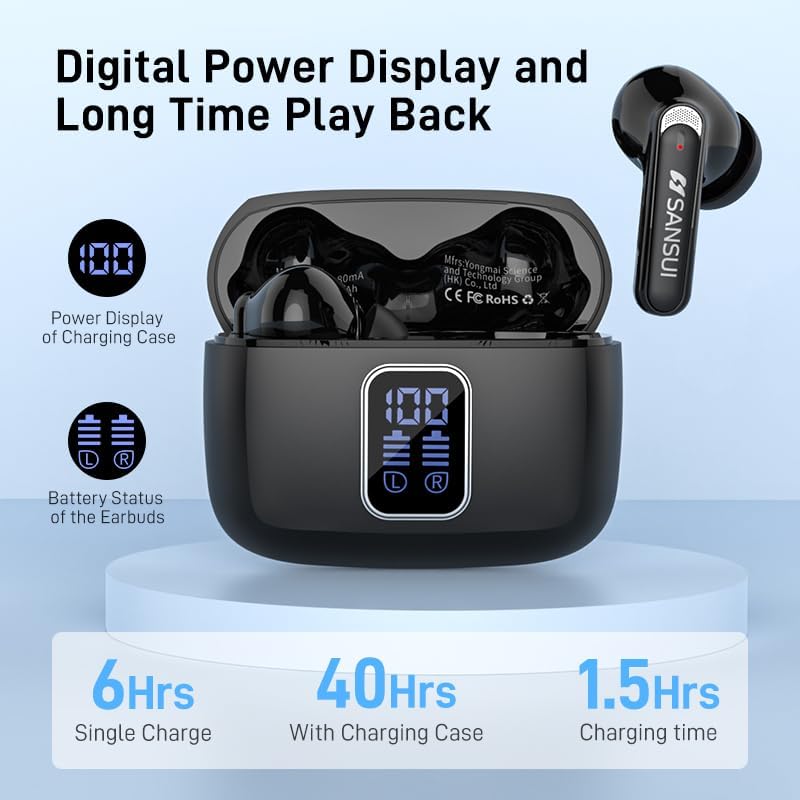
An infographic detailing the battery performance of the SANSUI W9 TWS Earbuds. It highlights 6 hours of playback on a single earbud charge, up to 40 hours total playtime with the charging case, and a charging time of 1.5 hours for the case.
- Connect the charging case to a USB power source using the provided USB cable.
- The LED display on the case will show the charging status.
- Place the earbuds into the charging case; they will begin charging automatically.
- Full charging time for the case is approximately 1.5 hours.
Initial Pairing
The earbuds are designed for easy pairing with your device using Bluetooth 5.4 technology, offering a stable connection up to 10 meters.
- Open the charging case. The earbuds will automatically enter pairing mode.
- On your device (smartphone, tablet, etc.), go to Bluetooth settings and turn Bluetooth on.
- Search for available devices and select "SANSUI W9" from the list.
- Once connected, you will hear a confirmation tone, and the earbuds will be ready for use.
Operating Instructions
Wearing the Earbuds
For optimal sound quality and comfort, choose the eartip size that best fits your ears. The earbuds are lightweight (3.7g each) and come with soft ear caps for extended wear.

This image demonstrates the comfort of the SANSUI W9 TWS Earbuds, showing them worn by a user. It also highlights their light weight (3.7g), the soft ear cap design, and the inclusion of three different eartip sizes (Small, Medium, Large) for a customizable fit.
- Select the eartips (S, M, L) that provide a snug and comfortable fit in your ear canal.
- Gently insert each earbud into your ear, twisting slightly to secure it in place.
- Ensure the microphone is facing downwards for clear call quality.
Touch Controls
The SANSUI W9 TWS Earbuds feature intuitive touch controls for managing your audio and calls.
- Play/Pause: Single tap on either earbud.
- Next Track: Double tap on the right earbud.
- Previous Track: Double tap on the left earbud.
- Answer/End Call: Single tap on either earbud during an incoming call or active call.
- Reject Call: Press and hold either earbud for 2 seconds during an incoming call.
- Activate Voice Assistant: Triple tap on either earbud.
- Volume Up: Press and hold the right earbud.
- Volume Down: Press and hold the left earbud.
Maintenance
Cleaning
- Regularly clean the earbuds and charging case with a soft, dry, lint-free cloth.
- Do not use abrasive cleaners, alcohol, or chemical solvents.
- Gently remove any earwax or debris from the eartips and speaker mesh using a small, soft brush or cotton swab.
Storage
- Always store the earbuds in their charging case when not in use to protect them and keep them charged.
- Store in a cool, dry place away from direct sunlight and extreme temperatures.
Troubleshooting
- Earbuds not pairing: Ensure both earbuds are in the charging case, then open the lid to activate pairing mode. Check your device's Bluetooth settings and try reconnecting.
- No sound from one earbud: Place both earbuds back into the charging case, close the lid for a few seconds, then open it again. This often resets the connection.
- Charging issues: Ensure the charging cable is securely connected to both the case and the power source. Check for any debris in the charging port.
- Low volume: Adjust the volume on both your connected device and using the earbud touch controls.
- Intermittent connection: Ensure you are within the 10-meter Bluetooth range and there are no significant obstructions between the earbuds and your device.
Specifications
| Feature | Specification |
|---|---|
| Model Name | W9 |
| Connectivity Technology | Wireless, Bluetooth |
| Bluetooth Version | 5.4 |
| Bluetooth Range | 10 Meters |
| Audio Driver Type | Dynamic Driver (10MM Speaker) |
| Noise Control | Passive Noise Cancellation (ENC) |
| Earbud Battery Life (Single Charge) | Up to 6 Hours |
| Total Playtime (with Charging Case) | Up to 40 Hours |
| Charging Case Battery Capacity | 400 mAh |
| Charging Time (Case) | 1.5 Hours |
| Control Method | Touch |
| Earbud Weight | 3.7 Grams (each) |
| Charging Case Dimensions | 58.7mm (L) x 47.7mm (W) x 26.6mm (H) |
| Water Resistance Level | Water Resistant |
| Material | ABS+PC |
Warranty and Support
SANSUI W9 TWS Earbuds come with a standard manufacturer's warranty. For detailed warranty information, please refer to the documentation included with your product or visit the official SANSUI website.
For further assistance, troubleshooting, or product inquiries, please contact SANSUI customer support. You may also find additional resources, including a downloadable PDF user manual, at the following link:
Ask a question about this manual
Ask about setup, troubleshooting, compatibility, parts, safety, or missing instructions. Manuals+ will review the question and use this page’s manual context to help answer it.