
NANLITE 9742634
Nanlite PavoSlim 60CL RGBWW LED Panel User Manual
Model: 9742634
Introduction
This manual provides detailed instructions for the safe and effective use of your Nanlite PavoSlim 60CL 2X.5 RGBWW LED Panel. Please read this manual thoroughly before operation and retain it for future reference.
The Nanlite PavoSlim 60CL is an exceptionally slim and lightweight RGBWW LED panel designed for professional lighting applications. It offers impressive output, accurate color rendition (CRI 96, TLCI 97), and flicker-free performance, suitable for high-frame-rate shooting. The unit supports both AC power and battery operation (NP-F and V-Mount) for versatile use on location.

Figure 1: Nanlite PavoSlim 60CL LED Panel with Softbox
Package Contents
Verify that all items listed below are included in your package. If any items are missing or damaged, please contact your dealer.
- PavoSlim 60CL LED Panel
- Control Unit
- Pop-up Softbox
- Fabric Grid (Eggcrate)
- 2 x Diffusion Cloths
- 2 x Mounting Brackets
- Super Clamp
- AC Power Cable
- Connecting Cables
- Carry Case

Figure 2: Complete PavoSlim 60CL Kit Contents
Safety Instructions
- Do not look directly into the light source when the light is on.
- Do not place the product in direct sunlight or near heating devices.
- Do not expose the product to rain or moisture.
- Always disconnect power before cleaning or maintenance.
- Ensure proper ventilation during operation to prevent overheating.
- Use only approved power adapters and accessories.
- Keep out of reach of children.
Setup
1. Mounting the LED Panel
- Attach the appropriate mounting bracket to the PavoSlim 60CL LED Panel.
- Secure the panel to a light stand using the mounting bracket and super clamp. Ensure it is stable.
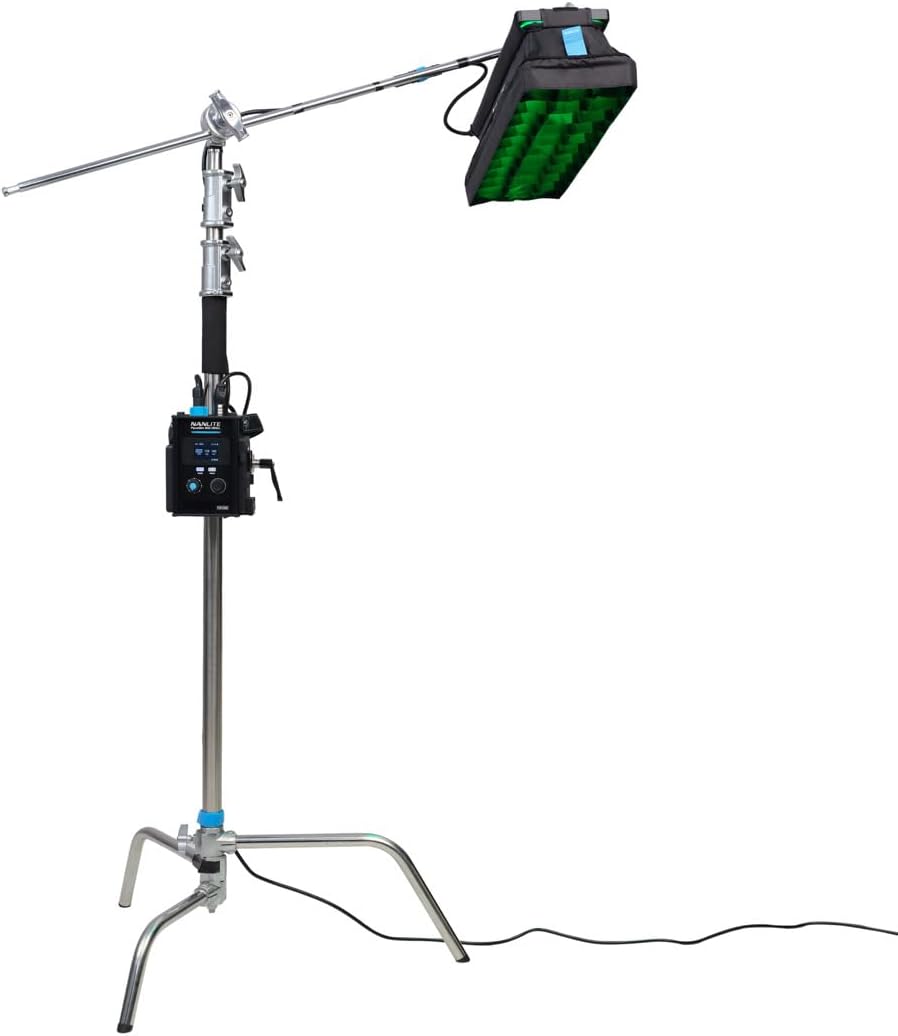
Figure 3: Panel Mounted on a C-Stand
2. Attaching the Softbox and Grid
- Unfold the pop-up softbox and attach it to the front of the LED panel.
- If desired, attach one or both diffusion cloths inside the softbox for softer light.
- For more directional light, attach the fabric grid (eggcrate) to the front of the softbox.

Figure 4: Panel with Softbox and Grid
3. Powering the Unit
- AC Power: Connect the AC power cable to the control unit, then plug it into a suitable power outlet.
- Battery Power: Insert compatible NP-F batteries into the designated slots on the control unit, or connect a V-Mount battery to the V-Mount plate.

Figure 5: Control Unit with V-Mount Battery
Operating Instructions
Control Unit Overview

Figure 6: PavoSlim 60CL Control Unit
- Display Screen: Shows current settings (brightness, color temperature, mode, etc.).
- MODE Button: Cycles through different lighting modes (CCT, HSI, RGBW, Effects).
- MENU Button: Accesses system settings and advanced options.
- Control Knobs: Adjust parameters such as brightness, color temperature, hue, saturation, and intensity depending on the selected mode.
Basic Operation
- Power On/Off: Press and hold the power button on the control unit.
- Adjust Brightness: In any mode, use the designated control knob to increase or decrease the light intensity.
- Change Color Temperature (CCT Mode): Press the MODE button until CCT mode is selected. Use the control knob to adjust the color temperature from warm to cool white light.
- Adjust Color (HSI Mode): Press the MODE button until HSI mode is selected. Use the control knobs to adjust Hue, Saturation, and Intensity.
- Special Effects: Press the MODE button to cycle through various built-in lighting effects. Refer to the on-screen display for effect names and parameters.

Figure 7: Panel Emitting Red Light
Bluetooth Connectivity
The PavoSlim 60CL supports Bluetooth connectivity for remote control via the Nanlink APP. Download the Nanlink APP from your device's app store and follow the in-app instructions to pair your light.
Maintenance
- Cleaning: Use a soft, dry cloth to clean the surface of the LED panel and control unit. Do not use abrasive cleaners or solvents.
- Storage: When not in use, store the unit in its carry case in a cool, dry place, away from direct sunlight and moisture.
- Battery Care: If using batteries, ensure they are charged regularly and stored according to battery manufacturer guidelines. Remove batteries if the unit will not be used for an extended period.
Troubleshooting
| Problem | Possible Cause | Solution |
|---|---|---|
| Light does not turn on. | No power supply; loose cable connection; dead battery. | Check AC power connection or battery charge. Ensure all cables are securely connected. |
| Light flickers. | Unstable power supply; incorrect settings. | Ensure stable power source. Reset settings or try a different mode. |
| Cannot connect via Bluetooth. | Bluetooth not enabled; incorrect pairing procedure; interference. | Ensure Bluetooth is enabled on both devices. Follow Nanlink APP pairing instructions. Move closer to the light. |
| Light is too dim. | Brightness set too low; power limitation. | Increase brightness setting. Ensure adequate power supply (e.g., fully charged batteries or AC). |
Specifications
| Feature | Detail |
|---|---|
| Model | PavoSlim 60CL |
| Item Model Number | 9742634 |
| Product Dimensions | 24 x 6 x 0.73 inches |
| Item Weight | 4.4 pounds |
| Color Temperature | Adjustable (CCT Mode) |
| Color Rendition Index (CRI) | 96 |
| Television Lighting Consistency Index (TLCI) | 97 |
| Connectivity | Bluetooth |
| Power Source | AC or Battery (NP-F, V-Mount) |
Warranty Information
The Nanlite PavoSlim 60CL comes with a 2-year limited warranty. This warranty can be extended to 3 years with online registration. The warranty covers defects in materials and workmanship under normal use. It does not cover damage caused by misuse, accident, unauthorized modification, or improper storage.
For warranty claims or to register your product, please visit the official Nanlite website or contact Nanlite customer support.
Customer Support
If you encounter any issues or have questions not covered in this manual, please contact Nanlite customer support:
- Website: www.nanlite.com
- Email: Refer to the official website for contact email.
- Phone: Refer to the official website for contact phone number.
You can also visit the NANLITE Store on Amazon for additional product information and support resources.
Important Notes
No official product videos from the seller were found in the provided data. Therefore, no videos are embedded in this manual.
Related documents9742634


Ask a question about this manual
Ask about setup, troubleshooting, compatibility, parts, safety, or missing instructions. Manuals+ will review the question and use this page’s manual context to help answer it.