User Manual for NV3180 Night Vision Goggles
Brand: WGFXYBFY
Introduction
The WGFXYBFY NV3180 Night Vision Goggles are designed for observation in various light conditions, from daylight to total darkness. Featuring 4X digital zoom, 4K video recording, and 36MP photo capabilities, these binoculars provide clear imaging for a wide range of outdoor activities. The built-in 850nm 3W infrared illuminator allows for observation up to 300 meters in complete darkness.
Safety Information
- Do not look directly at strong light sources through the device, as this may damage your eyes or the device's sensor.
- Keep the device away from extreme temperatures, humidity, and dust.
- Use only specified batteries (6*AA) and ensure correct polarity during installation.
- Do not attempt to disassemble or repair the device yourself. Contact qualified personnel for service.
- Keep out of reach of children.
Package Contents
Verify that all items are present in the package:
- NV3180 Night Vision Goggles (1)
- USB Cable (1)
- Shoulder Strap (1)
- Cloth Bag (1)
- Cleaning Cloth (1)
- User Manual (1)
- 32GB Memory Card (1)

Figure 1: Contents included in the NV3180 package.
Product Overview
Familiarize yourself with the components of your NV3180 Night Vision Goggles.

Figure 2: Front and rear view of the NV3180 with labeled components.
- SHOT Button: Used to capture photos or start/stop video recording.
- ON/OFF Button: Powers the device on or off.
- Zoom Out / IR- Button: Decreases digital zoom or decreases IR intensity.
- MODE Button: Switches between Photo, Video, and Playback modes.
- MENU Button: Accesses the device settings menu.
- Zoom In / IR+ Button: Increases digital zoom or increases IR intensity.
- Focus Lens: Adjusts the focus for clear viewing.
- Lanyard Buckle: Attachment point for the shoulder strap.
- Battery Button: Releases the battery compartment cover.
- Bracket Connection: For mounting to a tripod or other accessories.
- Lens Cap: Protects the objective lens when not in use.
- Battery Compartment: Houses the AA batteries.

Figure 3: The 2.31-inch HD viewing screen with 3x magnification.
Setup
1. Battery Installation
The NV3180 requires 6 AA batteries (not included, except for the 32GB memory card). Ensure batteries are inserted with correct polarity.
- Locate the battery compartment on the underside of the device (refer to Figure 2, item 12).
- Press the Battery Button (Figure 2, item 9) to open the battery compartment cover.
- Insert 6 AA batteries according to the polarity indicators inside the compartment.
- Close the battery compartment cover securely until it clicks into place.

Figure 4: Battery compartment for 6 AA batteries.
2. Memory Card Installation
The device supports up to a 32GB TF (MicroSD) card for storing photos and videos. A 32GB memory card is included.
- Locate the TF card slot, typically next to the USB port.
- Insert the 32GB TF card into the slot with the gold contacts facing down until it clicks into place.
- To remove, gently push the card in until it springs out.
Operating Instructions
1. Power On/Off
- To power on, press and hold the ON/OFF Button (Figure 2, item 2) until the screen illuminates.
- To power off, press and hold the ON/OFF Button again until the screen turns off.
2. Adjusting Focus
Rotate the Focus Lens (Figure 2, item 7) until the image on the screen appears clear and sharp.
3. Day and Night Vision Modes
The device can be used in both day and night conditions. In low light or total darkness, activate the infrared illuminator.
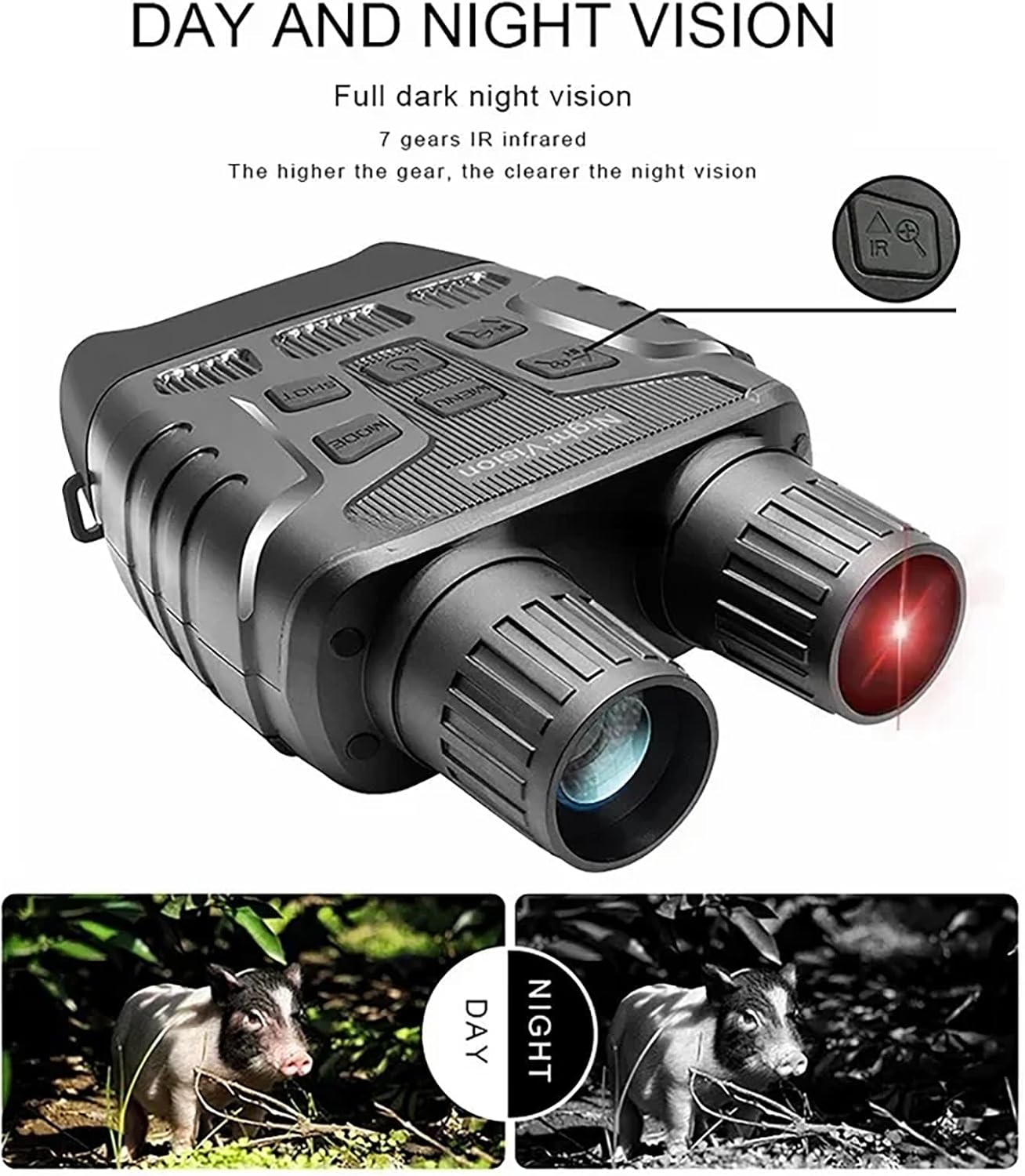
Figure 5: Day and Night Vision capability.

Figure 6: HD Night Vision Full Black Effect comparison.
4. Infrared (IR) Adjustment
The device features a 7-level IR adjustment for optimal viewing in varying degrees of darkness. Higher levels provide brighter images.
- Press the Zoom In / IR+ Button (Figure 2, item 6) to increase the IR intensity.
- Press the Zoom Out / IR- Button (Figure 2, item 3) to decrease the IR intensity.
5. Digital Zoom
The NV3180 has a 4X digital zoom capability.
- Press the Zoom In / IR+ Button (Figure 2, item 6) to zoom in.
- Press the Zoom Out / IR- Button (Figure 2, item 3) to zoom out.
6. Mode Selection (Photo/Video/Playback)
Press the MODE Button (Figure 2, item 4) to cycle through the available modes:
- Photo Mode: For capturing still images.
- Video Mode: For recording video footage.
- Playback Mode: For reviewing captured photos and videos.
7. Capturing Photos and Videos
- In Photo Mode, press the SHOT Button (Figure 2, item 1) once to take a photo.
- In Video Mode, press the SHOT Button once to start recording. Press it again to stop recording.
8. Menu Settings
Press the MENU Button (Figure 2, item 5) to access settings such as resolution, date/time, format, etc. Use the Zoom/IR buttons to navigate and the SHOT button to confirm selections.
Maintenance
- Cleaning Lenses: Use the provided cleaning cloth or a soft, lint-free cloth specifically designed for optical lenses. Do not use abrasive materials or harsh chemicals.
- Cleaning Body: Wipe the body of the device with a soft, damp cloth. Avoid getting water into electronic components.
- Storage: Store the device in a cool, dry place, away from direct sunlight and extreme temperatures. If storing for extended periods, remove the batteries to prevent leakage.
- Water Resistance: The device has an IP56 waterproof rating, meaning it is protected from dust and high-pressure water jets. Do not submerge the device in water.
Troubleshooting
| Problem | Possible Cause | Solution |
|---|---|---|
| Device does not power on. | Batteries are dead or incorrectly inserted. | Replace batteries or check polarity. |
| Image is blurry. | Focus lens not adjusted; dirty lens. | Rotate the focus lens; clean the lens with the provided cloth. |
| Cannot see in total darkness. | IR illuminator is off or too low. | Increase IR intensity using the IR+ button. |
| Cannot save photos/videos. | Memory card is full, not inserted, or corrupted. | Check memory card insertion; delete old files; format card (will erase all data); replace card if corrupted. |
| Screen is blank or flickering. | Low battery; software issue. | Replace batteries; try restarting the device. |
Specifications
| Observation Distance (Total Darkness) | 200-300 meters |
| Observation Distance (Weak Light) | 3m ~ Infinity |
| Screen | 2.31" HD TFT with 3x large window magnifier |
| Lens | Fov=10°, F=24mm |
| Video Resolution | 4K / FHD / HD |
| Photo Resolution | 36M / 12M / 8M / 5M / 2M / 1M |
| Digital Zoom | 4X |
| IR Illuminator | 7-Level IR Adjustment, 3W 850nm |
| Power Supply | 9V, 6*AA Battery |
| Storage | Up to 32GB TF Card (MicroSD) |
| Product Dimensions | 196 x 146 x 59mm (7.72 x 5.75 x 0.1 inches) |
| Weight | 0.576 kg (1.27 lbs) |
| Waterproof Rating | IP56 |
Warranty and Support
For warranty information and technical support, please refer to the contact details provided with your purchase or visit the official WGFXYBFY website. Keep your purchase receipt as proof of purchase for warranty claims.


