
Introduction
The Medcursor Cordless Hand Massager is designed to provide comprehensive relief and relaxation for your hands. Featuring advanced airbag compression, acupressure beads, and soothing heat therapy, this device targets key pressure points to alleviate pain, stiffness, and numbness. Its portable and rechargeable design ensures you can enjoy a professional-grade hand massage anytime, anywhere.
This manual provides essential information for the safe and effective operation of your Medcursor Hand Massager. Please read it thoroughly before first use and retain it for future reference.

Figure 1: Medcursor Cordless Hand Massager (Grey)
Important Safety Information
Please observe the following safety precautions to prevent injury or damage to the device:
- Avoid prolonged use on the same area.
- Do not use if you have a blood clot, deep vein thrombosis, or are prone to blood clots.
- Do not use on broken skin or areas with inflammation.
- Keep away from heat sources.
- Do not use while sleeping or bathing.
- Consult a doctor before use if you have a medical condition or are pregnant.
Disclaimer: Statements regarding dietary supplements have not been evaluated by the FDA and are not intended to diagnose, treat, cure, or prevent any disease or health condition. This product is not a medical device.
Product Features
Tailor-Made Hand Massage Comfort
The massager offers a highly customizable experience to suit individual needs:
- 6 Selectable Massage Modes: Choose from various massage patterns for different sensations.
- 6 Intensity Levels: Adjust the pressure from gentle to firm.
- 3 Timer Settings: Select 10, 15, or 20-minute massage sessions.
- 2 Heat Options: Apply soothing warmth to your hands.
It is recommended that first-time users and individuals with sensitive skin begin with Mode 2 at Intensity Level 1.
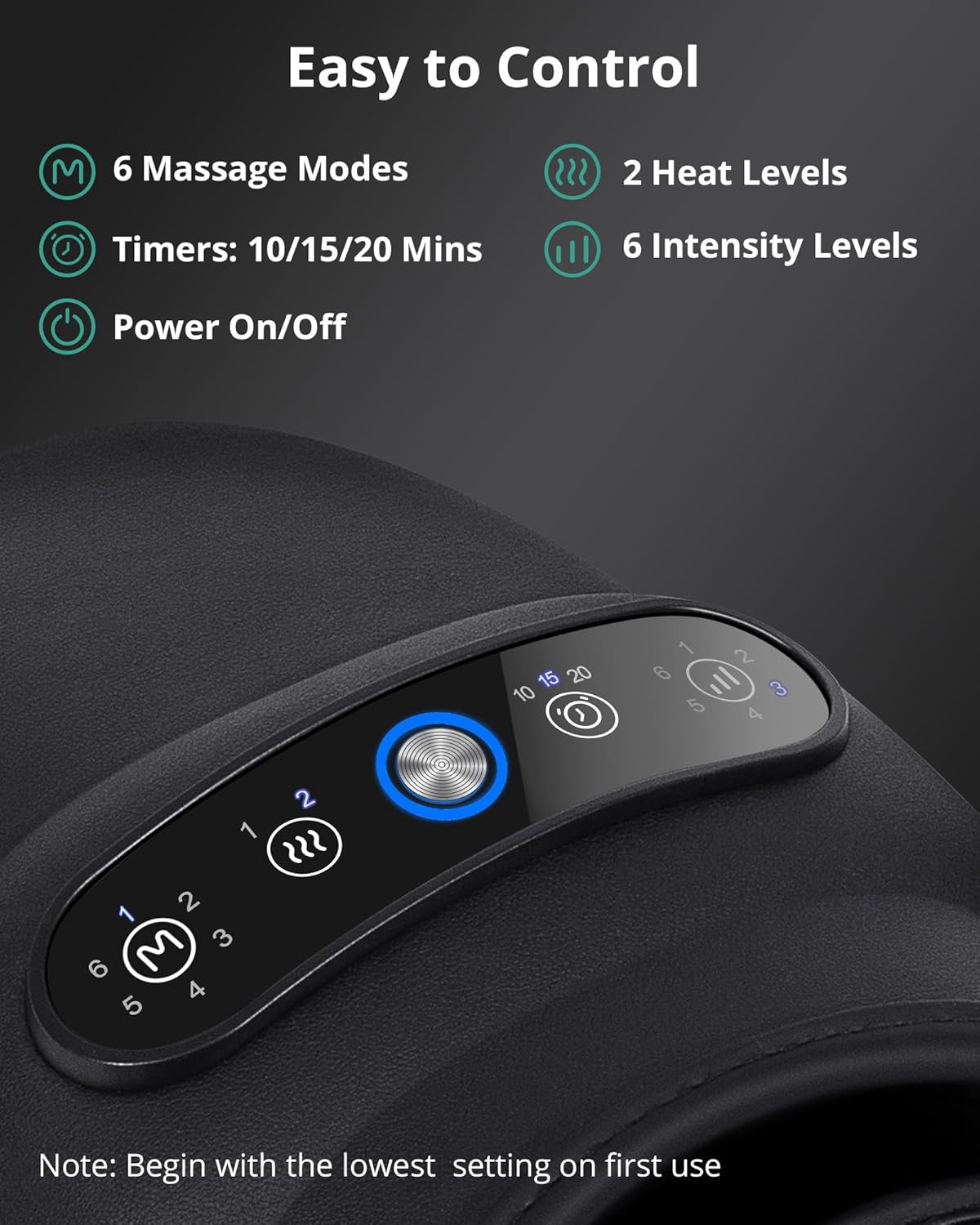
Figure 2: Easy-to-use control panel with mode, heat, timer, and intensity settings.
Dual-Level Soothing Heat Therapy
The massager provides two heat levels to enhance relaxation and relieve discomfort:
- Low Heat: 104-110.6°F (40-43.7°C)
- High Heat: 116-122°F (46.7-50°C)
Integrated heat functionality helps rejuvenate and relax overworked hands, effectively reducing sensations of pain, stiffness, and numbness.

Figure 3: Illustration of the two heat levels and their benefits.
Airbag & Acupressure Massage
Experience a deep, comprehensive hand massage from palm to fingertips. The device utilizes airbag pressure and bi-directional acupoint massage, targeting every acupoint in the hand with upper and lower airbags. It features 7 acupressure beads, offering two unique massage experiences:
- Zone Design: Fingers placed next to beads for gentle therapy, ideal for beginners and pain-sensitive individuals.
- Enhanced Massage: Fingers placed directly over beads for a stronger, more intense effect.
For those with low pain tolerance, it is advisable to try placing fingers beside the beads first.

Figure 4: Acupressure bead placement for gentle vs. enhanced massage.
Long-Lasting & Rechargeable Battery
Powered by a 2500mAh battery, the massager offers prolonged usage:
- Usage Time: 70 to 180 minutes per charge, depending on intensity settings.
- Rechargeable Design: Ensures continuous relaxation without frequent recharging.
The device can also operate while plugged in at low power if the battery is low.

Figure 5: Battery life and charging flexibility.
Setup
Package Contents
Upon opening the package, ensure all items are present:
- Packing Box
- Medcursor Hand Massager
- User Manual (this document)
- USB-C Charging Cable
Please note: An AC Power Adapter is NOT included. You can use a standard DC 5V 2A wall plug, laptop, or power bank for charging.

Figure 6: Contents included in the product package.
Charging the Device
Before first use, fully charge the hand massager. Connect the provided USB-C charging cable to the charging port on the device and plug the other end into a compatible power source (DC 5V 2A adapter, laptop, or power bank). The charging indicator light will show the charging status.
Operating Instructions
Getting Started
- Ensure the device is charged or connected to a power source.
- Place your hand comfortably into the massager. The adjustable wrap can be used to secure your hand if desired.
- Press the Power On/Off button to turn on the device.
Selecting Massage Settings
Use the control panel buttons to customize your massage experience:
- Mode Button (M): Press to cycle through the 6 available massage modes.
- Heat Button (Wavy lines): Press to select between Low Heat, High Heat, or turn heat off.
- Timer Button (Clock icon): Press to set the massage duration to 10, 15, or 20 minutes.
- Intensity Button (Vertical bars): Press to adjust the airbag compression intensity through 6 levels.
For optimal results, experiment with different combinations of modes, intensity, and heat to find your preferred setting. Remember to start with lower settings if you are new to hand massagers or have sensitive hands.
Maintenance
To ensure the longevity and hygiene of your Medcursor Hand Massager, follow these maintenance guidelines:
- Cleaning: Wipe the exterior of the massager with a soft, damp cloth. Do not use abrasive cleaners or immerse the device in water.
- Storage: Store the massager in a cool, dry place away from direct sunlight and extreme temperatures.
- Avoid Damage: Do not place heavy objects on the massager or drop it. Keep it away from sharp objects.
Troubleshooting
If you encounter any issues with your Medcursor Hand Massager, please refer to the following common solutions:
| Problem | Possible Cause | Solution |
|---|---|---|
| Device does not turn on. | Low battery or not charged. | Charge the device fully. Ensure the charging cable is securely connected. |
| Heat function is not working. | Heat setting not activated or device not plugged in (if operating at low power). | Press the Heat button to activate. Ensure the device has sufficient battery or is plugged in. Note: Heat only works if not plugged in, as per some user reviews. |
| Massage pressure feels too weak/strong. | Intensity level needs adjustment. | Adjust the Intensity Level using the corresponding button. Ensure hand is properly positioned. |
| Device stops unexpectedly. | Timer session ended or low battery. | Check the timer setting. Recharge the device if the battery is low. |
If the problem persists after trying these solutions, please contact Medcursor Customer Service for assistance.
Specifications
| Feature | Detail |
|---|---|
| Brand | Medcursor |
| Model Number | MD-HM02 |
| Product Dimensions | 11.81 x 6.69 x 5.91 inches |
| Item Weight | 2.16 Pounds (approx. 0.98 kg) |
| Material | Polyurethane |
| Power Source | Battery Powered (2500mAh) |
| Heat Levels | Low (104-110.6°F), High (116-122°F) |
| Massage Modes | 6 |
| Intensity Levels | 6 |
| Timer Settings | 10, 15, 20 minutes |
Warranty & Support
The Medcursor Hand Massager comes with a 12-month complimentary warranty. In the event of any product issues, please contact Medcursor Customer Service for attentive and prompt support.
For further assistance or to download the official user manual in PDF format, please visit the Medcursor User Manual (PDF).
You can also visit the official Medcursor Store on Amazon for more products and information.
