1. Introduction
This manual provides detailed instructions for the setup, operation, and maintenance of your LEMEGA MSY6 Bluetooth Stereo System. Please read this manual thoroughly before using the product to ensure proper function and safety. Keep this manual for future reference.

Image: The LEMEGA MSY6 Bluetooth Stereo System in Black Oak, showcasing its compact design and included remote control.
2. Safety Information
Always follow basic safety precautions when using this product to reduce the risk of fire, electric shock, and injury.
- Do not expose the unit to rain or moisture.
- Do not block any ventilation openings.
- Ensure the power adapter is compatible with your local power supply.
- Do not open the unit. Refer all servicing to qualified personnel.
- Keep the unit away from direct sunlight, heat sources, and strong magnetic fields.
3. What's in the Box
Upon unpacking, please verify that all items listed below are present and in good condition:
- 1 x LEMEGA MSY6 CD Player FM Radio
- 1 x Remote Control
- 1 x Mains Power Adapter
- 1 x User Manual (this document)

Image: A visual representation of the package contents, including the MSY6 unit, remote control, power adapter, and user manual.
4. Product Overview
4.1 Front Panel Controls and Display
The front panel features a 2.4-inch full-color TFT display, control buttons, and a central rotary knob for volume and menu navigation.

Image: The front of the LEMEGA MSY6 unit, highlighting the central display and various control buttons for easy operation.
- Display: Shows current mode, track information, radio station, time, and menu options.
- Power/Volume Knob: Rotate to adjust volume, press to power on/off or confirm selections.
- Navigation Buttons: For navigating menus and skipping tracks.
- Mode Button: Switches between CD, FM, Bluetooth, USB, and Aux-in modes.
- Alarm/Sleep Buttons: For setting alarms and sleep timer.
4.2 Rear Panel Connections
The rear panel provides essential ports for power, external audio devices, and antenna connection.
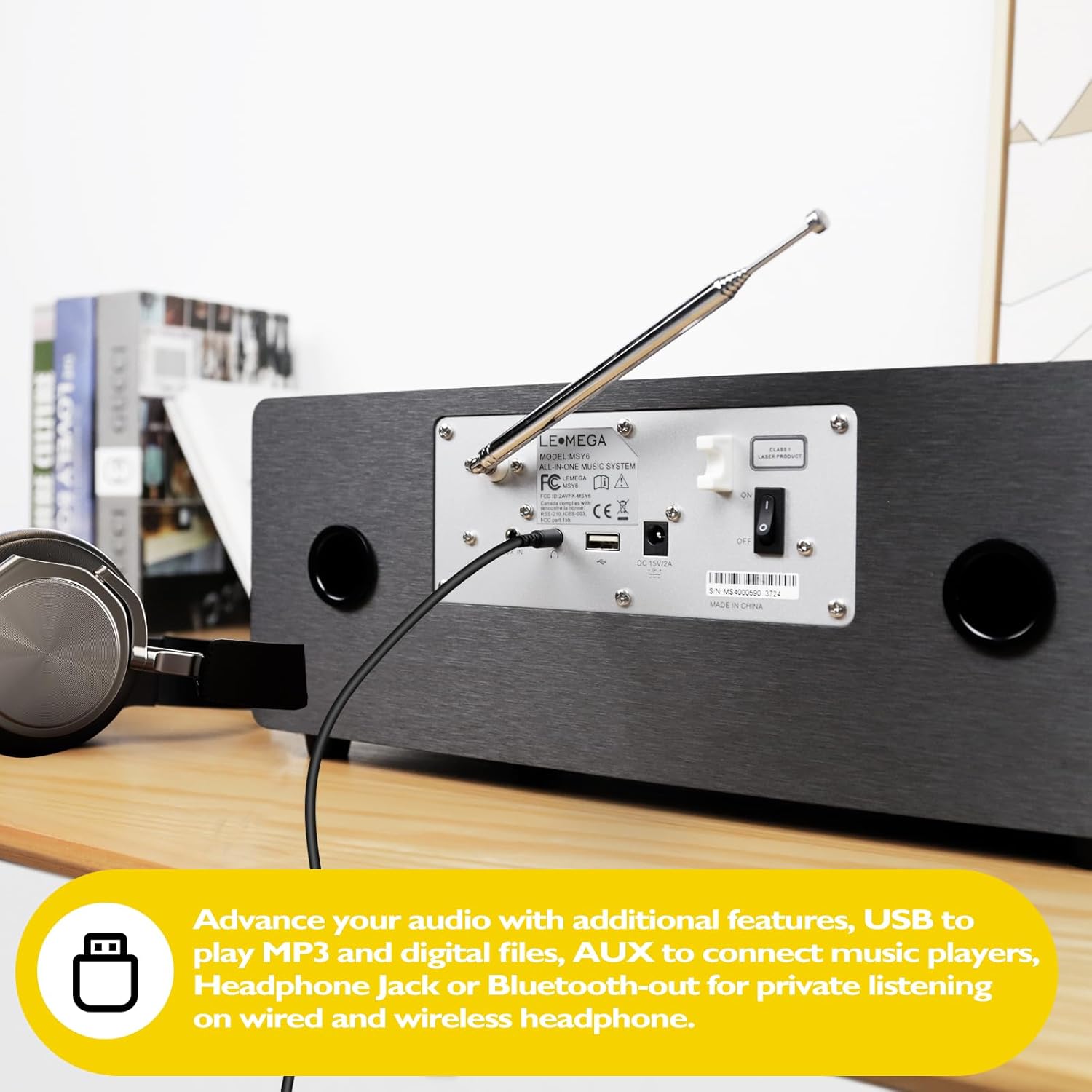
Image: The rear panel of the MSY6, illustrating the various input and output ports including USB and Aux-in.
- DC IN: Connect the provided power adapter here.
- USB Port: For playing MP3 and other digital audio files from a USB drive.
- AUX IN: Connect external audio devices using a 3.5mm audio cable.
- FM Antenna: Extend for optimal FM radio reception.
4.3 Remote Control
The full-function remote control allows convenient operation from a distance.

Image: The LEMEGA MSY6 unit positioned on a table, with its remote control clearly visible in the foreground.
Familiarize yourself with the buttons on the remote control for easy access to all functions.
5. Setup
- Placement: Place the MSY6 on a stable, flat surface, ensuring adequate ventilation around the unit. Avoid placing it near heat sources or in direct sunlight.
- Power Connection: Connect the provided mains power adapter to the "DC IN" port on the rear of the unit, then plug the adapter into a wall outlet.
- Antenna: Extend the FM antenna for optimal radio reception. Adjust its position if reception is poor.
- Initial Power On: Press the Power/Volume knob on the front panel or the Power button on the remote control to turn on the unit.
6. Operating Modes
6.1 CD Player Operation
The MSY6 features a slot-in CD player for your audio CDs.
- Insert a CD into the slot. The unit will automatically switch to CD mode and begin playback.
- Use the Play/Pause, Stop, Skip Forward, and Skip Backward buttons on the unit or remote to control playback.
Image: The LEMEGA MSY6 with a CD being inserted into its slot-in CD player.
Video: Demonstrates the operation of the MSY6 CD Player, including disc insertion and basic playback.
6.2 FM Radio Operation
Tune into your favorite FM radio stations.
- Press the Mode button to select FM Radio.
- Use the navigation buttons to scan for stations or manually tune to a frequency.
- Press and hold a preset button (1-20) to save the current station. Press briefly to recall a saved station.
6.3 Bluetooth Audio Streaming
Connect your smartphone or other Bluetooth-enabled device to stream audio wirelessly.
- Press the Mode button to select Bluetooth Audio. The display will show "Bluetooth Pairing".
- On your smart device, enable Bluetooth and select "LEMEGA MSY6" from the list of available devices.
- Once paired, you can play music from your device through the MSY6.

Image: The LEMEGA MSY6 on a bedside table, demonstrating Bluetooth pairing with a smartphone.
Video: Shows the process of fast pairing a smart device via Bluetooth 5.3 to play music wirelessly.
6.4 USB Player Operation
Play MP3 and other digital audio files directly from a USB drive.
- Insert a USB drive into the USB port on the rear panel.
- Press the Mode button to select USB. The unit will read the files and begin playback.
- Use the navigation buttons to select tracks.
Video: Demonstrates how to play MP3 music files from a USB drive on the MSY6.
6.5 Aux-in Operation
Connect external audio sources like MP3 players or older devices.
- Connect a 3.5mm audio cable from your external device's headphone jack or line-out to the AUX IN port on the rear panel of the MSY6.
- Press the Mode button to select AUX IN.
- Control playback from your external device.
7. Advanced Features
7.1 Dual Alarms & Sleep Timer
Set multiple alarms and use the sleep timer for convenience.
- Setting Alarms: Press the Alarm button to enter alarm setup. Follow the on-screen prompts to set time, source (FM or alarm sound), and weekday/weekend modes.
- Sleep Timer: Press the Sleep button to activate the sleep timer. Choose a duration (e.g., 15, 30, 60 minutes) after which the unit will automatically turn off.
7.2 Equalizer Settings
Customize the audio output to your preference with the built-in equalizer.
- Navigate to the System Settings menu on the display.
- Select "Equalizer" to choose from preset EQ modes (Classic, Jazz, Pop, Rock, Normal) or create a custom EQ setting.
Video: Demonstrates how to access and adjust the personal EQ settings for various music styles like Classic, Jazz, or Pop.
7.3 Bluetooth Headphone Connection (Transmitter)
Stream audio from the MSY6 to your Bluetooth headphones for private listening.
- Ensure your Bluetooth headphones are in pairing mode.
- On the MSY6, navigate to the Bluetooth Transmitter setting (refer to the full manual for exact menu path if not immediately visible).
- Select your headphones from the list of found devices to connect.
Image: The LEMEGA MSY6 on a bedside table with a pair of Bluetooth headphones, illustrating the unit's ability to transmit audio wirelessly.
Video: Demonstrates the built-in Bluetooth transmitter function, allowing music to be streamed from the MSY6 to headphones.
8. Maintenance
- Cleaning: Use a soft, dry cloth to clean the exterior of the unit. Do not use liquid cleaners or abrasive materials.
- CD Care: Handle CDs by their edges. Clean dirty CDs with a soft, lint-free cloth, wiping from the center outwards.
- Storage: If storing the unit for an extended period, unplug it from the power outlet and store it in a cool, dry place.
9. Troubleshooting
| Problem | Possible Cause | Solution |
|---|---|---|
| No power | Power adapter not connected or outlet not working. | Check power connections. Try a different outlet. |
| No sound | Volume too low, incorrect mode selected, or external device issue. | Increase volume. Ensure correct mode (CD, FM, Bluetooth, USB, AUX). Check external device connections/volume. |
| CD not playing | CD is dirty, scratched, or inserted incorrectly. | Clean the CD. Try a different CD. Ensure CD is inserted label-side up. |
| Poor FM reception | Antenna not extended or poor signal area. | Fully extend and reposition the FM antenna. Try auto-scanning for stations. |
| Bluetooth pairing issues | Device too far, Bluetooth not enabled, or already paired to another device. | Ensure devices are within range. Enable Bluetooth on your device. Disconnect from other Bluetooth devices. |
10. Specifications
| Feature | Detail |
|---|---|
| Product Dimensions (L x W x H) | 14 x 8 x 5.5 inches |
| Item Weight | 8 pounds |
| Model Number | MSY6 |
| Brand | LEMEGA |
| Connectivity Technology | Auxiliary, Bluetooth, Infrared, USB |
| Speaker Type | Stereo |
| Audio Output Power | 100W (Total) |
| Display | 2.4" Full Colour TFT Display |
| CD Compatibility | Audio CD |
| USB Playback | MP3 and other digital audio files |
Image: The product dimensions of the LEMEGA MSY6, indicating its length, width, and height.
Video: Illustrates the internal speaker components and highlights the 100W powerful stereo sound output of the MSY6.
11. Warranty and Support
LEMEGA products are designed for reliability and performance. For warranty information and technical support, please refer to the warranty card included with your product or visit the official LEMEGA website.
Online Support: Visit the LEMEGA Store on Amazon


