
Wooask A8 TransBuds
Wooask A8 TransBuds User Manual
Model: A8 TransBuds | Brand: Wooask
Introduction
The Wooask A8 TransBuds are advanced AI-powered translator earbuds designed for seamless real-time communication across various languages. This device operates independently with a built-in touchscreen, eliminating the need for a smartphone or external applications for core translation functions. It supports both online and offline translation modes, along with integrated ChatGPT AI for intelligent voice interactions and information retrieval. The A8 TransBuds are engineered for high accuracy and rapid response, making them suitable for travel, business, and general communication needs.

Image: The Wooask A8 TransBuds device, showcasing its compact design, integrated touchscreen display with various mode icons, and the earbuds nestled in their charging case.
Setup Guide
1. Charging the Device
Before initial use, fully charge your Wooask A8 TransBuds. Use the provided Type-C charging cable. A full charge takes approximately 1.5 hours and provides up to 35 hours of continuous working time.

Image: An illustration depicting the Wooask A8 TransBuds device with its earbuds, highlighting the 1000mAh battery, Type-C charging port, 1.5 hours for full charge, and 35 hours of continuous working time.
2. Powering On/Off
- Power On: Press and hold the power button (located on the side) until the screen illuminates.
- Power Off: Press and hold the power button until a power-off prompt appears on the screen, then confirm.
3. Initial Setup & Wi-Fi Connection
Upon first power-on, the device will guide you through initial setup, including system language selection (20 languages supported). Connect to a stable Wi-Fi network for full online translation capabilities and ChatGPT AI functionality. Navigate to the 'Settings' menu on the touchscreen to manage Wi-Fi connections.
4. Earbud Pairing
The earbuds are pre-paired with the main device. Simply open the case, and they will automatically connect. Battery levels for both the device and earbuds are displayed on the screen.

Image: A visual representation of the Wooask A8 TransBuds device showing instant pairing with the earbuds upon opening the case, displaying battery levels for both components.
Operating Modes
The Wooask A8 TransBuds offer multiple modes to suit different translation scenarios:
1. Voice Translation (Speaker Mode)
This mode utilizes the device's built-in 2W speaker for clear, audible translations, ideal for conversations in noisy environments or when sharing translations with a group. Select "Voice Translation" from the main menu. Choose your desired source and target languages (supports 144 languages and accents online). Press and hold the corresponding A or B button on the side of the device to speak, and the translation will be played aloud.

Image: A user holding the Wooask A8 TransBuds device in Speaker Mode, demonstrating its use for public translation without earbuds. The device's 2W speaker is highlighted.
2. Translator Earbuds (In-Ear Mode)
For private conversations, use the included earbuds. Select "Translator Earbuds" from the main menu. Each earbud can be assigned a different language, allowing for two-way, real-time private translation. Speak into the device, and the translation will be delivered directly to the earbuds.
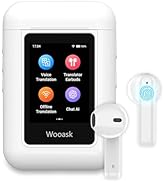
Image: Two individuals using the Wooask A8 TransBuds in In-Ear Mode for private, real-time translation. The earbuds are shown in their ears, with speech bubbles indicating translation.
3. Offline Translation
The A8 TransBuds support offline translation for 16 key languages, ensuring communication even without an internet connection. Select "Offline Translation" from the main menu. This feature is particularly useful for travel in areas with limited connectivity.

Image: A list of 16 languages supported for offline translation, including English, Spanish, Simplified Chinese, Traditional Chinese, Japanese, Arabic, Portuguese, Russian, French, German, Korean, Thai, Hindi, Vietnamese, Italian, and Indonesian. Scenarios like in-flight communication and outdoor exploration are depicted.
4. ChatGPT AI
Engage with the integrated ChatGPT AI for intelligent voice interactions, instant Q&A, and personalized information. Select "Chat AI" from the main menu. Speak your questions, and the AI will provide responses. This feature requires an internet connection.

Image: The Wooask A8 TransBuds device displaying a ChatGPT AI interface, with example questions like "What customs should I follow in Japan?" and "What are some must-see attractions in Barcelona?".
5. Additional Functions
The device also includes a music player, video player, and recorder functions, accessible from the main menu. These features enhance the device's utility beyond translation.
Key Features & Technology
- Truly Independent Operation: The A8 TransBuds feature a built-in touchscreen and operate without requiring a smartphone or external apps.
- Extensive Language Support: Supports 74 languages and 70 accents online, and 16 key languages offline.
- High Accuracy & Speed: Powered by a Qualcomm quad-core chipset, delivering translations with 97% accuracy in under 0.5 seconds.
- Advanced Noise Reduction: Wooask’s advanced ENC noise reduction technology ensures crystal-clear audio for flawless translation.
- Long-Lasting Battery: Equipped with a 1000mAh battery, providing up to 35 hours of continuous use.

Image: A comparison showing "clunky translator earbuds" that require a phone and app versus the Wooask A8 TransBuds, which offer independent use with a built-in screen.
Maintenance
- Cleaning: Use a soft, dry, lint-free cloth to clean the device and earbuds. Avoid using abrasive materials or harsh chemicals.
- Storage: Store the device and earbuds in their charging case when not in use to protect them and ensure they remain charged. Keep in a cool, dry place away from direct sunlight and extreme temperatures.
- Charging: Always use the original charging cable provided with the device. Avoid overcharging or completely draining the battery to prolong its lifespan.
Troubleshooting
| Issue | Possible Solution |
|---|---|
| Device does not power on. | Ensure the device is fully charged. Connect to the charger and try again. |
| Earbuds not pairing. | Place earbuds back into the charging case, close the lid, then open it again. Ensure Bluetooth is enabled on the main device. |
| Translation accuracy issues. | Ensure a stable internet connection for online translation. Speak clearly and at a moderate pace. Check selected languages. |
| No sound from speaker/earbuds. | Check volume settings on the device. Ensure earbuds are properly seated in the ears or the speaker is not obstructed. |
| Offline translation not working. | Verify that the selected languages are among the 16 supported for offline use. |
If issues persist, please refer to the official Wooask support channels for further assistance.
Specifications
- Model: A8 TransBuds
- Brand: Wooask
- Package Dimensions: 5.39 x 3.74 x 1.89 inches
- Item Weight: 9.6 ounces
- ASIN: B0DFY52529
- Batteries: 3 Lithium Ion batteries required (included)
- Date First Available: September 3, 2024
- Manufacturer: Wooask Tech
- Online Languages: 144 languages and accents
- Offline Languages: 16 languages
- Charging Port: Type-C
- Speaker: 2W
- Chipset: Qualcomm quad-core
- Noise Reduction: ENC technology
Warranty and Support
For warranty information, technical support, or service inquiries regarding your Wooask A8 TransBuds, please visit the official Wooask website or contact their customer service directly. Keep your purchase receipt for warranty claims.
Manufacturer: Wooask Tech
Seller: WOOASK (via Amazon)
Related documentsA8 TransBuds


Ask a question about this manual
Ask about setup, troubleshooting, compatibility, parts, safety, or missing instructions. Manuals+ will review the question and use this page’s manual context to help answer it.