
Introduction
Thank you for choosing the Fixwal L-Shaped Gaming Desk. This manual provides detailed instructions for assembly, operation, maintenance, and troubleshooting to ensure optimal use of your new desk. Please read this manual thoroughly before assembly and retain it for future reference.
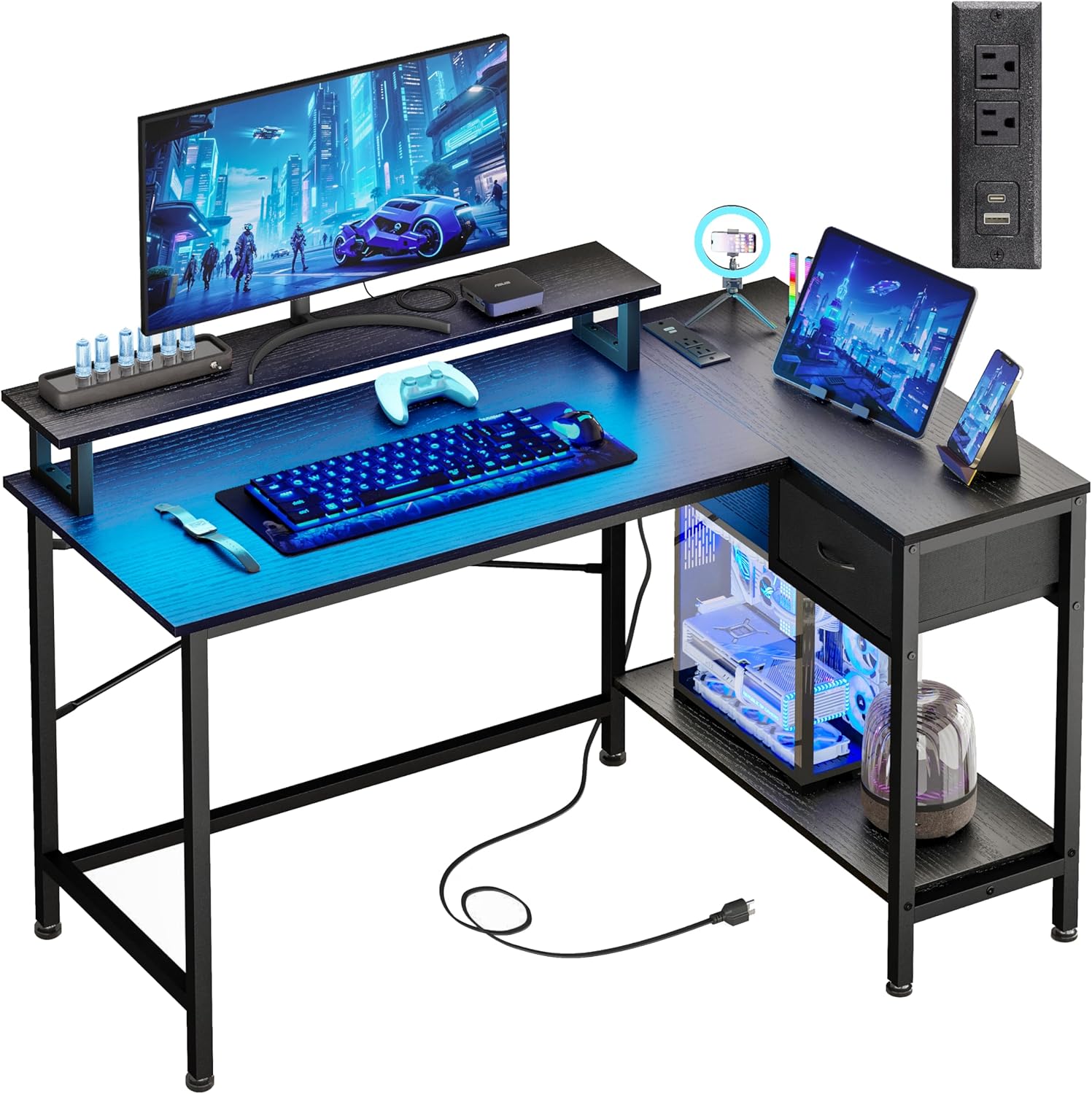
Image: The Fixwal L-Shaped Gaming Desk, showcasing its design and functionality in a typical user environment.
Safety Information
To prevent injury or damage to the product, please observe the following safety guidelines:
- Do not exceed the maximum weight capacity of 150 lbs (68 kg) for the desk surface.
- Ensure all screws and fasteners are securely tightened during assembly and periodically check for looseness.
- Keep liquids away from the power outlets and LED light strip to prevent electrical hazards.
- Assemble the desk on a soft, clean surface to avoid scratching the components.
- This L-shaped desk is not reversible; the drawer can only be installed on the right side.
Warning: This desk should not be loaded beyond 150 lbs to ensure safety and stability.
Package Contents
Before beginning assembly, verify that all components are present and undamaged. If any parts are missing or damaged, please contact customer support.
- Desk Panels (Main desktop, L-extension, monitor stand, drawer panels, bottom shelf)
- Metal Frame Components (Legs, support bars)
- Hardware Kit (Screws, bolts, Allen wrench)
- LED Strip Light Kit (LED strip, controller, remote)
- Power Outlet Unit (2 AC outlets, 1 USB-A, 1 USB-C port, power cord)
- Adjustable Foot Pads
- Assembly Instructions Manual
Setup and Assembly Instructions
Assembly typically takes 30-60 minutes. Follow the included step-by-step instructions carefully. It is recommended to have two people for assembly.
Key Assembly Tips:
- Identify all parts: Lay out all components and hardware, matching them with the parts list in the separate assembly guide.
- Do not overtighten screws initially: Hand-tighten screws during initial assembly, then fully tighten once the entire structure is aligned.
- Install the monitor stand: The monitor stand is designed to accommodate two 21-24 inch monitors and supports up to 50 lbs.
- Ensure stability: The desk features cross-bracing for enhanced stability. Ensure these are correctly installed.
- Adjust foot pads: Use the adjustable anti-slip foot pads to level the desk on uneven surfaces and protect your floor.

Image: A detailed diagram illustrating the dimensions and weight capacities for different sections of the desk, including the main desktop (150 lbs), monitor stand (50 lbs), and drawer (20 lbs).

Image: A close-up view of the X-shaped cross-bracing, highlighting the structural support for enhanced desk stability.
Operating Instructions
LED Strip Lights:
The integrated LED strip lights offer customizable ambiance for your workspace or gaming setup.
- Control Methods: The LED lights can be controlled via a physical switch control or a Bluetooth control application on your smartphone.
- Color Options: Choose from 12 static RGB colors.
- Brightness: Adjust between 6 brightness levels.
- Dynamic Modes: Explore various dynamic lighting modes.
- Memory Function: The lights retain your last setting when powered off and on.

Image: A smartphone displaying the Bluetooth application interface for controlling the desk's LED lights, showing color and mode selection.

Image: An infographic highlighting the RGB LED light strip's capabilities, such as 20 dynamic modes, a built-in microphone for sound reactivity, music synchronization, and a timing function.
Power Outlets:
The integrated power strip provides convenient access to charging ports.
- AC Outlets: Two standard 120V/12A AC outlets for powering devices like monitors or laptops.
- USB Ports: One USB-A charging port and one USB-C charging port (5V/2A) for mobile devices, power banks, and gaming accessories.
- Power Cord: The unit includes a 4.9-foot power cord for connection to a wall outlet.

Image: A close-up view of the desk's integrated power strip, showing two AC outlets, a USB-A port, and a USB-C port, with a smartphone charging.

Image: An infographic illustrating the technical specifications of the built-in power outlets, including voltage, amperage, and USB port output.
Maintenance
Regular maintenance will help prolong the life and appearance of your Fixwal desk.
- Cleaning: Wipe the desk surfaces with a soft, damp cloth. Avoid harsh chemicals or abrasive cleaners that could damage the finish.
- Dusting: Regularly dust the LED strip and power outlets to ensure proper function and prevent dust buildup.
- Hardware Check: Periodically check all screws and bolts to ensure they remain tight. Retighten if necessary.
- Cable Management: Organize cables to prevent tangles and reduce strain on the power outlets.
Troubleshooting
If you encounter issues with your desk, refer to the following common problems and solutions:
| Problem | Possible Cause | Solution |
|---|---|---|
| Desk is wobbly/unstable | Loose screws; uneven floor; incorrect assembly of cross-bracing. | Ensure all screws are fully tightened. Adjust the foot pads to level the desk. Verify cross-bracing is installed correctly. |
| LED lights not working | Power not connected; faulty connection; remote battery dead. | Check if the LED strip is properly plugged into its power source. Ensure connections are secure. Replace remote battery if applicable. |
| Power outlets not providing power | Desk power cord unplugged; circuit breaker tripped; device not properly plugged in. | Ensure the desk's main power cord is securely plugged into a working wall outlet. Check your home's circuit breaker. Verify devices are fully inserted into the outlets. |
| Parts do not align during assembly | Incorrect orientation of parts; manufacturing defect. | Double-check the assembly instructions and part numbers. If parts are still misaligned, contact customer support for assistance. |
Specifications
| Feature | Detail |
|---|---|
| Brand | Fixwal |
| Model Number | L Shaped Desk 0002 |
| Product Dimensions (D x W x H) | 19.7"D x 43"W x 30.1"H |
| Color | Black |
| Top Material Type | Metal, MDF Board |
| Base Material | Alloy Steel |
| Maximum Weight Recommendation | 150 lbs |
| Number of Drawers | 1 |
| Number of Shelves | 1 (lower shelf) |
| Special Features | LED Strip Lights, Built-in Power Outlets (2 AC, 1 USB-A, 1 USB-C), Monitor Stand, Utility Drawer, CPU Tower Space |
| Power Outlet Specs | AC: 120V/12A; USB: 5V/2A |
| Power Cord Length | 4.9 feet |
| Assembly Required | Yes |
Warranty Information
The Fixwal L-Shaped Gaming Desk comes with a limited warranty. Please refer to the warranty card included in your package for specific terms, conditions, and duration of coverage. This warranty typically covers manufacturing defects under normal use.
Customer Support
If you have any questions, require assistance with assembly, or need to report missing/damaged parts, please contact Fixwal customer support. Refer to the contact information provided in your product packaging or visit the official Fixwal store on Amazon: