
DuroFort 8V Magnetic Electric Screwdriver
DuroFort Cordless Electric Screwdriver Set User Manual
Model: 8V Magnetic Electric Screwdriver
Brand: DuroFort
1. Introduction
This user manual provides detailed instructions for the safe and efficient operation, maintenance, and troubleshooting of your DuroFort Cordless Electric Screwdriver Set. Please read this manual thoroughly before using the product to ensure optimal performance and longevity.
The DuroFort Cordless Electric Screwdriver Set is designed for various home repairs and DIY projects, offering powerful electric torque, a long-lasting battery, and versatile accessories for a wide range of applications.
2. Product Overview and Components
Familiarize yourself with the main components of your electric screwdriver:

Figure 2.1: Main components of the DuroFort Cordless Electric Screwdriver, including the magnetic chuck, battery indicator light, built-in LED light, forward/reverse button, 2-position toggle button, and charging port.
- Magnetic Chuck: Securely holds screwdriver bits.
- Battery Indicator Light: Displays remaining battery charge.
- Built-in LED Light: Illuminates the work area for improved visibility.
- Forward/Reverse Button: Controls the rotation direction of the chuck.
- 2-Position Toggle Button: Allows adjustment of the handle angle (90° or 180°).
- Charging Port: For connecting the charger to recharge the battery.
- Torque Adjustment Ring: Selects the desired torque setting (10+1 settings).
2.1 Included Accessories
Your DuroFort Cordless Electric Screwdriver Set comes with a comprehensive collection of accessories to meet various needs:

Figure 2.2: Overview of the 89-piece accessory set.
- Screwdriver Bits: A wide variety of Phillips, Slotted, Hex, Torx, and other common bit types.
- Flexible Shaft: For accessing screws in tight or awkward spaces.
- Socket Wrench Set: Various sizes (5mm-12mm) for nuts and bolts.
- Extension Rod: Extends the reach of screwdriver bits.
- Adapter: For connecting sockets to the screwdriver.
- Charger: For recharging the screwdriver's battery.
- Portable Storage Box: A durable cloth bag for organizing and transporting the set.
3. Technical Specifications
| Feature | Specification |
|---|---|
| Voltage | 8V |
| Battery Type | Lithium-Ion |
| Battery Capacity | 2000 mAh |
| Charging Time | Approx. 1 hour |
| No-Load Speed | 320 RPM |
| Max Electric Torque | 5.5 Nm |
| Manual Torque | 10 Nm |
| Torque Settings | 10+1 |
| Handle Positions | 90° (Pistol) and 180° (In-line) |
| Item Weight | 1.62 kg (3.56 pounds) |
| Product Dimensions | 7.01 x 5.71 x 2.01 inches |
4. Setup
4.1 Charging the Battery
Before first use, fully charge the screwdriver's battery. The battery indicator lights will show the charging status.
- Connect the charger to the charging port on the screwdriver.
- Plug the charger into a standard electrical outlet.
- The battery indicator lights will illuminate to show charging progress. A full charge typically takes about 1 hour.
- Once fully charged, disconnect the charger.

Figure 4.1: Charging the 2000mAh battery. A full charge is indicated by the battery indicator lights.
The battery indicator lights provide real-time power status:
- Red: Low battery (approx. 30% remaining)
- Orange: Medium battery (approx. 50% remaining)
- Green: High battery (approx. 100% remaining)

Figure 4.2: Battery indicator light states.
4.2 Inserting and Removing Screwdriver Bits
The screwdriver features a magnetic chuck for easy bit changes.
- Select the appropriate screwdriver bit for your task.
- Insert the bit firmly into the magnetic chuck until it clicks into place.
- To remove, simply pull the bit straight out from the chuck.

Figure 4.3: Inserting a screwdriver bit.

Figure 4.4: Magnetic chuck in action.
5. Operating Instructions
5.1 Adjusting Handle Position
The screwdriver features a dual-position handle, allowing you to switch between a 90° pistol grip and a 180° in-line grip for optimal comfort and access in different situations.
- Locate the 2-position toggle button on the handle.
- Press the button and rotate the handle to your desired position (90° or 180°).
- Release the button to lock the handle in place.
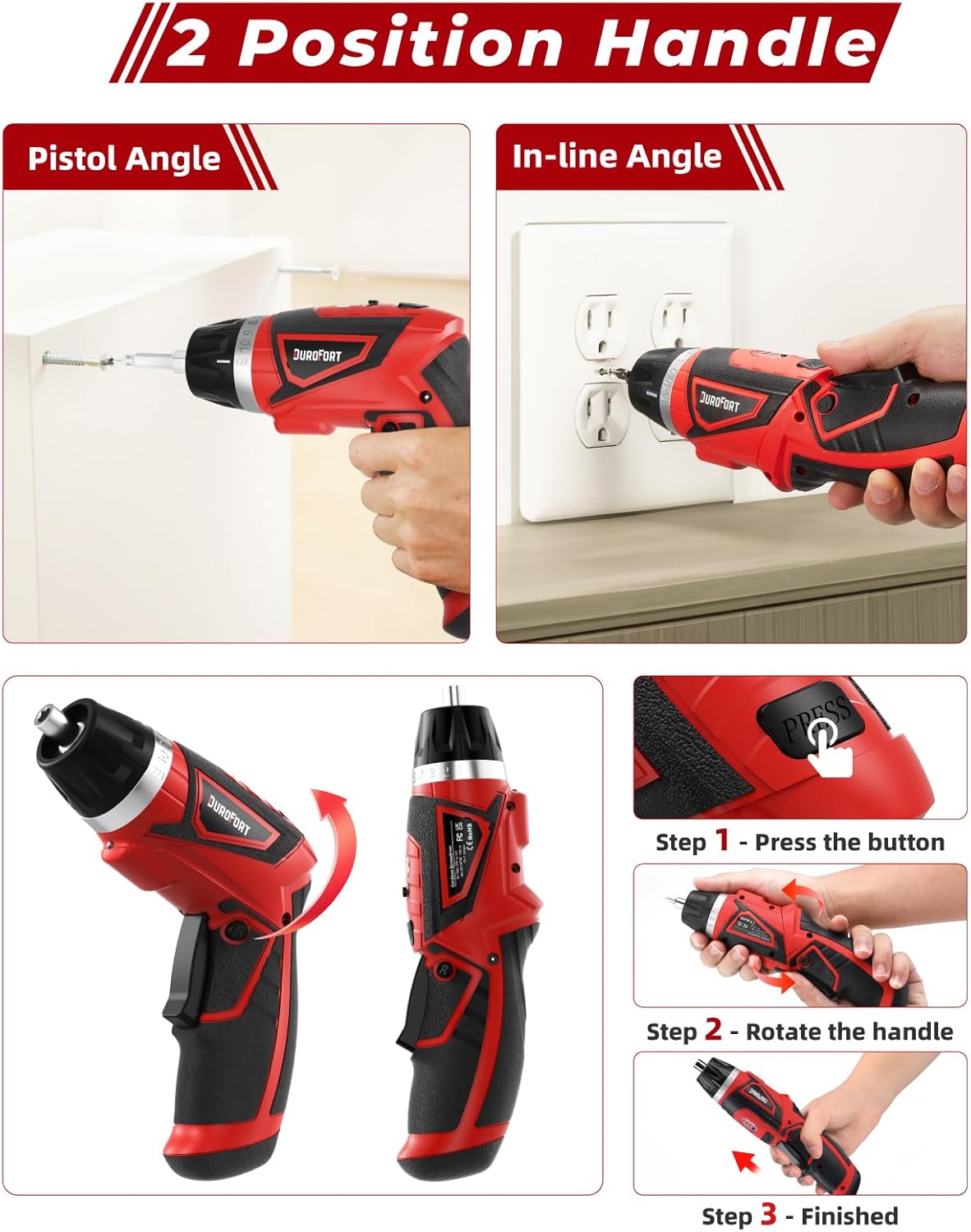
Figure 5.1: Adjusting the handle between Pistol Angle (90°) and In-line Angle (180°).
5.2 Setting Torque
The screwdriver offers 10+1 torque settings, allowing you to adjust the power output to prevent over-tightening or stripping screws. The '1' setting is for drilling or maximum torque.
- Rotate the torque adjustment ring located near the chuck.
- Align the desired torque number with the indicator mark on the screwdriver body.
- Start with a lower torque setting and increase if more power is needed.

Figure 5.2: Adjusting the 10+1 torque settings.
5.3 Forward, Reverse, and Lock Operation
The forward/reverse button controls the direction of rotation and also acts as a lock mechanism.
- Forward (F): Push the button to the left for clockwise rotation (tightening screws).
- Reverse (R): Push the button to the right for counter-clockwise rotation (loosening screws).
- Lock: Position the button in the center to lock the trigger and prevent accidental operation. This also allows for manual tightening/loosening.

Figure 5.3: Forward, Reverse, and Lock mechanism.
5.4 Using the Built-in LED Light
The integrated LED light automatically illuminates when the trigger is pressed, providing visibility in dimly lit work areas.

Figure 5.4: LED light illuminating the work area.
5.5 Applications and Versatility
The DuroFort screwdriver set is versatile for various tasks:
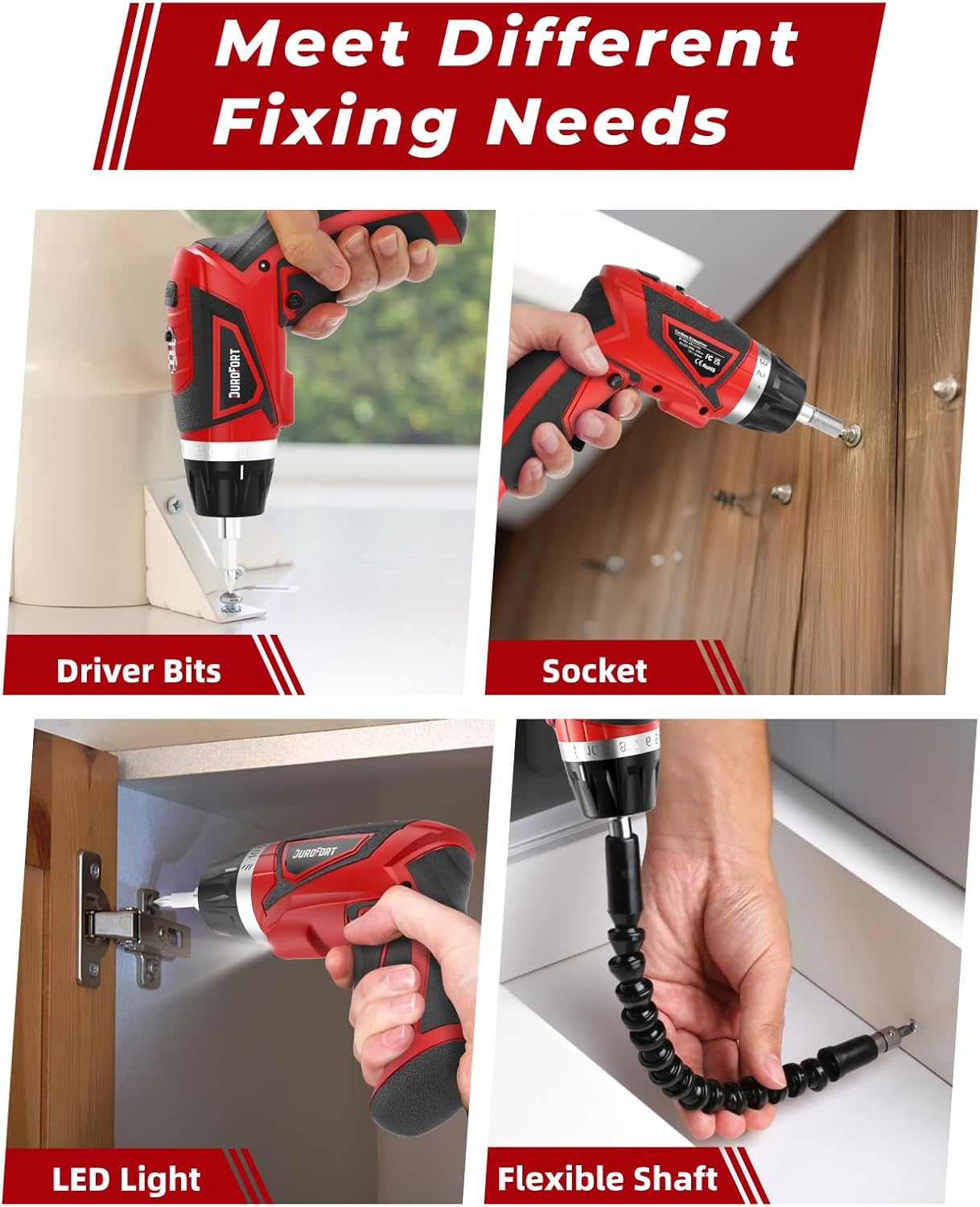
Figure 5.5: Examples of use with driver bits, sockets, LED light, and flexible shaft.
- Driver Bits: Ideal for assembling furniture, installing shelves, or general household repairs.
- Sockets: Use with the adapter and extension rod for tightening or loosening nuts and bolts.
- Flexible Shaft: Perfect for reaching screws in confined or hard-to-reach areas, such as inside cabinets or behind appliances.
6. Maintenance
Proper maintenance ensures the longevity and optimal performance of your screwdriver.
- Cleaning: Regularly wipe down the tool with a clean, damp cloth. Do not use harsh chemicals or abrasive cleaners. Ensure no moisture enters the motor or battery compartments.
- Storage: Store the screwdriver and its accessories in the provided portable cloth bag in a dry, cool place, away from direct sunlight and extreme temperatures.
- Battery Care:
- Avoid fully discharging the battery frequently.
- Recharge the battery before it is completely depleted.
- If storing for extended periods, charge the battery to approximately 50% every 3-6 months to maintain battery health.
- Do not expose the battery to water or extreme heat.
- Bit Maintenance: Keep screwdriver bits clean and free of debris. Replace worn or damaged bits to ensure proper screw engagement and prevent stripping.
7. Troubleshooting
Refer to the following table for common issues and their solutions:
| Problem | Possible Cause | Solution |
|---|---|---|
| Screwdriver does not turn on. | Battery is depleted. Forward/Reverse switch is in the locked (center) position. | Charge the battery fully. Move the switch to the Forward (F) or Reverse (R) position. |
| Screwdriver lacks power or stops during use. | Low battery charge. Torque setting is too low. Overload protection activated. | Recharge the battery. Increase the torque setting. Reduce pressure on the tool; allow it to cool down if overheated. |
| Screwdriver bit slips or strips screw head. | Incorrect bit size/type. Worn or damaged bit. Torque setting too high or too low. | Use the correct bit for the screw type. Replace the bit. Adjust torque setting appropriately. |
| Handle does not lock in position. | Toggle button not fully released. Debris obstructing mechanism. | Ensure the toggle button is fully released after adjusting. Clean the area around the pivot mechanism. |
8. Warranty and Support
For warranty information, technical support, or service inquiries, please contact DuroFort customer service. Refer to your purchase documentation for specific warranty terms and conditions.
Manufacturer: DuroFort
Model Number: 8V Magnetic Electric Screwdriver
For further assistance, please visit the official DuroFort website or contact their customer support channels as provided with your product packaging.
Ask a question about this manual
Ask about setup, troubleshooting, compatibility, parts, safety, or missing instructions. Manuals+ will review the question and use this page’s manual context to help answer it.