Introduction
This manual provides detailed instructions for the setup, operation, maintenance, and troubleshooting of your NGXDFL GPS Tracker. Please read this manual thoroughly before using the device to ensure proper functionality and to maximize its lifespan. Keep this manual for future reference.
What's in the Box
Upon unpacking, please verify that all the following items are included:
- NGXDFL GPS Tracker Device
- Charger
- Secure Loop
- Lock Clip
- User Manual (this document)
If any items are missing or damaged, please contact customer support.
Product Overview
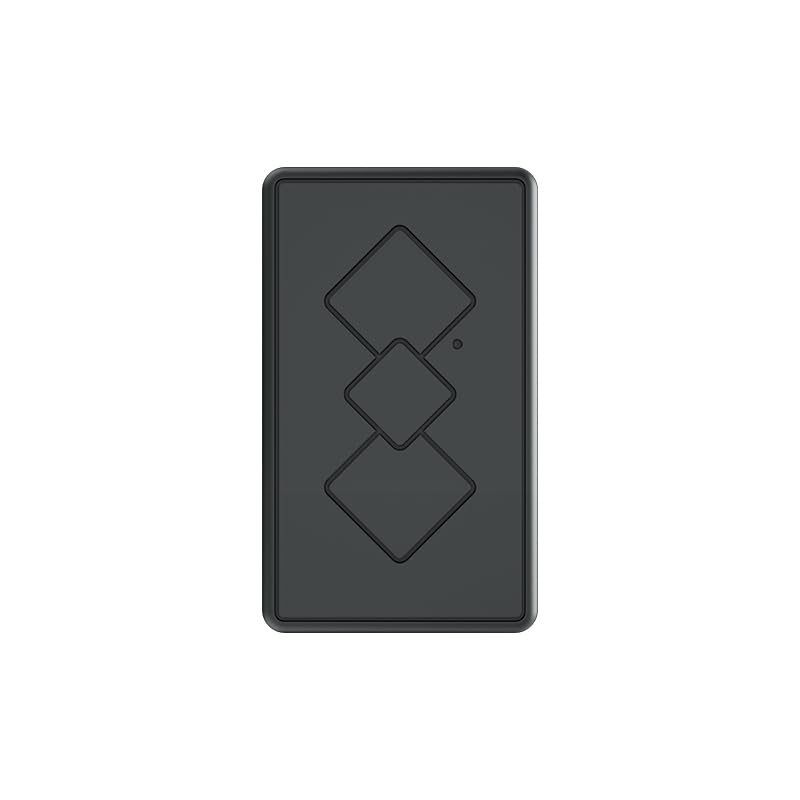
Figure 1: Front view of the NGXDFL GPS Tracker. The device is a compact rectangular unit with a dark gray finish, featuring three embossed diamond shapes and a small indicator light.
The NGXDFL GPS Tracker is a compact, waterproof device designed for tracking vehicles, children, spouses, seniors, and assets. It utilizes cellular connectivity for real-time location updates and supports alarm functions. Its wireless design ensures ease of placement and use.
Setup
1. Charging the Device
Before first use, fully charge the GPS tracker using the provided charger. Connect the charger to the device and a power source. The indicator light will show charging status and turn off or change color when fully charged.
2. SIM Card Installation (if applicable)
The NGXDFL GPS Tracker requires a compatible SIM card for cellular connectivity. Locate the SIM card slot, typically protected by a waterproof seal. Insert the activated SIM card according to the diagram inside the slot. Ensure the seal is properly re-secured after installation to maintain waterproofing.
3. Device Activation and App Pairing
Download the official NGXDFL tracking application from your device's app store. Follow the in-app instructions to create an account and pair your GPS tracker. This typically involves scanning a QR code on the device or entering its unique ID number. Ensure your smartphone has an active internet connection during this process.
Operating Instructions
1. Powering On/Off
- Power On: Press and hold the power button (if present, refer to device diagram) for 3-5 seconds until the indicator light illuminates.
- Power Off: Press and hold the power button for 5-7 seconds until the indicator light turns off.
2. Real-time Tracking
Open the NGXDFL tracking application on your smartphone. The main interface will display the current location of your GPS tracker on a map. Location updates are typically provided at regular intervals, which can often be configured within the app settings.
3. Setting Up Geo-fences
A geo-fence is a virtual boundary. Within the tracking application, navigate to the geo-fence settings. You can draw custom areas on the map. The device will send an alert to your paired smartphone when it enters or exits these predefined zones.
4. Alarm Functions
The tracker supports various alarm types, configurable through the app. These may include:
- SOS Alarm: Activated by a dedicated button on the device (if present), sending an emergency alert to pre-set contacts.
- Low Battery Alarm: Notifies you when the device's battery level is critically low.
- Speeding Alarm: Alerts if the device exceeds a set speed limit.
- Vibration Alarm: Notifies if the device detects significant movement or vibration.
Maintenance
- Cleaning: Wipe the device with a soft, dry cloth. Avoid using harsh chemicals or abrasive cleaners.
- Waterproofing: Ensure all ports and seals are securely closed to maintain the device's waterproof rating. Do not submerge the device beyond its specified depth or for extended periods.
- Battery Care: For optimal battery life, avoid extreme temperatures. Charge the device regularly, and do not allow it to remain fully discharged for long periods.
- Software Updates: Periodically check the tracking application for available software or firmware updates for the device. Install updates to ensure optimal performance and access to new features.
Troubleshooting
| Problem | Possible Cause | Solution |
|---|---|---|
| Device not powering on | Low battery; device malfunction | Charge the device fully. If problem persists, contact support. |
| No GPS signal / Inaccurate location | Poor satellite reception (indoors, dense urban areas); device obstruction | Move the device to an open area with a clear view of the sky. Ensure no large metal objects are blocking the signal. |
| No cellular connectivity | SIM card not installed or activated; out of network coverage; SIM card balance low | Check SIM card installation and activation status. Verify network coverage in your area. Recharge SIM card balance if necessary. |
| App not connecting to device | Incorrect pairing; app or device software outdated; internet connection issues | Re-pair the device in the app. Update the app and device firmware. Ensure your smartphone has a stable internet connection. |
For issues not listed here, please refer to the manufacturer's online support resources or contact customer service.
Specifications
| Model Number | B0DFXTJLKN |
| Brand | NGXDFL |
| Package Dimensions | 4.61 x 3.23 x 1.34 inches |
| Item Weight | 2.39 ounces |
| Connectivity Technology | Cellular |
| Special Feature | Waterproof |
| Other Display Features | Wireless |
| Supported Application | Alarm |
| Specific Uses | Vehicles, Child, Spouse, Senior, Asset Tracking |
Warranty and Support
For warranty information, technical support, or service inquiries, please refer to the official NGXDFL website or contact their customer service department directly. Details for contacting support are typically found on the product packaging or the manufacturer's website.
Note: Keep your purchase receipt as proof of purchase for warranty claims.