
DAREU EK75RT
DAREU EK75RT Rapid Trigger Gaming Keyboard User Manual
Model: EK75RT | Brand: DAREU
1. Introduction
The DAREU EK75RT Rapid Trigger Wired Gaming Keyboard is engineered for high-performance gaming and precision typing. Featuring advanced Hall Effect Magnetic Switches, this 75% TKL keyboard offers customizable actuation points, dynamic keystrokes, and vibrant RGB backlighting. Its robust construction and intuitive software provide a superior and highly responsive user experience for various applications, from competitive gaming to everyday use.
2. What's in the Box
- Keyboard body
- USB A to C cable
- Keycap Puller
- Add keycaps (2 sets)
- User Manual (this document)
3. Product Features
3.1 Hall Effect Magnetic Switches
The DAREU EK75RT utilizes advanced Hall Effect Magnetic Switches, which detect key presses using magnetic fields rather than physical contact. This design significantly speeds up response times, enhances key durability, and reduces wear, extending the lifespan to 100 million keystrokes. This technology provides a faster and more efficient gaming experience.

Image: Detailed view of the 45G Linear Magnetic Switches, highlighting their components and specifications such as initial force, pre-travel, trigger force, total travel, bottom force, and switch lifespan.
3.2 Rapid Trigger & Dynamic Keystrokes
This keyboard eliminates the physical delay associated with traditional mechanical switches, offering up to 20 times faster accuracy and 11 times faster response. The Rapid Trigger feature allows for dynamic keystrokes, enabling users to program up to four different commands within the same key. This is particularly beneficial for fast-paced games requiring quick, successive actions or complex combos.

Image: Visual representation of the Rapid Trigger mode, showing the adjustable trigger travel from 0.1mm to 4.0mm, compared to a fixed mechanical switch trigger area.
3.3 Customizable Actuation Points
Each key on the DAREU EK75RT features 40 levels of per-key actuation, adjustable from 0.1mm to 4.0mm with 0.1mm precision. This allows gamers to fine-tune the sensitivity of each key to match their personal preference or specific gaming style, providing a competitive edge in FPS and rhythm games. Auto-calibration of magnetic switches occurs upon reinserting the USB cable, eliminating the need for separate drivers for this function.
3.4 Magnetic Sensing RGB Backlighting
The keyboard features magnetic sensing RGB backlighting with over 50 customizable light effects. The backlight intensity can change based on the strength of the Hall effect, offering dynamic visual feedback. The TKL form factor combined with PBT keycaps ensures durability and a premium feel, preventing oiling or fading during extended use. Two sets of replacement keycaps are included for customization.

Image: The DAREU EK75RT keyboard displaying its vibrant Magnetic Induction RGB Light Effect, with light strips visible on the sides.
3.5 Stable Aluminum Positioning Plate
The keyboard incorporates a 1.5mm aluminum custom positioning plate. This design significantly reduces key wobbling, contributing to a more stable and precise gaming and typing experience.

Image: A close-up view of the stable aluminum positioning plate, showing the internal structure that minimizes key wobbling.
3.6 Product Overview
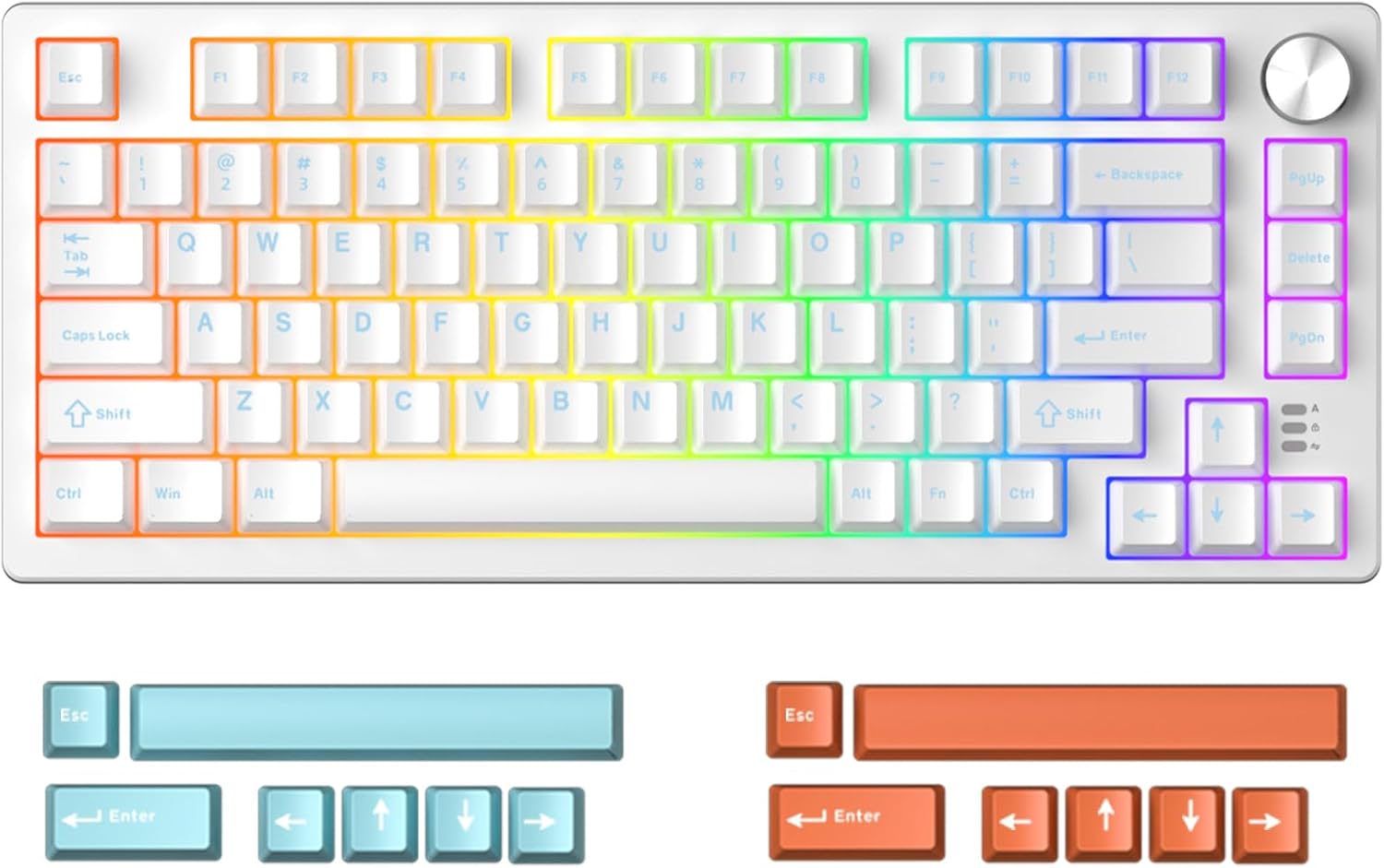
Image: Top-down view of the DAREU EK75RT Rapid Trigger Gaming Keyboard, showcasing its 75% TKL layout with RGB backlighting and the volume knob.

Image: The DAREU EK75RT keyboard integrated into a gaming desk setup, highlighting its aesthetic appeal and compact size alongside other peripherals.
Video: An official product video demonstrating the DAREU EK75RT Rapid Trigger Magnetic Switch Gaming Keyboard, showcasing its features, RGB lighting, and keycap/switch removal.
4. Setup
- Connect the Keyboard: Plug the USB-A end of the provided cable into an available USB port on your computer. Connect the USB-C end to the port on the DAREU EK75RT keyboard.
- Driver Installation (Optional): The keyboard is plug-and-play for basic functionality. For advanced customization, download and install the DAREU A+ driver from the official DAREU website.
- Auto-Calibration: Upon initial connection or re-connection, the magnetic switches will auto-calibrate. No manual driver intervention is required for this process.
5. Operating Instructions
5.1 Basic Usage
The DAREU EK75RT functions as a standard wired keyboard. Simply connect it to your device, and it will be ready for use. The 75% TKL layout provides a compact design while retaining essential keys for gaming and productivity.
5.2 Volume Knob Functionality
The integrated knob on the keyboard typically controls system volume. Rotate clockwise to increase volume, counter-clockwise to decrease volume. Pressing the knob usually mutes/unmutes audio.
6. Customization
The DAREU EK75RT offers extensive customization options through the DAREU A+ driver software.
6.1 DAREU A+ Driver
The DAREU A+ driver provides integrated management for your keyboard. Key features include:
- Key Customization: Remap keys to perform different functions.
- Actuation Settings: Adjust the actuation point for individual keys (0.1mm to 4.0mm).
- Custom Macros: Create and assign complex macros for gaming or productivity.
- RGB Light Settings: Customize lighting effects, colors, and patterns.
- Game Configurations: Preset settings for popular games like Valorant and CSGO, allowing for quick switching between profiles.
- DKS/MT/TGL Functions: Support for Dynamic Keyway Switching (DKS), Multi-Trigger (MT), and Toggle Switch (TGL) functions for advanced control.

Image: Screenshot of the DAREU A+ All-in-One Driver interface, showing options for key function, key travel, DKS/MT/TGL, RGB, and Macro settings, with game mode presets for Valorant and CSGO.
7. Maintenance
- Cleaning Keycaps: Use the provided keycap puller to carefully remove keycaps. Clean them with a soft, damp cloth and mild soap if necessary. Ensure they are completely dry before reattaching.
- Cleaning Switches: With keycaps removed, use compressed air to clear dust and debris from around the magnetic switches. Avoid liquid cleaners directly on the switches.
- General Care: Keep the keyboard away from excessive moisture, dust, and extreme temperatures. Avoid dropping the keyboard or applying excessive force to the keys.
8. Troubleshooting
- Keys Not Responding or Double-Typing:
This can sometimes occur with magnetic switches if calibration is off. Disconnect and re-connect the USB cable to trigger an auto-calibration of all magnetic switches. Ensure the DAREU A+ driver is updated to the latest version, as software issues can sometimes cause unexpected key behavior.
- RGB Lighting Issues:
If RGB lighting is not functioning correctly, check the settings within the DAREU A+ driver. Ensure the keyboard is properly connected and try cycling through lighting modes using the keyboard's built-in shortcuts (refer to driver software for specific key combinations).
- Connectivity Issues (Mac/PC):
The DAREU EK75RT is compatible with PC, Mac, Laptop, Gaming Console, and Tablet devices via USB. If experiencing connectivity problems, try a different USB port or cable. For Mac users, ensure that any necessary drivers or permissions are correctly configured, as some operating systems may require specific settings for external peripherals.
- Software Not Recognizing Keyboard:
Ensure the DAREU A+ driver is installed correctly and is the latest version. Temporarily disable any antivirus or firewall software that might be blocking the driver. Reinstall the driver if the issue persists.
9. Specifications
| Feature | Detail |
|---|---|
| Product Dimensions | 13.1 x 5.53 x 1.5 inches |
| Item Weight | 1.63 pounds |
| Manufacturer | DAREU |
| Item Model Number | EK75 |
| Connectivity Technology | USB |
| Keyboard Description | TKL Rapid Trigger Gaming Keyboard |
| Special Feature | Actuation Point Adjustable, Magnetic Switch, Magnetic sensing RGB, Portable, Volume Roller |
| Color | White |
| Number of Keys | 80 |
| Keyboard Backlighting | RGB |
| Compatible Devices | Gaming Console, Laptop, Mac, PC, Tablet |
10. Warranty and Support
For warranty information and technical support, please refer to the official DAREU website or contact DAREU customer service. DAREU is committed to product quality and customer satisfaction.
You can also visit the DAREU Store on Amazon for more product information and support resources.
Ask a question about this manual
Ask about setup, troubleshooting, compatibility, parts, safety, or missing instructions. Manuals+ will review the question and use this page’s manual context to help answer it.