1. Introduction
This manual provides detailed instructions for the assembly, operation, and maintenance of your CANMOV Large Power Lift Recliner Chair. Designed for comfort and ease of use, this chair features power lift assistance, massage and heating functions, integrated cup holders, and a USB charging port. Please read this manual thoroughly before use to ensure safe and optimal performance.
2. Safety Information
WARNING: To reduce the risk of injury, please adhere to the following safety guidelines:
- Do not exceed the maximum weight capacity of 350 lbs.
- Use caution when reclining or adjusting the chair position. Ensure no obstructions are present.
- Ensure the chair is on a stable, level surface to prevent tipping.
- Keep children and pets away from the chair's moving parts.
- Unplug the chair from the power outlet before cleaning or maintenance.
- Do not operate the chair if the power cord or plug is damaged.
- Avoid placing liquids directly on the chair's control panel or electrical components.
3. Package Contents
Before assembly, verify that all components are present. If any parts are missing or damaged, please contact customer support.
- Backrest Section
- Seat Base Section (with armrests and footrest mechanism)
- Power Adapter and Cord
- Remote Control for Lift, Recline, Massage, and Heat Functions
- User Manual
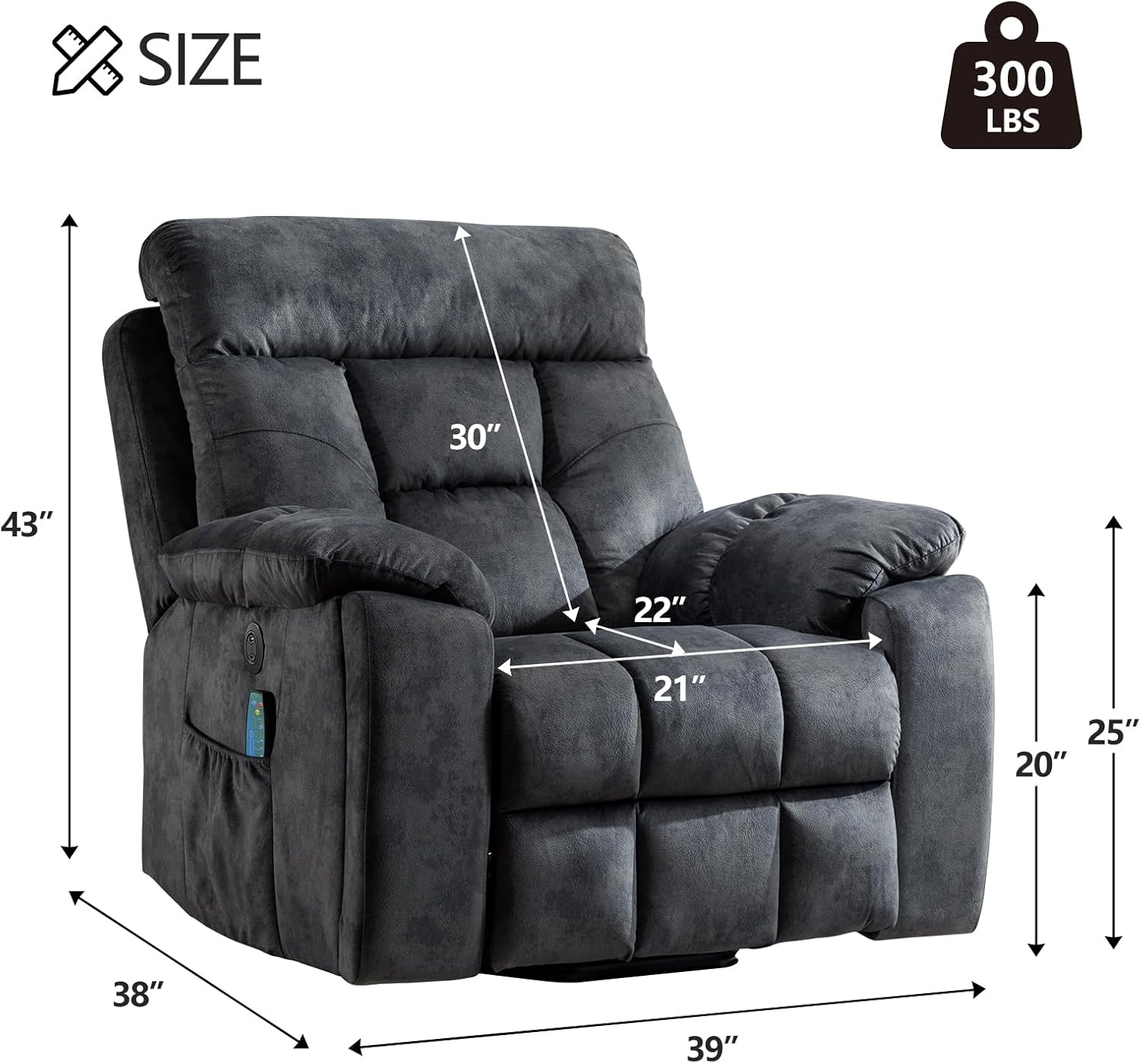
Figure 3.1: Exploded view showing the main components of the recliner chair.
4. Setup and Assembly
The CANMOV Power Lift Recliner Chair is designed for easy assembly with no tools required. It typically involves connecting the backrest to the seat base and plugging in the power.
- Unpack Components: Carefully remove all parts from the packaging. Retain packaging materials for potential returns or future transport.
- Connect Backrest: Align the metal brackets on the backrest with the corresponding slots on the seat base. Slide the backrest down firmly until it locks into place. You should hear a click.
- Connect Power: Locate the power cord from the chair and connect it to the power adapter. Plug the adapter into a standard electrical outlet.
- Verify Connections: Ensure all connections are secure before operating the chair.
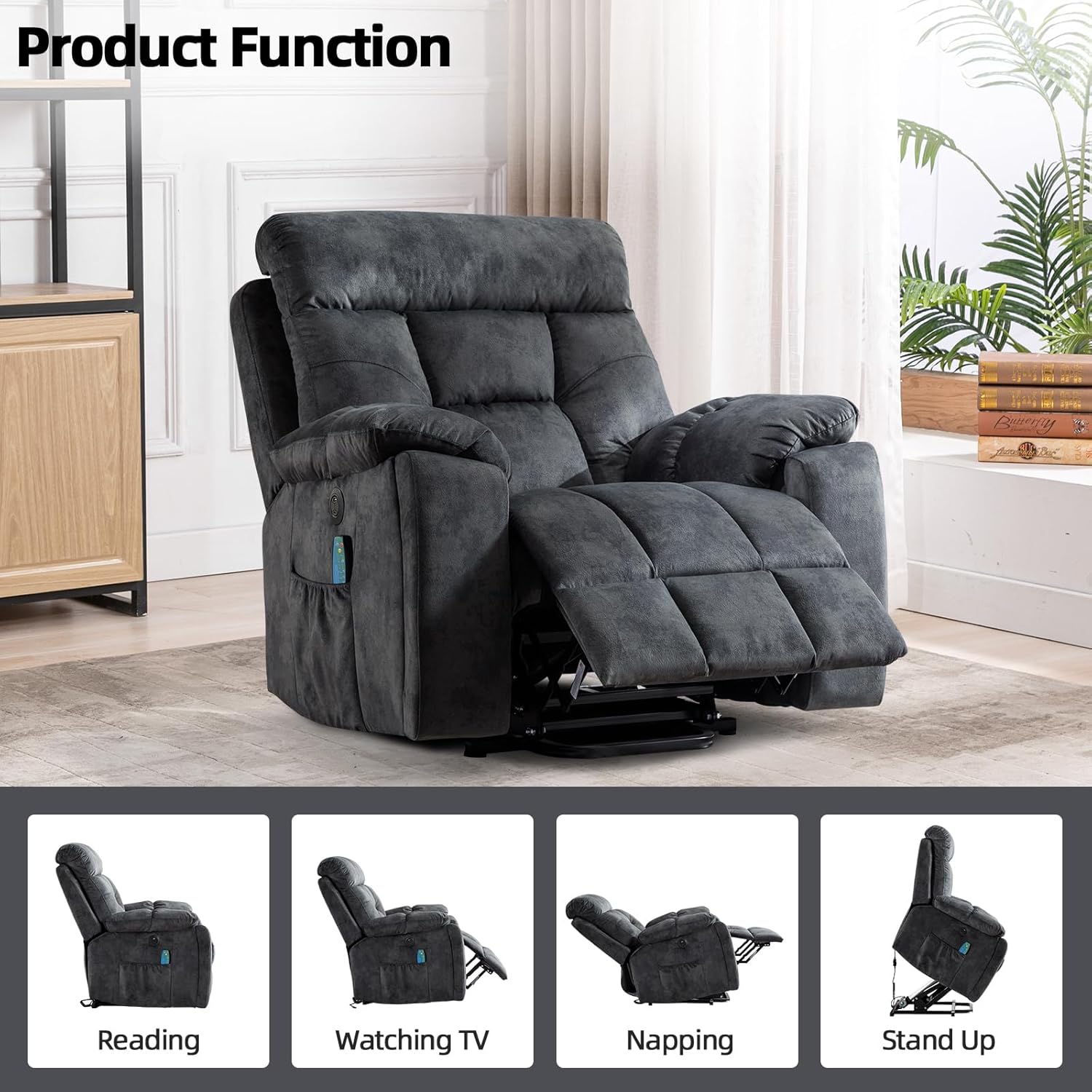
Figure 4.1: Visual guide for connecting the backrest to the seat base.
5. Operating Instructions
5.1 Power Lift and Recline Functions
The chair's power lift and recline functions are controlled via the remote control.
- To Recline: Press and hold the "Recline" button on the remote. The backrest will lean back and the footrest will extend. Release the button when the desired position is reached.
- To Lift/Stand: Press and hold the "Lift" button. The chair will gently tilt forward and lift, assisting you to a standing position. Release the button when you are ready to stand.
- To Return to Upright Position: Press and hold the "Upright" button. The chair will return to its standard seated position.

Figure 5.1: The chair supports multiple positions for reading, watching TV, napping, and assisted standing.
5.2 Massage and Heating Functions
The chair features 8-point massage and lumbar heating, controlled by the remote.
- Activate Massage: Press the "Massage" button on the remote. Cycle through 5 different massage modes.
- Adjust Intensity: Use the intensity buttons to increase or decrease the massage strength.
- Activate Heat: Press the "Heat" button to turn on the lumbar heating function. Press again to turn off.
- Set Timer: Use the "Timer" button to set a duration for the massage and heat functions.

Figure 5.2: Remote control functions for massage modes, intensity, heating, and timer.
5.3 USB Charging Port
A USB charging port is located on the side of the chair for convenient charging of electronic devices.
- Connect your device's USB cable to the port.
- Ensure the chair is plugged into a power outlet for the USB port to function.

Figure 5.3: Integrated USB port for charging devices.
5.4 Cup Holders and Side Pocket
The chair includes hidden cup holders in the armrests and a side pocket for storage.
- Cup Holders: Gently pull out the cup holders from the armrests when needed. Push them back in for a flush appearance.
- Side Pocket: Use the side pocket to store the remote control, magazines, or other small items.

Figure 5.4: The hidden cup holder provides convenient beverage access.
6. Maintenance
Proper maintenance will extend the life of your recliner chair.
- Cleaning: Wipe clean with a damp cloth. For spills, blot immediately with a clean, dry cloth. Avoid harsh chemicals or abrasive cleaners.
- Inspection: Periodically check all connections and moving parts for wear or damage. Ensure the power cord is not frayed or pinched.
- Lubrication: Moving metal parts may benefit from occasional lubrication with a silicone-based spray to ensure smooth operation.
7. Troubleshooting
If you encounter issues with your recliner, refer to the following common problems and solutions.
| Problem | Possible Cause | Solution |
|---|---|---|
| Chair does not recline or lift. |
|
|
| Massage/Heat functions not working. |
|
|
| Unusual noises during operation. |
|
|
If the problem persists after attempting these solutions, please contact CANMOV customer support.
8. Specifications
| Brand | CANMOV |
| Model Name | Large Power Lift |
| Product Dimensions | 38"D x 39"W x 43"H |
| Seat Depth | 21 inches |
| Chair Backrest Width | 27 Inches |
| Color | Grey |
| Material | Cotton, Foam, Sponge |
| Special Features | Adjustable Backrest, Arm Rest, Cup Holders, Reclining, USB Charging Port, Massage, Heat |
| Maximum Weight Capacity | 350 lbs |
| Item Model Number | f9126f72-b6bb-4232-9862-9db194e70c20 |
| ASIN | B0DFX72ZPC |
Figure 8.1: Key dimensions of the recliner chair.
9. Warranty and Support
CANMOV provides a 1-year warranty guarantee for this product. This warranty covers installation problems, damaged, and missing parts.
- For warranty claims or support inquiries, please contact CANMOV customer service.
- Additional protection plans may be available for purchase through your retailer.
- For prompt assistance, please have your model number (Large Power Lift) and ASIN (B0DFX72ZPC) ready when contacting support.
CANMOV Support: We are committed to providing excellent customer experience. For any issues with your item or shipment, please contact us. Messages are typically responded to within 24 hours.


