
Bodytone FIT12
Bodytone FIT12 Inxide Foldable Treadmill User Manual
Model: FIT12 Inxide
1. Important Safety Instructions
Please read all instructions carefully before using the Bodytone FIT12 Inxide Foldable Treadmill. Retain this manual for future reference.
- Always place the treadmill on a flat, stable surface.
- Ensure adequate clear space (at least 2 meters behind and 0.6 meters on each side) around the treadmill.
- Keep children and pets away from the treadmill during operation.
- Always attach the safety key clip to your clothing before starting your workout. The treadmill will stop if the safety key is dislodged.
- Do not operate the treadmill if it has a damaged cord or plug, or if it is not working properly.
- Wear appropriate athletic footwear and clothing.
- Do not exceed the maximum user weight of 90 kg (198 lbs).
- Consult a physician before starting any exercise program.
2. Product Overview
The Bodytone FIT12 Inxide is a foldable treadmill designed for home use, offering a blend of technology and convenience for your fitness routine.
Key Features:
- Foldable Design: Compact for easy storage in small spaces.
- Bluetooth Connectivity: Compatible with FitShow, Kinomap, and Zwift for interactive training.
- LED Display: Tracks speed, time, distance, calories burned, and heart rate.
- Pre-set Programs: 12 varied workout programs to optimize results.
- MP3 Speakers: Integrated speakers for audio playback during workouts.
- Running Surface: 42 x 120 cm (16.5 x 47.2 inches) for comfortable use.
- Max Speed: Up to 12 km/h (7.5 mph).
- Motor: 0.8 HP brushless DC motor for efficient and quiet operation.
Components:
Familiarize yourself with the main parts of your treadmill.

Figure 2.1: Front view of the Bodytone FIT12 Inxide Foldable Treadmill, showing the console, handlebars, and running deck.
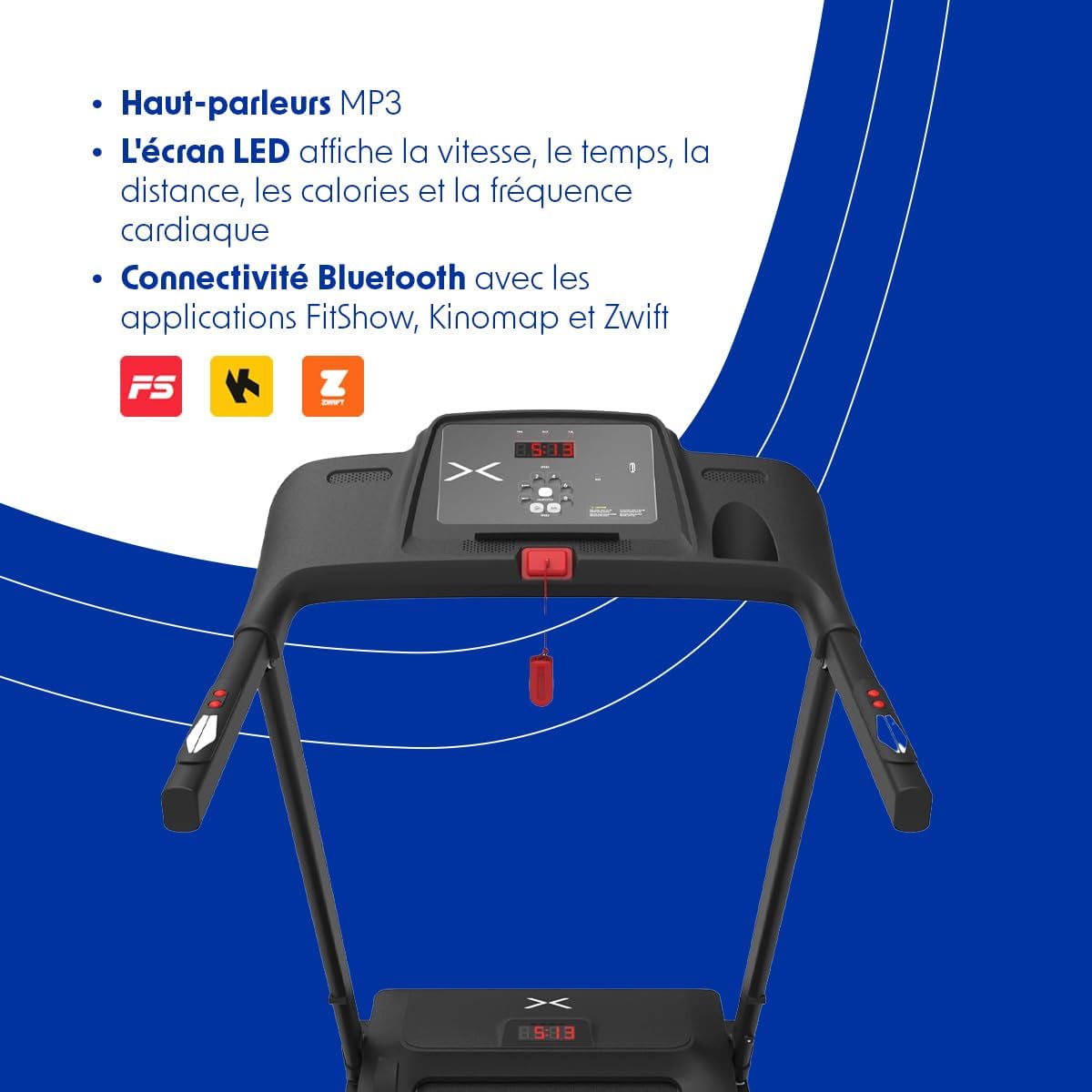
Figure 2.2: Close-up of the treadmill console, featuring the LED display, control buttons for speed and programs, and the safety key slot.

Figure 2.3: The Bodytone FIT12 Inxide Treadmill in its folded, compact position, illustrating its space-saving design.
3. Setup and Assembly
The Bodytone FIT12 Inxide Treadmill comes largely pre-assembled. Follow these steps to prepare it for use.
Unfolding the Treadmill:
- Carefully remove the treadmill from its packaging.
- Place the treadmill on a clear, level surface.
- Locate the locking pin or knob that secures the running deck in the folded position.
- Release the locking mechanism and gently lower the running deck until it is flat on the floor. Ensure it clicks securely into place.
- Raise the console and handlebars to their upright position and secure them with any provided locking pins or screws.
Connecting Power:
- Connect the provided power cord to the treadmill's power input port.
- Plug the power cord into a grounded electrical outlet.
- Ensure the power switch (usually located near the power cord input) is in the 'ON' position.

Figure 3.1: The treadmill in its folded state, emphasizing its compact and lightweight design for easy storage and portability.
4. Operating Instructions
This section guides you through the basic operation of your Bodytone FIT12 Inxide Treadmill.
Starting a Workout:
- Ensure the treadmill is plugged in and the power switch is ON.
- Attach the safety key clip to your clothing and insert the safety key into its designated slot on the console. The display will illuminate.
- Step onto the treadmill, placing your feet on the side rails.
- Press the 'START' button. The treadmill will begin with a short countdown, then the belt will start moving at a low speed.
- Adjust the speed using the '+' and '-' buttons on the console or handlebars.
Console Functions:
The LED display shows the following metrics:
- Speed: Current running speed in km/h.
- Time: Duration of your workout.
- Distance: Total distance covered.
- Calories: Estimated calories burned.
- Heart Rate: Your pulse, detected by hand sensors (if equipped and used).

Figure 4.1: The LED display on the console, illustrating how speed, calories, distance, time, and heart rate are tracked during a workout.
Pre-set Programs:
The treadmill includes 12 pre-set programs. To select a program:
- From standby mode, press the 'PROGRAM' button to cycle through the available programs (P1-P12).
- Once you've selected your desired program, press 'START' to begin. The treadmill will automatically adjust speed according to the program's profile.
Bluetooth Connectivity:
Connect your treadmill to compatible fitness apps for an enhanced training experience.
- Download a compatible app (e.g., FitShow, Kinomap, Zwift) on your smartphone or tablet.
- Enable Bluetooth on your device.
- Open the app and follow its instructions to search for and connect to your Bodytone FIT12 treadmill.
- Once connected, you can control the treadmill and track your progress through the app.
Using MP3 Speakers:
Connect your audio device to the treadmill's MP3 input port (if available) or via Bluetooth (if supported by the console) to play music through the integrated speakers.
Stopping the Treadmill:
- Press the 'STOP' button to gradually slow down and stop the treadmill belt.
- Alternatively, pull the safety key from its slot to immediately stop the treadmill in an emergency.
5. Maintenance
Regular maintenance ensures the longevity and optimal performance of your treadmill.
Cleaning:
- Always unplug the treadmill before cleaning.
- Wipe down the console and other surfaces with a damp cloth after each use to remove sweat and dust.
- Do not use abrasive cleaners or solvents.
Belt Lubrication:
The running belt requires periodic lubrication to reduce friction and wear. Refer to the specific instructions provided with your treadmill's lubricant kit. Typically, lubrication is needed every 3-6 months depending on usage.
Belt Adjustment:
If the running belt becomes off-center or slips, it may need adjustment. Consult the detailed instructions in the full product manual or contact customer support for guidance.
6. Troubleshooting
Here are solutions to common issues you might encounter:
| Problem | Possible Cause | Solution |
|---|---|---|
| Treadmill does not start. | Power cord unplugged, power switch off, safety key not inserted. | Check power connection, ensure power switch is ON, insert safety key fully. |
| Running belt slips. | Belt too loose, belt needs lubrication. | Adjust belt tension (refer to full manual), lubricate the belt. |
| Display not working correctly. | Loose cable connection, console malfunction. | Check all cable connections, power cycle the treadmill. If issue persists, contact support. |
| Unusual noise during operation. | Loose parts, belt friction, motor issue. | Inspect for loose screws, lubricate belt, or contact customer support. |
7. Specifications
Detailed technical specifications for the Bodytone FIT12 Inxide Treadmill:
| Feature | Detail |
|---|---|
| Model | FIT12 Inxide |
| Brand | Bodytone |
| Color | Black |
| Motor | 0.8 HP Brushless DC |
| Speed Range | Up to 12 km/h (7.5 mph) |
| Running Surface | 42 x 120 cm (16.5 x 47.2 inches) |
| Display Type | LED |
| Workout Programs | 12 Pre-set Programs |
| Connectivity | Bluetooth (FitShow, Kinomap, Zwift compatible) |
| Special Features | Built-In Speaker, Heart Rate Monitor, Lightweight, Wheeled for transport |
| Max User Weight | 90 kg (198 lbs) |
| Product Dimensions (Unfolded) | 154 x 73 x 22 cm (60.6 x 28.7 x 8.7 inches) |
| Product Dimensions (Folded) | 66.5 x 65 x 120 cm (26.2 x 25.6 x 47.2 inches) |
| Item Weight | 31 kg (68.3 lbs) |
| Included Components | Power Cord |
8. Warranty and Support
For warranty information, please refer to the documentation included with your purchase or visit the official Bodytone website. If you require technical assistance or have questions not covered in this manual, please contact Bodytone customer support.
Bodytone Customer Support: www.bodytone.eu/en/contact/
Related documentsFIT12


Ask a question about this manual
Ask about setup, troubleshooting, compatibility, parts, safety, or missing instructions. Manuals+ will review the question and use this page’s manual context to help answer it.