
ARCCAPTAIN MIG200 Fit
ARCCAPTAIN 6-in-1 Multiprocess Welder (MIG200 Fit) User Manual
Comprehensive guide for setup, operation, and maintenance.
Product Overview
The ARCCAPTAIN MIG200 Fit is a versatile 6-in-1 multiprocess welding machine designed for a wide range of applications, from home DIY to professional metal fabrication. It supports Gas MIG, Flux Core MIG, Lift TIG, Stick (MMA), Spot Welding, and Spool Gun MIG. This welder features dual voltage input (110V/220V) and synergic control for simplified operation, making it suitable for both beginners and experienced welders. Its advanced MCU digital control ensures stable and consistent welding performance across various materials and thicknesses.

Image: The ARCCAPTAIN MIG200 Fit Multiprocess Welder, showcasing its compact red design and various connection points for welding accessories.
Video: Official ARCCAPTAIN overview of the 6-in-1 MIG Welder, highlighting its features and capabilities.
Key Features
- 6-in-1 Multifunctionality: Supports Gas MIG, Flux Core MIG, Lift TIG, MMA (Stick), Spot Welding, and Spool Gun MIG.
- Synergic & Manual MIG Control: Automatic parameter matching for ease of use, with manual options for experienced users.
- Aluminum Welding Capability: Compatible with spool guns for smooth and consistent aluminum welding (spool gun sold separately).
- Dual Voltage (110V/220V): Adapts to various power sources for increased flexibility.
- Digital MCU Control: Ensures precise control, stable arc, and efficient welding for different materials and thicknesses.
- Enhanced Safety: Features VRD, over-current, over-voltage, over-load, and overheating protection.

Image: Visual representation of the six welding processes supported by the ARCCAPTAIN MIG200 Fit: Gas MIG, Flux Core MIG, MMA, Lift TIG, Spool Gun, and Spot Welding.
Setup Guide
1. Unpacking and Inspection
Carefully remove all components from the packaging. Verify that all items listed in the 'Package Including' section are present and undamaged. Report any missing or damaged parts to ARCCAPTAIN support immediately.
2. Power Connection
- Ensure the welder is turned off before connecting to power.
- Connect the power cord to a suitable 110V or 220V power outlet. The machine automatically detects the input voltage.
3. Wire Spool Setup (for MIG/Flux Core)
- Open the wire spool compartment.
- Remove the spool plate and spring.
- Place the welding wire spool onto the spindle, ensuring it rotates freely.
- Replace the spring and spool plate, tightening the knob to secure the spool.
- Feed the wire through the wire feed mechanism and into the MIG torch liner.
- Press the torch trigger to feed the wire through the torch until it exits the nozzle.
Video: Official ARCCAPTAIN guide demonstrating the cable connections for the MIG200 Fit welder, including wire spool setup and torch connection.
4. Connecting Welding Accessories
- MIG Torch: Connect the MIG torch to the Euro connector on the front panel.
- Ground Clamp: Connect the ground clamp to the appropriate polarity terminal (positive for Flux Core, negative for Gas MIG).
- Electrode Holder (for MMA/Stick): Connect the electrode holder to the positive terminal and the ground clamp to the negative terminal.
- TIG Torch (WP-17V, sold separately): Connect the TIG torch to the negative terminal and the ground clamp to the positive terminal.
- Spool Gun (sold separately): Connect the spool gun to the Euro connector and its control line to the dedicated socket.
- Gas Hose (for Gas MIG/Lift TIG): Connect one end of the gas hose to the gas inlet connector on the rear of the welder and the other end to your gas cylinder regulator.

Image: Diagram illustrating various cable connections for Gas MIG, Flux Core MIG, DC Stick (MMA), Spot Welding, Lift TIG, and Spool Gun modes.
Operating Instructions
1. Power On and Mode Selection
- Turn on the welder using the power switch on the rear panel.
- Use the 'Mode' button on the front panel to select the desired welding process (MIG, MMA, TIG, Spot, Spool Gun).
2. Parameter Adjustment
- Synergic Mode: Press the 'SYN' button to activate. Select the wire diameter and material type. The welder will automatically set recommended current and wire feed speed. You can fine-tune these settings with the adjustment knobs.
- Manual Mode: Adjust the 'Current Adjustment Knob' and 'Voltage Adjustment Knob' independently to achieve desired welding parameters.
- Refer to the 'MIG Welding Parameters' and 'Stick & TIG Welding Parameters' tables in the Specifications section for recommended settings.
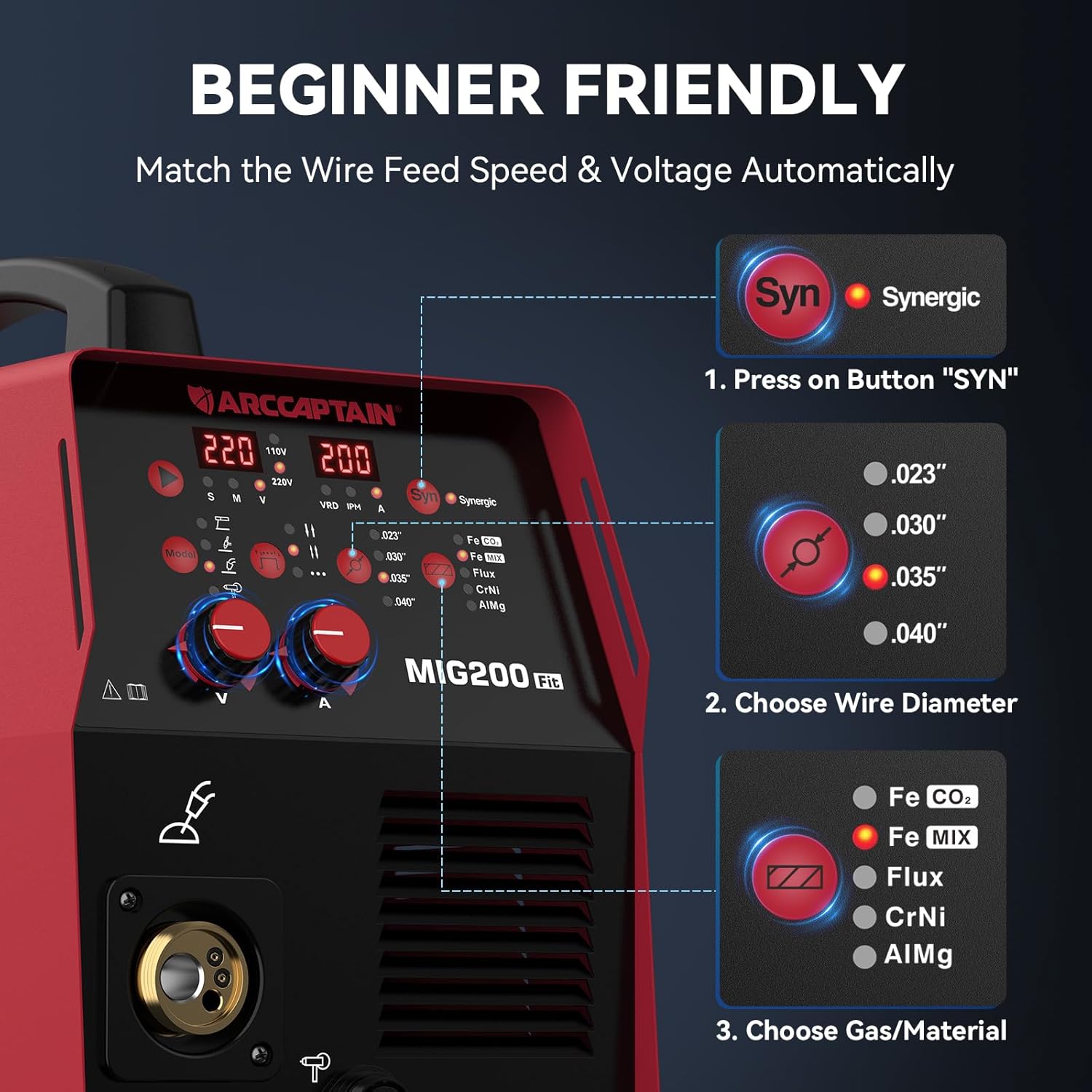
Image: Close-up of the ARCCAPTAIN MIG200 Fit control panel, highlighting the synergic control feature for automatic parameter matching.
3. Welding Techniques
- MIG Welding: Maintain a consistent travel speed and proper torch angle. Ensure good gas coverage if using Gas MIG.
- MMA (Stick) Welding: Maintain a consistent arc length and travel speed.
- Lift TIG Welding: Initiate the arc by touching the tungsten to the workpiece and lifting slightly. Maintain a short arc length.

Image: A welder performing MIG welding on a motorcycle frame, demonstrating the application of the ARCCAPTAIN MIG200 Fit.

Image: A welder performing aluminum welding using a spool gun, highlighting the machine's capability for aluminum materials.

Image: A welder performing MMA (Stick) welding on a metal gate, showcasing the machine's versatility for different welding processes.

Image: A welder performing TIG welding on a metal piece, demonstrating the precision possible with the Lift TIG function (torch sold separately).

Image: A welder performing spot welding on a vehicle panel, illustrating the machine's capability for precise spot welds.
Maintenance
- Regularly clean the exterior of the welder with a dry cloth.
- Inspect welding cables and connections for wear or damage before each use.
- Check the wire feed mechanism for any debris or wire tangles.
- Ensure proper ventilation around the machine to prevent overheating. The intelligent fan system optimizes heat dissipation.
- Replace worn contact tips and nozzles as needed to maintain optimal welding performance.
Troubleshooting
| Problem | Possible Cause | Solution |
|---|---|---|
| No power | Power switch off, loose connection, circuit breaker tripped | Turn on switch, check connections, reset breaker |
| Poor arc starting | Incorrect parameters, dirty workpiece, worn contact tip | Adjust settings, clean workpiece, replace contact tip |
| Wire feeding issues | Tangled wire, incorrect drive roller tension, clogged liner | Untangle wire, adjust tension, clean/replace liner |
| Overheating protection activated | Prolonged use, insufficient ventilation | Allow machine to cool down, ensure proper airflow |
Specifications
| Feature | Detail |
|---|---|
| Model Number | MIG200 Fit |
| Input Voltage | 110V/220V Dual Voltage |
| Welding Processes | Gas MIG, Flux Core MIG, Lift TIG, MMA (Stick), Spot, Spool Gun MIG |
| Item Weight | 32.2 pounds |
| Package Dimensions | 23 x 16.5 x 12 inches |
| Included Components | MIG Welder, 10FT MIG Torch, 10FT Ground Clamp, 10FT Electronic Holder, 10FT Gas Hose, 2 Throat Hoop, 2 Contact Tips (.030"/.035"), 1 Roller (V.030/.035), User Manual |
MIG Welding Parameters
| Material | Wire Type | Drive Roller | Polarity | Gas Type | Gas Flow Rate | Material Thickness | Wire V / IPM |
|---|---|---|---|---|---|---|---|
| Steel (Gasless) | E71T-GS | K Groove | DCEN | - | - | 19ga (1mm) | .030" / 15.7V / 132 IPM |
| 14ga (2mm) | .030" / 17.0V / 180 IPM | ||||||
| 11ga (3mm) | .030" / 18.0V / 200 IPM | ||||||
| Steel | Solid ER70S-6 | V Groove | DCEP | CO2 | 17-25 CFH | 19ga (1mm) | .023" / 18.8V / 372 IPM |
| 14ga (2mm) | .030" / 18.0V / 140 IPM | ||||||
| 11ga (3mm) | .035" / 17.9V / 112 IPM | ||||||
| 8ga (4mm) | .040" / 17.5V / 400 IPM | ||||||
| Stainless | ER308LSi | V Groove | DCEP | ARCO2 | 17-25 CFH | 19ga (1mm) | .030" / 16.2V / 252 IPM |
| 14ga (2mm) | .035" / 15.5V / 168 IPM | ||||||
| 11ga (3mm) | .040" / 15.0V / 144 IPM | ||||||
| Aluminum | ER5356 | U Groove | DCEP | ARGON | 17-25 CFH | 16ga (1.6mm) | .035" / 13.5V / 340 IPM |
| 14ga (2mm) | .040" / 14.0V / 280 IPM |
Stick & TIG Welding Parameters
| Material | Electrode Type | Polarity | Electrode Diameter | Welding Current (A) |
|---|---|---|---|---|
| MMA | E60XX | DCEP+ | 1/16" (1.6mm) | 30-60 |
| E70XX | DCEN- | 3/32" (2.5mm) | 70-110 | |
| Lift TIG (Steel) | Tungsten Diameter | - | 1/16" (1.6mm) | 60-90 |
| 3/32" (2.4mm) | 80-115 | |||
| 1/8" (3.2mm) | 115-165 | |||
| Lift TIG (Stainless) | Tungsten Diameter | - | 1/16" (1.6mm) | 40-70 |
| 3/32" (2.4mm) | 65-110 | |||
| 1/8" (3.2mm) | 100-150 |

Image: A visual list of included components with the ARCCAPTAIN MIG200 Fit welder, including the main unit, torch, clamps, and accessories.
Warranty & Support
ARCCAPTAIN offers a 2-year warranty on their welding machines, ensuring peace of mind for your purchase. For any technical assistance, troubleshooting, or warranty claims, please contact ARCCAPTAIN customer service directly.
You can visit the official ARCCAPTAIN store for more information and support: ARCCAPTAIN Store
Related documentsMIG200 Fit


Ask a question about this manual
Ask about setup, troubleshooting, compatibility, parts, safety, or missing instructions. Manuals+ will review the question and use this page’s manual context to help answer it.