
Introduction
Thank you for purchasing the Red Rock Foldable Work Light. This manual provides essential information for the safe and efficient operation, setup, and maintenance of your work light. Please read this manual thoroughly before use and retain it for future reference.
Safety Information
WARNING: Read all safety warnings and instructions. Failure to follow the warnings and instructions may result in electric shock, fire, and/or serious injury.
- Always ensure the work light is stable on a flat, level surface before operation.
- Do not look directly into the light source when it is illuminated, as this may cause eye injury.
- Keep the work light away from flammable materials.
- Do not expose the work light to rain or wet conditions.
- Use only compatible Makita 18V batteries. Batteries are not included.
- Disconnect the battery before performing any maintenance or adjustments.
- Do not attempt to modify or repair the work light yourself. Contact qualified service personnel.
- Keep children and unauthorized persons away from the work area.
Package Contents
Verify that all items listed below are present and undamaged:
- Foldable Work Light Head
- Adjustable Collapsible Tripod
- Instruction Manual
Setup
- Unpacking: Carefully remove all components from the packaging. Inspect for any damage that may have occurred during shipping.
- Tripod Assembly:
Place the collapsible tripod on a flat surface. Extend the legs outwards until they are fully spread and stable. Ensure all locking mechanisms are engaged.

Image: The tripod base with its legs extended for stability.
- Attaching the Light Head:
Align the work light head with the mounting point on top of the tripod. Secure it firmly using the provided tilt control knobs on both sides. Ensure the light head is securely fastened before proceeding.
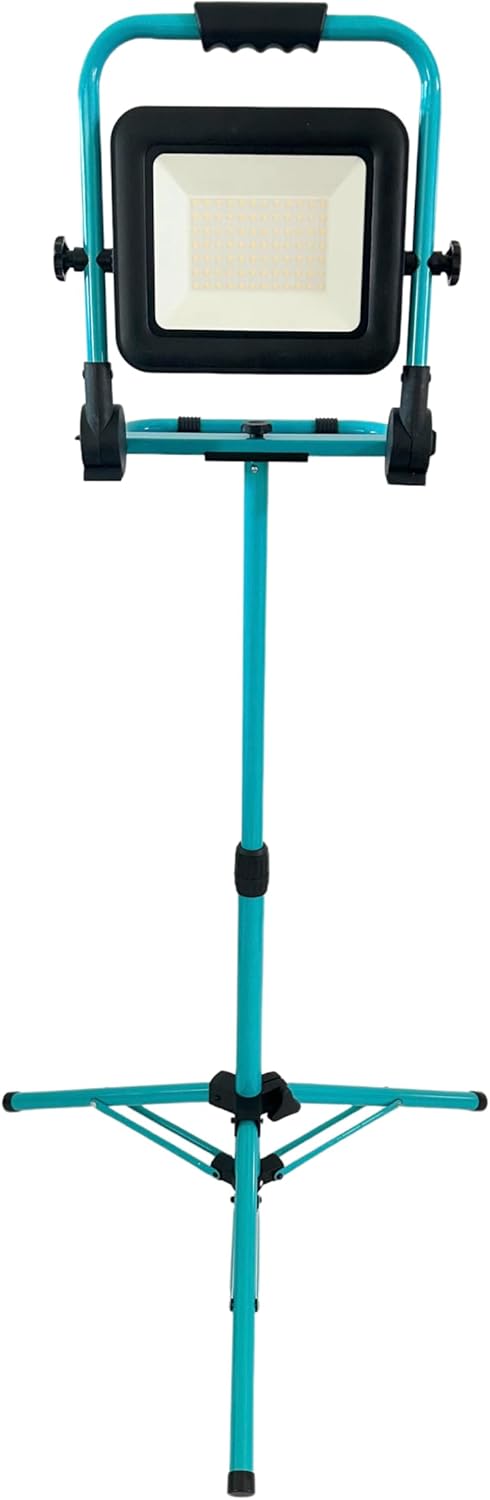
Image: The Red Rock Work Light fully assembled on its tripod, ready for use.
- Battery Installation:
The work light operates with Makita 18V batteries (not included). Locate the battery compartment on the light head. Insert a charged Makita 18V battery, ensuring it clicks into place. To remove, press the battery release button and slide the battery out.
Operating Instructions
- Powering On/Off and Brightness Adjustment:
Locate the HIGH/LOW/OFF switch on the work light. Press the switch once for HIGH brightness (6,000 lumens). Press again for LOW brightness (3,000 lumens). Press a third time to turn the light OFF.
- Adjusting Light Angle:
Loosen the tilt control knobs on both sides of the light head. Adjust the light head to the desired angle. Tighten the knobs firmly to secure the light in position.
- Adjusting Tripod Height:
The tripod is adjustable up to 39 inches. Loosen the locking collar on the tripod pole. Extend or retract the pole to the desired height. Tighten the locking collar securely to fix the height.
- Folding and Collapsing:
For storage or transport, the work light and tripod can be folded. First, remove the battery. Loosen the tripod locking collar and retract the pole. Fold the tripod legs inwards. The light head can also be folded down. Use the top handle for easy carrying.

Image: The Red Rock Work Light shown in both its fully extended and folded configurations.
Maintenance
- Cleaning: Wipe the work light and tripod with a soft, damp cloth. Do not use abrasive cleaners or solvents. Ensure the light is dry before storage or next use.
- Battery Care: Always remove the battery when the work light is not in use for extended periods. Store batteries in a cool, dry place. Follow the battery manufacturer's instructions for charging and storage.
- Storage: Store the folded work light in a dry, protected area away from direct sunlight and extreme temperatures.
Troubleshooting
| Problem | Possible Cause | Solution |
|---|---|---|
| Light does not turn on | Battery not inserted correctly Battery is discharged Switch is in OFF position | Ensure battery is fully seated Charge or replace battery Toggle switch to HIGH or LOW |
| Light flickers | Low battery charge Loose battery connection | Charge or replace battery Re-insert battery firmly |
| Tripod is unstable | Legs not fully extended Locking collar not tightened | Ensure legs are fully spread Tighten all locking collars |
Specifications
| Feature | Specification |
|---|---|
| Model Number | WLB5ASPT |
| Brightness | 6,000 Lumens (High) / 3,000 Lumens (Low) |
| Power Source | Battery Powered (Compatible with Makita 18V batteries, not included) |
| Light Source Type | LED |
| Material | Aluminum Alloy Steel (Frame), Polycarbonate (PC) (Shade) |
| Adjustable Tripod Height | Up to 39 inches (approximately 99 cm) |
| Product Dimensions (Extended) | Approximately 33.12 x 19.58 x 134.24 cm (13.04 x 7.71 x 52.85 inches) |
| Weight | 4.01 kg (8.84 lbs) |

Image: Line drawing illustrating the dimensions of the Red Rock Work Light when fully extended.
Warranty and Support
Red Rock products are manufactured to high-quality standards. For warranty information or technical support, please refer to the documentation included with your purchase or contact your retailer. Keep your proof of purchase for warranty claims.

