1. Introduction
The EZAIoT EZ-TRV702W Intelligent Thermostat Valve is designed to optimize water-based heating systems by automatically regulating the flow of hot water to radiators. This allows for individual temperature control in each room, enhancing comfort and energy efficiency. This device integrates seamlessly into your smart home environment, offering flexible control options.
2. Product Features
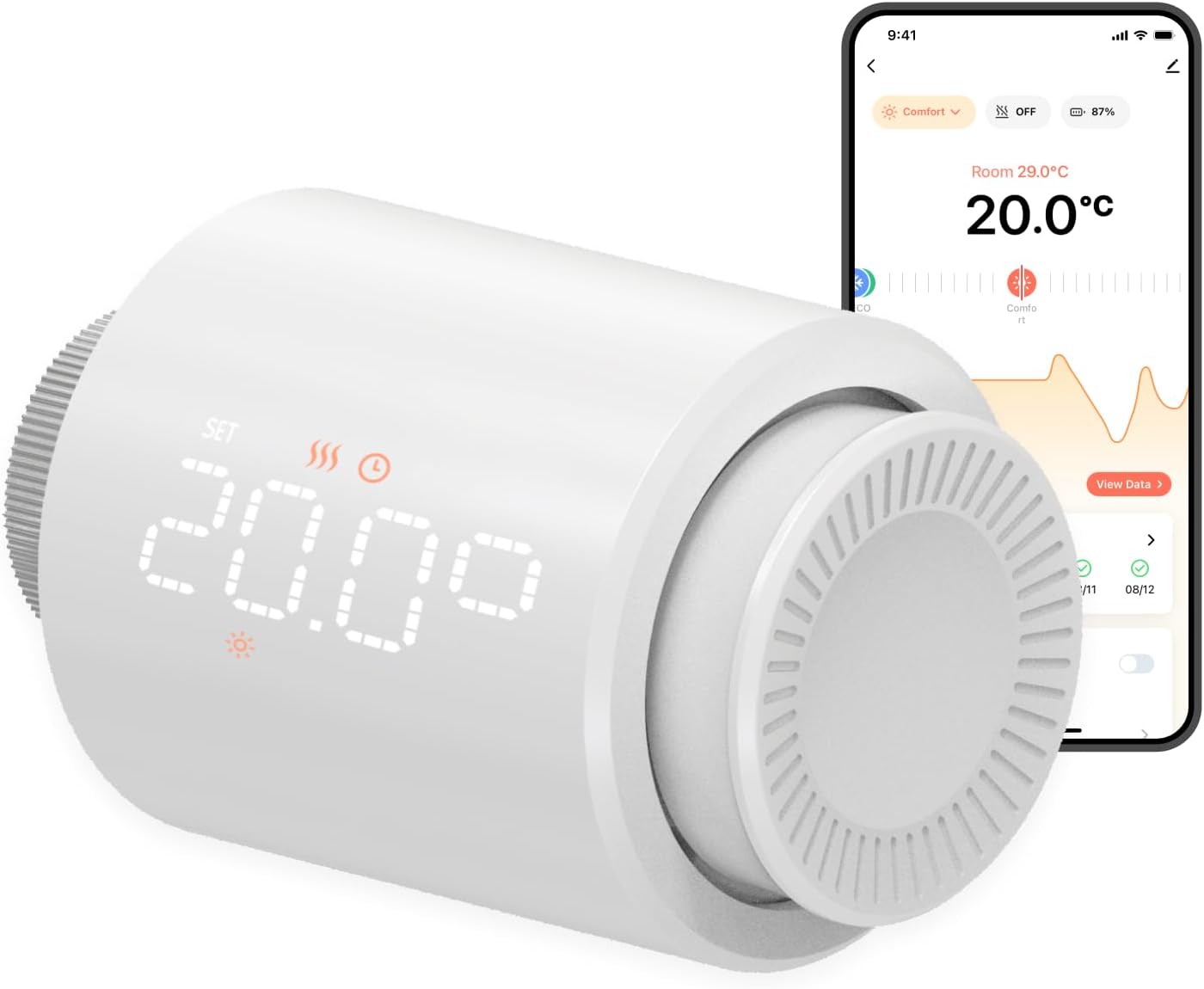
- Flexible Control Options: Control your heating via Smart Life and Tuya apps, voice commands with Alexa, or manually using the digital LED display.
- Direct WiFi Connection: The EZ-TRV702W is a WiFi thermostat that connects directly to your network; no additional hub is required.
- Extended Battery Life: Powered by 3 alkaline batteries, the thermostat offers a 50% longer battery life compared to similar products, contributing to energy efficiency.
- Programmable Timer Function: Set up to 6 schedules per day for each day of the week to automatically adjust room temperature. This function operates even if the internet connection is temporarily interrupted.
- Practical Functions: Includes a holiday mode for automatic heating adjustment, window opening detection (closes the heater valve for 30 minutes when an open window is detected), and an intelligent memory function after a power failure.
- Quiet Operation & Easy Installation: Designed for silent operation and compatible with 97% of radiators on the market. Easy installation with 6 included valve adapters.
- Display Features: Frost Protection, Low Battery Indicator, Programmable settings, Temperature Display, Vacation Mode.
3. Package Contents
The EZAIoT EZ-TRV702W Smart Radiator Thermostat package typically includes:
- 1x EZAIoT Smart Radiator Thermostat (Model: EZ-TRV702W)
- 3x AA 1.5V Alkaline Batteries
- 6x Valve Adapters (for various radiator valve types: Danfoss RA, Danfoss RAV, Danfoss RAVL, Caleffi i-Ventile, Giacomini-Ventile, M28x1.5)
- User Manual (this document)

4. Setup and Installation
Follow these steps for proper installation of your EZAIoT Smart Radiator Thermostat:
- Insert Batteries: Open the battery compartment and insert the 3x AA 1.5V alkaline batteries, ensuring correct polarity.
- Select Adapter: Identify the correct valve adapter for your radiator. The manual provides illustrations for common types (Danfoss RA, RAV, RAVL, Caleffi, Giacomini, M28x1.5).
- Mount Adapter: Securely attach the selected adapter to your radiator valve.
- Attach Thermostat: Screw the EZAIoT thermostat onto the mounted adapter. Ensure it is firmly attached.
- Initial Setup: After installation, the thermostat will perform an initial calibration. You may need to adjust the display orientation using the SET button if necessary.
- App Pairing (Optional): For smart control, download the "Smart Life" or "Tuya" app from your smartphone's app store. Follow the in-app instructions to pair your thermostat with your home Wi-Fi network. No additional hub is required.

5. Operating Instructions
5.1 Manual Control
You can manually adjust the temperature directly on the thermostat by rotating the dial. The digital LED display will show the current temperature setting. The display appears only during operation and otherwise shows the current room temperature.
5.2 App Control (Smart Life / Tuya)
For advanced control and scheduling, use the Smart Life or Tuya app. Once paired, you can:
- Adjust temperature remotely.
- Create up to 6 daily schedules for each day of the week.
- Activate special modes like Holiday Mode or Frost Protection.
- Monitor battery status.

5.3 Special Modes and Functions
- Comfort Mode: Maintains a comfortable temperature.
- ECO Mode: Energy-saving temperature setting.
- Frost Protection Mode: Prevents pipes from freezing by maintaining a minimum temperature.
- Holiday Mode: Automatically adjusts heating for extended periods of absence.
- Window Opening Detection: The thermostat detects open windows and temporarily closes the heating valve for 30 minutes to save energy.
- Child Lock: Prevents unauthorized changes to settings.
- Boost Mode: Quickly heats the room to a desired temperature.
- Memory Function: Retains settings after a power failure.

6. Maintenance
- Battery Replacement: The thermostat is powered by 3x AA 1.5V alkaline batteries. Replace them when the low battery indicator appears on the display or in the app.
- Cleaning: Wipe the thermostat with a soft, dry cloth. Do not use abrasive cleaners or solvents.
- Battery Precautions:
- Use only recommended battery types.
- Avoid contact with water.
- Do not expose batteries to extreme heat or direct sunlight.
- Do not open batteries.
- Dispose of used batteries responsibly at designated collection points for proper recycling.
7. Troubleshooting
| Problem | Possible Cause | Solution |
|---|---|---|
| Thermostat not responding / Display off | Low or depleted batteries. | Replace the 3x AA batteries. Ensure correct polarity. |
| Cannot connect to Wi-Fi / App | Incorrect Wi-Fi password, thermostat too far from router, 5GHz Wi-Fi network (thermostat supports 2.4GHz only). | Verify Wi-Fi password. Move thermostat closer to router. Ensure your router is broadcasting a 2.4GHz network. Re-initiate pairing process in the app. |
| Temperature not regulating correctly | Thermostat not properly calibrated or valve adapter not securely fitted. | Check that the thermostat is securely attached to the valve. Perform a calibration through the app if available, or manually reset. |
| Thermostat is noisy | Valve mechanism might be obstructed or adapter not perfectly aligned. | Ensure the adapter is correctly installed and the thermostat is screwed on straight. If noise persists, consult the online manual or customer support. |
8. Specifications
| Feature | Detail |
|---|---|
| Brand | EZAIoT |
| Model Number | EZ-TRV702W |
| Product Dimensions | 59.4D x 59.4W x 94.7H mm (59.4 x 59.4 x 94.7 cm; 300 Grams) |
| Power Supply | 3x 1.5V AA Alkaline Batteries |
| Voltage | 4.5 Volts |
| Material | Acrylonitrile Butadiene Styrene (ABS) |
| Wireless Protocol | 802.11b/g/n (2.4GHz Wi-Fi) |
| System Requirements | Android 6.0 / iOS 11.0 or higher |
| Special Features | Frost Protection, Low Battery Indicator, Programmable, Temperature Display, Vacation Mode |
| Compatible Valve Adapters | Danfoss RA, Danfoss RAV, Danfoss RAVL, Caleffi i-Ventile, Giacomini-Ventile, M28x1.5 |

9. Warranty and Support
For warranty information and customer support, please refer to the official EZAIoT website or contact your retailer. You can also find additional resources and an online product manual at: https://manual.rti-tek.org/TRV702W.
Manufacturer: Shenzhen eZaioT Technology Co., Ltd.
Email: ezaiot@163.com
10. Important Safety Information
- This device is intended for use with water-based heating systems only.
- Ensure proper battery installation and disposal as outlined in the Maintenance section.
- Discontinue use immediately if there are signs of overheating or battery leakage.
- Do not attempt to disassemble or repair the device yourself. Contact qualified personnel for service.
- Keep the device away from direct sunlight, extreme temperatures, and moisture.
- Keep out of reach of children.


