1. Introduction
This manual provides essential information for the safe and effective operation, maintenance, and troubleshooting of your JJCEQBPE MMA-250 Arc Welder (220V Model). Please read this manual thoroughly before using the equipment to ensure proper function and to prevent injury or damage.
2. Safety Information
WARNING: Welding can be dangerous. Always follow safety precautions to prevent serious injury or death.
- Always wear appropriate personal protective equipment (PPE), including a welding helmet with proper shade, flame-resistant clothing, welding gloves, and safety shoes.
- Ensure adequate ventilation in the work area to avoid inhaling welding fumes.
- Protect bystanders from arc rays and hot metal. Use welding screens if necessary.
- Never touch live electrical parts. Ensure the machine is properly grounded.
- Keep a fire extinguisher nearby. Welding sparks can cause fires.
- Disconnect power before performing any maintenance or service.
- Do not operate the welder in damp or wet conditions.
3. Product Overview
The JJCEQBPE MMA-250 is a portable inverter arc welding machine designed for various welding tasks. It features a compact design and adjustable current output for precise control.
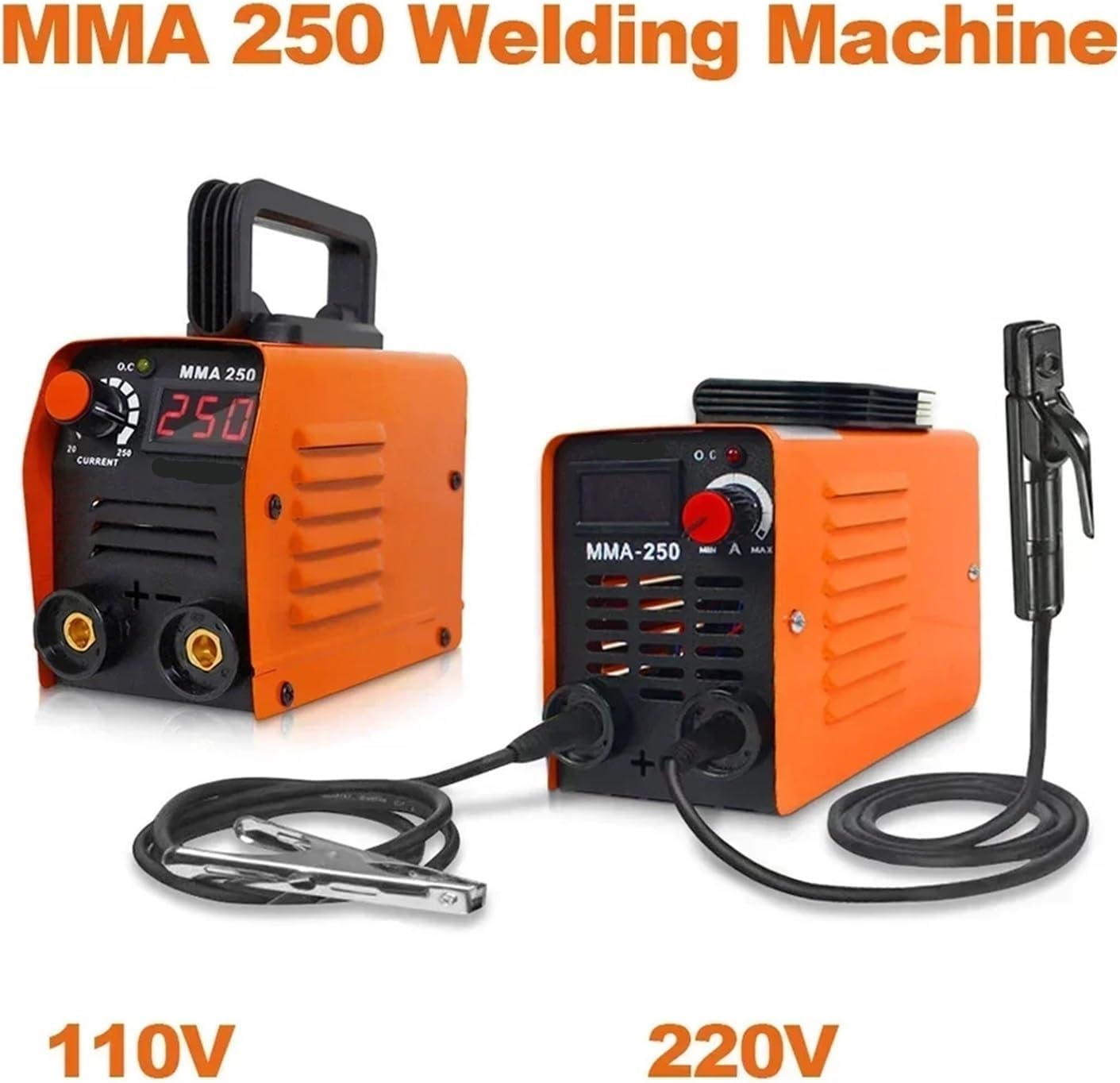
Figure 1: Overview of the MMA-250 Arc Welder, illustrating its compact design and connection points.
4. Setup
- Unpacking: Carefully remove the welder and all accessories from the packaging. Inspect for any shipping damage.
- Power Connection: Connect the welder to a suitable 220V AC power supply. Ensure the power outlet is properly grounded and can handle the rated input power of 4KW.
- Electrode Holder Connection: Connect the electrode holder cable to the positive (+) terminal on the welder. Ensure a secure connection.
- Ground Clamp Connection: Connect the ground clamp cable to the negative (-) terminal on the welder. Ensure a secure connection.
- Workpiece Grounding: Attach the ground clamp securely to the workpiece, ensuring good electrical contact. The ground clamp should be as close to the welding area as possible.
- Electrode Insertion: Insert the welding electrode into the electrode holder. Ensure the electrode is firmly gripped.
5. Operating Instructions
- Power On: Turn on the main power switch on the welder. The digital display will illuminate.
- Current Adjustment: Use the current regulation knob to set the desired welding current (20-250A). Refer to electrode manufacturer guidelines for recommended current settings based on electrode type and material thickness.
- Arc Striking: Gently tap or scratch the electrode against the workpiece to strike an arc. Avoid sticking the electrode.
- Welding: Maintain a consistent arc length and travel speed. Move the electrode steadily along the joint, ensuring proper penetration and bead formation.
- Power Off: After welding, turn off the main power switch. Allow the machine to cool down before storing.
Tips for Optimal Welding:
- Clean the workpiece thoroughly before welding to remove rust, paint, or grease.
- Practice on scrap material to get a feel for the machine and current settings.
- Ensure proper ventilation to disperse welding fumes.
6. Maintenance
Regular maintenance ensures the longevity and safe operation of your welding machine.
- Cleaning: Periodically clean the internal components of the welder using compressed air to remove dust and metal particles. Ensure the power is disconnected before cleaning.
- Cable Inspection: Regularly inspect welding cables, electrode holder, and ground clamp for damage, fraying, or loose connections. Replace damaged components immediately.
- Ventilation Grilles: Keep the ventilation grilles clear of obstructions to ensure proper airflow and prevent overheating.
- Storage: Store the welder in a dry, clean environment, away from moisture and corrosive materials.
7. Troubleshooting
| Problem | Possible Cause | Solution |
|---|---|---|
| No power to the machine | Power cord unplugged, circuit breaker tripped, faulty power switch | Check power cord connection, reset circuit breaker, contact service if switch is faulty |
| No arc or weak arc | Poor ground connection, incorrect current setting, damp electrode, faulty cable | Ensure good ground contact, adjust current, use dry electrodes, inspect cables |
| Electrode sticks to workpiece | Low current setting, incorrect arc length, damp electrode | Increase current, maintain proper arc length, use dry electrodes |
| Overheating indicator on | Exceeded duty cycle, blocked ventilation | Allow machine to cool down, clear ventilation grilles |
8. Specifications
Technical specifications for the JJCEQBPE MMA-250 Arc Welder (220V Model):

Figure 2: Detailed specifications and dimensions for the 220V MMA-250 Arc Welder.
| Parameter | Value |
|---|---|
| Model | MMA-250 |
| Rated Input Voltage | AC 220V |
| Rated Input Power | 4KW |
| Frequency | 50/60Hz |
| Current Regulation Range | 20-250A |
| Load Duration | 60% |
| Welding Rod Diameter | 2.5 Welding Rods |
| Welding Material Thickness | 2-5mm |
| Machine Weight | 1.5 Kg |
| Product Size (L*W*H) | 210mm * 100mm * 130mm |
| Applicable Welding Rods | Ordinary J422, DC: 506 / 507, Pig Iron Z208 |
| Capacitance | National Standard Capacitor |
9. Warranty and Support
For warranty information and technical support, please refer to the documentation provided with your purchase or contact the manufacturer directly. Keep your purchase receipt as proof of purchase for warranty claims.
Manufacturer: JJCEQBPE


