Introduction
The Chatthen eMylo Smart WiFi Thermometer Hygrometer (Model CSAG463) is designed to monitor both temperature and humidity in various environments. It features a built-in sensor for ambient conditions and an external probe for specialized applications such as aquariums, refrigerators, or incubators. Data can be accessed and managed remotely via the Smart Life/Tuya Smart application, offering real-time monitoring, data export, and customizable alerts.
Safety Information
- Keep the device and its components out of reach of children.
- Do not expose the main unit to water or extreme moisture. The external probe is designed for immersion, but the main unit is not waterproof.
- Use only specified AAA alkaline batteries. Do not mix old and new batteries or different types of batteries.
- Avoid placing the device near strong electromagnetic fields or heat sources.
- The external probe is not designed for disassembly. Attempting to disassemble it may damage the device and void any potential warranty.
- Ensure proper ventilation around the device if placed in an enclosed space.
Package Contents
Verify that all items are present in the package:

Figure 1: Package Contents - The image displays the main thermometer sensor unit with its external probe, two AAA batteries, a sticker, and a magnetic sticker, along with a user manual.
- Smart WiFi Thermometer Hygrometer Unit (with built-in sensor) x 1
- External Temperature Probe (1 meter / 40 inches) x 1
- AAA Alkaline Batteries x 2
- Sticker x 1
- Magnetic Sticker x 1
- User Manual x 1
Product Overview
The device consists of a main unit and an external probe. The main unit houses the built-in temperature and humidity sensors, WiFi module, and battery compartment. The external probe extends the temperature monitoring capabilities to specific environments.

Figure 2: Device Front View - This image shows the front of the main thermometer unit, highlighting its compact design.
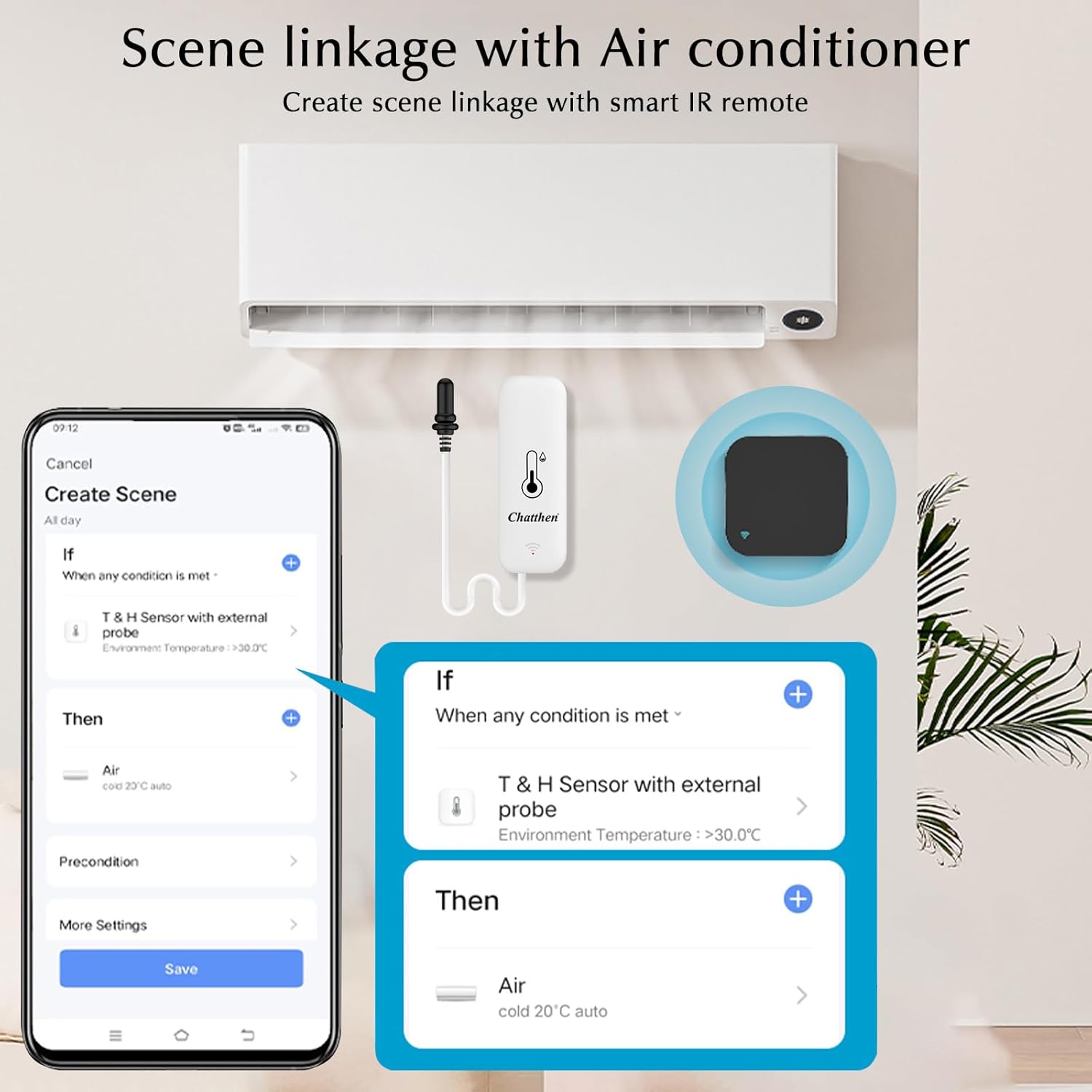
Figure 3: Usage Options - The image illustrates how the device can be used, showing the main unit attached to a refrigerator and the external probe extended, along with the included accessories like the magnetic sticker.
Setup
1. Battery Installation
- Open the battery compartment cover on the back of the device.
- Insert two AAA alkaline batteries, ensuring correct polarity (+/-).
- Close the battery compartment cover securely.
2. App Download and Account Registration
- Download the "Smart Life" or "Tuya Smart" app from your smartphone's app store (Google Play Store for Android, Apple App Store for iOS).
- Register for a new account or log in if you already have one.
3. Device Pairing (WiFi Connection)
The device requires a 2.4GHz WiFi network. 5GHz networks are not supported.
- Ensure your smartphone is connected to a 2.4GHz WiFi network.
- Open the Smart Life/Tuya Smart app.
- Tap the "+" icon in the top right corner to add a device.
- Select "Sensors" or "Temperature & Humidity Sensor" from the device list.
- Follow the on-screen instructions to put the device into pairing mode (usually involves pressing and holding a button on the device until an indicator light flashes).
- Confirm the indicator light is flashing rapidly in the app.
- Enter your 2.4GHz WiFi network password.
- Wait for the device to connect. Once connected, you can rename the device for easier identification.
4. Device Placement
- Main Unit: Place the main unit in the desired indoor location where you want to monitor ambient temperature and humidity. It can be placed on a flat surface or attached using the provided sticker or magnetic sticker (e.g., to a refrigerator door).
- External Probe: Connect the external probe to the main unit. The probe can be used to monitor temperatures in specific environments:
- Aquariums: Submerge the probe into the fish tank water.
- Refrigerators/Freezers: Place the probe inside the refrigerator or freezer compartment.
- Greenhouses/Incubators: Position the probe within the specific area requiring temperature monitoring.

Figure 4: External Probe in Fish Tank - The image demonstrates the external probe being used to monitor the temperature of an aquarium.

Figure 5: External Probe in Refrigerator - This image illustrates the device attached to a refrigerator, with the external probe placed inside to monitor its internal temperature.
Operating Instructions
1. Viewing Data in the App
- Open the Smart Life/Tuya Smart app.
- Select your eMylo device from the device list.
- The app will display real-time temperature and humidity readings from both the built-in sensor and the external probe (if connected).
2. Data Export
The app records data hourly and allows for export.
- In the device interface within the app, navigate to the "Statistics" or "History" section.
- Select the desired time range (Day, Month, Year).
- Look for an export icon (often a square with an arrow pointing out) or an "Export Data" option.
- Enter your email address to receive the data file.

Figure 6: Data Recording and Export - This image displays the app interface with historical temperature data and a pop-up window for entering an email address to export the data.
3. Temperature Unit Switching (℉/℃)
You can switch between Fahrenheit (℉) and Celsius (℃) units within the app settings for the device.
4. Setting Up Alerts
Configure notifications for high or low temperature/humidity thresholds:
- In the device interface, go to "Settings" or "Automation."
- Create a new "Smart Scene" or "Automation."
- Set the condition: "When temperature/humidity exceeds/falls below [desired value]."
- Set the action: "Send notification to phone."
5. Smart Operations (Alexa/Google Home & Scene Linkage)
- Voice Control: Integrate with Amazon Alexa or Google Home for voice commands. Enable the "Smart Life" or "Tuya Smart" skill/action in your voice assistant app and link your account. You can then ask, for example, "Alexa, what is the temperature of [device name]?"
- Scene Linkage: Create automated scenarios with other smart devices. For instance, if the temperature exceeds a certain threshold, you can configure the app to automatically turn on a smart air conditioner or fan.

Figure 7: Voice Assistant Compatibility - This image illustrates the device's compatibility with smart home assistants like Amazon Alexa and Google Home, showing example voice commands.
Figure 8: Scene Linkage Example - The image shows a mobile app interface where a smart scene is configured: if the external probe temperature exceeds 30.0°C, then an air conditioner is set to 20°C auto mode.
Maintenance
- Cleaning: Wipe the main unit with a clean, dry cloth. Do not use abrasive cleaners or immerse the main unit in water. The external probe can be cleaned with a damp cloth.
- Battery Replacement: When the app indicates a low battery, replace both AAA batteries promptly to ensure continuous monitoring.
- Probe Care: The external probe is designed for durability but should not be disassembled. Handle the cable carefully to avoid damage.
Troubleshooting
| Problem | Possible Cause | Solution |
|---|---|---|
| Device not connecting to WiFi. |
|
|
| Inaccurate temperature/humidity readings. |
|
|
| App shows "Offline." |
|
|
| No data export. |
|
|
Specifications
| Feature | Detail |
|---|---|
| Model Number | CSAG463 |
| Brand | Chatthen |
| Manufacturer | eMylo |
| Built-in Sensor Temperature Range | -9.9°C to 60°C (14°F to 140°F) |
| Built-in Sensor Humidity Range | 0% to 100% RH |
| External Probe Temperature Range | -40°C to 120°C (-40°F to 240°F) |
| Temperature Accuracy | ±1°C |
| Humidity Accuracy | ±5% RH |
| External Probe Length | 1 meter (40 inches) |
| Connectivity | Wi-Fi (2.4GHz only) |
| Power Source | 2 x AAA Alkaline Batteries |
| Battery Life | Approximately 1 year (depending on usage) |
| Dimensions (Main Unit) | 7.0 x 2.5 x 2.0 cm (2.9 x 1.0 x 0.8 inches) |
| Weight | 60g (0.13 lb) |
| Color | White |
| Material | Plastic |
| Special Features | High Accuracy, Data Export, App Monitoring, Smart Home Integration |
Support
For further assistance or technical support, please refer to the official Chatthen website or contact their customer service. Details can typically be found on the product packaging or the manufacturer's website.

