1. Introduction
Thank you for choosing the EMERBU Pro-Grade Gel Splatter Ball Blaster MP5K. This manual provides essential information for the safe and proper setup, operation, and maintenance of your new gel blaster. Please read all instructions carefully before use.
2. Safety Information
- Recommended Age: This product is intended for individuals 15 years old and up, and adults.
- Eye Protection: Always wear the provided safety glasses or other appropriate eye protection when operating or near the operation of the gel blaster.
- Gel Ball Type: Use only hardened gel balls (e.g., XHC, milky, ultramax V2) with this blaster. Standard or soft gel balls may burst inside the blaster, causing malfunctions or damage.
- Proper Soaking: Ensure gel balls are properly soaked to their full size (7-8mm) and drained of excess water before use. Excess water can affect trajectory and performance.
- Never Aim at Eyes or Face: Always aim away from people's eyes and faces.
- Supervision: Adult supervision is recommended for users under 18.
- Storage: Store the gel blaster in a safe place, out of reach of small children.
3. What's in the Box
The EMERBU Pro-Grade Gel Splatter Ball Blaster MP5K set includes:
- EMERBU Gel Splatter Ball Blaster MP5K (Black)
- 11.1V Rechargeable Battery
- USB Charger
- Magazine (High Speed Electric Mag)
- Safety Glasses
- Starter Pack of Hardened Gel Balls
- M-LOK Metal Finger Stop
- Small Screwdriver
4. Setup
4.1. Charging the Battery
- Connect the 11.1V rechargeable battery to the provided USB charger.
- Plug the USB charger into a compatible AC adapter (not included).
- Allow the battery to fully charge before first use (approximately 2 hours).
4.2. Preparing Gel Balls
- Place the hardened gel balls in a container with plenty of water.
- Allow them to soak for at least 4 hours, or until they reach 7-8mm in size.
- Drain any excess water thoroughly before loading them into the magazine.

4.3. Installing the Battery
- Locate the battery compartment at the front of the blaster, beneath the barrel.
- Slide open the compartment cover.
- Connect the battery's XT30 interface plug to the corresponding port inside the compartment.
- Carefully tuck the battery and wires into the compartment and close the cover.

4.4. Loading the Magazine
- Open the loading port on the magazine.
- Carefully pour the prepared and drained gel balls into the magazine.
- Close the loading port securely.
- Insert the loaded magazine into the blaster's magazine well until it clicks into place.
4.5. Attaching the M-LOK Finger Stop
The included M-LOK metal finger stop can be attached to the bottom rail of the blaster's handguard using the provided screws and screwdriver for improved grip and control.
5. Operating Instructions
5.1. Powering On/Off and Firing Modes
- Locate the fire mode selector switch on the side of the blaster.
- Set the switch to 'S' for Safety (blaster will not fire).
- Set the switch to 'E' for Semi-Automatic (one shot per trigger pull).
- Set the switch to 'F' for Full-Automatic (continuous firing while trigger is held).

5.2. Priming the Blaster
Before firing, pull the charging handle (mag prime and bolt catch) located on the top of the blaster. This activates the magazine's motor to feed gel balls into the firing chamber, ensuring consistent shots.

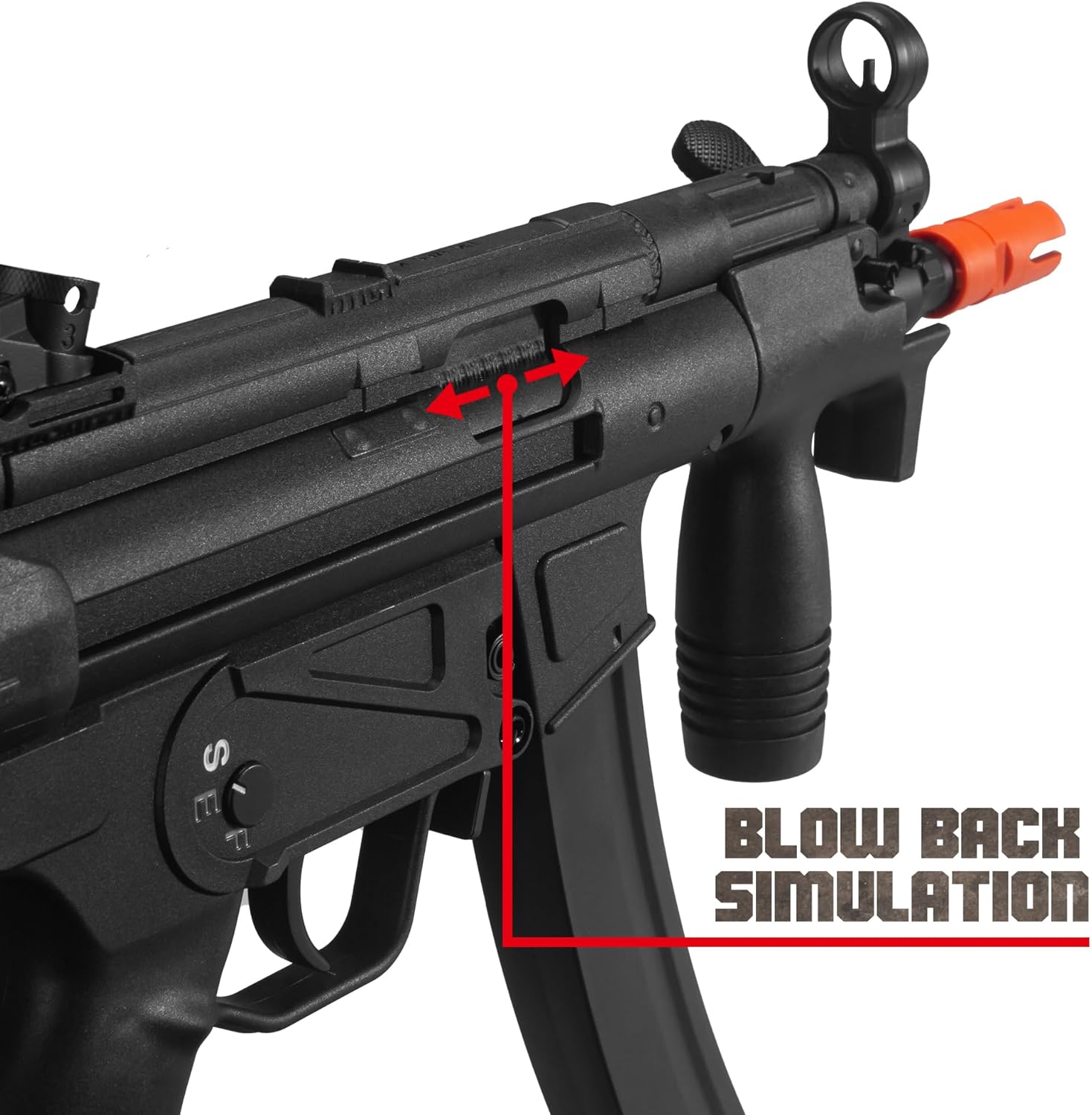
5.3. Blowback Simulation
The MP5K features a blowback simulation mechanism, providing a realistic firing experience. The bolt will cycle with each shot.
5.4. Stock Adjustment and Folding
The blaster's stock can be adjusted for length and folded for compact storage or transport.
- To adjust length: Press the release button on the stock and extend or retract to your desired position.
- To fold: Press the folding release button (typically located near the hinge) and fold the stock to the side until it locks into place.

6. Maintenance
6.1. General Cleaning
Regularly wipe down the exterior of the blaster with a clean, dry cloth. Ensure no dirt or debris enters the magazine or firing mechanism.
6.2. Gel Ball Quality
Always use high-quality, hardened gel balls. Poor quality or improperly soaked gel balls can lead to jamming, reduced performance, and potential damage to the internal components.
7. Troubleshooting
- Blaster not firing: Ensure the battery is fully charged and properly connected. Check that the fire mode selector is not on 'Safety'. Verify the magazine is correctly inserted and primed.
- Gel balls not feeding: Confirm gel balls are properly soaked and drained. Ensure the magazine is fully loaded and the priming handle has been pulled.
- Reduced performance/jamming: This is often caused by using incorrect or improperly prepared gel balls. Switch to hardened gel balls and ensure they are soaked to the correct size and drained.
- Semi-auto malfunction: Some users report occasional semi-auto malfunctions. Ensure the blaster is clean and using optimal gel balls. If issues persist, contact customer support.
- Battery connection issues: Ensure the XT30 connector is securely attached. Avoid forcing connections to prevent damage to wires or ports.
8. Specifications
| Feature | Detail |
|---|---|
| Model Number | MP5K |
| Manufacturer | EMERBU |
| Product Dimensions | 24.8 x 11 x 2.8 inches |
| Item Weight | 4.66 pounds |
| Recommended Age | 15 years and up |
| Gearbox | Upgraded V2 Gearbox |
| Gears | Metal Gearset |
| Motor | High Speed Motor |
| Battery | 11.1V High Power |
| Inner Barrel | 7.3mm Inner Diameter Metal Inner Barrel |
| Muzzle Thread | 14mm Counter-Clockwise (CCW) |


9. Warranty and Support
For warranty information, technical support, or any questions regarding your EMERBU Pro-Grade Gel Splatter Ball Blaster MP5K, please refer to the contact information provided with your product packaging or visit the official EMERBU website.


