Introduction
Thank you for choosing the FIIL GS Open Ear Earbuds. This manual provides detailed instructions for setting up, operating, and maintaining your earbuds to ensure optimal performance and longevity. Please read this manual thoroughly before use.

Image: The FIIL GS Open Ear Earbuds with their charging case.
What's in the Box
The FIIL GS Open Ear Earbuds package includes the following items:
- FIIL GS Open Ear Earbuds (Left and Right)
- Charging Case
- USB Charging Cable
- User Manual (this document)
Product Overview
The FIIL GS earbuds feature an open-ear design for comfort and situational awareness. They are equipped with advanced audio technology, including LDAC codec support for Hi-Res Audio Wireless, and Bluetooth 5.3 for stable connectivity.

Image: Illustration of the ergonomic design features of the FIIL GS earbuds.
- Ergonomic Design: Features a 6:4 weight ratio between earbuds and charging case, 6g fitting force for comfort, and 0.68mm ultra-fine titanium alloy wire for adaptive fit.
- Sound Leakage Prevention: Utilizes a scientific sound aperture matrix and multiple sound barrier configurations to minimize sound leakage.
- IPX5 Water Resistance: Designed to withstand splashes and sweat, suitable for various activities.
Setup
1. Charging the Earbuds and Case
Before first use, fully charge the earbuds and the charging case.
- Place the earbuds into the charging case, ensuring they are correctly seated.
- Connect the USB charging cable to the charging port on the case and to a power source (e.g., USB wall adapter, computer USB port).
- The indicator lights on the case will show the charging status. A full charge for the case takes approximately 1.5 hours.

Image: The FIIL GS charging case being charged via a USB cable, illustrating battery life.
The earbuds provide approximately 9.8 hours of listening time on a single charge, with the charging case offering an additional 2 full charges, totaling over 32 hours of playtime.
2. Bluetooth Pairing
Pair your FIIL GS earbuds with your device for wireless audio.
- Open the charging case. The earbuds will automatically enter pairing mode, indicated by flashing lights.
- On your device (smartphone, tablet, computer), enable Bluetooth and search for available devices.
- Select "FIIL GS" from the list of found devices to connect.
- Once connected, a voice prompt will confirm successful pairing.
The earbuds support Bluetooth 5.3 Dual Device Connectivity, allowing connection to two devices simultaneously. For example, you can connect to both your phone and computer and switch seamlessly between them for calls or media.

Image: Graphic illustrating Bluetooth 5.3 technology.
3. FIIL+ App Installation
For enhanced features and customization, download the FIIL+ app from your device's app store.
- Search for "FIIL+" in the Apple App Store or Google Play Store.
- Install the app and follow the on-screen instructions to connect your FIIL GS earbuds.
- The app allows for customizable EQ settings, sound effects, and other tuning options.

Image: Screenshot of the FIIL+ app interface on a smartphone, showing customization options.
Operating Instructions
Touch Controls
The FIIL GS earbuds feature touch-sensitive controls for various functions. Specific gestures can be customized via the FIIL+ app.
| Action | Function |
|---|---|
| Single Tap (Left/Right) | Play/Pause Music, Answer/End Call |
| Double Tap (Right) | Next Track |
| Double Tap (Left) | Previous Track |
| Triple Tap (Left/Right) | Activate Voice Assistant |
| Press and Hold (Left/Right) | Volume Up/Down (configurable via app) |
| Incoming Call: Press and Hold | Reject Call |
Hi-Res Audio with LDAC
The FIIL GS earbuds support LDAC codec for high-resolution audio transmission. To experience Hi-Res Audio Wireless:
- Ensure your audio source device supports LDAC.
- Activate LDAC in your device's Bluetooth settings or through the FIIL+ app if available.
- Play Hi-Res audio content for the best listening experience.
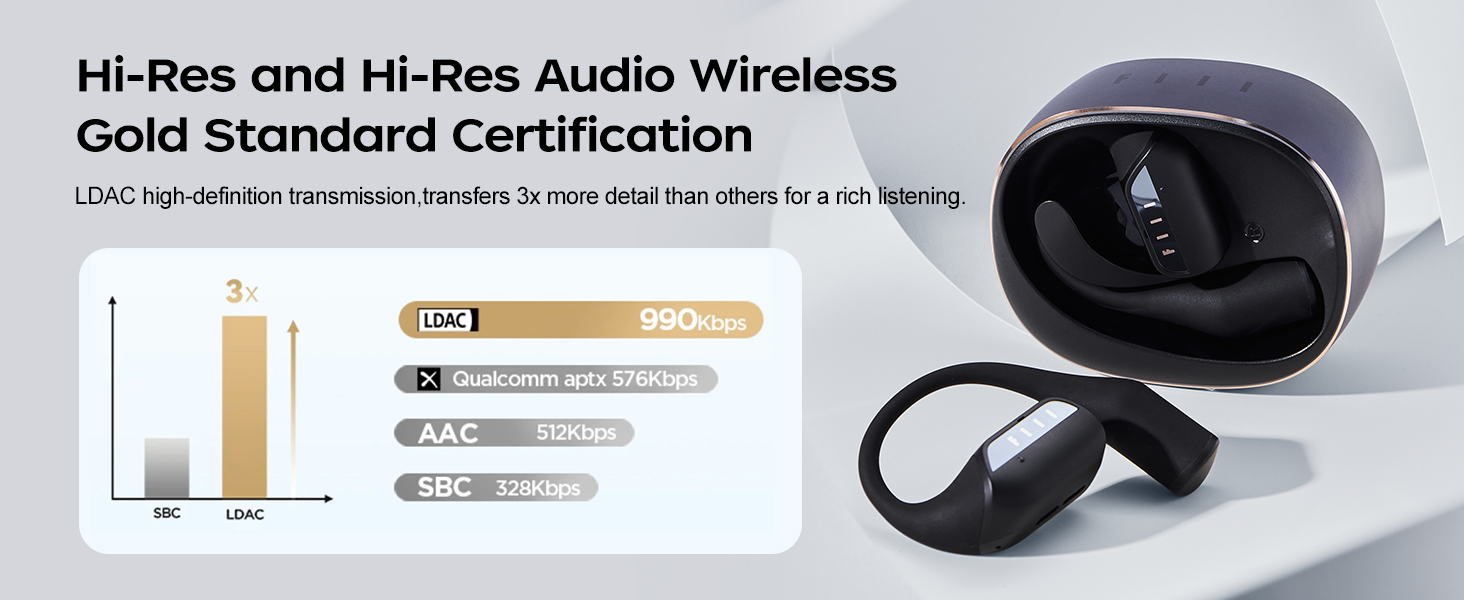
Image: A comparison chart showing LDAC's higher bitrate compared to other audio codecs like AAC and SBC.
Call Management
The earbuds feature ENC Dual-Mic Call Noise Cancellation for clear calls.
- Answering/Ending Calls: Single tap either earbud.
- Rejecting Calls: Press and hold either earbud.

Image: Diagram illustrating the ENC Dual-Mic Call Noise Cancellation feature for improved call quality.
Maintenance
Cleaning
- Regularly clean the earbuds and charging case with a soft, dry, lint-free cloth.
- Avoid using abrasive materials, solvents, or chemical cleaners.
- Ensure charging contacts on both earbuds and case are clean and dry for proper charging.
Water Resistance (IPX5)
The FIIL GS earbuds are IPX5 water-resistant, meaning they can withstand splashes of water and sweat. They are not designed for submersion in water.
- Do not expose the earbuds to running water or wear them while swimming or showering.
- If the earbuds get wet, wipe them dry thoroughly before placing them back in the charging case or using them.

Image: The FIIL GS earbuds in their case, showing resistance to water splashes, highlighting the IPX5 rating.
Battery Care
- Store the earbuds and case in a cool, dry place when not in use.
- Avoid extreme temperatures, which can degrade battery life.
- Charge the device regularly, even if not used frequently, to maintain battery health.
Troubleshooting
| Problem | Possible Solution |
|---|---|
| Earbuds not pairing |
|
| No sound or low volume |
|
| Charging issues |
|
| Touch controls unresponsive |
|
Specifications
| Feature | Detail |
|---|---|
| Model Name | GS |
| Item Model Number | F043 |
| Connectivity Technology | Wireless (Bluetooth 5.3) |
| Audio Codec Support | LDAC (Hi-Res Audio Wireless Certified) |
| Water Resistance | IPX5 |
| Battery Life (Earbuds) | Up to 9.8 hours (single charge) |
| Total Battery Life (with Case) | Up to 32 hours |
| Charging Time (Case) | Approx. 1.5 hours |
| Ear Placement | Open Ear |
| Control Type | Touch Control, App Control |
| Special Features | Lightweight, Microphone Included, Multipoint Pairing, Sweatproof |
| Frequency Range | 20 Hz - 20,000 Hz |
| Impedance | 16 Ohm |
| Item Weight | 5.6 ounces |
| Material | Plastic |
Warranty Information
FIIL products are typically covered by a limited warranty against defects in materials and workmanship. Please refer to the warranty card included with your product or visit the official FIIL website for specific warranty terms and conditions, including duration and coverage details.
Keep your proof of purchase for warranty claims.
Support
For further assistance, technical support, or frequently asked questions, please visit the official FIIL website or contact their customer service.
- FIIL Official Store: Visit FIIL Store on Amazon
- Online Support: Refer to the official FIIL website for support resources.