1. Important Safety Instructions
Please read all instructions carefully before using this appliance. Retain this manual for future reference.
- This appliance is for household use only. Do not use outdoors or on wet surfaces.
- Do not allow children to operate the vacuum cleaner. Close supervision is necessary when used near children.
- Do not pick up flammable or combustible liquids, such as gasoline, or use in areas where they may be present.
- Do not pick up anything that is burning or smoking, such as cigarettes, matches, or hot ashes.
- Do not use without the dust cup and filters in place.
- Turn off the appliance before connecting or disconnecting the motorized brush, extension wand, or other accessories.
- Use only the charger supplied by the manufacturer to recharge.
- Do not handle the charger or appliance with wet hands.
- If the appliance is not working as it should, has been dropped, damaged, left outdoors, or dropped into water, return it to a service center.
2. Product Components
The SINCHER Cordless Vacuum Cleaner comes with several components designed for versatile cleaning. Familiarize yourself with each part before assembly.

Image 2.1: Overview of the SINCHER Cordless Vacuum Cleaner and its included accessories, including the main unit, extension wand, motorized floor brush, crevice tool, round brush, pet/sofa brush, wall mount, and spare filters.
- Main Unit: Contains the motor, dust cup, and battery.
- Extension Wand: Connects the main unit to the floor brush for upright cleaning.
- Motorized Floor Brush: Equipped with LED lights and a rotating brush for effective cleaning on various floor types.
- Crevice Tool: Ideal for narrow gaps and corners.
- Round Brush: Suitable for dusting delicate surfaces and upholstery.
- Pet/Sofa Brush: Designed for cleaning pet hair from furniture.
- Wall Mount: For convenient storage and charging.
- Power Adapter: For charging the detachable battery.
- Washable Filters: HEPA and sponge filters for advanced filtration.
3. Setup and Assembly
3.1 Battery Charging
Before first use, fully charge the battery. The detachable 2200mAh 6-cell lithium battery requires approximately 4.5 hours for a full charge.
- Remove the battery from the main unit by pressing the release button.
- Connect the power adapter to the battery charging port.
- Plug the adapter into a power outlet. The battery indicator lights will show charging status.
- Once fully charged, disconnect the adapter.

Image 3.1: The detachable battery unit connected to the power adapter for charging, shown next to the main vacuum unit stored on its wall mount.
3.2 Assembling the Vacuum Cleaner
The vacuum can be assembled in various configurations for different cleaning tasks.
- For Stick Vacuum Mode:
- Insert the extension wand into the main unit until it clicks securely.
- Attach the motorized floor brush to the other end of the extension wand until it clicks.
- For Handheld Vacuum Mode:
- Attach the desired accessory (crevice tool, round brush, or pet/sofa brush) directly to the main unit until it clicks.
3.3 Wall Mount Installation
The included wall mount provides a convenient storage and charging solution.
- Choose a suitable location near a power outlet, ensuring it is at an appropriate height for easy access.
- Mark the positions for drilling using the wall mount as a template.
- Drill holes and insert the wall plugs.
- Secure the wall mount to the wall with screws.
- Hang the assembled vacuum cleaner on the wall mount.

Image 3.2: Illustration showing the wall mount bracket with included screws and anchors, ready for installation. The vacuum can be stored on this mount.
4. Operating the Vacuum Cleaner
The SINCHER Cordless Vacuum Cleaner offers powerful suction and flexible operation for various cleaning needs.
4.1 Power On/Off and Suction Modes
- Press the power button on the main unit to turn the vacuum cleaner on. It will start in the standard suction mode.
- Press the mode button (often indicated by '+' or 'Max') to switch to the higher suction mode (30KPa).
- Press the power button again to turn the vacuum cleaner off.

Image 4.1: A close-up view of the main unit's handle, highlighting the power button and the mode selection button for adjusting suction power.
4.2 Using Attachments and Configurations
The 4-in-1 design allows for versatile cleaning across different surfaces and areas.
- Stick Vacuum: Use with the extension wand and motorized floor brush for cleaning hard floors, carpets, and rugs. The LED headlights on the brush illuminate dust in dark areas.
- Handheld Vacuum: Detach the extension wand and attach accessories directly to the main unit for cleaning car interiors, upholstery, stairs, and tabletops.
- Crevice Tool: Excellent for reaching tight spaces, corners, and edges.
- Round Brush: Ideal for delicate surfaces like keyboards, curtains, and shelves.
- Pet/Sofa Brush: Effectively removes pet hair and debris from fabric surfaces.
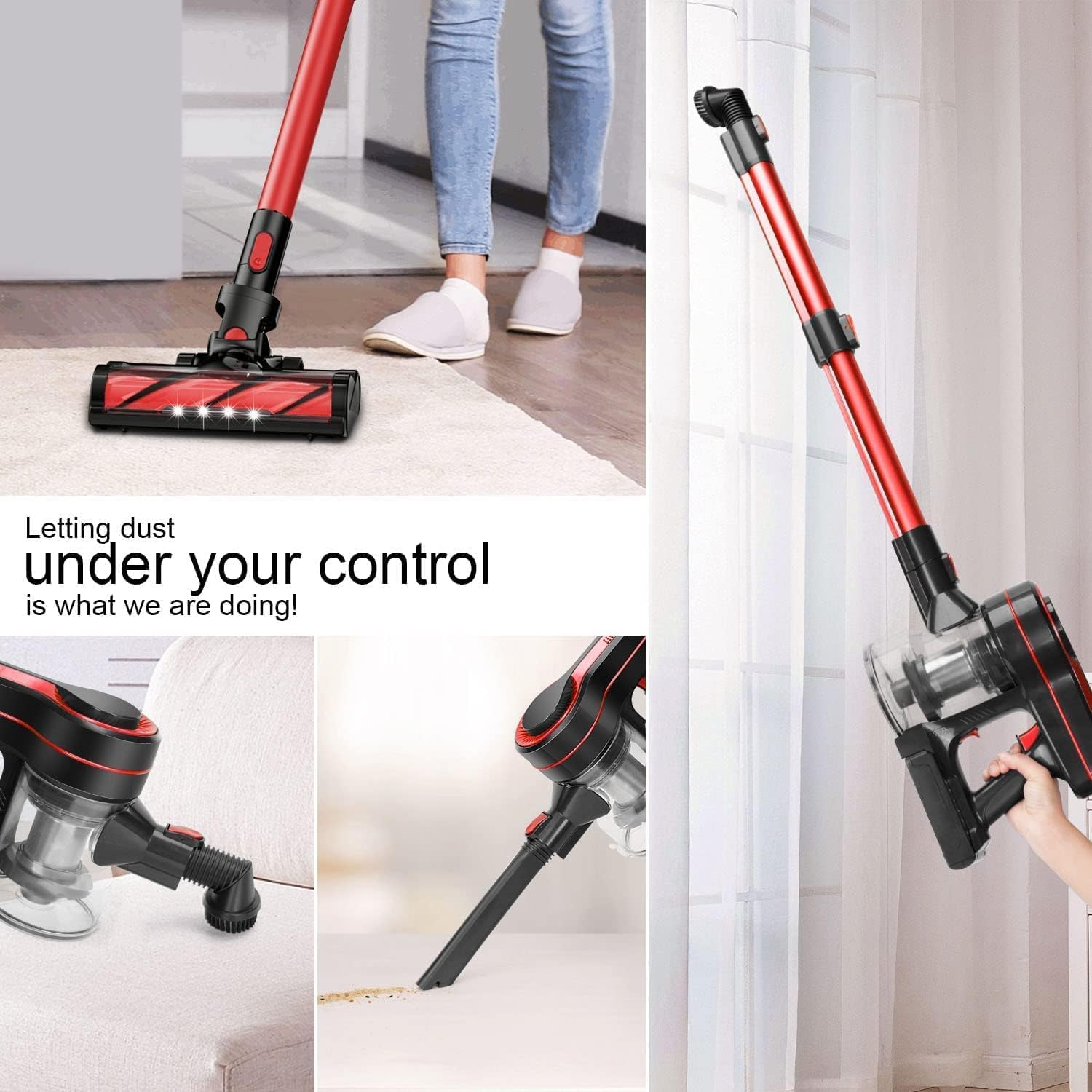
Image 4.2: The SINCHER vacuum cleaner shown in various configurations: as a stick vacuum, a handheld vacuum with a crevice tool, and a handheld vacuum with a brush attachment, demonstrating its versatility.

Image 4.3: A collage showing the vacuum cleaner in action, cleaning under furniture, as a handheld unit for shelves, and inside a car, highlighting its adaptability.

Image 4.4: A detailed view of the motorized floor brush head, illustrating its flexible 180-degree horizontal and 90-degree vertical rotation for easy maneuverability around obstacles.
5. Maintenance
Regular maintenance ensures optimal performance and extends the lifespan of your SINCHER Cordless Vacuum Cleaner.
5.1 Emptying the Dust Cup
Empty the dust cup regularly, especially when debris reaches the MAX fill line.
- Ensure the vacuum cleaner is turned off.
- Press the dust cup release button to detach it from the main unit.
- Hold the dust cup over a trash bin and press the bottom release latch to open the lid and empty the contents.
- Close the lid and reattach the dust cup to the main unit until it clicks.

Image 5.1: A sequence showing how to empty the dust cup by pressing a release button and allowing collected debris to fall into a waste bin.
5.2 Cleaning the Filters
The HEPA and sponge filters are washable. Clean them regularly to maintain suction power and air quality.
- Ensure the vacuum cleaner is turned off and the dust cup is detached.
- Remove the HEPA filter and sponge filter from the dust cup.
- Rinse both filters under cold running water until the water runs clear. Do not use detergent.
- Allow the filters to air dry completely for at least 24 hours before reassembling. Do not use a dryer or heat to dry them.
- Reinsert the dry filters into the dust cup and reattach the dust cup to the main unit.

Image 5.2: An exploded view diagram illustrating the 4-stage filtration system, including the cone metal sedimentation, vortex cyclone, sponge filter, and precise filter for fresh exhaust.

Image 5.3: The dust cup and filters submerged in water, demonstrating that they are washable for easy maintenance.
5.3 Cleaning the Brush Roll
Periodically check the motorized floor brush for tangled hair or debris and clean as needed.
- Ensure the vacuum cleaner is turned off and disconnected from the power source.
- Detach the motorized floor brush from the extension wand.
- Locate the brush roll release mechanism (usually a latch or screw) and remove the brush roll.
- Use scissors or the included cleaning tool to cut and remove any tangled hair or fibers from the brush roll.
- Reinsert the brush roll and secure it in place.
6. Troubleshooting
If you encounter issues with your SINCHER Cordless Vacuum Cleaner, refer to the following common problems and solutions.
| Problem | Possible Cause | Solution |
|---|---|---|
| Vacuum does not turn on | Battery is not charged or not properly installed. | Ensure the battery is fully charged and securely inserted into the main unit. |
| Loss of suction power | Dust cup is full, filters are clogged, or there is a blockage in the hose/attachments. | Empty the dust cup. Clean the HEPA and sponge filters. Check for and remove any blockages in the extension wand, floor brush, or accessories. |
| Motorized brush not spinning | Brush roll is tangled with hair/debris or the brush head is not properly attached. | Clean the brush roll, removing any obstructions. Ensure the motorized floor brush is securely attached to the extension wand or main unit. |
| Battery runtime is short | Battery not fully charged or battery life is diminishing. | Ensure the battery is fully charged before use. If the issue persists, consider purchasing a replacement battery. |
7. Specifications
Key technical specifications for the SINCHER Cordless Vacuum Cleaner, Model B0DFQBBGTS.
| Feature | Specification |
|---|---|
| Brand | SINCHER |
| Model | B0DFQBBGTS |
| Power / Wattage | 350 watts |
| Suction Power | Up to 30KPa |
| Battery Type | 2200mAh 6-Cell Lithium Battery |
| Runtime | Up to 30 minutes (standard mode), 15 minutes (super mode) |
| Charging Time | Approximately 4.5 hours |
| Dust Cup Capacity | 1.2 Liters |
| Filtration System | 4-stage, 12-degree HEPA and High-Density-Sponge filtration (99.99% efficiency) |
| Special Features | Detachable Battery, LED Turbo Electric Floor Brush, Wall Mount |
| Item Weight | 3.16 Kilograms |
| Package Dimensions | 43.79 x 25.8 x 19.2 cm |
| Recommended Surfaces | Carpet, Hardwood, Tile, Marble, Upholstery |

Image 7.1: Visual summary of key specifications including 20KPa suction, 350W power, 4.5H charging time, 30 mins running time, 1.2L dust cup, 99.99% filter efficiency, 2200mAh battery, and 72dB noise level.
8. Warranty and Support
The SINCHER Cordless Vacuum Cleaner is designed for durability and performance. For specific warranty details, please refer to the product packaging or contact the retailer where the product was purchased.
For technical support, replacement parts, or further assistance, please visit the official SINCHER store or contact customer service.
- Online Support: For additional information and support, please visit the SINCHER Store on Amazon.
- Protection Plans: Extended protection plans may be available for purchase separately. Refer to your retailer for options.