1. Introduction and Overview
The toocki Open Ear Headphones are designed to provide a comfortable and safe listening experience, especially during sports and daily activities. Utilizing advanced air conduction technology, these headphones sit outside the ear canal, reducing pressure and discomfort associated with traditional in-ear earphones.
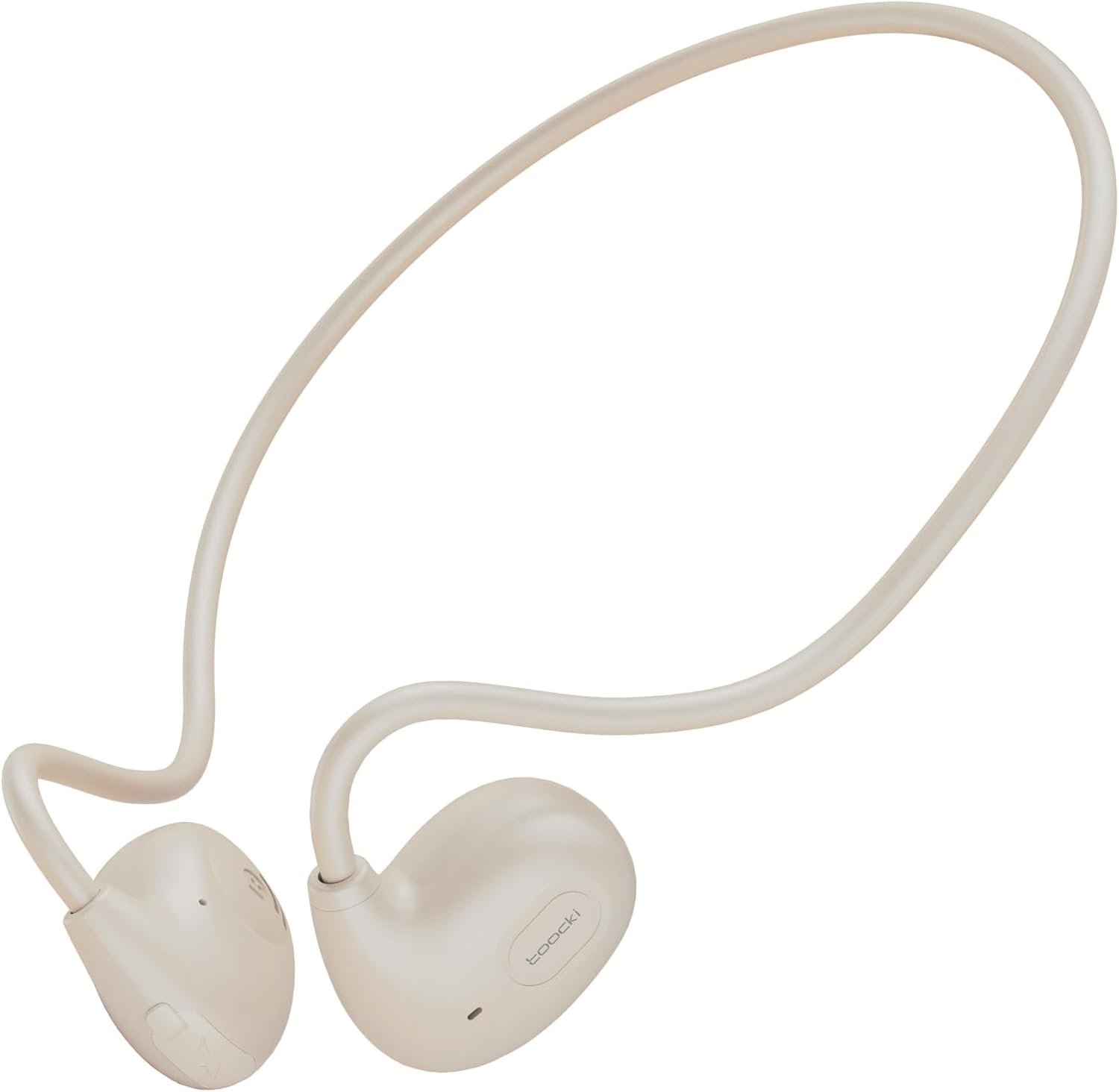
Image: toocki Open Ear Headphones, showing the lightweight, open-ear design with a neckband connecting the two earpieces.
Key features include:
- Open-Ear Design & Air Conduction Technology: Provides a new listening experience without entering the ear canal, reducing discomfort and pressure.
- HD Sound Quality & Bluetooth 5.3: Equipped with high-resolution speaker units and Bluetooth 5.3 for stable, fast, and clear audio.
- Easy Control & Built-in Microphone: Multifunction buttons allow for effortless control of music and calls.
- Waterproof and Sweat-Resistant (IPX4): Ideal for various sports activities.
- 8 Hours Playtime & Fast Charging: Long battery life with quick recharge capability.

Image: A person wearing the toocki Open Ear Headphones, illustrating the open-ear design and air conduction technology that avoids burden on the ear canal.

Image: A comparison showing the comfort and stability of the toocki Open Ear Headphones (left) versus traditional in-ear headphones (right), highlighting the air conduction tech and secure earhook design.
2. Setup
2.1. Charging the Headphones
Before first use, fully charge your toocki Open Ear Headphones. A USB-C charging cable is included.
- Connect the USB-C end of the charging cable to the charging port on the headphones.
- Connect the USB-A end to a compatible USB power adapter (not included) or a computer's USB port.
- The charging indicator light will show the charging status.
- A full charge takes approximately 1.2 hours.

Image: Visual representation of key features including Bluetooth 5.3 chip, IPX4 waterproof rating, lightweight design (12.5g), and the Type-C charging port.
2.2. Bluetooth Pairing
Follow these steps to pair your headphones with a Bluetooth-enabled device:
- Ensure the headphones are sufficiently charged.
- Press and hold the Power button on the right earpiece for approximately 3 seconds until the indicator light flashes, indicating pairing mode.
- On your device (smartphone, tablet, laptop), enable Bluetooth and search for available devices.
- Select "TQ-EJ04" from the list of found devices.
- Once connected, the indicator light will change, and you may hear an audible confirmation.
The headphones will automatically attempt to reconnect to the last paired device when powered on.

Image: Close-up of the Bluetooth 5.3 chip inside the headphone, emphasizing stable and fast connection capabilities.
3. Operating the Headphones
3.1. Wearing the Headphones
Place the headphones over your ears with the earhooks resting securely. The design ensures the sound is delivered without blocking your ear canal, allowing you to remain aware of your surroundings.

Image: Diagram illustrating the pulse directional sound transmission technology (DST Tech) that effectively reduces sound leakage, ensuring privacy while maintaining open-ear awareness.
3.2. Button Controls
The headphones feature intuitive controls, primarily located on the right earpiece. Refer to the table below for common functions:
| Action | Function |
|---|---|
| Tap *1 | Play/Pause music |
| Tap *3 | Previous song |
| Tap *2 | Next song |
| Tap *1 | Answer/End call |
| Tap *2 | Reject call |
| Long press 2s | Voice assistant activation |
| Long press 3s | Power On/Off |

Image: A visual guide to the intelligent touch controls on the headphones, detailing single, double, triple taps, and long presses for various functions like play/pause, track skipping, call management, and power.
3.3. Audio Quality
The headphones are equipped with 14.2mm driver units, providing Hi-Fi stereo sound with deep bass. While designed for open-ear listening, they deliver clear audio for music, videos, and calls.

Image: An exploded view diagram of the 14.2mm driver unit, illustrating the components that contribute to the Hi-Fi stereo surrounded sound experience.
3.4. Battery Life
Enjoy up to 8 hours of music playtime on a single charge. The headphones also offer approximately 7 hours of talk time and 100 hours of standby time.

Image: A visual representation of the 8-hour battery life, with the headphones placed on a clock face, indicating extended usage time.
4. Maintenance
4.1. Cleaning
To maintain the performance and longevity of your headphones:
- Wipe the headphones with a soft, dry, lint-free cloth.
- Do not use abrasive cleaners, solvents, or strong chemicals.
- Avoid getting moisture into the charging port or speaker openings.
4.2. Storage
When not in use, store the headphones in a cool, dry place, away from direct sunlight and extreme temperatures. Avoid placing heavy objects on them.
The IPX4 water resistance protects against sweat and splashes, but the headphones are not designed for submersion in water.
5. Troubleshooting
If you encounter issues with your toocki Open Ear Headphones, refer to the following common solutions:
| Problem | Possible Cause | Solution |
|---|---|---|
| Headphones do not power on. | Low battery. | Charge the headphones fully. |
| Cannot pair with device. | Headphones not in pairing mode; Bluetooth off on device; device too far. | Ensure headphones are in pairing mode (flashing indicator). Turn on Bluetooth on your device. Move device closer to headphones (within 10 meters). Try restarting both devices. |
| No sound or poor sound quality. | Volume too low; headphones not properly positioned; connection issue. | Increase volume on both headphones and device. Adjust headphone position on your ears. Re-pair the headphones. |
| Intermittent connection. | Interference; device too far; low battery. | Move away from sources of interference (Wi-Fi routers, other Bluetooth devices). Ensure device is within range. Charge headphones. |
6. Specifications
Detailed technical specifications for the toocki Open Ear Headphones:
| Feature | Detail |
|---|---|
| Brand | toocki |
| Model Name | TQ-EJ04 |
| Model Number | OpenBlue30 |
| Connectivity Technology | Wireless (Bluetooth 5.3) |
| Ear Placement | Open Ear |
| Form Factor | On-Ear |
| Water Resistance | IPX4 |
| Playtime | Up to 8 hours |
| Charging Time | Approx. 1.2 hours |
| Weight | 30 grams (packaging dimensions: 10 x 8 x 1.2 cm) |
| Included Components | USB-C Charging Cable |
7. Warranty and Support
Your toocki Open Ear Headphones come with a 12-month quality guarantee from the date of purchase. This warranty covers all product defects and damages that occur under normal use.
For professional customer support or any questions regarding your product, please contact the seller or refer to the official toocki support channels.


