
1. Introduction
The M-VAVE Chocolate Plus is a versatile wireless MIDI controller designed for musicians and producers. It features four programmable foot switches, an integrated MIDI Host interface, and broad compatibility across Windows, Mac, iOS, and Android platforms. This manual provides detailed instructions for setting up, operating, and maintaining your device to ensure optimal performance.
The Chocolate Plus allows you to control various musical software and hardware, offering hands-free operation for effects, patch changes, and more. Its compact design and long battery life make it suitable for studio use, live performances, and practice sessions.
2. Product Overview
The M-VAVE Chocolate Plus is a powerful tool for MIDI control. Below is an overview of its main components and capabilities.

Image: M-VAVE Chocolate Plus MIDI Controller. This image shows the top view of the Chocolate Plus, highlighting its four foot switches, display, and connectivity ports (USB, Host).
Key Features:
- Wireless MIDI Connectivity: Utilizes Bluetooth BLE-MIDI for seamless connection to compatible devices.
- 4 Programmable Foot Switches: Allows for hands-free control of various functions.
- Integrated MIDI Host Interface: Enables direct control of other effect pedals and MIDI devices without a computer.
- Long Battery Life: Up to 12 hours of continuous use on a single charge (2.5 hours charging time).
- Broad Compatibility: Supports Windows, Mac, iOS, and Android operating systems.
- Customizable MIDI Messages: Send Program Change (PC), Control Change (CC), Note On/Off, and SYSEX messages.
- Mobile Application: Dedicated app (CubeSuite) for detailed configuration and customization.
- Compact and Portable Design: Lightweight and durable, ideal for musicians on the go.
3. Setup
3.1 Unpacking and Initial Charge
Carefully remove the M-VAVE Chocolate Plus from its packaging. Before first use, it is recommended to fully charge the device. Connect the provided USB Type-C cable to the Chocolate Plus and a standard 5V USB power adapter (not included) or a computer USB port. The charging indicator will show the charging status.
3.2 Powering On/Off
- To power on: Press and hold the power button located on the side of the unit until the display illuminates.
- To power off: Press and hold the power button until the display turns off.
3.3 Connecting to Devices
The Chocolate Plus offers multiple connectivity options:
3.3.1 Bluetooth BLE-MIDI Connection
- Ensure the Chocolate Plus is powered on.
- On your mobile device (iOS/Android) or computer (Windows/Mac), enable Bluetooth.
- Open your preferred music application or the CubeSuite app.
- Navigate to the MIDI settings within the application and select the "Chocolate Plus" from the list of available Bluetooth MIDI devices.
- The Bluetooth indicator on the Chocolate Plus will confirm a successful connection.
3.3.2 USB Connection
Connect the Chocolate Plus to your computer using the provided USB Type-C cable. The device will be recognized as a standard MIDI input device. No special drivers are typically required for Windows, Mac, iOS, or Android.
3.3.3 MIDI Host Interface
The MIDI Host interface allows you to connect other USB-MIDI devices directly to the Chocolate Plus, enabling them to be controlled by the foot switches or to pass MIDI data through the Chocolate Plus. Set the selector to the 'H' position for Host mode.

Image: M-VAVE Chocolate Plus connected to another pedal via MIDI Host. This image illustrates the Chocolate Plus connected to an external MIDI pedal, demonstrating the MIDI Host functionality.
4. Operating Instructions
4.1 Basic Foot Switch Functions
The four foot switches (A, B, C, D) can be programmed to send various MIDI messages. By default, they may be configured for common functions such as:
- Program Change (PC): Switch between presets or patches.
- Control Change (CC): Toggle effects on/off, adjust parameters.
- Note On/Off: Trigger notes or samples.
- SYSEX Messages: Send complex system exclusive messages for advanced control.
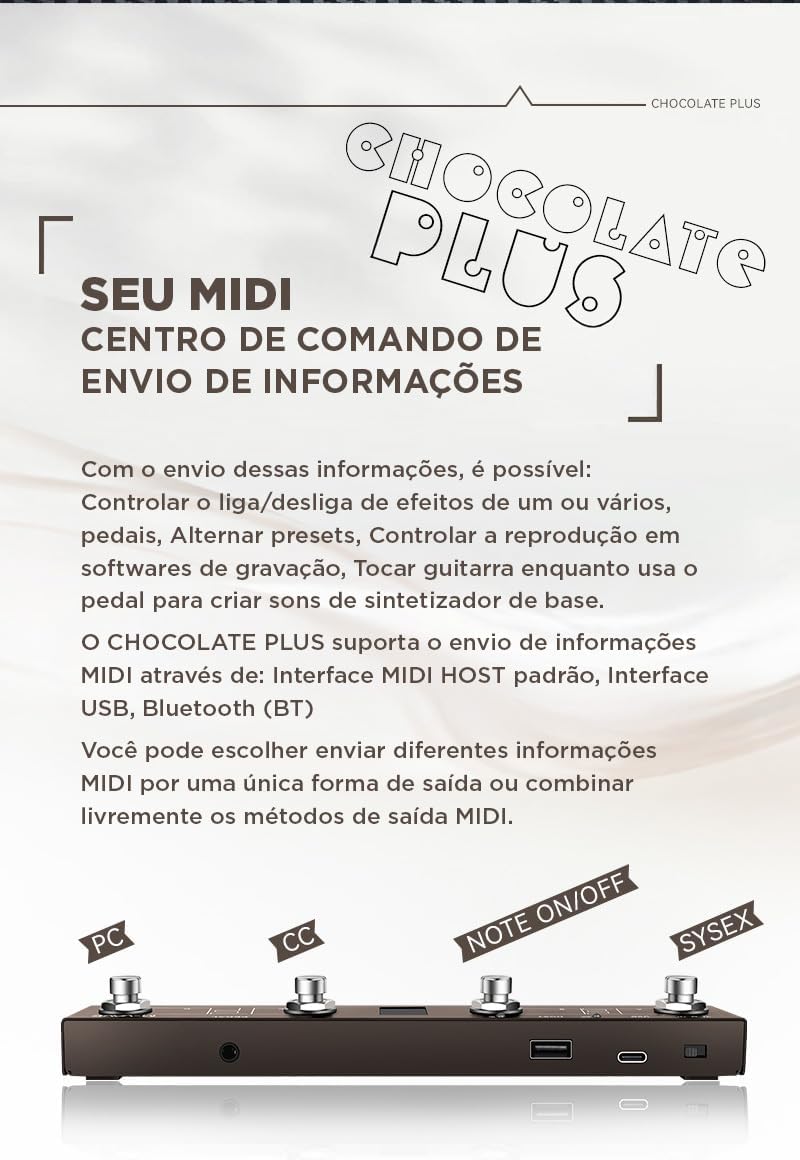
Image: M-VAVE Chocolate Plus displaying MIDI message types. This image highlights the different types of MIDI messages (PC, CC, Note On/Off, SYSEX) that can be sent by the controller.
4.2 Customizing Foot Switch Actions
The Chocolate Plus allows for extensive customization of each foot switch. You can configure short press and long press actions independently. This enables sending two different sequences of MIDI information (up to 16 messages per sequence) from a single foot switch.

Image: M-VAVE Chocolate Plus with a shoe, illustrating foot switch use. This image shows the compact size of the controller and how it is used with a foot, emphasizing its versatility.
4.3 Expansive Software Functionalities
Beyond MIDI control, the Chocolate Plus can be used for various software-related tasks:
- Page Turner: Control page-turning in digital sheet music applications.
- Video Player Controller: Manage playback functions like fast-forward, rewind, play/pause, and loop for online videos when connected via USB.
- Keyboard Customization: Program foot switches to send keyboard shortcuts (e.g., Ctrl, Shift, Alt, Win/Command) for recording software, DAWs, or office applications.
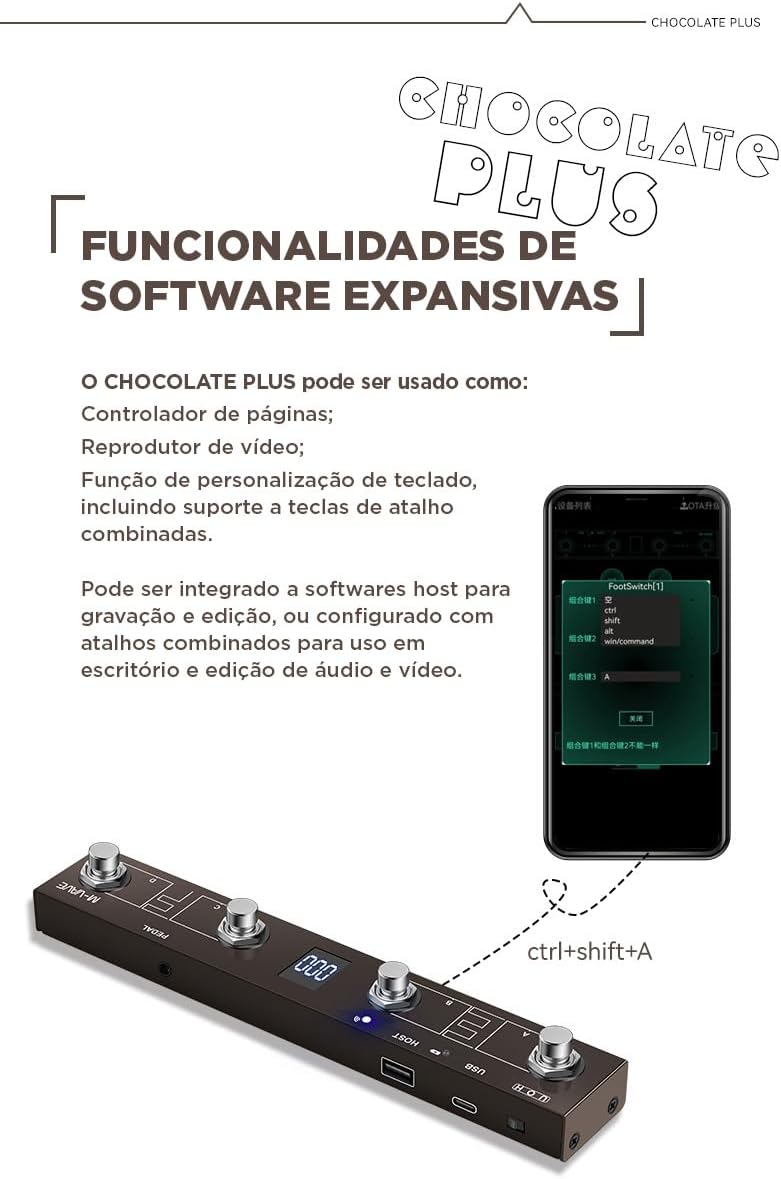
Image: M-VAVE Chocolate Plus controlling a mobile app with keyboard shortcuts. This image shows the Chocolate Plus connected to a smartphone displaying an app interface, demonstrating its ability to send keyboard commands like "Ctrl+Shift+A".
5. Mobile Application (CubeSuite)
The dedicated CubeSuite mobile application (available for Android and iOS) provides a simple and convenient way to customize every detail of your Chocolate Plus MIDI Controller. All elements are easily accessible for hassle-free MIDI configuration.
5.1 App Features:
- Customize MIDI messages (PC, CC, Note On/Off, SYSEX) for each foot switch.
- Configure short press and long press actions.
- Manage bank switching and presets.
- Perform Over-The-Air (OTA) firmware upgrades.
- Adjust device settings and preferences.

Image: Screenshots of the CubeSuite mobile application interface. This image displays three different screens from the CubeSuite app, showing options for configuring PC codes, CC codes, and custom MIDI settings for the foot switches.
6. Power Supply
The M-VAVE Chocolate Plus supports multiple power supply methods:
- Internal Battery: The device is equipped with a 3.7V, 300mAh rechargeable battery, providing up to 12 hours of operation.
- USB Power: Can be powered directly via the USB Type-C connection from a computer or a USB power adapter.
- Standard 5V DC Input: The device accepts a standard 5V DC power input with internal negative and external positive polarity.

Image: Graphic illustrating power percentage, indicating battery life. This image shows a stylized "99%" power indicator, representing the device's battery status or charging capability.
7. Specifications
Refer to the table below for detailed technical specifications of the M-VAVE Chocolate Plus.

Image: Diagram of M-VAVE Chocolate Plus with technical specifications. This image provides a visual breakdown of the controller's parts and lists its technical specifications in Portuguese.
| Feature | Specification |
|---|---|
| Input Power | Standard 5V DC |
| Average Operating Current | 45mA |
| USB Connection Type | Type-C |
| Product Dimensions (L x W x H) | 212 x 36 x 17 mm |
| Product Weight | 280g |
| Battery Capacity | 3.7V, 300mAh |
| Connectivity Technology | USB, Bluetooth |
| Compatible Devices | Computer (desktop/laptop), Smartphone, Tablet |
| Compatible Software | CubeSuite |
| Hardware Interface | USB, USB 2.0 |
| Control Type | Button and pedal controller |
| Supported Platforms | Android, Windows, iOS, Mac |
| Included Components | Instruction manual, power cable, Chocolate Plus unit |
8. Troubleshooting
If you encounter issues with your M-VAVE Chocolate Plus, please refer to the following common troubleshooting steps:
- Device not powering on: Ensure the battery is charged. Connect the device to a power source via USB-C and try again.
- Bluetooth connection issues:
- Make sure Bluetooth is enabled on both the Chocolate Plus and your host device.
- Ensure the Chocolate Plus is within range (typically up to 10 meters).
- Try restarting both the Chocolate Plus and your host device.
- Forget the device in your host device's Bluetooth settings and attempt to pair again.
- MIDI messages not being received:
- Verify that the Chocolate Plus is correctly connected via USB or Bluetooth.
- Check the MIDI input settings in your software or DAW to ensure the Chocolate Plus is selected as an active input device.
- Confirm that the foot switches are programmed to send the correct MIDI messages (PC, CC, etc.) using the CubeSuite app.
- MIDI Host interface not working:
- Ensure the selector is in the 'H' position for Host mode.
- Verify that the connected external MIDI device is powered on and functioning correctly.
- Check the cable connection between the Chocolate Plus and the external device.
9. Maintenance
To ensure the longevity and optimal performance of your M-VAVE Chocolate Plus, follow these maintenance guidelines:
- Cleaning: Use a soft, dry cloth to clean the exterior of the device. Avoid using abrasive cleaners, solvents, or harsh chemicals, as these can damage the finish and internal components.
- Storage: Store the device in a cool, dry place away from direct sunlight, extreme temperatures, and high humidity.
- Handling: Avoid dropping the device or subjecting it to strong impacts.
- Battery Care: For optimal battery life, avoid fully discharging the battery frequently. If storing for an extended period, charge the battery to approximately 50% every few months.
10. Warranty and Support
The M-VAVE Chocolate Plus comes with a standard manufacturer's warranty. Please refer to your purchase documentation for specific warranty terms and conditions. For technical support, product inquiries, or warranty claims, please contact your retailer or the manufacturer's customer service.
Included Components:
- M-VAVE Chocolate Plus Wireless MIDI Controller x1
- Instruction Manual x1
- USB Type-C Power Cable x1
11. Important Information
Product Color Clarification:
Please note that the actual product color shipped is black, not pink, despite some promotional images or related product videos that may show a pink variant. This video clarifies the actual color of the product.
Video: Product Color Clarification. This video, titled "The actual shipment is black, not pink," demonstrates the true color of the M-VAVE Chocolate Plus MIDI Controller.


