
Spider Farmer Spider Farmer 4'' Inline Fan and Clip Fan 6''
Spider Farmer 4 Inch Smart Inline Duct Fan and 6 Inch Clip Fan User Manual
Model: Spider Farmer 4'' Inline Fan and Clip Fan 6''
Introduction
This manual provides detailed instructions for the setup, operation, and maintenance of your Spider Farmer 4 Inch Smart Inline Duct Fan with GGS Controller and New Grow Tent Clip Fan 6". Please read this manual thoroughly before use to ensure proper functionality and safety.

Image: The Spider Farmer 4-inch inline duct fan and the 6-inch grow tent clip fan, showing both components of the product bundle.
Important Safety Instructions
- Read all instructions before using the appliance.
- Do not operate any fan with a damaged cord or plug. Discard fan or return to an authorized service facility for examination and/or repair.
- Do not run cord under carpeting. Do not cover cord with throw rugs, runners, or similar coverings. Do not route cord under furniture or appliances. Arrange cord away from traffic area and where it will not be tripped over.
- Always unplug the fan before cleaning or performing maintenance.
- Ensure the power supply matches the voltage specified on the product label.
- Keep hands and foreign objects away from fan blades during operation.
- This appliance is not intended for use by persons (including children) with reduced physical, sensory or mental capabilities, or lack of experience and knowledge, unless they have been given supervision or instruction concerning use of the appliance by a person responsible for their safety.
Product Components
Your Spider Farmer fan system includes the following main components:
- 4-inch Smart Inline Duct Fan
- GGS Temperature and Humidity Controller
- 6-inch Grow Tent Clip Fan
- Power Adapters
- Mounting Accessories (for inline fan)

Image: Illustration showing the GGS controller, a power strip, and a smartphone displaying the Spider Farmer app interface, highlighting compatibility and control options.
Setup Guide
1. Inline Duct Fan Installation
- Positioning: Determine the optimal location for the inline fan within your ventilation system (e.g., inside or outside the grow tent, connected to ducting).
- Mounting: Use the provided mounting accessories to securely hang or fix the inline fan. Ensure it is stable and vibrations are minimized.
- Ducting Connection: Connect appropriate ducting to both ends of the inline fan. Secure connections with duct clamps to prevent air leaks.
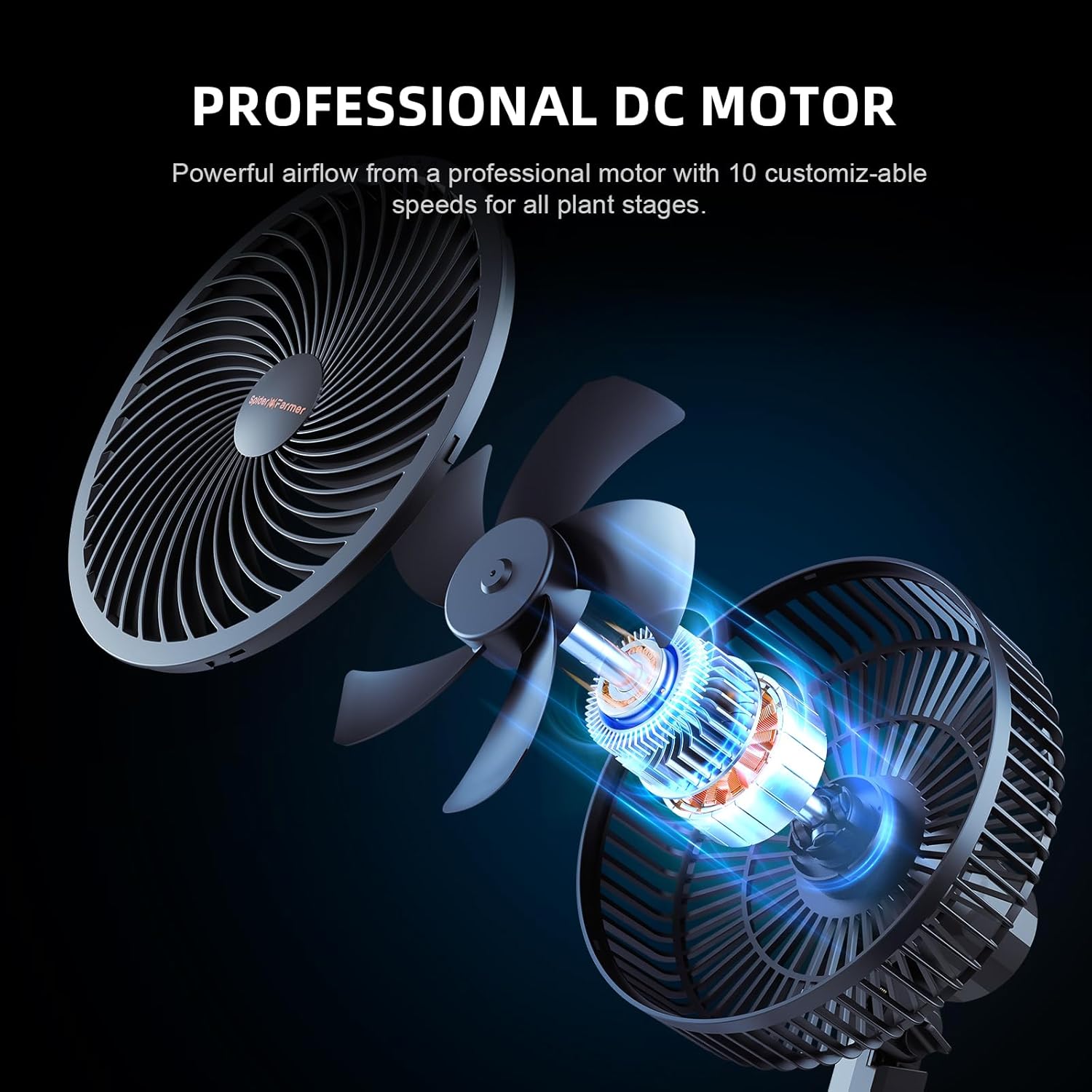
Image: A visual representation of the inline duct fan installed within a grow tent, demonstrating airflow patterns and its integration with other grow equipment.
2. Clip Fan Installation
- Attachment: Securely clip the 6-inch fan to a pole or frame inside your grow tent. Ensure the clip is firm and the fan is stable.
- Positioning: Adjust the fan's angle and height to ensure optimal air circulation within the tent, avoiding direct, constant airflow on plants.

Image: A diagram illustrating the 90-degree adjustable oscillation feature of the clip fan, showing how airflow can be directed across different levels.
3. GGS Controller Connection and App Pairing
- Connect Fans: Plug the inline duct fan and clip fan into the appropriate ports on the GGS Controller.
- Power On: Connect the GGS Controller to a power outlet. The display should illuminate.
- App Pairing: Download the Spider Farmer App from your device's app store. Follow the in-app instructions to pair the controller via Wi-Fi. Ensure your Wi-Fi network is 2.4GHz for compatibility.
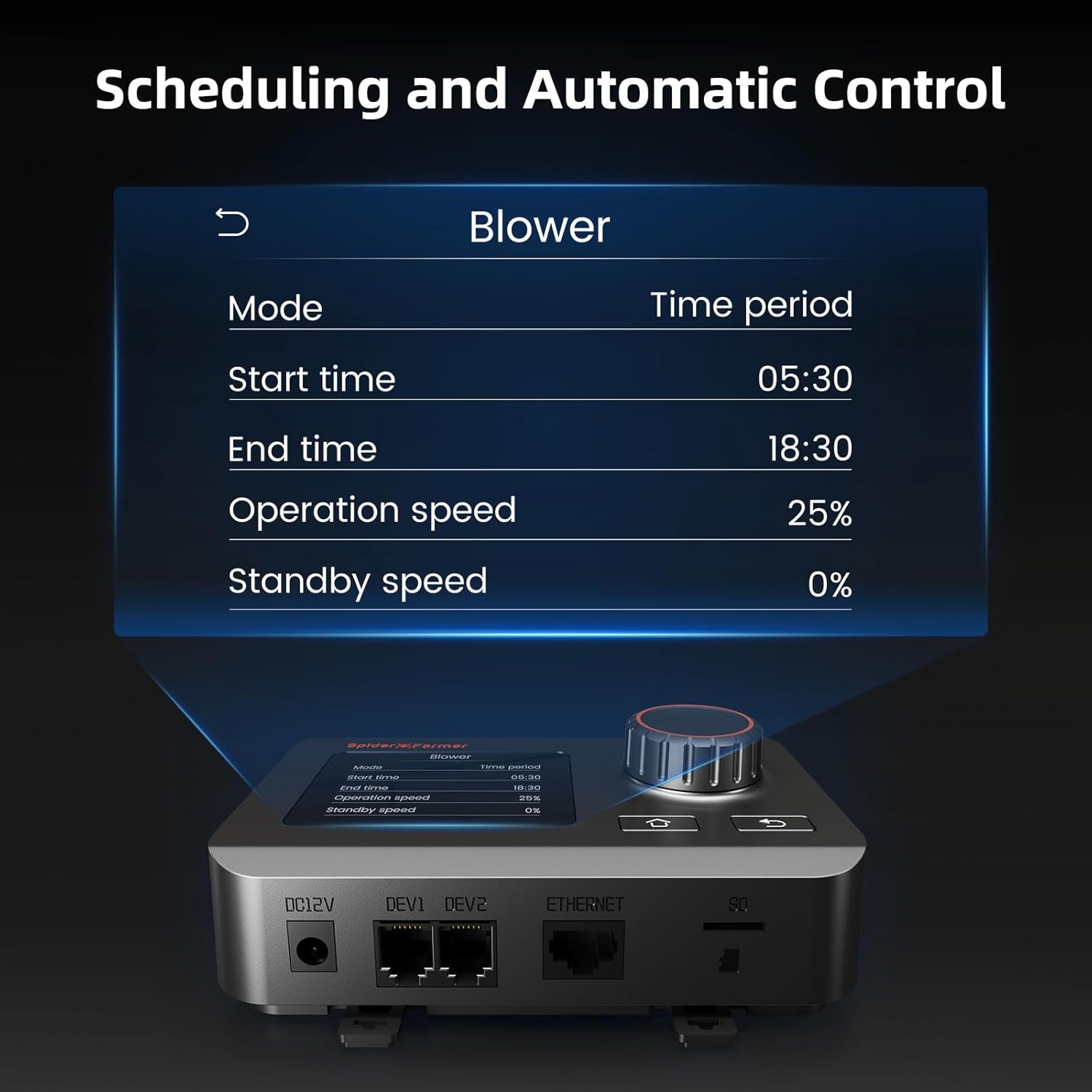
Image: A close-up of the GGS controller display showing scheduling options for fan operation, including start time, end time, and operation speed settings.
Operating Instructions
GGS Controller Operation
The GGS Controller allows for both manual and automatic control of your fans. It monitors climate change in real-time and adjusts fan operation accordingly.

Image: A detailed view of the GGS controller's main interface, showing options for light, blower, and fan control, along with navigation instructions for the rotary knob and buttons.
- Navigation: Use the rotary knob to scroll through menu options and adjust values. Press the knob to confirm selections.
- Home Button: Press the home button (house icon) to return directly to the main screen.
- Back Button: Press the back button (arrow icon) to return to the previous screen or menu.
- Manual Mode: Manually set fan speed (0-100%) for both inline and clip fans.
- Automatic Mode: Set desired temperature and humidity thresholds. The controller will automatically adjust fan speed to maintain these conditions.
- Scheduling: Program specific start and end times for fan operation, along with desired speeds for different periods.
App Control
The Spider Farmer App provides comprehensive control and monitoring capabilities from your smartphone or tablet.
- Remote Control: Adjust fan settings, monitor environmental data, and set schedules from anywhere via Wi-Fi.
- Data Logging: View historical temperature and humidity data to optimize your environment.
- Notifications: Receive alerts for out-of-range conditions or system status changes.
Clip Fan Specific Features
- Dynamic Wind Speeds: The 6-inch clip fan offers 10 dynamic wind speeds for varied airflow, customizable for all plant growth stages.
- 10-Level Oscillation: Utilize the 90° horizontal automatic oscillation and 90° vertical manual adjustment for wide-angle air distribution or focused airflow.
- Natural Wind Mode: Simulates natural wind fluctuations, adjusting speed within 1-10 gears to reduce plant stress.
- Auto Rebound: The fan is designed to automatically rebound when contacting objects, preventing damage.

Image: A close-up of the clip fan's blades in motion, illustrating the gentle airflow designed to promote plant growth, with text describing the natural wind mode.
Maintenance
Regular maintenance ensures the longevity and optimal performance of your Spider Farmer fan system.
- Cleaning Fan Blades: Periodically unplug both fans and gently wipe the blades with a soft, damp cloth to remove dust and debris. Do not use harsh chemicals or abrasive materials.
- Ducting Inspection: Check ducting for any tears, blockages, or loose connections that could impede airflow. Ensure all clamps are secure.
- Controller Care: Keep the GGS Controller clean and dry. Avoid exposing it to excessive moisture, direct sunlight, or extreme temperatures.
- Storage: If storing the fans for an extended period, ensure they are clean and dry. Store them in a cool, dry place away from direct sunlight and extreme temperatures.
Troubleshooting
| Problem | Possible Cause | Solution |
|---|---|---|
| Fan not turning on | No power; Loose connection; Controller issue | Check power outlet and cable connections. Ensure controller is powered on. Reset controller if necessary. |
| Low airflow | Blocked ducting; Dirty fan blades; Incorrect speed setting | Inspect ducting for obstructions. Clean fan blades. Increase fan speed setting on controller or app. |
| Controller not connecting to Wi-Fi | Incorrect Wi-Fi password; Router too far; Network interference; Using 5GHz Wi-Fi | Verify Wi-Fi password. Move controller closer to router. Try restarting router. Ensure you are connecting to a 2.4GHz Wi-Fi network. |
| Fan making unusual noise | Debris in fan; Loose mounting; Worn bearings | Unplug and inspect for debris. Ensure fan is securely mounted. If noise persists after checking, contact customer support. |
| Automatic adjustment not working | Sensor malfunction; Incorrect threshold settings; Controller not in auto mode | Check sensor connection. Verify temperature and humidity thresholds in controller/app settings. Ensure controller is set to automatic mode. |
Specifications
| Feature | Detail |
|---|---|
| Product Model | Spider Farmer 4'' Inline Fan and Clip Fan 6'' |
| Inline Fan Airflow | Up to 205 CFM |
| Inline Fan Noise Level | 26.8 dB |
| Inline Fan Power Consumption | 27 watts |
| Inline Fan Motor Type | EC Motor |
| Clip Fan Wind Speeds | 10 Dynamic Speeds |
| Clip Fan Oscillation | 90° Horizontal Automatic, 90° Vertical Manual (10-Level) |
| Clip Fan Motor Type | Professional DC Motor |
| Controller Type | GGS Temperature & Humidity Controller with Wi-Fi App Control |
| Certifications | FCC, ETL |

Image: A graphic illustrating the high airflow (205 CFM) and low noise level (26.8 dBA) of the inline duct fan, comparing its sound to common environmental noises.
Warranty and Support
Spider Farmer products typically come with a manufacturer's warranty. Please refer to the warranty card or documentation included with your product for specific terms and conditions, as warranty periods may vary by region and product.
For technical support, troubleshooting assistance, or warranty claims, please contact Spider Farmer customer service. You can usually find contact information on their official website or within your product packaging.
Official Website: www.spider-farmer.com