
OSCAL PowerMax 6000
OSCAL PowerMax 6000 Portable Power Station User Manual
Model: PowerMax 6000
Brand: OSCAL
1. Introduction
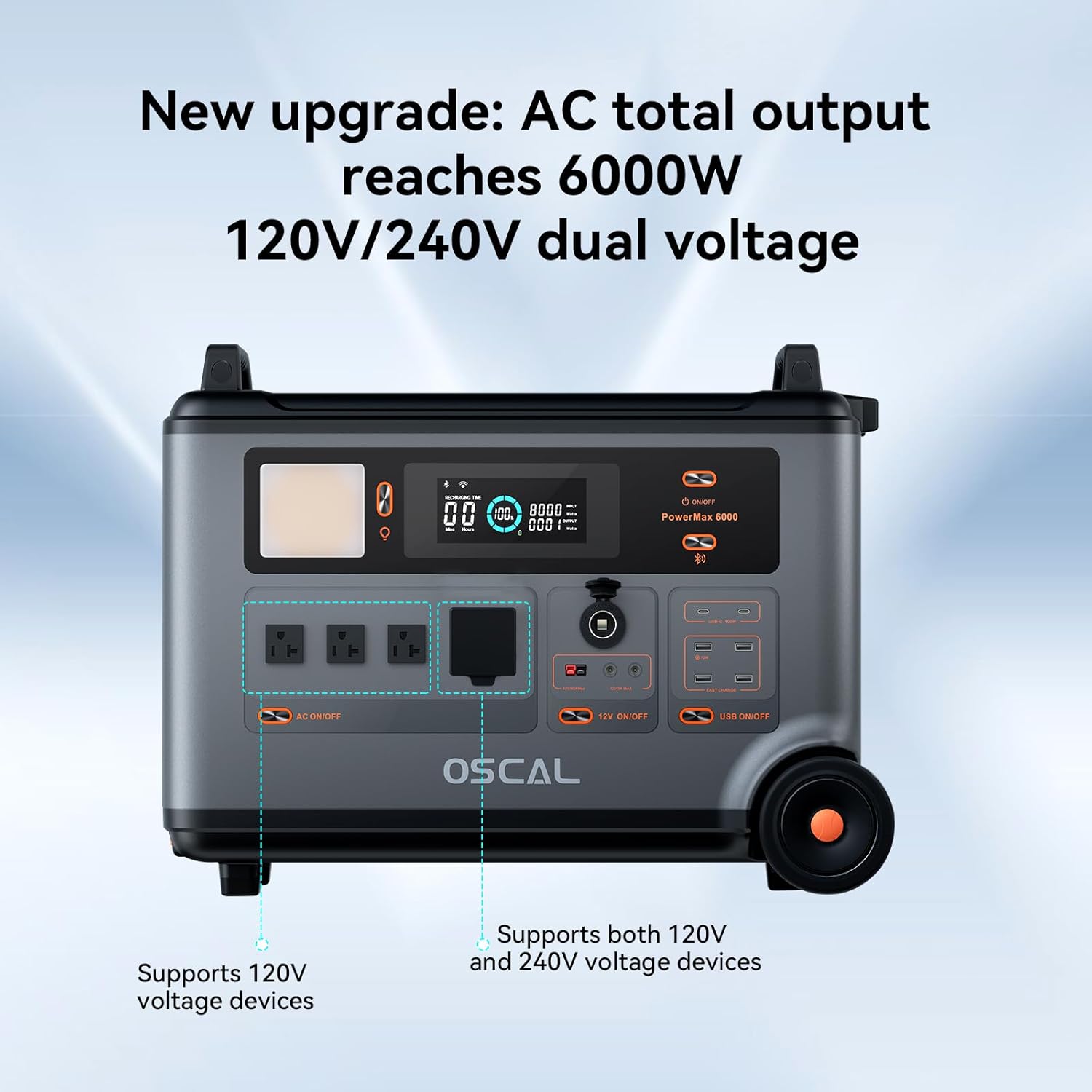
The OSCAL PowerMax 6000 is a high-capacity portable power station designed to provide reliable power for various applications, from home emergencies to outdoor adventures. Featuring a 3600Wh LiFePO4 battery and a 6000W (Surge 7200W) output, it supports DC/AC bi-directional inverter 120V/240V dual voltage output. Its robust construction ensures durability in diverse environments, and advanced features like 5-8ms UPS fast switchover and smart app control enhance its utility.
2. Safety Instructions
Please read and understand all safety instructions before operating the PowerMax 6000. Failure to follow these instructions may result in electric shock, fire, or serious injury.
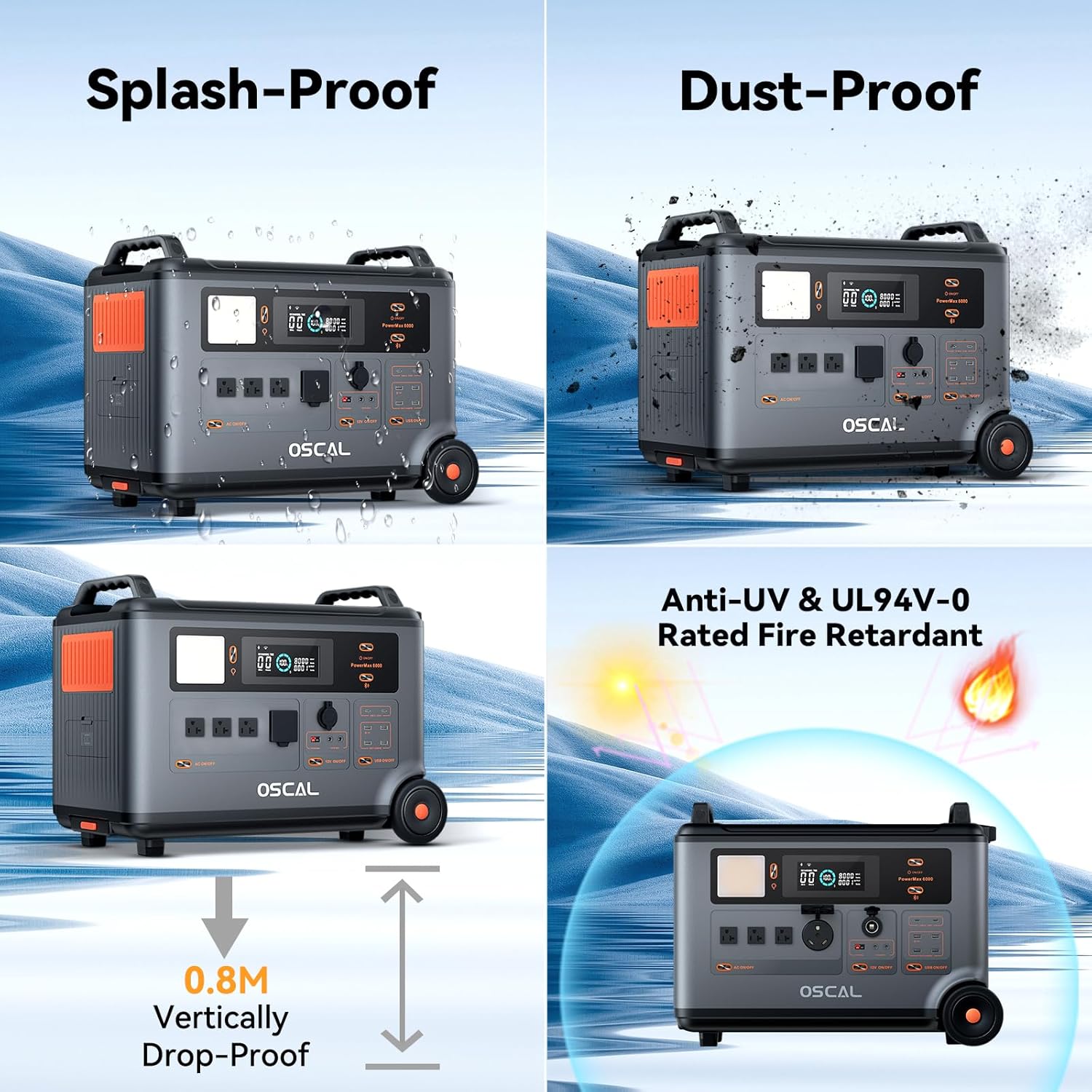
- Do not expose the device to rain or moisture.
- Operate the device within the specified temperature range of -20°C to 55°C (optimal range: -10°C to 45°C).
- Ensure adequate ventilation during operation to prevent overheating.
- Do not disassemble, repair, or modify the unit. Contact authorized service personnel for any repairs.
- Keep out of reach of children.
- Avoid dropping the unit from heights greater than 0.8 meters.
- Use only approved charging cables and accessories.
3. What's in the Box
Verify that all the following components are included in your package:
- OSCAL PowerMax 6000 Portable Power Station
- AC Charging Cable
- Car Charging Cable
- Solar Charging Cable
- User Manual
- Warranty Card
4. Product Overview
Familiarize yourself with the various parts and interfaces of your PowerMax 6000.



5. Setup
Follow these steps for initial setup of your PowerMax 6000:
- Unpacking: Carefully remove the PowerMax 6000 and all accessories from the packaging. Retain the packaging for future storage or transport.
- Initial Charge: It is recommended to fully charge the PowerMax 6000 before first use. Connect the AC charging cable to a standard wall outlet and to the AC input port on the power station. The display will indicate charging status. A full charge takes approximately 1.96 hours.
- Placement: Place the power station on a stable, flat surface in a well-ventilated area, away from direct sunlight, heat sources, and moisture.
6. Operating Instructions
This section details how to operate your PowerMax 6000 for various functions.
6.1 Powering On/Off
- To power on the unit, press and hold the main power button for a few seconds until the display illuminates.
- To power off, press and hold the main power button again until the display turns off.
6.2 Charging the Power Station
The PowerMax 6000 supports multiple charging methods:
- AC Charging: Connect the AC charging cable to a wall outlet. Full charge in approximately 1.96 hours.
- Solar Charging: Connect compatible solar panels (not included) to the solar input port using the provided solar charging cable. Ensure panels are positioned for maximum sunlight exposure.
- Car Charging: Use the car charging cable to connect to your vehicle's 12V/24V cigarette lighter port.
- EV Station Charging: The unit supports charging from EV stations.
- Generator Charging: The unit can be charged using a compatible generator.
6.3 Using AC/DC/USB Outputs
- AC Output: Press the AC ON/OFF button to activate the AC outlets. Connect your AC-powered devices. The PowerMax 6000 provides 4 AC outputs with 6000W continuous power (7200W surge) and supports 120V/240V dual voltage.
- DC Output: Press the 12V ON/OFF button to activate the DC output ports. Connect your 12V DC devices.
- USB Output: Press the USB ON/OFF button to activate the USB ports. Connect your USB-powered devices for charging.
6.4 Uninterruptible Power Supply (UPS) Function
The PowerMax 6000 features a UPS function for critical devices. When connected to an AC power source and simultaneously powering devices, it will automatically switch to battery power within 5-8 milliseconds in case of a power outage, ensuring uninterrupted operation of connected equipment.
6.5 Smart APP Control
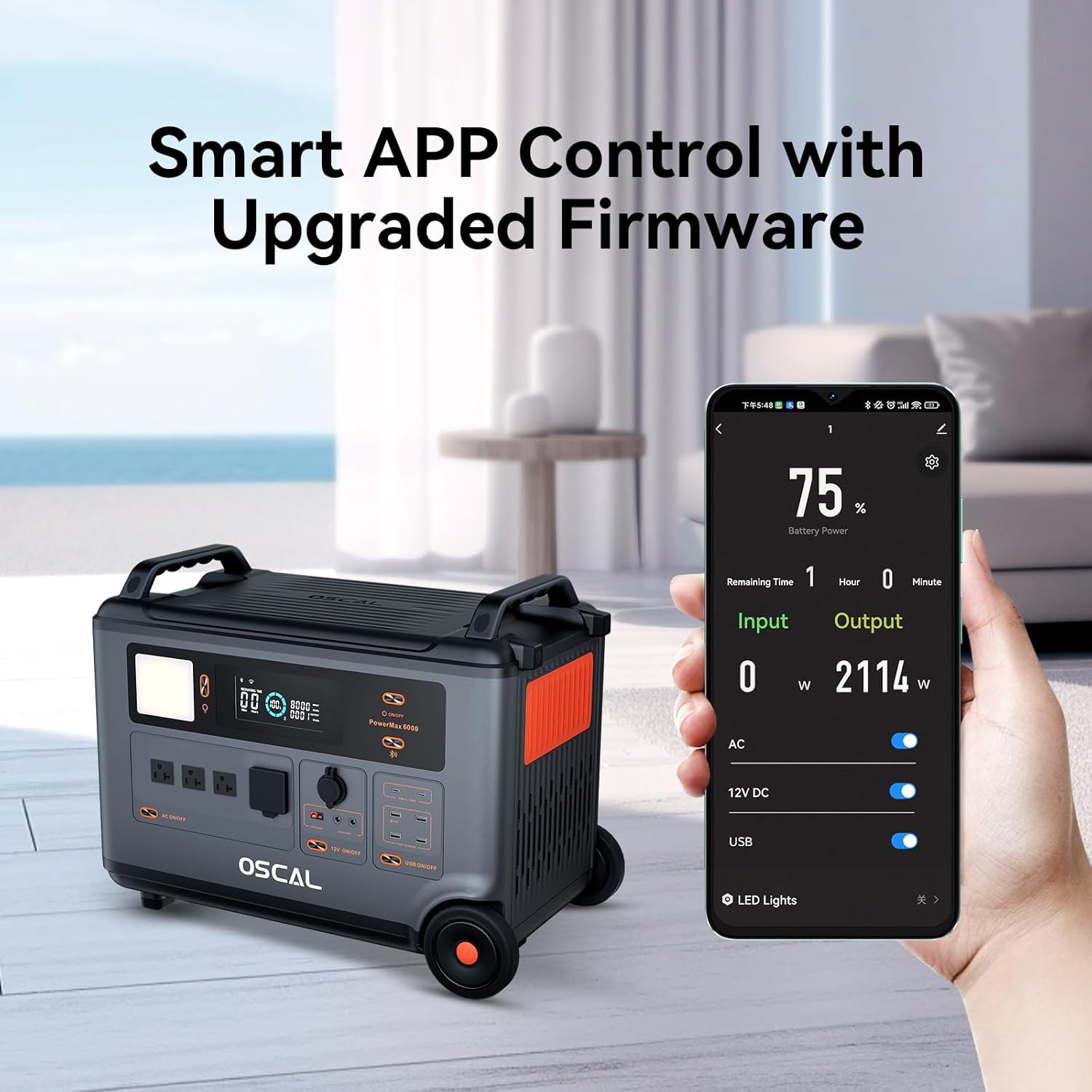
Download the OSCAL application on your smartphone to control and monitor the PowerMax 6000 remotely via Wi-Fi or Bluetooth. The app allows you to check battery status, input/output wattage, and control various functions.
6.6 LED Light Modes
The PowerMax 6000 includes five LED light modes for various situations, including a Morse code function for emergency signaling. Refer to the device's interface for specific button controls to cycle through these modes.
7. Maintenance
Proper maintenance ensures the longevity and optimal performance of your PowerMax 6000.
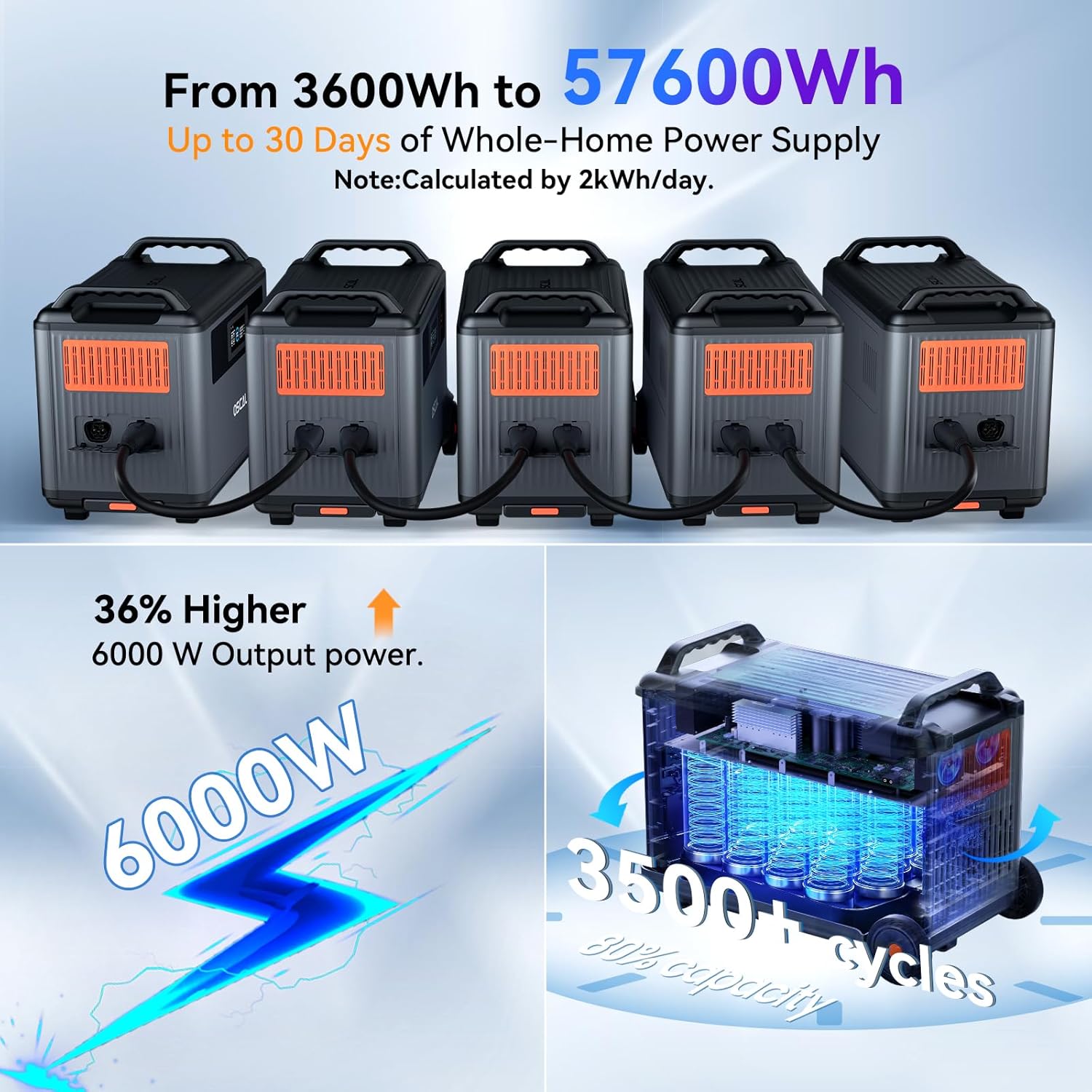
- Battery Care: The LiFePO4 battery is designed for up to 3500 charge and discharge cycles to 80% capacity. For optimal battery health, avoid fully discharging the unit frequently. Recharge the unit at least once every 3-6 months if not in regular use.
- Cleaning: Use a soft, dry cloth to clean the exterior of the unit. Do not use abrasive cleaners or solvents. Ensure all ports are free of dust and debris.
- Storage: Store the PowerMax 6000 in a cool, dry place, away from direct sunlight and extreme temperatures. If storing for extended periods, ensure the battery is charged to approximately 50-80%.
8. Troubleshooting
If you encounter issues with your PowerMax 6000, refer to the following common problems and solutions:
| Problem | Possible Cause | Solution |
|---|---|---|
| Unit does not power on | Battery is fully discharged; Power button not pressed long enough | Charge the unit; Press and hold the power button for 3-5 seconds |
| AC output not working | AC output not enabled; Overload protection activated; Device power exceeds unit capacity | Press AC ON/OFF button; Reduce connected load; Check device wattage |
| Charging is slow or not occurring | Charging cable not properly connected; Environmental temperature too high/low; Solar panel insufficient sunlight | Ensure secure connections; Move unit to optimal temperature range; Adjust solar panel position |
| App connection issues | Bluetooth/Wi-Fi off; App not updated; Unit too far from phone | Enable Bluetooth/Wi-Fi; Update OSCAL app; Move phone closer to unit |
If the problem persists, please contact customer support.
9. Specifications
Detailed technical specifications for the OSCAL PowerMax 6000:
| Feature | Specification |
|---|---|
| Brand | OSCAL |
| Model | PowerMax 6000 |
| Wattage | 6000W (Surge 7200W) |
| Battery Type | LiFePO4 |
| Capacity | 3600Wh (Expandable up to 57600Wh) |
| AC Output Voltage | 120V/240V Dual Voltage |
| Full Charge Time (AC) | Approx. 1.96 hours |
| UPS Switchover Time | 5-8 ms |
| Operating Temperature | -20°C to 55°C (Optimal: -10°C to 45°C) |
| Dimensions (L x W x H) | 23.3" x 13.8" x 17.3" |
| Special Features | Automatic Idle Control, Smart APP Control, LED Light Modes, Rugged Construction (Splash-Proof, Dust-Proof, 0.8m Drop-Proof, UL94V-0 Fire Retardant) |
10. Warranty and Support
The OSCAL PowerMax 6000 comes with a 2-year warranty from the date of purchase, ensuring your satisfaction and peace of mind. This warranty covers defects in materials and workmanship under normal use.
For technical support, warranty claims, or any inquiries, please contact OSCAL customer service through the official website or the contact information provided on your warranty card. Please have your product model and purchase details ready when contacting support.
Related documentsPowerMax 6000


Ask a question about this manual
Ask about setup, troubleshooting, compatibility, parts, safety, or missing instructions. Manuals+ will review the question and use this page’s manual context to help answer it.