Introduction
This manual provides essential information for the safe assembly, operation, and maintenance of your PASYOU S30B Magnetic Belt-Drive Exercise Bike. Please read this manual thoroughly before using the equipment and retain it for future reference. Proper use and maintenance will ensure optimal performance and longevity of your exercise bike.
Safety Information
Observe the following safety precautions to prevent injury and damage to the equipment:
- Consult a physician before starting any exercise program.
- Ensure all bolts and nuts are securely tightened before each use.
- Place the exercise bike on a flat, stable surface. Use a mat to protect flooring.
- Keep children and pets away from the equipment during operation.
- Wear appropriate exercise attire and footwear. Avoid loose clothing that could get caught in moving parts.
- The maximum user weight capacity for this bike is 150 kg (330 lbs).
- Use the emergency brake function immediately if you feel unwell or need to stop quickly.
- Do not attempt to modify the equipment.
Package Contents
Verify that all components are present and undamaged before assembly. If any parts are missing or damaged, contact customer support.
- Main Frame
- Front Stabilizer
- Rear Stabilizer
- Handlebar Post
- Handlebars
- Seat Post
- Seat
- Pedals (Left and Right)
- LCD Monitor
- Tablet Holder
- Water Bottle Holder
- Hardware Kit (bolts, washers, nuts, tools)
Setup and Assembly
Assembly typically takes approximately 20-30 minutes. Follow the numbered steps below. All necessary tools are included in the package.
- Attach Stabilizers: Secure the front and rear stabilizers to the main frame using the provided bolts and washers. Ensure they are firmly tightened.
- Install Pedals: Identify the left (L) and right (R) pedals. The left pedal screws counter-clockwise, and the right pedal screws clockwise. Tighten them securely to the crank arms.
- Mount Seat: Attach the seat to the seat post, then insert the seat post into the main frame. Do not tighten the adjustment knob yet.
- Install Handlebars: Attach the handlebars to the handlebar post. Connect any sensor wires if present. Insert the handlebar post into the main frame. Do not tighten the adjustment knob yet.
- Attach LCD Monitor and Tablet Holder: Secure the LCD monitor to the handlebar assembly. Connect the sensor wires from the main frame to the monitor. Attach the tablet holder above the monitor.
- Install Water Bottle Holder: Attach the water bottle holder to the designated area on the main frame.
- Final Checks: Ensure all connections are secure and the bike is stable. Adjust the leveling stoppers on the stabilizers if the floor is uneven.
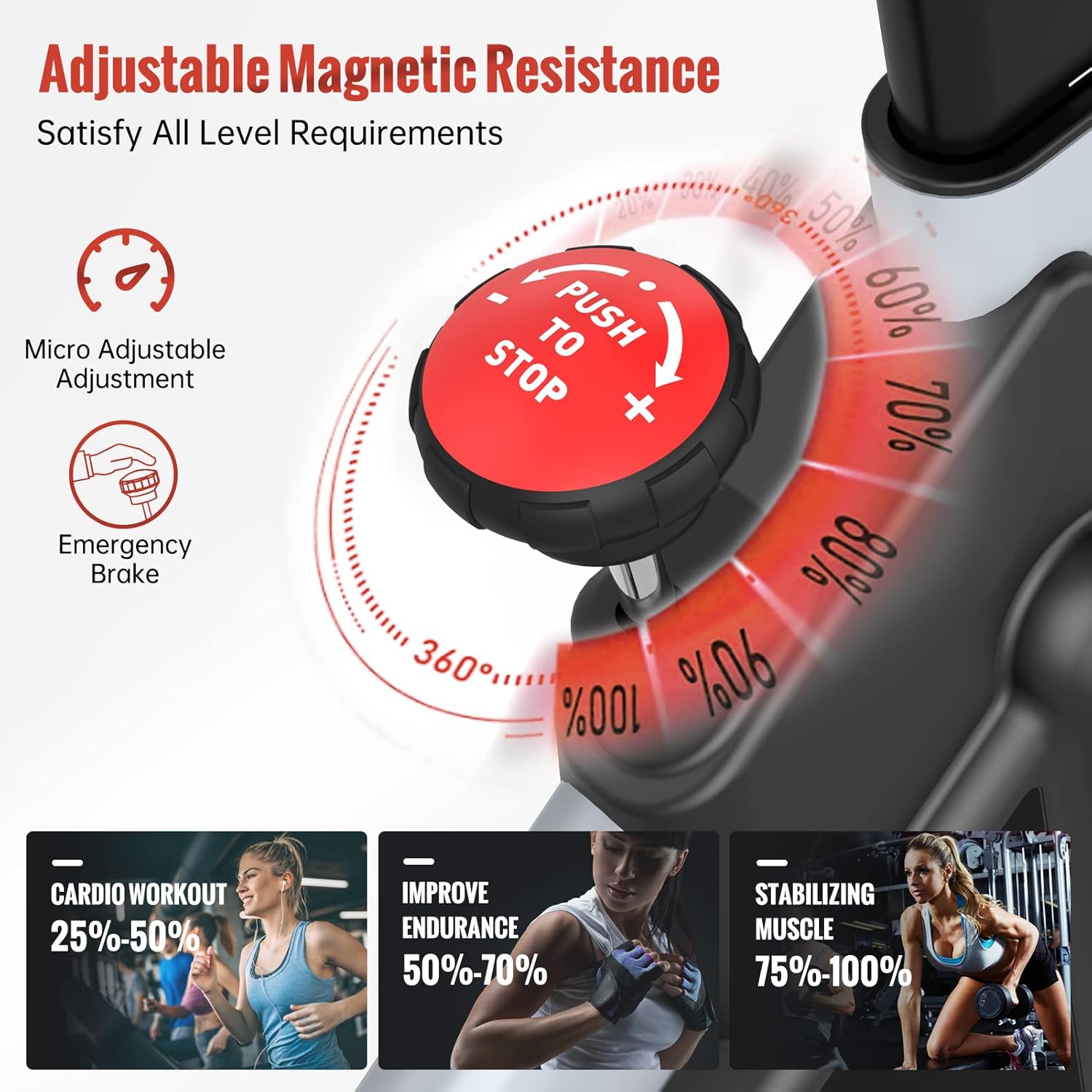
Image: Fully adjustable dimensions for various user heights and inseam lengths.
Operating Instructions
Adjusting Seat and Handlebars
The PASYOU S30B offers 4-way seat adjustment (up/down, forward/backward) and 2-way handlebar adjustment (up/down) to accommodate users with different heights (150cm-190cm / 4.92ft-6.23ft) and inseam lengths (70cm-92cm / 27.5in-36.2in).
- To adjust the seat or handlebars, loosen the corresponding adjustment knob, move the component to the desired position, and then firmly tighten the knob.
- Ensure the seat is at a height where your knee has a slight bend at the bottom of the pedal stroke.

Image: Seat and handlebar adjustment points for personalized fit.
Adjusting Magnetic Resistance
The bike features a micro-adjustable magnetic resistance system for a smooth and quiet workout.
- Turn the red resistance knob clockwise to increase resistance, making pedaling harder.
- Turn the red resistance knob counter-clockwise to decrease resistance, making pedaling easier.
- The magnetic resistance system provides a wide range of intensity levels suitable for beginners to advanced users.
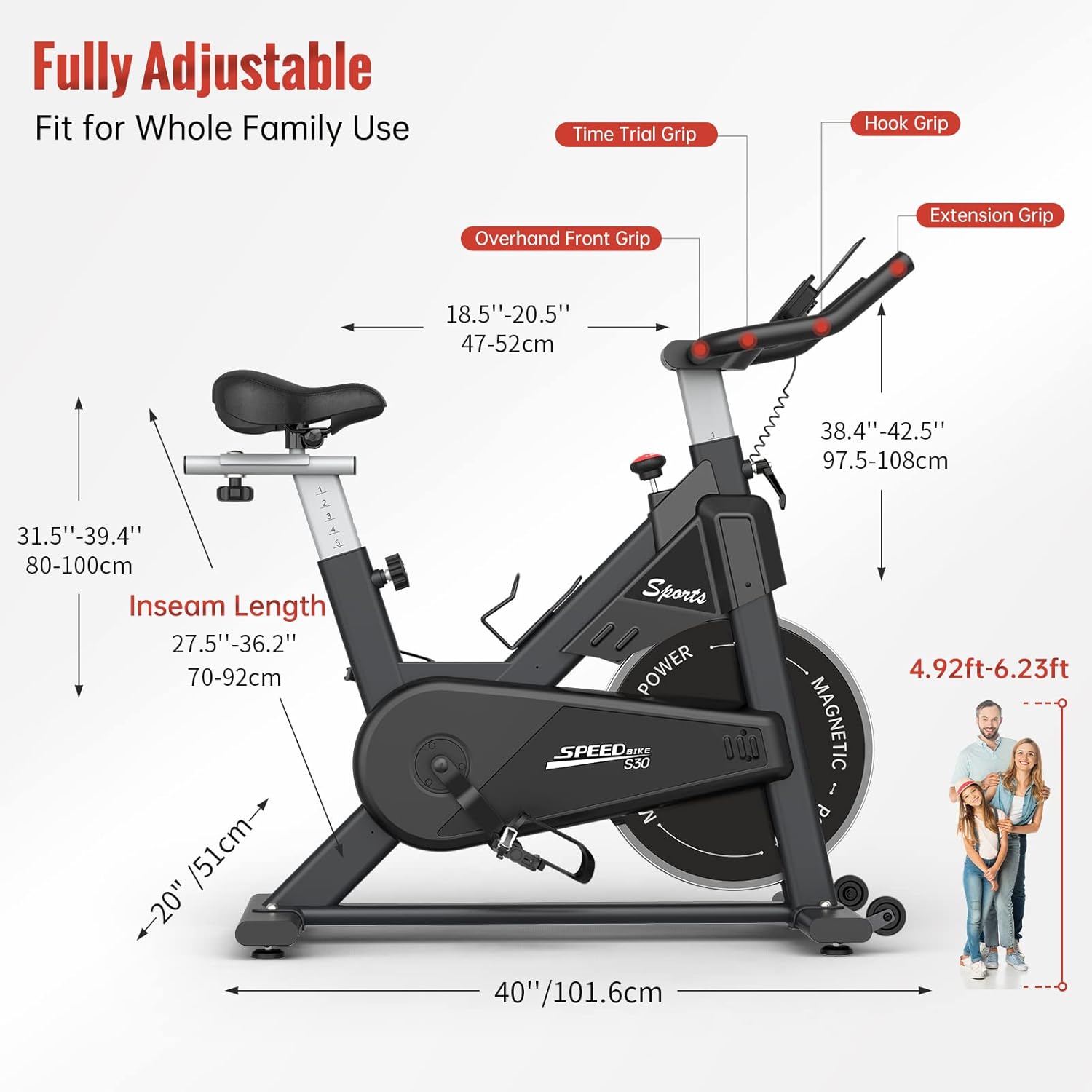
Image: Resistance adjustment knob and emergency brake function.
Using the LCD Monitor
The integrated LCD monitor tracks your workout data. It requires 2 AAA batteries (not included).
- Functions: The monitor displays Time, Speed, RPM (Revolutions Per Minute), Distance, Calories Burned, and Odometer.
- SCAN Mode: The monitor will automatically cycle through all functions, displaying each for a few seconds.
- Mode Button: Press the 'MODE' button to select a specific function to display continuously or to activate SCAN mode.
- Reset: Press and hold the 'MODE' button for a few seconds to reset all values (except Odometer).
- Auto On/Off: The monitor will turn on automatically when activity is detected or a button is pressed. It will turn off after a few minutes of inactivity.

Image: LCD monitor displaying workout data with an iPad on the holder.
Emergency Stop
For immediate cessation of the flywheel, firmly press down on the red resistance knob. This acts as an emergency brake.
Maintenance
Regular maintenance ensures the longevity and safe operation of your exercise bike.
- Cleaning: Wipe down the bike with a damp cloth after each use to remove sweat and dust. Avoid abrasive cleaners.
- Inspection: Periodically check all bolts, nuts, and moving parts for tightness and wear. Tighten any loose fasteners.
- Belt Drive: The belt-drive system is designed to be low-maintenance and does not require lubrication.
- Storage: Store the bike in a dry, cool place away from direct sunlight and extreme temperatures.
Troubleshooting
If you encounter issues with your exercise bike, refer to the following table:
| Problem | Possible Cause | Solution |
|---|---|---|
| Bike is unstable or wobbles | Uneven floor surface; loose stabilizers | Adjust the leveling stoppers on the stabilizers; ensure all stabilizer bolts are tight. |
| Pedaling feels rough or noisy | Loose pedals; internal component issue (rare for magnetic system) | Ensure pedals are securely tightened. If noise persists, contact customer support. |
| Resistance not changing | Resistance knob not properly engaged or internal mechanism issue | Ensure the resistance knob is turning freely. If the issue persists, contact customer support. |
| LCD monitor not displaying | Dead batteries; loose sensor connection | Replace AAA batteries. Check that sensor wires are securely connected to the monitor. |
Specifications
- Model: S30B
- Drive System: Belt Drive
- Resistance Mechanism: Magnetic
- Material: Alloy Steel
- Color: Black
- Maximum Weight Capacity: 150 Kilograms (330 Pounds)
- Product Dimensions (L x W x H): 100.5 x 50.5 x 110 cm (approximately 40 x 20 x 43 inches)
- Item Weight: 26.5 Kilograms
- Recommended User Height: 150cm - 190cm (4.92ft - 6.23ft)
- Inseam Length Range: 70cm - 92cm (27.5in - 36.2in)
- Power Source: Pedal-powered (non-electric)
- Monitor Batteries: 2 x AAA (not included)

Image: Overview of the PASYOU S30B Exercise Bike.
Transportation
The PASYOU S30B is equipped with transport wheels for easy relocation.
- To move the bike, firmly grasp the handlebars.
- Tilt the bike forward until it rests on its front transport wheels.
- Carefully roll the bike to its desired location.
- Lower the bike gently back onto its stabilizers.

Image: Transport wheels for easy movement.
Warranty and Support
PASYOU offers a one-year free replacement on all parts for new PASYOU bikes. Our customer support team is committed to providing 100% satisfactory solutions and will respond to inquiries within 24 hours.
For any issues, questions, or to claim warranty service, please contact PASYOU customer support through the retailer where you purchased the product or visit the official PASYOU brand store online.
Contact Information: Refer to your purchase documentation or the PASYOU brand store for the most current support contact details.


