
Spider Farmer 49e7460e-81f2-449a-a510-0802d2d04ded
Contents
Spider Farmer 4 Inch Smart Inline Duct Fan & SF1000D LED Grow Light System User Manual
Model: 49e7460e-81f2-449a-a510-0802d2d04ded
1. Introduction
Thank you for choosing the Spider Farmer 4 Inch Smart Inline Duct Fan with GGS Controller and SF1000D 2-Pack LED Grow Light System. This comprehensive system is designed to provide optimal environmental control and lighting for your indoor plant cultivation. The smart inline duct fan offers app control via WiFi, real-time climate monitoring, and automatic adjustments for temperature and humidity. The SF1000D LED grow lights feature premium Samsung LM301B diodes, delivering powerful and uniform light penetration with a full spectrum ideal for all growth stages.
This manual provides detailed instructions for the safe installation, operation, and maintenance of your new Spider Farmer system.

Image 1.1: Complete Spider Farmer Grow System components.
2. Important Safety Information
Please read all safety instructions carefully before installing or operating the product. Failure to follow these instructions may result in electric shock, fire, or serious injury.
- Always disconnect power before installing, cleaning, or servicing the fan or grow lights.
- Ensure the power source matches the voltage requirements specified on the product label.
- Do not operate the fan or lights with a damaged cord or plug.
- Keep electrical components away from water or excessive humidity.
- Ensure proper ventilation around the fan and lights to prevent overheating.
- Do not block the fan's intake or exhaust openings.
- Avoid direct eye exposure to the LED grow lights when they are operating.
- This product is intended for indoor use only.
3. Package Contents
Verify that all components are present and undamaged upon unpacking:
- 1 x Spider Farmer 4 Inch Smart Inline Duct Fan
- 1 x GGS Controller with Temperature and Humidity Sensor
- 2 x SF1000D LED Grow Light Fixtures
- 2 x Power Cords for Grow Lights
- Mounting Hardware for Grow Lights (Hanger ropes, adjustable ratchets)
- Mounting Hardware for Duct Fan
- User Manual
4. Setup Instructions
4.1 Mounting the SF1000D LED Grow Lights
- Attach the hanger ropes to the four corners of each SF1000D grow light fixture.
- Hang the grow lights from a sturdy support structure (e.g., grow tent frame, ceiling hooks) using the adjustable ratchets. Ensure the lights are level and securely fastened.
- Adjust the height of the lights according to your plant's growth stage. Refer to the operating section for recommended distances.
4.2 Installing the 4 Inch Smart Inline Duct Fan
- Determine the optimal location for your inline duct fan within your ventilation system (e.g., inside or outside the grow tent).
- Securely mount the fan using the provided mounting hardware. Ensure it is stable and vibrations are minimized.
- Connect appropriate ducting to both the intake and exhaust ports of the fan. Use duct clamps to ensure airtight connections.
4.3 Connecting the GGS Controller
- Connect the GGS Controller to the inline duct fan using the provided RJ12 cord. The controller typically connects to a dedicated port on the fan.
- Plug the power cords of the SF1000D grow lights into the appropriate outlets on the GGS Controller or a compatible power strip connected to the controller.
- Plug the GGS Controller's power adapter into a standard electrical outlet.

Image 4.1: GGS Controller connectivity and mobile app interface overview.
4.4 App Download and Initial Setup
- Download the "Spider Farmer" app from your mobile device's app store (iOS or Android).
- Open the app and follow the on-screen instructions to create an account or log in.
- Add your GGS Controller to the app by following the pairing instructions, typically involving connecting to your home WiFi network. Ensure your WiFi is 2.4GHz for initial setup.
5. Operating Instructions
5.1 GGS Controller Functions
The GGS Controller provides a central interface for managing your fan and lights. Use the rotary knob and buttons to navigate the menu.
- Navigation: Rotate the knob to scroll through options. Press the knob to confirm selections.
- Home Button: Returns directly to the home screen.
- Back Button: Returns to the previous screen or menu.
- Fan Control: Adjust fan speed (0-100%), set manual or automatic modes based on temperature/humidity.
- Light Control: Turn lights ON/OFF, set timers.
- Scheduling: Program specific start and end times for fan operation and light cycles.

Image 5.1: GGS Controller display and navigation.
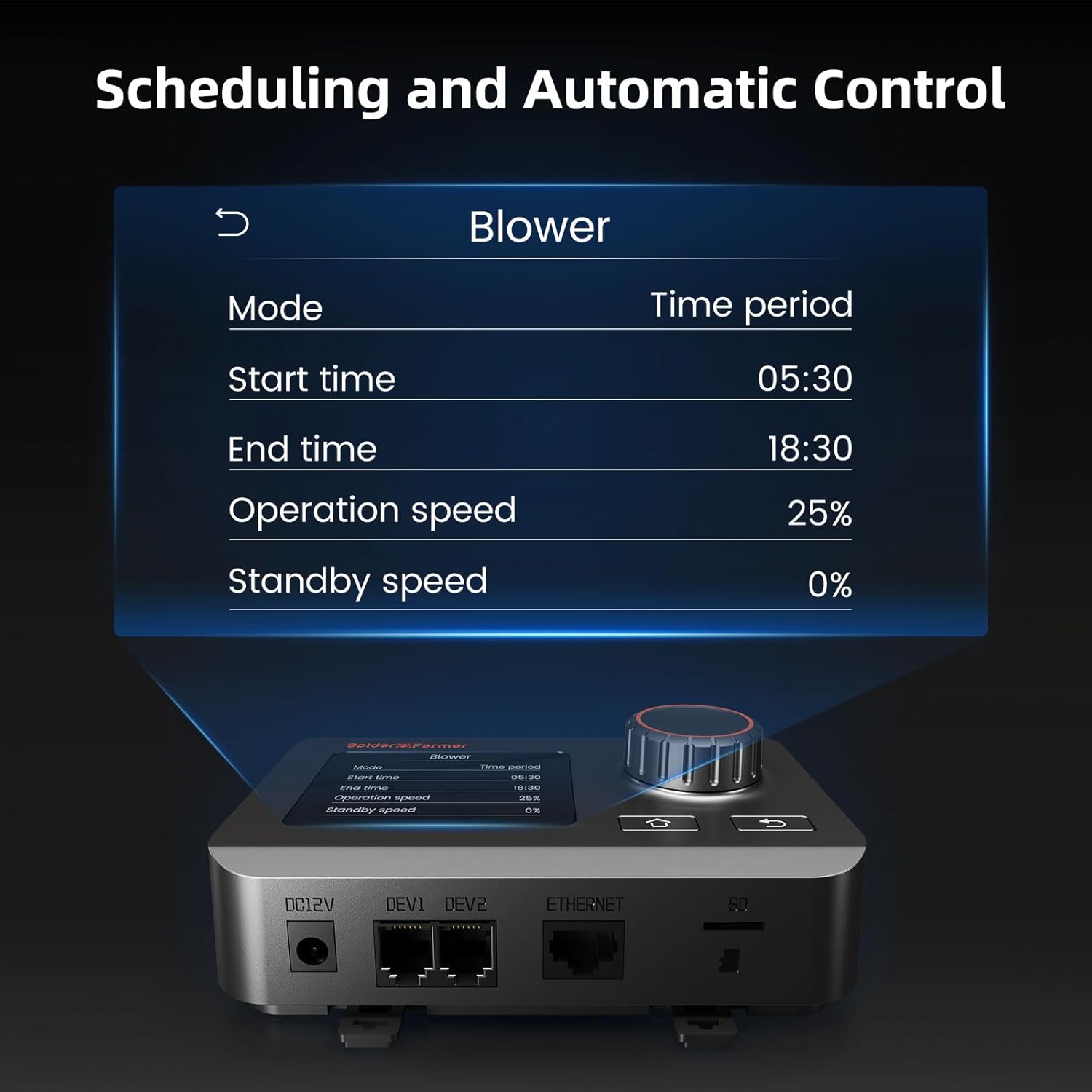
Image 5.2: Example of scheduling settings on the GGS Controller.
5.2 Spider Farmer App Control
The Spider Farmer app allows for remote monitoring and control of your system.
- Real-time Monitoring: View current temperature and humidity readings from the GGS Controller's sensor.
- Fan Speed Adjustment: Manually adjust the fan speed or set automatic modes based on environmental conditions.
- Automated Regulation: Program the fan to automatically adjust speed or turn on/off based on set temperature and humidity thresholds.
- Scheduling: Create detailed schedules for fan operation and light cycles directly from your phone.
- Notifications: Receive alerts for critical environmental changes or system status.
5.3 SF1000D LED Grow Light Usage
The SF1000D lights provide a full spectrum (Blue, 660-665nm, 3000K, 5000K, and IR) suitable for all plant growth stages.
- Veg Footprint: Approximately 3 x 3 ft.
- Flowering Footprint: Approximately 2 x 2 ft.
- Optimal Distance: Adjust the light height based on the plant's growth stage and intensity requirements. Refer to PPFD maps for guidance.
- Light Cycle: Set appropriate light/dark cycles using the GGS Controller or app for your specific plant type and growth stage.

Image 5.3: SF1000D PPFD Map for optimal light placement.
6. Maintenance
Regular maintenance ensures optimal performance and longevity of your Spider Farmer system.
- Fan Cleaning: Periodically inspect the fan blades and housing for dust and debris buildup. Disconnect power before cleaning. Use a soft, dry cloth or a brush to gently remove any accumulation. Do not use harsh chemicals or abrasive materials.
- Grow Light Cleaning: Ensure the LED diodes and protective cover are free from dust, water spots, or plant residue. Disconnect power before cleaning. Use a soft, damp cloth to wipe surfaces.
- Controller Care: Keep the GGS Controller clean and dry. Avoid exposing it to extreme temperatures or direct sunlight.
- Ducting Inspection: Check ducting for any leaks, tears, or blockages that could impede airflow.
7. Troubleshooting
If you encounter issues with your Spider Farmer system, refer to the following common problems and solutions:
| Problem | Possible Cause | Solution |
|---|---|---|
| Fan not turning on. | No power, loose connection, controller setting. | Check power cord connection. Ensure GGS Controller is powered and fan is set to ON or an active schedule. Verify RJ12 cable connection. |
| Grow lights not illuminating. | No power, loose connection, controller setting. | Check power cords. Ensure lights are plugged into active outlets on controller/power strip. Verify light setting on GGS Controller or app. |
| App cannot connect to GGS Controller. | Incorrect WiFi, controller not in pairing mode, network issues. | Ensure your phone is on a 2.4GHz WiFi network. Restart the controller and try pairing again. Check router settings. |
| Fan is noisy or vibrating excessively. | Loose mounting, debris in fan, ducting issues. | Ensure fan is securely mounted. Disconnect power and check for debris in fan blades. Inspect ducting for obstructions or loose connections. |
| Inaccurate temperature/humidity readings. | Sensor obstruction, sensor placement. | Ensure the sensor is not blocked and is placed in an area representative of the grow space's climate. |
8. Specifications
| Feature | Detail |
|---|---|
| Brand | Spider Farmer |
| Model Number | 49e7460e-81f2-449a-a510-0802d2d04ded |
| ASIN | B0DFPQ4C1S |
| Material | Plastic |
| Power Source | Corded Electric |
| Mounting Type | Ceiling Mount (for lights) |
| Fan Airflow | Up to 205 CFM |
| Fan Noise Level | 26.8 dB (very low) |
| Fan Power Consumption | 27 Watts |
| LED Diodes | Samsung LM301B |
| Light Spectrum | Blue, Full spectrum 660-665nm, 3000K, 5000K, and IR |
| Veg Footprint (SF1000D) | 3 x 3 ft |
| Flowering Footprint (SF1000D) | 2 x 2 ft |
| Certifications | ETL, FCC |
9. Warranty and Support
Spider Farmer products are designed for durability and performance. For specific warranty details regarding your 4 Inch Smart Inline Duct Fan and SF1000D LED Grow Lights, please refer to the warranty card included with your purchase or visit the official Spider Farmer website.
If you require technical assistance, have questions about product operation, or need to report a defect, please contact Spider Farmer customer support through their official website or the contact information provided in your product packaging. Please have your model number and purchase date ready when contacting support.
Official Website: Visit the Spider Farmer Store on Amazon
Ask a question about this manual
Ask about setup, troubleshooting, compatibility, parts, safety, or missing instructions. Manuals+ will review the question and use this page’s manual context to help answer it.