
1. Introduction
Thank you for choosing the Aigostar 4-Slice Toaster. This manual provides essential information for the safe and efficient operation, maintenance, and troubleshooting of your new appliance. Please read it thoroughly before first use and keep it for future reference.
This toaster is designed to provide quick and even toasting for various types of bread, featuring an intuitive LED touch screen and multiple functions to enhance your breakfast experience.
2. Important Safety Instructions
When using electrical appliances, basic safety precautions should always be followed, including the following:
- Read all instructions before operating the toaster.
- Do not touch hot surfaces. Use handles or knobs.
- To protect against electrical shock, do not immerse cord, plug, or toaster in water or other liquid.
- Close supervision is necessary when any appliance is used by or near children.
- Unplug from outlet when not in use and before cleaning. Allow to cool before putting on or taking off parts.
- Do not operate any appliance with a damaged cord or plug, or after the appliance malfunctions or has been damaged in any manner. Contact customer service for examination, repair, or adjustment.
- The use of accessory attachments not recommended by the appliance manufacturer may cause injuries.
- Do not use outdoors.
- Do not let cord hang over edge of table or counter, or touch hot surfaces.
- Do not place on or near a hot gas or electric burner, or in a heated oven.
- Always attach plug to appliance first, then plug cord into the wall outlet. To disconnect, turn any control to “off,” then remove plug from wall outlet.
- Do not use appliance for other than intended use.
- Oversize foods, metal foil packages, or utensils must not be inserted in a toaster as they may create a fire or risk of electric shock.
- A fire may occur if toasters are covered or touching flammable material, including curtains, draperies, walls, and the like, when in operation.
- Do not attempt to dislodge food when toaster is plugged in.
- Do not operate unattended.
- Bread may burn. Therefore, toasters must not be used near or below curtains and other combustible materials. They must be attended when in use.
3. Product Overview
The Aigostar 4-Slice Toaster is designed for convenience and efficiency, featuring a sleek stainless steel exterior and advanced toasting capabilities.
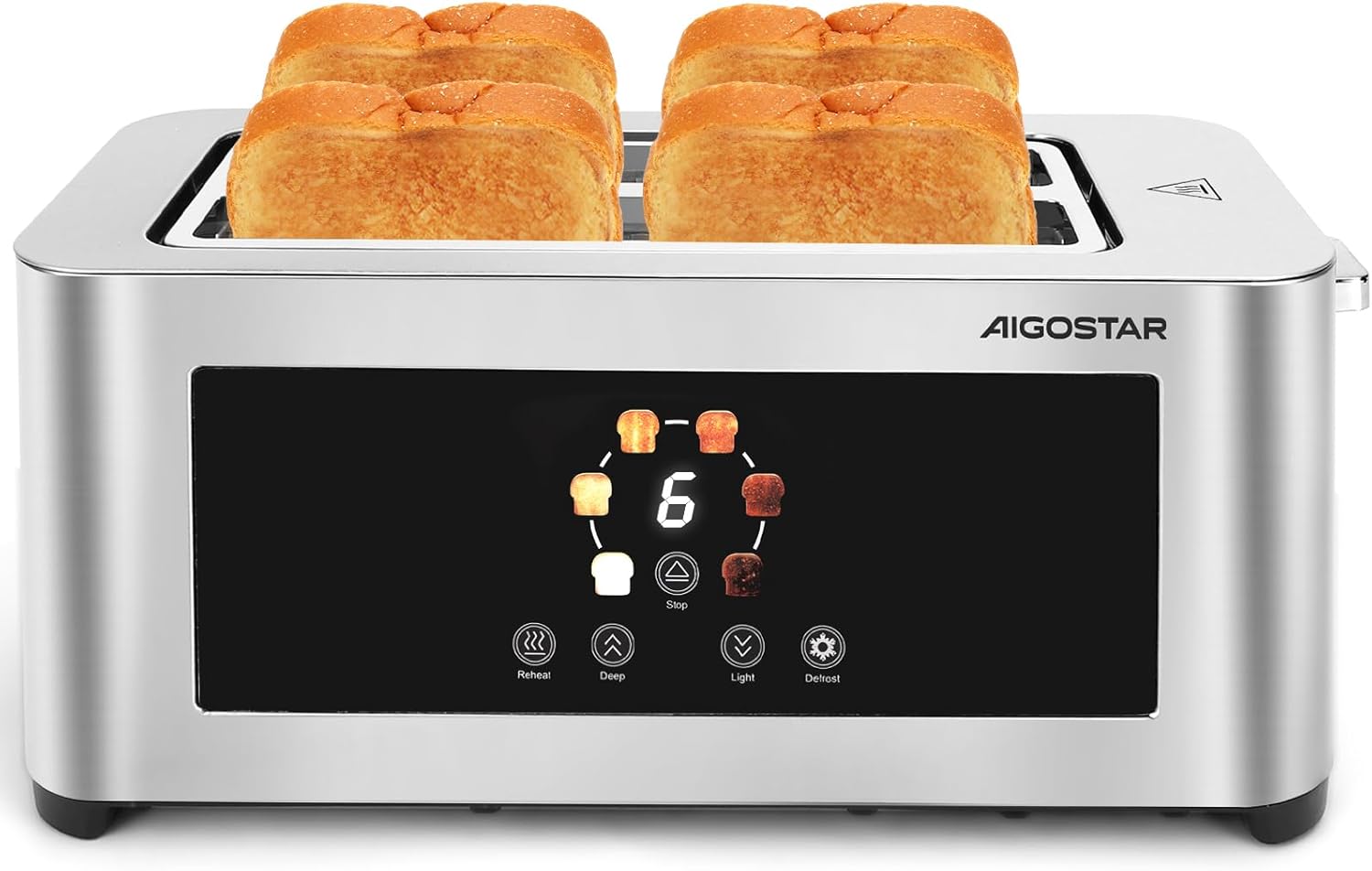
The Aigostar 4-slice toaster, showcasing its sleek stainless steel design and capacity for four slices of bread.
Key Features:
- LED Touch Screen: An intuitive interface for easy control and monitoring of toasting settings.
- Extra-Long and Wide Slots: Four 25.5 cm long and 4 cm wide slots accommodate various bread types, including thick slices and bagels.
- Auto-Centering Guides: Ensures even toasting on both sides of the bread.
- 6 Browning Levels: Adjustable settings from light to dark to suit individual preferences.
- Multiple Functions: Dedicated buttons for Reheat, Defrost, and Cancel.
- High-Lift Lever: Allows for safe and easy retrieval of smaller items.
- Removable Crumb Tray: Simplifies cleaning and maintenance.
- Cord Storage: Integrated design for tidy storage.
- Cool-Touch Exterior: Stainless steel housing designed to remain cool during operation for safety.

The large LED control panel features intuitive icons for easy operation, enhancing user experience.

The toaster features extra-wide 4 cm slots, accommodating thick slices of bread, bagels, and other pastries without jamming.
4. Setup
- Unpacking: Carefully remove the toaster and all packaging materials. Ensure all components are present and undamaged.
- Placement: Place the toaster on a stable, flat, heat-resistant surface, away from flammable materials like curtains. Ensure adequate ventilation around the appliance.
- First Use (Burn-Off Cycle): Before toasting bread for consumption, operate the toaster without bread for a few cycles at the highest browning setting. This will burn off any manufacturing residues and eliminate initial odors. It is normal for a slight odor or smoke to be present during this process. Ensure the area is well-ventilated.
- Power Connection: Plug the power cord into a grounded electrical outlet.
5. Operating Instructions
Toasting Bread:
- Insert up to four slices of bread into the toasting slots. The auto-centering guides will adjust to hold the bread securely.
- Select your desired browning level (1-6) using the LED touch screen. Level 1 is the lightest, and Level 6 is the darkest.
- Press down the toast lever until it locks into place. The toasting cycle will begin, and the selected browning level will be displayed on the LED screen.
- Once the toasting cycle is complete, the toast will automatically pop up. Use the high-lift lever to safely retrieve smaller items.

A simple four-step guide illustrating the ease of use: 1. Place bread in slots, 2. Select desired browning level on the LED screen, 3. Lower the lever, 4. Enjoy your perfectly toasted bread.
Browning Levels:
The toaster offers 6 browning levels to customize your toast. Refer to the visual guide below to select your preferred shade.

An illustration demonstrating the six adjustable browning levels, allowing users to achieve their preferred toast shade, from lightly warmed to dark and crispy.

This visual guide demonstrates how the 6 browning levels can be used for various bread types, from light bagels to dark whole wheat toast, ensuring optimal results for diverse preferences.
Special Functions:
The LED touch screen provides dedicated buttons for the following functions:
- Cancel (Stop): Press this button to stop the toasting cycle at any time. The toast will immediately pop up.
- Reheat: Use this function to warm up already toasted bread without further browning. Insert the bread, lower the lever, and press the Reheat button.
- Defrost: This function is designed to toast frozen bread. Insert the frozen bread, lower the lever, and press the Defrost button. The toaster will automatically adjust the toasting time to account for the frozen state.

The toaster offers three primary functions: "Stop" to cancel toasting, "Reheat" to warm bread without further browning, and "Defrost" to toast frozen bread. The "Intense & Light" refers to browning level adjustment.
6. Maintenance and Cleaning
Regular cleaning ensures optimal performance and extends the life of your toaster.
- Always unplug the toaster from the power outlet and allow it to cool completely before cleaning.
- Cleaning the Exterior: Wipe the exterior surfaces with a soft, damp cloth. Do not use abrasive cleaners or metal scouring pads, as these can scratch the stainless steel finish.
- Emptying the Crumb Tray: Pull out the removable crumb tray located at the bottom of the toaster. Discard the crumbs and wipe the tray clean with a damp cloth. Ensure the tray is completely dry before reinserting it.
- Do not immerse the toaster in water or any other liquid.
- Do not use sharp objects to clean the inside of the toaster, as this can damage the heating elements.

Details of the toaster's convenient features, including a pull-out crumb tray for easy cleaning, integrated cord storage for a tidy countertop, and non-slip feet for stability.

The toaster features a cool-touch stainless steel exterior for safety and a removable, washable crumb tray for hygienic maintenance.
7. Troubleshooting
If you encounter any issues with your toaster, please refer to the following common problems and solutions:
- Toaster does not turn on:
- Ensure the power cord is securely plugged into a working electrical outlet.
- Check if the circuit breaker has tripped.
- Bread is not toasting or toasts unevenly:
- Ensure the toast lever is fully pressed down and locked.
- Adjust the browning level to a higher setting.
- Ensure bread slices are not too thick or irregularly shaped, which might prevent proper auto-centering.
- Smoke or burning smell:
- Immediately press the Cancel button and unplug the toaster.
- Check the crumb tray for excessive crumbs and clean it.
- Ensure no food items are stuck inside the toasting slots.
- Toast gets stuck:
- Unplug the toaster and allow it to cool.
- Carefully remove the stuck bread using non-metallic tongs. Never use metal utensils.
If the problem persists, please contact Aigostar customer support.
8. Specifications
- Brand: Aigostar
- Model: 4-Slice Toaster
- Power: 1400W
- Slots: 4 (25.5 cm long, 4 cm wide)
- Browning Levels: 6
- Functions: Cancel, Reheat, Defrost
- Material: Stainless Steel
- Approximate Dimensions (L x W x H): 39.6 cm x 16 cm x 18.2 cm

A dimensional diagram indicating the toaster's measurements: approximately 39.6 cm in length, 16 cm in width, and 18.2 cm in height.
9. Warranty and Support
For warranty information, product support, or any inquiries not covered in this manual, please refer to the documentation provided with your purchase or contact Aigostar customer service directly. You can also visit the official Aigostar store for more information: Aigostar Store.

