
BALILA CM6
BALILA CM6 Speakerphone User Manual
Your guide to setting up and using your BALILA CM6 Conference Speakerphone.
1. Introduction
Thank you for choosing the BALILA CM6 Speakerphone. This device is designed to provide clear, high-quality audio for online meetings, remote work, video conferencing, and online education. With its 360° omnidirectional sound pickup and advanced noise cancellation technology, it ensures effective communication in various environments. This manual will guide you through the setup, operation, and maintenance of your speakerphone.
2. Product Overview
2.1. Package Contents
- 1 x BALILA CM6 Speakerphone
- 6 x Lavalier Microphones
- 1 x USB Cable (Type-C)
- 1 x User Manual
2.2. Key Features
- 360° Omnidirectional Sound Pickup: Equipped with 6 omnidirectional microphones to capture sound from all directions, ideal for 6-8 person meetings.
- Advanced Audio Processing: Features echo cancellation, reverberation suppression, and noise reduction for crystal-clear calls.
- Plug-and-Play USB Connectivity: Simple USB Type-A and Type-C connection, no driver installation required.
- Wide Compatibility: Works seamlessly with popular online meeting platforms like Zoom, Skype, GoToMeeting, WebEx, and more.
- Compact & Portable Design: Palm-sized and lightweight, making it easy to carry for meetings on the go.
- Convenient Controls: Integrated mute button and volume controls directly on the unit for easy operation.
- Extended Battery Life: Up to 10 hours of continuous use, ensuring long meeting sessions without power concerns.
2.3. Product Diagram
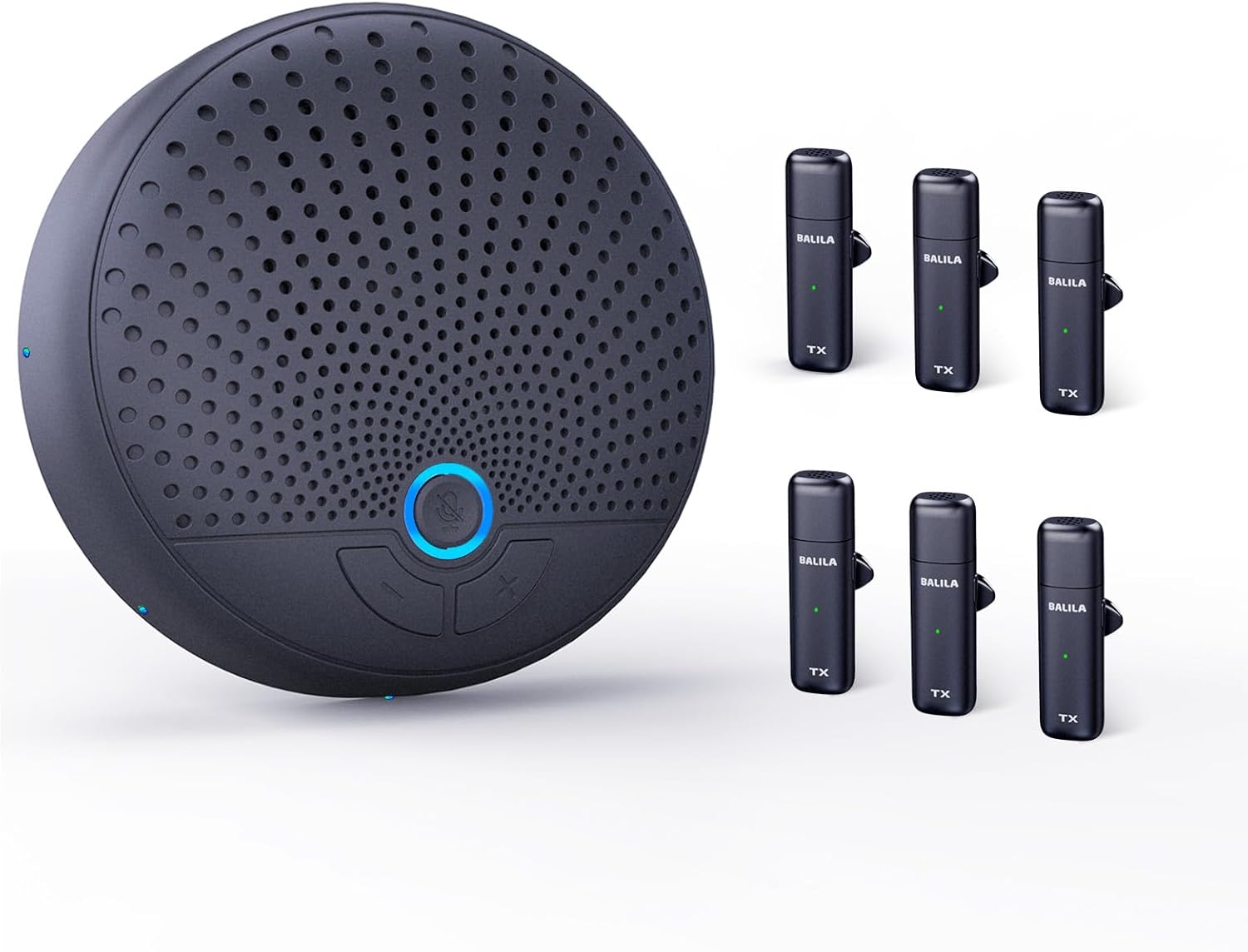
Figure 2.3.1: BALILA CM6 Speakerphone and included lavalier microphones.

Figure 2.3.2: Close-up of the convenient mute button and LED indicator on the speakerphone.
3. Setup Guide
- Connect the Speakerphone: Use the provided USB Type-C cable to connect the BALILA CM6 speakerphone to your computer's USB-A or USB-C port. The device is plug-and-play, so no additional drivers are typically needed.

Figure 3.1: Connecting the speakerphone via USB-C or USB-A.
- Connect Lavalier Microphones: The 6 lavalier microphones are designed to connect wirelessly to the speakerphone. Ensure they are charged and powered on. They will automatically pair with the main unit.
- Select Audio Device:
On your computer, navigate to your sound settings (e.g., Windows: Sound Settings > Sound Control Panel; macOS: System Settings > Sound). Select "USB PHONE" as both your input (microphone) and output (speaker) device.

Figure 3.2: Selecting "USB PHONE" in your computer's sound settings.
- Launch Meeting Software: Open your preferred online meeting application (e.g., Zoom, Skype, Microsoft Teams) and ensure that "USB PHONE" is selected as the audio input and output device within the application's settings.
4. Operating Instructions
4.1. Basic Operation
- Power On/Off: The speakerphone powers on automatically when connected via USB. The lavalier microphones have their own power buttons.
- Volume Control: Use the volume up (+) and volume down (-) buttons on the speakerphone to adjust the audio output level.
- Mute/Unmute Microphone: Press the dedicated mute button on the speakerphone to mute or unmute the microphones. A blue LED indicator will show the microphone status (blue light on: recording; blue light off: muted).
4.2. Usage Scenarios
The BALILA CM6 is versatile and suitable for various communication needs:
- Online Meetings: Ideal for small to medium-sized conference rooms (6-8 people) or individual use.
- Remote Work/Home Office: Provides clear audio for virtual team collaborations.
- Video Conferencing: Enhances the audio experience for video calls.
- Online Education/Webinars: Ensures participants can hear and be heard clearly during lectures or presentations.

Figure 4.2.1: The BALILA CM6 speakerphone is suitable for diverse environments.

Figure 4.2.2: Optimal for large meetings with its multiple microphones.
5. Maintenance
- Keep the device clean by wiping it with a soft, dry cloth.
- Avoid exposing the speakerphone to extreme temperatures, humidity, or direct sunlight.
- Do not attempt to disassemble or repair the device yourself. Contact customer support for assistance.
- Store the speakerphone and microphones in a cool, dry place when not in use.
6. Troubleshooting
| Problem | Possible Cause | Solution |
|---|---|---|
| No sound from speakerphone / Speakerphone not recognized by computer. |
|
|
| Microphone not picking up sound / Other participants cannot hear me. |
|
|
| Audio quality is poor (echo, noise). |
|
|
| Volume is too low/high. |
|
|
7. Specifications
| Feature | Detail |
|---|---|
| Model Name | CM6 |
| Brand | BALILA |
| Connectivity Technology | USB |
| Connector Type | USB Type-C |
| Microphone Form Factor | Lavalier |
| Polar Pattern | Omnidirectional |
| Frequency Response | 20 Hz - 120 KHz |
| Product Dimensions | 10 x 10 x 2 cm; 430 g |
| Power Source | Corded Electric |
| Battery Included | Yes (for lavalier mics) |
| Compatible Devices | Smartphones, Desktop PCs, Laptops |
| Special Features | Echo Control, Clip-on, Noise Reduction, Battery Indicator Light, Mute Function |
| Recommended Uses | Online Education, Streaming, Video Conferencing, Business Travel |
8. Warranty and Support
For warranty information and technical support, please refer to the official BALILA website or contact BALILA customer service directly. Keep your purchase receipt for warranty claims.
For further assistance, please visit: BALILA Official Store on Amazon
Ask a question about this manual
Ask about setup, troubleshooting, compatibility, parts, safety, or missing instructions. Manuals+ will review the question and use this page’s manual context to help answer it.