Introduction
This manual provides instructions for the Generic Replacement Remote Control, designed for use with various United Smart LCD LED HDTV TV models, including LED40HS61, LED32H45, LED24H42, and LED32H50. This remote control offers a straightforward, no-programming-required solution for your television control needs.
Package Contents
- 1 x Generic Replacement Remote Control
Note: Batteries and additional instructions are not included in the package. Please purchase 2 AAA batteries separately.
Setup
- Locate the Battery Compartment: Turn the remote control over to its back. The battery compartment cover is located at the bottom section.

Image: Back view of the remote control, showing the battery compartment cover.
- Open the Battery Compartment: Gently slide the battery compartment cover downwards or press the latch (if present) and lift the cover off.
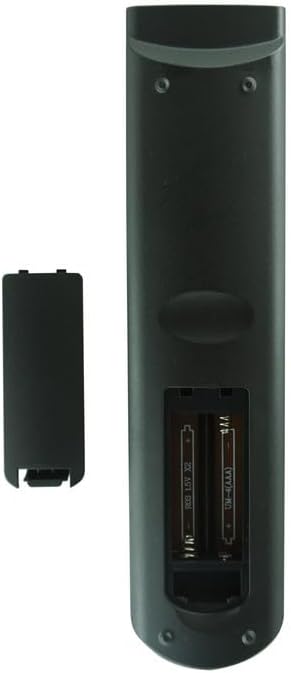
Image: Back view of the remote control with the battery cover removed, revealing the two AAA battery slots.
- Insert Batteries: Insert two (2) AAA batteries into the compartment, ensuring the positive (+) and negative (-) terminals align correctly with the markings inside the compartment.
- Close the Battery Compartment: Replace the battery compartment cover by sliding it back into place until it clicks securely.
- No Programming Required: This remote control is pre-programmed and does not require any additional setup or coding. It will function immediately upon correct battery installation.
Operating Instructions
Once batteries are installed, point the remote control directly at your United Smart LCD LED HDTV TV. Press the desired function buttons (e.g., Power, Volume, Channel, Menu) to operate your television. Ensure there are no obstructions between the remote control and the TV's infrared receiver.
Note: The functionality of specific buttons may vary slightly depending on your TV model. Refer to your television's original user manual for detailed button functions.
Maintenance
- Cleaning: Wipe the remote control with a soft, dry cloth. Do not use liquid cleaners or abrasive materials.
- Battery Replacement: Replace batteries when the remote control's response becomes sluggish or stops working. Always replace both batteries at the same time with new ones.
- Storage: If the remote control will not be used for an extended period, remove the batteries to prevent leakage and potential damage.
- Avoid Damage: Do not drop the remote control or expose it to extreme temperatures, humidity, or direct sunlight.
Troubleshooting
- Remote not working:
- Ensure batteries are inserted correctly with the correct polarity (+/-).
- Replace old batteries with new AAA batteries.
- Check for any obstructions between the remote control and the TV's infrared sensor.
- Ensure you are within the effective range and pointing the remote directly at the TV.
- Specific buttons not responding:
- Some advanced functions might require the original TV remote or specific TV settings.
- Clean the remote control buttons and surface to ensure no debris is interfering.
Specifications
| Brand | Generic |
| Special Feature | No Programming Required |
| Color | As shown (typically black/dark gray) |
| Max Supported Devices | 1 |
| Compatible Devices | United LED40HS61, LED32H45, LED24H42, LED32H50 Smart LCD LED HDTV TVs |
| Power Source | 2 x AAA Batteries (not included) |
Warranty and Support
As a generic replacement product, specific warranty details may vary. Please refer to the seller's return policy or contact the seller directly for information regarding warranty coverage and support. The product is designed to function as a direct replacement without additional programming.
For further assistance, please contact your point of purchase or the seller.


