
Introduction
The Pyle PFA560BTEU is a compact and powerful 100W 5.1 channel stereo HiFi amplifier receiver designed to enhance your audio experience. Featuring Bluetooth connectivity for wireless music streaming, an FM radio, and multiple input options, this amplifier delivers acoustically accurate sound reproduction with low distortion. Its user-friendly design includes a digital LED display and intuitive front panel controls, making it an ideal choice for various audio setups.
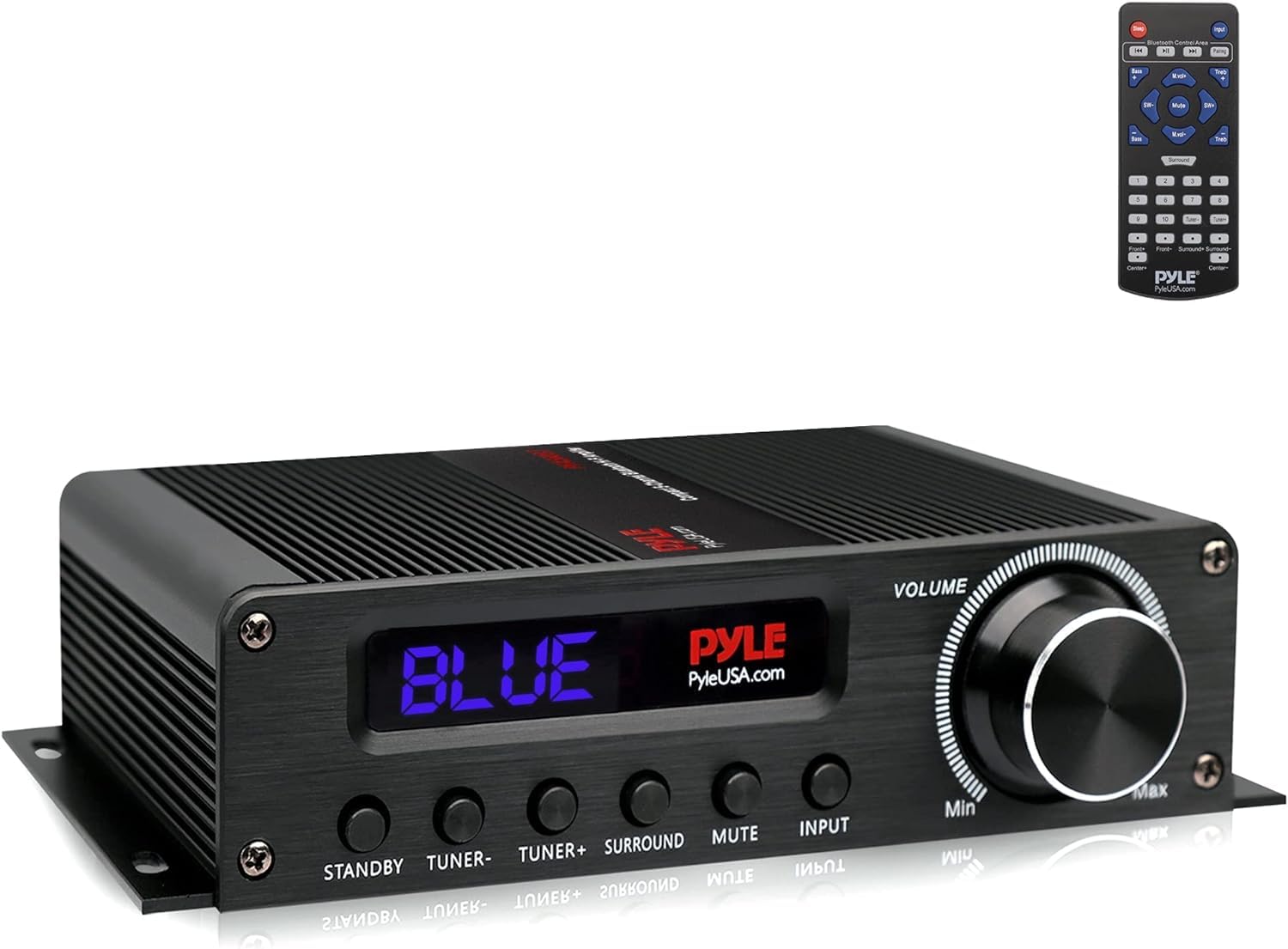
Figure 1: Front view of the Pyle PFA560BTEU Amplifier Receiver.
Setup
1. Unpacking and Placement
Carefully remove all components from the packaging. The package should include the Pyle PFA560BTEU amplifier, a remote control, and a 12V power adapter. Place the amplifier on a stable, flat surface, ensuring adequate ventilation around the unit to prevent overheating.
2. Physical Connections
Before connecting any cables, ensure the amplifier is powered off. Refer to the rear panel for all connection ports.
- Speaker Connections: Connect your 5.1 channel speakers to the spring-loaded speaker terminals. Ensure correct polarity (positive to positive, negative to negative) for each speaker. The amplifier supports 5 sets of speaker terminals.
- Audio Inputs: Connect your audio sources using the available inputs:
- AUX RCA L/R: For standard analog audio devices.
- USB: For digital audio playback from compatible devices.
- Optical (OPT): For digital audio sources like TVs or game consoles.
- Subwoofer Output: Connect an active subwoofer to the RCA subwoofer output for enhanced bass.
- FM Antenna: Connect the included FM antenna to the designated FM antenna input for radio reception.
- Power Connection: Connect the 12V power adapter to the amplifier's power input, then plug the adapter into a wall outlet.
The following video demonstrates the physical connections on a similar amplifier model, providing a visual guide for connecting speakers and various audio sources.
Video 1: Demonstration of amplifier connections and front panel operation.
3. Power On
Once all connections are secure, toggle the 'POWER' switch on the front panel to the 'ON' position. The LED display will illuminate, indicating the amplifier is ready for operation.
Operating Instructions
1. Input Selection
Use the 'INPUT' button on the front panel or the remote control to cycle through the available audio sources: Bluetooth (BT), USB, Optical (OPT), Auxiliary (AUX), and FM Radio.
2. Bluetooth Pairing
- Select 'BT' as the input source using the front panel button or remote. The Bluetooth indicator on the display will flash.
- On your smartphone, tablet, or other Bluetooth-enabled device, navigate to the Bluetooth settings.
- Search for available devices and select 'PyleUSA' from the list.
- Once connected, the Bluetooth indicator on the amplifier will stop flashing and remain solid. You can now stream audio wirelessly from your device.
The PFA560BTEU supports Bluetooth version 4.0 and AVRCP V1.4 protocol for stable and efficient wireless audio transmission.
3. Volume and Tone Control
- Volume: Adjust the overall sound level using the large 'VOLUME' rotary knob on the front panel or the 'VOL+' and 'VOL-' buttons on the remote control.
- Bass/Treble: Use the 'BASS' and 'TREBLE' controls on the front panel or remote to fine-tune the low and high frequencies of your audio.
4. FM Radio Operation
Select 'FM' as the input source. Use the 'TUNING' buttons on the front panel or remote to scan for radio stations. The digital LED display will show the current frequency.
Maintenance
To ensure the longevity and optimal performance of your Pyle PFA560BTEU amplifier, follow these maintenance guidelines:
- Cleaning: Use a soft, dry cloth to clean the exterior of the amplifier. Avoid using liquid cleaners, solvents, or abrasive materials, as these can damage the finish and internal components.
- Ventilation: Always ensure that the ventilation openings on the amplifier are clear and unobstructed. Proper airflow is crucial to prevent overheating and maintain stable operation.
- Power Off When Not in Use: If the amplifier will not be used for an extended period, it is recommended to power it off and unplug it from the wall outlet.
Troubleshooting
If you encounter any issues with your Pyle PFA560BTEU amplifier, refer to the following common troubleshooting steps:
- No Power:
- Check if the 12V power adapter is securely connected to both the amplifier and a working wall outlet.
- Ensure the 'POWER' switch on the front panel is in the 'ON' position.
- No Sound Output:
- Verify that the correct input source (BT, USB, OPT, AUX, FM) is selected.
- Check the volume level on both the amplifier and your audio source device.
- Ensure all speaker cables are securely connected to the amplifier's speaker terminals and to the speakers, with correct polarity.
- Confirm that audio cables (RCA, Optical) are properly connected between the source and the amplifier.
- Bluetooth Connection Issues:
- Make sure the amplifier's input is set to 'BT'.
- Ensure your Bluetooth device is within range (typically up to 30 meters without obstructions) and has Bluetooth enabled.
- If 'PyleUSA' does not appear in your device's Bluetooth list, try restarting both the amplifier and your device.
- Distorted Sound:
- Reduce the volume level on both the amplifier and the audio source.
- Check speaker impedance compatibility (refer to speaker specifications).
- Ensure all audio cables are in good condition and properly connected.
Specifications
| Feature | Specification |
|---|---|
| Model | PFA560BTEU |
| Power Output | 100W (5 x 20W Max) |
| Channels | 5.1 Channel |
| Bluetooth Version | 4.0 |
| Bluetooth Protocol | AVRCP V1.4 |
| Inputs | AUX RCA L/R, USB, Optical, FM Antenna |
| Outputs | Subwoofer RCA, Spring-loaded speaker terminals (5 sets) |
| HDMI Resolution Support | 2160p |
| Power Supply | 110/220V (via 12V adapter) |
| Dimensions (L x W x H) | 20.3 x 14.7 x 5 cm |
| Material | Metal and Aluminum |
| Remote Control Batteries | (2) AAA batteries (not included) |
Warranty and Support
For detailed warranty information, technical assistance, or customer support regarding your Pyle PFA560BTEU amplifier, please refer to the warranty card or user manual included in your product packaging. You may also visit the official Pyle website for the most up-to-date support resources and contact information. Please retain your purchase receipt as proof of purchase for any warranty claims.


